443 points · by thejosh · 10y ago · 152 comments
I never realized this so clearly, but it's true. The biggest hindrance to security until LE was that certs were expensive and hard to install. I don't think it was so much the former as the latter. I'd gladly pay 10% more for my cert if it meant my server could renew automatically without me touching it at all.
Then again, for small things, like my home computer that I want to access some stuff on but don't want to pay $10 for, self-signed was fine, so I guess the price was a problem, to a degree.
Absolutely! Every time I had to create a CSR and install an SSL certificate on a server (having done it before in the past), I felt repeatedly terribly painful the process was.
You're going to have to renew anyway. Previously you would have to remember to do that once a year, or maybe once every two years. Now let's ignore the security implications of having certificates that are valid for a year for a moment, and just focus on the actual work. Every year, you have to request a new certificate, wait for your certificate authority, upload the new certificate to the server, reload your webserver, check if everything works.
With LE, you do all of that once. You set up the tooling and the cronjob once. You make sure it works once. And you're done. No more hassle.
I'm not claiming these risks are that significant, but given that LE takes just as much time and effort for initial set-up as a standard multi-year cert, if not more, I think the mantra "some risk of failure is more risk of failure than no risk of failure" is something worth baring in mind.
And I'm not convinced having 90 day certs is a huge security win. Not only can someone do a lot of damage in 90 days, but your private key (the important bit) can't be rolled every 90 days anyway without integrating your rollover scripts with your HPKP config. If you botch that then your visitors can't come back to your website until the pin expires. Scary. Site ending scary. And if you're not using HPKP then i'm not even going to debate the security pros and cons.
On remembering to renew certs... there are many many services out there to send you reminders. Pick 2 or 3 and use them all. Or use a CA that sends reminders.
I'm glad LetsEncrypt exists, but let's not treat it like the be-all-and-end-all.
I know for me, it was a choice between farting around with lets-encrypt for hours, or a $40 wildcard cert. so I went with the $40/year cert instead.
There are just too many choices for lets-encrypt with no super-simple how-to for people who don't know this stuff (like myself).
In the next few months we'll be shipping an Nginx installer plugin and model renewal scripts for operating systems to provide native automated renewal with their packages of the client. Both of those should help to reduce the amount of work for your use case!
I'm thinking the only thing that would really fix this is an nginx module that would automatically fetch certificates for domains when they're first requested via SNI. First hit takes some time, then it's cached and refreshed once a month or something... it would effectively mean 0 configuration SSL for all new domains.
Regarding the 5 requests per week, I believe that's only for repeated re-issuances of the same domain. As long as you cache the certs, then this shouldn't be an issue. Registering new certificates for new domains is limited to 500 per 3 hours: https://community.letsencrypt.org/t/rate-limits-for-lets-enc...
this is too hard: https://antipaucity.com/2016/02/26/automated-lets-encrypt-ss... ?
I wrote a server that does this. Would be happy to have your feedback sometime: https://caddyserver.com - here's how it works with regards to Let's Encrypt certs: https://www.youtube.com/watch?v=OE5UhQGg_Fo&t=32m
To me, the killer feature right now is that I can just drop it in my /usr/bin directory and have a performant HTTP server in the current dir with just one command. I don't use the LE integration (even though I love the feature) because I haven't deployed it in anything outward-facing.
One small nit would be that I'm not very clear on how the LE fetching is done (where all the files are placed). The docs do mention this, but I left with a feeling that I was still not very clear on where the files go after reading it. Other than that, great job on Caddy!
2. If the certificate is ever compromised, you'll have to keep it in the revocation list forever, or replace the entire CA.
(And I hope your CA contains a DNS name restriction.)
This is the most annoying part of using certs for Radius authentication with Android. Either you self-sign a cert and forever get these warnings, or you let someone else sign your cert and then that CA can issue device certs for your domain.
The number of not https wordpress admin pages and plain text ftp logins still in regular use is chilling and directly attributable to this misaligned incentive.
So the customer calls their developer and their developer calls the host and insists it's a server problem and someone spends an hour or more explaining what mixed content is to a developer and how to fix it.
Then someone runs it through the SSLLabs test and decides they don't like seeing RC4 supported. So you provide some warnings regarding it, confirm, and then oblige, but then you get angry, aggressive emails because their entire office uses Windows XP and their website doesn't work.
A company can burn hours on every individual SSL deployment. There's plenty of unfortunate incentives against hosting companies.
https://community.letsencrypt.org/t/list-of-client-implement...
I've recently compared 10 different Let's Encrypt / ACME clients: https://www.metachris.com/2015/12/comparison-of-10-acme-lets...
https://github.com/nuxi/acme-tiny
For now I've just done enough to get a cert for a mail server.
At a first glance it looks like LE has neutered the DV cert business. How much of their revenue is up for grabs here... how strong is the incentive to pursue extra-legal means of killing off LE? (Such as by stealing and leaking their signing keys...)
In either case, I suspect that LE will take a huge bite out of CA's bottom lines, since there are a lot more DV certs out there than EV ones.
The question I wonder is if CA's can actually survive on only doing their intended job, and if the green bar can sustain enough trust to be worth paying for.
So, your connection to _qhtn.org may be secure, but it may not be this _qhtn you're exchanging data with. Traditional CAs claim to do some sort of ID verification.
EDIT: I am very wrong.
DVs are available from almost every CA. They're popular because they involve no paper checks which makes them cheap and fast. You don't need a company to get one, like you do with OV and EV.
DV should give some level of confidence that you're connecting with the owner of the domain name. CAs should make you go through a process that only a domain's controller could complete.
So I can't get a DV for paypal.com but I can get one for olipaypal.com if I own that domain. I can't get an OV or EV for either domain showing Paypal as the company unless I somehow manage to register that as a company name somewhere. Possible? Probably.
[1] http://www.netcraft.com/internet-data-mining/ssl-survey/
However, you are limited to five subdomain registrations or renewals per seven day window. Since certs are only good for 90 days, you are effectively limited to 60 or so, and that only if you do some crazy timing acrobatics, carefully spread the registrations out over the full 90 days and never make a mistake.
So I would say, at this point, LE is not an effective replacement for a wildcard cert for many people.
Scroll down to "Rate Limits": https://community.letsencrypt.org/t/quick-start-guide/1631
[1] https://community.letsencrypt.org/t/rate-limits-for-lets-enc...
Here's hoping for wildcards some day : )
* Well, I'm sure there's a limit, I just heard it's more or less unlimited.
Edit: A bit further in the thread I read a limit of 100 per cert, except you can only register or renew a few per day. Never mind that being unlimited, then.
Edit: I understand and agree on why they made it like this. But automating it is not an option in my use case, oh well... I agree it's for the better in the grand scheme of things :).
I think they do that on purpose to get people to automate the certificate renewal. Their default client of course messes with all sorts of configuration to make auto-renew work "out of the box".
Many people (myself included) aren't fans of their client getting so much access, but there are other clients out there that don't need it. I use acme-tiny[0] in a small shell cronjob once a month. It lets acme-tiny request a renewed certificate. Then it checks that the new certificate is valid, copies it to the right places and reloads the relevant services.
Honestly, I couldn't be happier about not having to manually change certificates again.
_Renewal doesn't touch any config files at all._ "letsencrypt-auto" puts the certs/keys under /etc/letsencrypt/keys. On renewal, new files get added. Old files are never touched. /etc/letsencrypt/live contains symlinks to the most recent files. Your webserver config uses these => its config does not need to be changed for renewal.
What you're talking about is only the initial certificate installation with "letsencrypt-auto run", and it makes a very targeted change in your Apache config. Use etckeeper if you don't trust it. If you still don't want that, use "letsencrypt-auto certonly".
(Note on server restarts: It also supports multiple methods, one of which is the webroot method, with which letsencrypt-auto does the challenge by putting a file under .well-known/acme-challenge/ of your webroot and lets your webserver handle the request, so it doesn't need to restart/replace your webserver itself.)
And about all these "minimalistic tools": I've seen one that literally did "new-cert.sh > $cert-file". If it failed (e.g. due to ratelimit, no internet connectivity, ...), it would null your old cert! Written and used by very smug people.
If you're happy with the official client, by all means, use it! There's nothing inherently wrong with that approach, it's just not compatible with the way I and some others prefer to do things.
EDIT in response to your edit:
> And about all these "minimalistic tools": I've seen one that literally did "new-cert.sh > $cert-file". If it failed (e.g. due to ratelimit, no internet connectivity, ...), it would null your old cert! Written and used by very smug people.
Absolutely, the minimal tools are not for people who don't know what they're doing. You absolutely would not run acme-tiny for example with write access to your actual cert that the web server is using, because any number of failure scenarios would result in downtime. That's why I specifically addressed that in the initial post you're replying to when I said: "Then it checks that the new certificate is valid, copies it to the right places and reloads the relevant services".
It does more than you'd expect, IMO.
> letsencrypt-auto is a wrapper which installs some dependencies from your OS standard package repositories (e.g. using apt-get or yum), and for other dependencies it sets up a virtualized Python environment with packages downloaded from PyPI.
http://letsencrypt.readthedocs.org/en/latest/using.html
I was certainly a bit surprised when apt-get ran.
I'd rather run that script manually 4 times a year than go through the pain of renewing all of my certs by logging in to websites and pasting CSR's and Certs around every 1 or 2 years.
Once I'm comfortable with the process I'll just cron it and forget about it.
It's advanced setups like this where LetsEncrypt fails out of the box, but it's nice we have tools like this at our disposal now.
Since v0.4.0 all it takes is a "letsencrypt renew && apachectl graceful" in a daily cronjob (or, preferably, systemd timer), it handles the rest. Tweak as you like.
Still crossing fingers for full nginx support soon.
"letsencrypt-auto renew" uses the same settings you've used with "letsencrypt-auto run/certonly". If you're using nginx, that's probably the --webroot method. Which works for renewals too.
"It is possible to hit the rate limit using letsencrypt renew and have it fail or partially fail for that reason."
https://community.letsencrypt.org/t/help-us-test-renewal-wit...
They launched with 90-day expiry but without a robust renewal process.
I'm glad your setup is so simple.
Then you're doing it wrong - there is no reason you shouldn't be able to automate it that I can envision
Then you've got those appliances that take a power cycle and 30 minute outage to install such a certificate. Five year certs are very attractive for this situation.
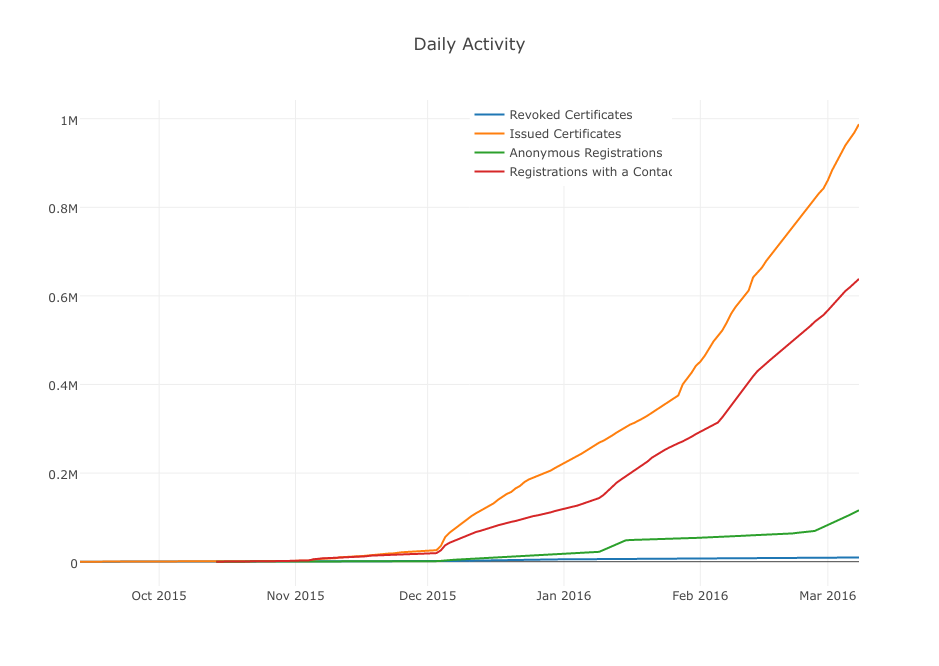
And for the record, here is the millionth LE cert in all its glory: https://crt.sh/?id=14392504
Not to just anyone, no. The certificates aren't all in service for HTTPS, which might explain some of it, but I don't know.
Absolutely simple. Literally the only way it could have been easier is if letsencrypt had been installed on my Centos 6.7 box but it was only a `git clone' away.
---
1) Stop the web server.
2) ./letsencrypt-auto certonly --standalone -d _my_domain1_ -d _my_domain2_ ... At the curses prompt give it your contact email address, and accept the licence
3) Edit nginx.conf - Change all listen 80s to listen 443s. Add the following commands
ssl_certificate /etc/letsencrypt/live/_my_domain_/fullchain.pem;
ssl_certificate_key /etc/letsencrypt/live/_my_domain_/privkey.pem;
# bump up protection
ssl_protocols TLSv1 TLSv1.1 TLSv1.2;
ssl_prefer_server_ciphers on;
ssl_ciphers 'EECDH+AESGCM:EDH+AESGCM:AES256+EECDH:AES256+EDH';
4) Start the web server5) Doh! Go through website changing hardcoded http:// links to protocol (scheme) relative links // See here: https://www.paulirish.com/2010/the-protocol-relative-url/
6) Restart the web server
---
Ok. It's doesn't seem that simple now that I say it but it was easier than wrestling with Apache and rewrite rules :)
server { listen 80; listen [::]:80 ipv6only=on; server_name www.mydomain.com; return 301 https://$server_name$request_uri; }
In general, certificate authorities should only issue certificates with unambiguous subjects.
Of course, if you don't need a certificate that is automatically trusted by everyone, then you can still generate a certificate yourself, without the help of a Let's Encrypt or any other CA. You would have to configure the machines on your network to trust it though.
Alternatively you could use a self signed cert and sign it to localhost or whatever, then configure all your browsers to trust this certificate.
A subdomain of something like DynDNS or just your IP address. I know you can't for good reasons, but I'm just saying, it would make sense if you never heard it's for domains only.
As long as the domain is on the Public Suffix List (which should be best practice for DynDNS providers), you don't even have to worry about rate limits.
AFAIK, certificates for non-reserved IPs would be allowed. Let's Encrypt doesn't support that, however. I imagine proof of ownership would be harder to demonstrate for an IP address (compared to a DNS name).
I have seen paid software promising to solve this [0], but I'd rather not pay to get a free certificate.
The situation certainly sucks for shared hosting customers who do not have access to LE. However, cPanel have stated that they will be delivering the functionality as an out-of-release plugin between 11.56 and 11.58.
If you don't want to pay, I suggest taking a look at one of the dependency-free, root-less tools, such as acmetool[1]. You should be able to plug this into your crontab without any issues. Depends how limited your SSH is, though.
1. https://github.com/hlandau/acme . Great tool. Unfortunately the official Let's Encrypt client tooling is really quite poor. Python was not a good choice (way too many dependencies get pulled, esp. for such a simple ops tool, messed up situation with 2.6/2.7/3.x availability across Linux distros).
https://github.com/letsencrypt/letsencrypt/wiki/Web-Hosting-...
One nagging thing in my mind, though, is how easy it seems it would be for a Three-Letter Agency to backdoor LE to pieces. Then again, I guess that's nearly just as true for any CA out there.
(I don't mean to pooh-pooh this useful service! And, if there's any interloper-mitigation going on that I don't know about, I'd be happily put straight!)
For my mail server which only I use, my websites which only technical people visit, etc, there's no reason to deal with the hassle of LE.