1313 points · by joshschreuder · 10y ago · 539 comments
Not sure if 1Password does as well, but it seems like a fairly obvious feature to add.
The certificate/password link is a guess since on their website they say to change the password starting with date that matches the date of certificate reissuance.
This seems to be related to Hearbleed, also it lists a site that didn't reissue certificate after Heartbleed as vulnerable too, and so for passwords there, seems to be regardless of age.
I am a long-time 1password user and have a lot of old passwords, so for me like 90% of passwords are listed as compromised, which I'm pretty sure is not the case.
Thankfully the notification emails from this service are prompt and helpful (not to mention totally free).
Also it's an email address, not your credit card number.
Which I suppose forces more awareness, but it doesn't instill a lot of confidence.
Why do I see my username as breached on a service I never signed up to? When you search for a username that is not an email address, you may see that name appear against breaches of sites you never signed up to. Usually this is simply due to someone else electing to use the same username as you usually do. Even when your username appears very unique, the simple fact that there are several billion internet users worldwide means there's a strong probability that most usernames have been used by other individuals at one time or another.
My primary personal email address is routinely used by a small handful of other real people (all strangers) for all sorts of things - college applications, car insurance, some address books think it belongs to a cousin who gets included in a lot of group threads about reunions and full of photos. I've found the families more difficult to unsubscribe from than the services, name+email associations spread like a virus. I routinely get alarming/misleading "Someone has your password!" security alerts from Google after someone tries to list my email as a backup account.
These little strings we use to identify ourselves can be typed by anyone, anywhere, bot or human. I wouldn't worry too much about false positives.
It's not that I'm worried, it's that it's a distraction. When the margin of error is high enough, it becomes less signal and more noise, which leads to either panic (spending all your time managing access credentials) or complacency (ignoring the indicators).
They might not even know it's yours, like if your email is davidsmith@gmail and they fat-finger davidrsmith@gmail--boom, "you" now have an account.
Good services use double-opt-in to ensure that every account is actually tied to a correct and working email address. But not every service does this.
And even services that do use double opt-in would create a row in their database to note that a confirm email was sent out. If they never scrub those invite rows, "your" email address would still be in the DB when it's exfiltrated, even if the confirmation process was never completed.
FWIW I was subscribed and didn't get anything until this most recent breach. Unfortunately GMail thought it was spam (speaking of false positives!).
Everything I know about it (this article included) places the Dropbox leak very low in my sense of severity.
Even when the exposed sites have minimal information or impact, minor information in aggregate adds up to a lot of danger for escalation and social engineering.
Now consider that there are huge swaths of people with the same password that they've use for email, banking, medicare, and everything else.
A proper response from Dropbox would be to explicitly and loudly inform every leaked email address (not just their current users) that they need to immediately change every password across any and all sites that might use the same leaked credentials.
Furthermore, Dropbox should set up a secure site with a unique link per email address that allows a user to key-in and check their memory against the exposed hash. I know that I have changed my password for Dropbox at least twice since 2012, but in 2012 I might have used an insecure password. Allowing me to figure it out before a nefarious party would allow me to better judge the potential personal impact.
The significantly greater issue imo is the leaking of email addresses and ensuing spam.
If not, there's nothing to suggest they didn't take other things.
Sure most of us have a few passwords we reuse, but I know less than 5 people with truly unique passwords.
I don't even know any of my passwords.
ad. 1: I find it a pretty good idea to also have a secondary junk mail for signing up to these services - just in case they give my e-mail to someone for spamming or get breached.
On a side note, don't forget the time dropbox accepted ANY password during logins - http://www.cnet.com/news/dropbox-confirms-security-glitch-no...
I do this too, but it taught me everything is breached - the local ambulance service, the local computer store, the local car share, small businesses overseas that I've placed orders with.
Some of the big names don't seem to be, which is lucky because otherwise I'd be wondering if it was the ISPs that had been breached. Either large chunks of SMTP routes are breached and picking up confirmation emails, or there's a giant iceberg of pwnage floating beneath the surface out of view.
Very poetic. I'd like to see this made into one of those motivational posters and hung in the office of every dev team nationwide.
For the sysadmins out there ;)
I also have expiring subdomains. So I'm not using domain.com, but something like b2.domain.com. The rationale is that if I start receiving a lot of spam, I go through all the accounts I have, change all emails to use another subdomain like b3.domain.com, and then invalidate the old subdomain entirely. I haven't had to do that yet and my domain is several years old.
With two big exceptions: the email address I leave on my website and the email address I publish on my GitHub profile. These 2 have dedicated throwaway domains like throwaway283728@domain.com. Because you wouldn't believe how much spam I get from that GitHub profile, not just recruiters, but also get rich offers from princes in Nigeria and Viagra pills.
More likely, sold. Every service that collects user data will get offers, and many can't resist the temptation.
Doesn't matter however, businesses that will sell you to the highest bidder (and in many cases, outside the US, illegally) can't be trusted to ever seriously invest in security. So if they aren't breached, they sooner or later will be.
failure to send to a@example.com
failure to send to b@example.com
...
failure to send to aa@example.com
etc.
I have been running per-service emails for 10 years and wonder to myself if it is worth the bother as I can recall only one ever spreading.
I don't have any fancy script to check these addresses - I have to go into my spam headers manually, and I've not done that for a long time. Perhaps there was a common issue a while ago that got patched. I'll have to check whether modern addresses are being spammed.
I mention that because most of the ISP do have re-targeting efforts.
Also it would seem more likely that your email provider is breached as opposed to lots of other companies/servers.
E.g. myaddress+service1@gmail.com will go to your inbox and you can filter on it.
Everything is breached. From websites to software to hardware, I would estimate the majority of them can be/have been exploited by advanced hackers.
I'm awaiting the time when we all acknowledge that computers are fundamentally insecure.
One that stands out in my head is Cadillac. I had requested a brochure for a CTS, and I got random unrelated spam just days later!
I've not forgotten, and this glitch has kept me from ever considering opening a Dropbox account.
I'm surprised everyone else seems so forgiving of this massive screw up.
- Useful as a canary of which website has been breached
- Useful as a canary of which website sold your details
- and if your details are in the wild, you can stop the spam by deleting the address
Credit cards should work the same way: a unique authorization code specific to this vendor or this transaction and useless to any other actor.
If someone steals my credit card, AMEX has a problem. I'll take reasonable care, but I'm not going to generate transaction specific numbers or whatever unless there is a strong incentive to do so.
I recently started using it, works great.
http://www.theregister.co.uk/2016/08/17/pgp_admins_kill_shor...
I'm using a card from getfinal.com, which appears to be the same idea. So far so good, though it's not 100% disposable, I still have a plastic card who's number is no easier to change than a chase card.
(Yes, I know about the '+' in gmail, but I suspect the word is out on it)
Biggest downside to ASO: you have to pay $7/yr extra on domain registrations to make them private. So I register with Hover and host with ASO.
There was an HN discussion about it fairly recently, https://news.ycombinator.com/item?id=11781361
Sounds a lot like a bitcoin address.
Isn't that how chip-and-pin works?
My dropbox alias email started getting loads of spam about 2 years ago, I immediately junked that account, and set-up a new dropbox account (friends insist on sharing stuff over it...) - my old spammy dropbox alias is in the Dropbox leaked dump, my new current one isn't, which proves that this dump of credentials is from at least before 2015.
> Unique-per-service email addresses work pretty well
and they're so easy with Gmail - anything following a '+' character after your username (or alias, if using your own/company domain) will go to the same box, but keep the distinct address.Unfortunately, depressingly many sites validate email fields, and get it wrong - thinking '+' is not allowed.
IMO it's not even worth trying to get an email regex (or other validation) right - you're probably going to send out an activation email anyway!
Another feature of Gmail is you can place dots anywhere in your email and it will still reach you: ex.am.ple@gmail.com. I haven't seen services that reject that so it is what I use when I can't use a +.
HOWEVER, you should only do so after careful consideration. This will restrict moving your email hosting to the limited number of providers who provide provide this type of service, or hosting your own server.
Alternatively, you could go and reset your email address with all of the services that you gave a subdomain email.
For myself, I have been using FastMail for years and feel confident that I will continue to use their services. In the event that I needed to move from FastMail, I know that could self host if forced to.
I am a google apps customer and already have a few 20 aliases in there but having to go through their UI every time I sign up seems very tiresome. Can I create a wildcard email in the terms of service-*@bar.com being a alias of email foo@bar.com?
Do you know of a non-selfhosted provider that is able to do that?
/EDIT: Looks like fastmail, a service many on HN recommended is able to do something similar [0], though if one email gets added into a spam list, it seems to be not possible to remove one particular one.
/EDIT2: Fastmail just confirmed to be on Twitter that it is possible to set individual emails to rejected. Though this requires effectively creating a new alias and setting it to bounce which falls under the account limitations [1], so 600 for a single person account.
[0]: https://www.fastmail.com/help/receive/alias-catchall.html
This works better than something+realaddress@gmail.com because many sites fail to handle/allow that 'format'.
I would assume that google apps version of gmail offers something similar.
I also use it but some services do not allow the plus sign in their registration form. Very frustrating.
Another Google Mail trick is to use periods. Not as useful as the +, but for those sites that don't accept +, one can usually add in a few extra periods to place sites into buckets (multiple adjacent periods don't work).
m.y.e.m.a.i.l@example.com
Plus you can't completely shut down a label. You could route it into the trash but it will still end up in your email account.
Gmail also ignores full stops, so you could also use d.v.crn@gmail or dvc.rn@gmail etc.
yourusername+anything@gmail.com
This also works on google apps hosted email domains. You can then use that as part of a filter if you start getting spam to it.
When I've contacted them about it, they've been absolutely adamant that the spammer must have (twice) guessed the exact email address that I've had there.
Sadly, it doesn't support 2FA.
So, asking the HNers who crack passwords or follow the tech closely and have a good feel:
Salted sha1 can be brute forced much quicker, but in practical terms what kind of complexity of password is vulnerable today if it was stored salted sha1 vs bcrypt?
And how can this be projected to change in the next couple of years?
See hashcat docs and benchmarks for complete answers to your questions. The GPU versions of hashcat.
Is anyone able to make any sense of the GPU hashcat benchmarks that are posted? Something distilled down to "if you spend $xxx, then you can crack any salted sha1 under 12 letters+digits+punctuation in n hours if you knew the salt; if its bcrypt, that would take x hours". Something like that ;)
Added: I'm a bit confused how the attackers know the hash and not the salt though; normally they are stored side-by-side. Or were dropbox using a site-wide salt?
(I've seen systems with a site-wide salt hardcoded into the codebase and a per-user salt in the db with the hash; This means attackers have to compromise both sourcecode and db to get far.)
Switch to bcrypt and you're now at 25 million hashes per dollar on those same instances. Now you can barely crack passwords that are 4 characters long, or for a million dollars you get 7 characters.
That's if you know the salt, of course. Otherwise that gets added on to the length you're cracking.
None of this is very exact but it gets you in the right ballpark. And you can compare it to a password manager spitting out 20 character passwords that are completely immune to brute forcing.
Do we know for sure these were "salted SHA"? It could well be "SHA1-HMAC through an HSM", and thus, actually be the stronger option.
Alternatively, someone has probably kept a lot of cracked passwords to themselves.
I highly recommend Troy's HIBP service, hiding your e-mail from showing up in public searches (important for opsec), and donating whatever you can to Troy. He's doing excellent work. This is the first time it's notified me and it was great, because I completely forgot I signed up. I appreciate a service that low maintenance.
HIBP is a truly essential service and I'd be happy to pay more. Even with good password discipline it's useful knowledge on your exposure and I cannot recommend it enough. He mentions it near the end but this is one of those no brainers that should be repeated very loudly.
I changed my Dropbox password last week after they sent the email, same with LinkedIn.
Great site though
I recommend Authy as your 2FA app, as it lets you set a backup password, which you can use to move your 2FA tokens between devices.
For your critical services, keeping encrypted copies of your backup codes is a must.
The real pain point is that it managed to corrupt one of my keys (how??) and the app tries to get me to backup my keys to their servers with multiple popups (which I cannot disable) prompting me to backup every time I use the app. I don't know why they are so determined to get hold of my OTP keys, but it isn't happening.
I'm currently using an app called "OTP Auth" and it seems quite nice, and is quick to use.
I would recommend testing theories of :
- losing phone
- losing computer
- losing both
and have reasonable backup strategies for these scenarios.
Backing up the secrets to a third party makes them vulnerable to anyone who can hack your Authy account. I'm not sure what that requires, possibly hacking a phone number. Of course, there's also a backup password, but then you're just replacing the "physical" factor in 2FA with another password.
Without Authy, to compromise my account, you need physical access to my phone, my backup codes, or another backup mechanism I've specified. Authy just provides an additional way to compromise my account, and I don't think it provides any real benefit in exchange for that risk.
I'm less worried about losing my "computer" since I don't own a laptop, plus the secrets are backed up using my normal backup process.
That's the idea for using Authy.
Yeah if it is really a critical service and rarely used, we should. But if I have to wait 30sec in front of a login box every time I go on netfix or on amazon, you can bet their sales will go down the drain.
SMS isn't real time either, it's best effort. Mostly (~99,9%) it gets through within seconds, but delays of a few minutes are perfectly acceptable to telcos. As service provider you can't do much about it, either pay through the nose for "priority" delivery (which maybe halves the amount of delayed messages in our experience) or tell your customers to switch mobile providers (yeah, good luck with that).
I like the idea behind SQRL, which still requires another device, so still inconvenient, but at least it does not rely on the server sending a message through a slow protocol. The website displays a QR code, you launch an app, scan the QR code, this app connects to the server and authenticate you through cryptography. No login or password to type, no message to wait for or to copy manually. No privacy concern since it does not rely on a third party. I could live with that.
That's not such a high penalty so that devices you've physically used are authorized and all others aren't.
That's definitely true, and it's definitely annoying. But one is not logging in every day (or even, I hope, every month: 90-day cookies are safe enough).
A successful attack would require both an Authy breach and that the attacker have passwords for the services that they want to compromise.
This should buy you enough time to regenerate your 2FA tokens to mitigate the threat.
I have one on my keychain, never an issue in years, but I can't help but be concerned, one day, I will be locked out...
Note: Dropbox also supports U2F for 2FA, which provides much better protection agains phishing.
https://blogs.dropbox.com/dropbox/2015/08/u2f-security-keys/
https://blog.agilebits.com/2011/09/23/two-factor-or-not-two-...
Not a fault of authy, but namecheap and paypal both don't offer support.
I'm especially angry at namecheap because their homegrown 2fa solution is unreliable. Especially when travelling. I'm considering leaving them agter 4 years of promises to support authy but nothing!
https://www.namecheap.com/support/knowledgebase/article.aspx...
FWIW, Gandi.net supports TOTP, but their prices are a bit higher. However if you only own a handful of domains, the $20/year difference won't really matter.
Don't pay for this people. Use the open source password manager Keepass http://keepass.info/
If 1Password ever got owned, the Internet would be severely fucked.
And to stem the potential flood a bit, I realize there are plenty of good counterargument built up over the years to try and combat this general idea, but fundamentally the concept of giving your password to someone else to manage is still a confounding idea, regardless of whatever points those arguments make.
That sounds more like LastPass than 1Password, although I haven't looked at the new subscription offering.
I don't give my passwords to 1Password.
Password reuse has been slightly overblown as a concern. Things like your Google, GitHub, TeamViewer, bank, etc. accounts should always be unique. But if someone hacks your password for the Engadget forums or something, does it matter that they can now log in to your Kotaku commenting account? REALLY? People talk about how they have hundreds of accounts and could never remember passwords for all of them, so need a password manager... but in reality, only a few of those accounts actually matter.
And you're better off leaving a piece of paper with passwords on it by your desk than using a password manager. The likelihood of a digital hack of a password manager is infinitely greater than the likelihood of someone breaking into your house to get your passwords (instead of like... just taking your TV).
On the other hand, the PuTTY website is also everything but polished, but people have always been using it. Also, I suspect that most people will get it through the third-party site "www.putty.org" instead of the real PuTTY website, whose URL is as complicated as: http://www.chiark.greenend.org.uk/~sgtatham/putty/download.h...
I don't think it's ugly -- just dated. Isn't it weird that mentally we trust software less if they have a dated website? Shouldn't it be the opposite? (As in: a dated website means this software is mature and tested?)
I'm biased, but I can't agree with this. From what I can tell, there are two communications from Dropbox -- one in 2012 [1] and one last week [2].
In 2012 they did not disclose that hashes were stolen, so I don't see how it's really relevant. In the latest communication, they don't actually explain the risk to the user. They say it is "purely as a preventative measure" but if salts and hashes were accessed, then that is not the case.
Just because Troy doesn't have access to some of the salts, doesn't mean the attacker doesn't have access. We don't know how many iterations of SHA-1, but SHA-1 can be run by a single GPU on the order of billions of times per second. So unless Dropbox is coming out and saying they know for certain that random 128-bit salts were definitely not accessed by the attacker, almost all of the SHA1 hashed passwords are getting cracked. Users need to know their passwords are exposed, and must be reset not as a preventative measure, but because they are almost certain to be compromised.
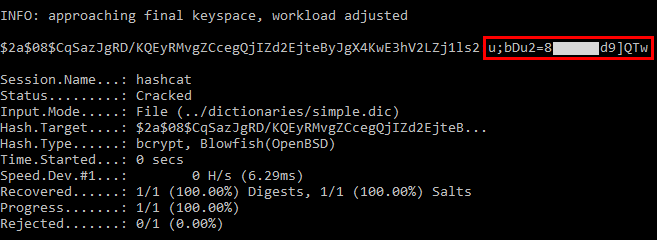
As for the salted/bcrypt passwords, we can see from Troy's hash they used $2a$08$ which is bcrypt with a cost factor of 8 -- 2^8 iterations. Gosney's latest rig [3] could crack these bcrypt hashes at about 105,700 / 8 = 13,212 per second. That's not terrible, but that's still 416 billion tries in a year for a modest investment.
[1] - https://blogs.dropbox.com/dropbox/2012/07/security-update-ne... [2] - https://blogs.dropbox.com/dropbox/2016/08/resetting-password... [3] - https://gist.github.com/epixoip/a83d38f412b4737e99bbef804a27...
"We’re reaching out to let you know that if you haven’t updated your Dropbox password since mid-2012, you’ll be prompted to update it the next time you sign in. This is purely a preventative measure, and we’re sorry for the inconvenience.
To learn more about why we’re taking this precaution, please visit this page on our Help Center. If you have any questions, feel free to contact us at password-reset-help@dropbox.com"
> I'm biased, but I can't agree with this. From what I can tell, there are two communications from Dropbox -- one in 2012 [1] and one last week [2].
Especially given that 2012 they assured me that no credentials were lost and this time they didn't even inform me since my account was deleted in the mean time. So it's more or less luck that I know that my old password was compromised.
This should be assumed regardless of what is known if it's know a breach happened; meaning basic password hygiene should be followed, and I'm the case of Dropbox, if a user had any plaintext files with passwords to other accounts (yes, people still do this) - they need to change those passwords too.
As for the average user, to be honest at the point I increaslying feel like people are responsible for their own security and if you that concerned a service won't notify you of a breach or make a mistake that to you is unforgivable — don't use them. Reason I take this position now is because increased you feel like all the hand holding related to security is dangerous long-term.
This way I don't ever remember a password, I just remember the system.
If an attacker has access to 4 of your passwords in plaintext, you have bigger fish to fry.
I use this same method, but my method will often generate special characters, and AWS as an example, and several others (apparently following AWS' lead) won't let you use those. (Any punctuation not on the shift-numbers row of USA keyboards are not considered legit for password use)
I still mostly use this system, and given my lucky memory I can memorise the exceptions, but I doubt a vast majority of the population could follow my example.
I have implemented a little program to generate such a square: http://loup-vaillant.fr/projects/password-generator
Though by now, I find this a little tedious. I'm thinking of using an encrypted password database, protected with a diceware generated password. That way I will be able to copy&paste my passwords instead of typing them by hand.
I did this for a few months for a master password and set everything to forget the password so I used it several times a day. After a little while I can get rid of the paper and have a LONG random password that is committed to memory.
EDIT: Thanks everyone for your answers, this is a good example of the power of communities.
https://en.wikipedia.org/wiki/List_of_password_managers
I use Keepass, it does exactly what I need.
Secure the password manager itself with a long password. Put your logins into it, and generate a unique random password for each one, then go to the website in question and change the password to the new one.
When you want to login to that website, open your password manager, copy the password to your clipboard and paste it in. Remove the password from the clipboard (Keepass does this automatically after about 10 seconds).
That is ALL you need to do. You could get into using keys, etc, to secure the password manager but if you have a long, unique password for the password manager, it shouldn't be necessary. I'm sure others can provide you with info on how to finesse the process using online password managers, etc, but what I've just described is the basics. Start simple, ramp it up later if you're the paranoid type (which you should be ;)
EDIT: Another thing, if you can use two-factor authentication, do it. I use this on my Google accounts, Paypal and my bank.
https://www.google.com/landing/2step/
https://www.turnon2fa.com/tutorials/how-to-turn-on-2fa-for-p...
Another edit: You can store more in the password manager than just passwords. I keep a scan of my signature in there in case I have to put it into one of those (admittedly insecure) PDF-type forms to "verify" I've signed something. I also make up stupid answers to password hint questions and these also go in the password manager, e.g. "First school" -> "Dr Magnus Pike's School for Aspiring Arsonists". Too easy for people to work out what my real first school is called.
Also, how comes all security-aware people trust 1Password and LastPass, even though they are not open source? Isn't that one of the rules of security, publish the source so we can trust it?
Also, the idea that an army of trained security professionals is ready and able to scan open-source software for vulnerabilities isn't true - I think there was a study a few years ago which proved these security checks often didn't happen, people just assumed they did. The OpenSSH (secure shell) software was compromised for years and nobody noticed, and it is true open source and a critical part of people's systems as well.
You're looking to mitigate risks. A password manager is a step in the right direction. If you are truly paranoid (good for you) something like this, based on GPG, might be the right answer for you:
https://www.passwordstore.org/
Personally I prefer not to use cloud-based password managers because I don't know what their backend security is like. But those more knowledgeable than me might say "they're fine" because of the way the encryption is structured.
I don't think this is true at all. Many people do not recommend using these services for exactly that reason. Plenty of so-called experts make lots of compromises in their choices and recommendations for various reasons.
At present I still recommend LastPass because that way you can easily have everything synced on your computers, phone, etc., and it's easier to convince people to remember one strong password and let LastPass handle remembering all the other strong passwords no matter what device you're on.
If you use service like LastPass or 1Password you can never be entirely certain that a breach or a security flaw in any of these services isn't going to expose your passwords. I'm sure they use the proper encryption measures, but like the Dropbox breach shows, shit happens and companies get hacked.
I'm not saying never use a cloud password manager, but understand that the added convenience comes with added risk; I would definitely not make my company depend on them.
Even if Google or your Google drive is hacked, assuming you are using a strong passphrase for keypads, you are still OK.
If Lastpass is hacked, that's a different story.
I wrote a small program that generates a list of random passwords. I just open terminal and type password, then copy/paste one of the outputs and allow Keychain Access to remember it. I do this for every service, the only manual password I use is for my actual computer, which is rotated periodically. You’ll need to manually backup your keychain file though.
This isn’t a friendly solution for most people.
http://penguindreams.org/blog/my-accounts-been-hacked-no-it-...
The article is dated. I'd suggest a longer minimum and 2 factor for services that support it. The advantage is unique passwords that you don't have to look up.
Of course, the pattern doesn't have to be that simple, but even if it were incredibly complex, at the end of the day you are still relying on one single pattern for all your passwords.
Clarification edit: I did receive the e-mail from Dropbox letting me know that I should change my password, but when visiting dropbox.com I was already logged in and wasn't prompted to perform the pw reset
For us, this is deliberate for a few reasons. Most of our customers authenticate via their employer's SSO (single sign on) and do not use any Syncplicity password management. We also do not believe that routine password maintenance should force someone to run around and re-authenticate all their computers. (Like Dropbox, a user can log into our web site and remove computers from their account.)
I do understand the argument that a password change should force a re-authentication on all clients; but I don't think it's the right approach. Changing a password is reactionary and preventative. An email notification will inform a user that his or her account is compromised.
Unlink the device to restart the session.
I thought he was just going to hash the password and see if it fit the leaked hash, but no, it looks like he actually did the reverse and cracked the hash to see if it fit the password, right?
Edit: oh it looks like he provided the password to hashcat in the form of a psudo 'dictionary' to use. So Hashcat was not really cracking it - just iterating through a 1 word dictionary - like he said.
He did it in a way that appears more complicated to people using Hashcat not as often as he probably does.
Hashcat used the real password as a single-entry password dictionary. So in order to "crack" the hash, it grabbed the first and single entry from its dictionary, hashed it, ... match!
Don't worry, this has been confusing to me and several people in the comments section on his website as well.
> My wife uses a password manager. If your significant other doesn't (and I'm assuming you do by virtue of being here and being interested in security), go and get them one now! 1Password now has a subscription service for $3 a month and you get the first 6 months for free.
How about...not? There are tiny open source tools for every OS. You can do it locally, save it on a stick or on your damn phone...why taking more risks especially facing this massive fail here?
Because you can secure it better than them? Or because you'll be less of a target?
Or better yet, ask actual security experts about that setup, they're likely to come up with something better (just as simple and more secure).
I hope this will bring out even more cloudless solutions in the future.
E.g., I use Resilio Sync (formerly Bittorrent Sync) for file sync with encryption-only keys on my cloud peer. The cloud peer participates in the mesh, providing bandwidth, but if it gets hacked, no one can read the data.
(Of course, I would prefer an open source solution. SyncThing does not have the right sharing model for me. So I was thrilled to hear about LibreVault on HN, which provides functionality similar to BTSync 1.x: https://librevault.com)
Good job they changed their name. Couldn't get the product adopted in a corporate environment because of all the cries of "Witch! Witch!" when the suits saw the word Bittorrent in there.
1. An interesting phishing target for a hacker
2. Lots of employees who can fuck up, a hacker only needs one, one time
I'd say the probability you will be hacked is probably less if you use like a Synology with a reasonably strong password and automatic system updates.
No idea about Keepass(x), although I found that ecosystem to be confusing, with different apps for different platforms you might accidentally download a rouge one on e.g. your phone. I know, paranoia.
Also I find there's some kind of pride in quality amongst mac-developers.
Plus the lastpass vulnerability that was disclosed a couple of month ago seemed pretty basic and I haven't heard from serious vulnerabilities in 1password for a while.
And that 1Password is local.
All of that is just a feeling though, of course.
a subscription service
for $3 a month and you
get the first 6 months
for free.
...and now, a word from our sponsors.Between gmail, dropbox (1password is synced here), and apple, I'm not sure where I should be enabling it. It seems like everywhere but gmail and apple is probably the right move...
Also, I don't use it, but 1password can store and backup 2FA keys so you can theoretically recover from a lost phone that way, depending on how you store the 1password vault. Not a replacement for backup keys necessarily.
One scenario is traveling abroad and having my phone stolen/lost.
And you'll be printing out emergency passwords when you set up two-factor either way.
Why wouldn't you enable it on Google and Apple? Those seem like the most important. You print out the backup codes and keep them safe.
[1] https://en.wikipedia.org/wiki/HMAC-based_One-time_Password_A...
https://blogs.dropbox.com/dropbox/2012/07/security-update-ne...
He goes on to say that 1Password has a subscription now and that you should signup for it.
No. I will never, ever put all my passwords into a cloud based password store. I simply do not trust them to not fuck it up at one point in time.
Am I alone with this view?
For some products, they are.
"Your vaults, items, and documents are fully encrypted in your 1Password Families and 1Password Teams and stored on our servers."
Oh well, another HIBP entry with my email address...
You have to wonder if all those grumbling whitehats were on to something when they said bug bounties should pay a lot more than what they do and that there IS a black market interest for them.
Thing is I've deleted my LinkedIn account thrice in 2013. They have no right to stop have my email after that long.
Hi <first name>,
We’re reaching out to let you know that if you haven’t
updated your Dropbox password since mid-2012, you’ll be
prompted to update it the next time you sign in. This is
purely a preventative measure, and we’re sorry for the
inconvenience.
To learn more about why we’re taking this precaution,
please visit this page on our Help Center. If you have
any questions, feel free to contact us at
password-reset-help%dropbox.com.
Thanks,
The Dropbox Team
[0]: https://www.dropbox.com/help/9257No thanks, I'll keep control over my own data.
I have a huge photo library, but I'm not a professional photographer. I'm not going to sell any of the photos I have on my computer. So when Apple told me I could offload all that data to the cloud, and worry about it less (from a backup perspective), I said "absolutely".
Sensitive data is more problematic. But the vast majority of people aren't handling "sensitive" data.
Absolutely it depends.
> But the vast majority of people aren't handling "sensitive" data.
I don't think that is necessarily true, but it would depend on how you define "sensitive". If you are storing data in the cloud that you are happy sharing with the public, then security isn't an issue. However, many people backup all of their data in the cloud (you need look no further then OneDrive that comes with every copy of Windows 10). This includes their financial information, tax returns, intimate personal information, and other things that would horrify them if they were exposed to the public. Most do so without understanding the risks because cloud computing has been sold so heavily by the government, corporations, and media outlets.
And we aren't just talking about individuals. Many, if not most, corporations use cloud computing to store their data. This includes financial data, customer information, credit cards, account numbers, and everything else you can imagine.
I'm not trying to argue cloud computing doesn't have its uses. I have no problem using the Steam cloud to save my game in Civilization 5, regardless of how insecure their servers are. But the risks are very real any time you entrust your data (or anything else) to a third party, and they should be recognized.
SHA-1 hashes should still be okay, right?
you're not alright, we have a way of knowing if that was your password or not and having unlimited tries with unlimited processing power, which means it's a matter of time before someone is able to guess their way into your accounts.
We noticed some of the websites you read, and were wondering if you'd like to buy some stuff?
A lot of the stuff we're selling is directly related to what you were reading about just five minutes ago!
Are you interested in spending money on our stuff? Click here to find out more!
Would you like to fill out a survey, and be entered into a contest to win our stuff. It's fast, fun and easy! Try it now!
Here are some other articles we thought you might like. Is this ad irrelevant? Tell us how!
Troy Hunt is a person, not a team, and I guess he links to HIBP because he's proud of his work. I know I would.
At this point I'd say signing up for notifications with it is just a solid security practice.