250 points · by coloneltcb · 10y ago · 577 comments
Being able to hit a function key without looking? I may be able to to touch type. But I've never trusted myself to hit a function key blindly.
I will say. Stepping through code could be difficult. Where I repeatedly am stepping over lines while looking at the screen. I imagine my finger could drift. Couldn't say without using it, but I imagine I would keep one finger on a number to ground my hand while tapping step over or step in.
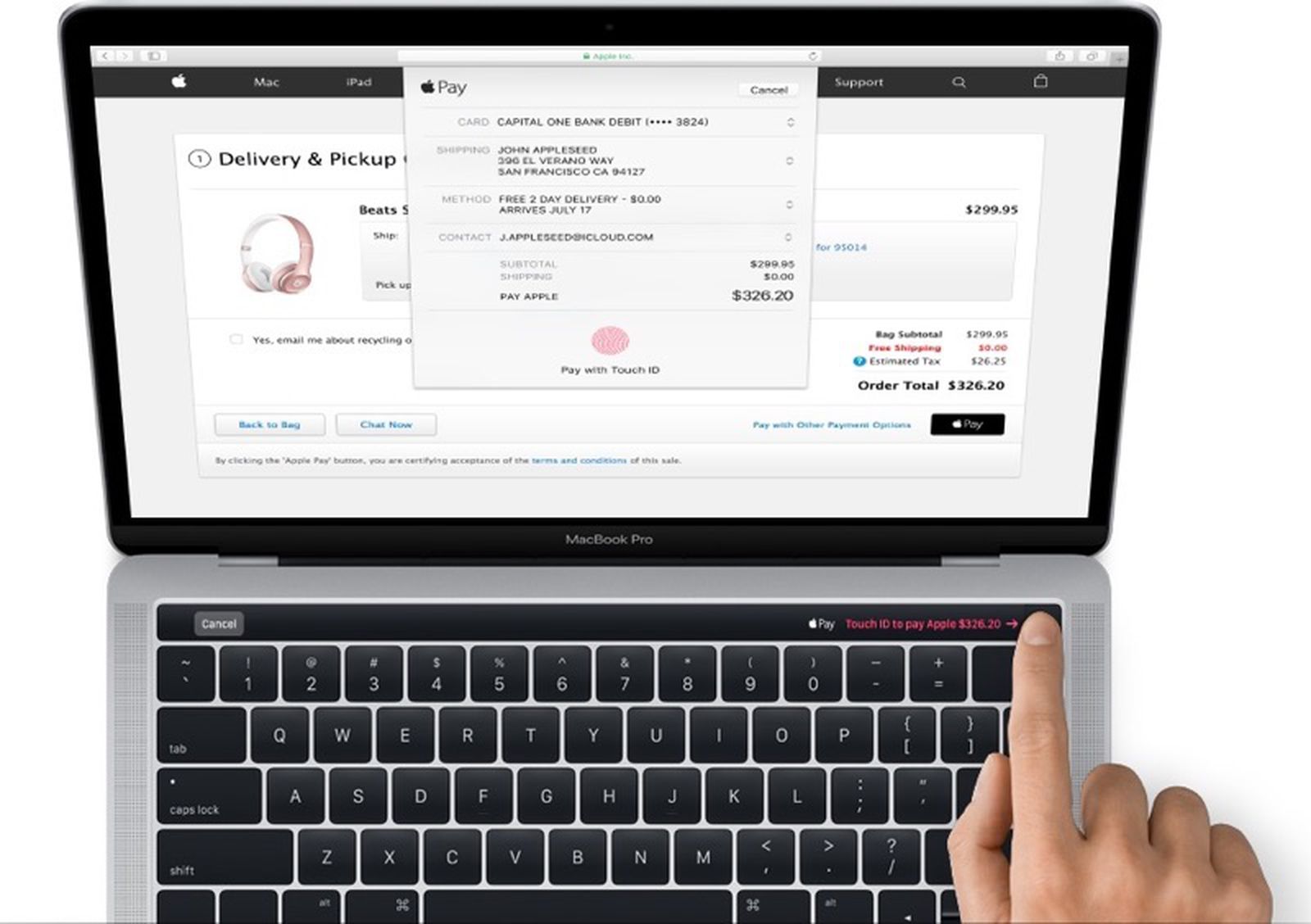
The "context bar" seems like a huge win for people who look at the keyboard (who do comprise a huge fraction of the market), and a huge loss for touch-typists.
That said, I also don't use that many function keys, and I've slowly started remapping the keys I care about to other key combinations. In practice, I care about a few sets of function keys, most notably F11/F12 (commonly used for fullscreen, which I've now remapped to Super-F), and F4 (Alt-F4 to close applications, for which I've now trained my fingers to use Ctrl-W or Ctrl-Q and report bugs on the occasional application that doesn't accept those).
They just aren't that useful for many people, and so the muscle memory never forms. (They are also really far from home row on some keyboards)
I'd be surprised if the majority of touch-typists on Windows don't have muscle-memory for Alt-F4, at a minimum.
> They are also really far from home row on some keyboards
Fair enough; helps that I exclusively use and prefer laptop keyboards, to the point of having a USB ThinkPad keyboard/mouse combo on my desk.
I've also gotten worse at the number row now that few games use more than the first 3-4 for quick slots or weapons.
1. Questionable utility. Sure, there's an icon for 'copy' and 'paste', but I cannot imagine it being easier for anyone to hunt along a non tactile touch surface located in an awkward position to hit that icon rather than just using Ctrl + C (or the mouse, which you've just made your selection with). That's a shortcut almost everyone knows.
2. Poor/Non-existent third party software support. Basically works for IE and Windows Explorer and that's it.
3. Software that drives the screen is poorly made and crashes occasionally.
4. The strip is a 2 bit/pixel B&W screen that is hard to read and is not backlit.
Function-key shennanigans reminds me of an apple laptop from years and years ago, well before the unibodies came out, where the function keys were hard up against the screen - hit a function key, and you bang your fingers against the screen (well, most of the time).
Every personal computing device is either a) a rough prototype for some Apple product or b) a shameless knockoff of one. The Carbon touchstrip was the former.
I don't know about the boundary between keys thing, but for tactile feedback: Force Touch?
"The "context bar" seems like a huge win for people who look at the keyboard (who do comprise a huge fraction of the market), and a huge loss for touch-typists."
I don't think so. I touch-type, but I hardly ever touch-type the function bar. Doubly so on a Mac, because the function bar is, by default, used for brightness and media controls.
I've (briefly) used a device with Force Touch. It doesn't come anywhere close to replacing the depress-and-release of a physical key. It's better than nothing, barely. But I don't want to use a tablet with an on-screen keyboard as my primary productivity device; I want to use a laptop with a physical keyboard.
> I don't think so. I touch-type, but I hardly ever touch-type the function bar. Doubly so on a Mac, because the function bar is, by default, used for brightness and media controls.
That seems like a self-fulfilling prophecy. I also know many Mac users who don't know why anyone would need a right mouse button, let alone a middle mouse button. If you design your interface to not need it, and you know people will never run third-party applications that do, then sure.
F2 - rename
F4 - jump to the address bar (explorer, elsewhere)
F5 - refresh in the browser, execute/debug in various places
F9 to F12 - Visual Studio debugging and navigation
F11 - full-screen toggle (browser)
I remap function keys for global purposes like window tiling with Divvy. Seems like context-sensitivity will delete what I consider to be key functionality.
I'll still probably get one of these MacBook Pros eventually, but the lack of F1 buttons is a loss.
If that spot is occupied by a pinned shortcut, Windows will run that program. But it won't remember that it's done that - so if it takes a while to start, and you press the key again, it will see there's a shortcut to a program that's not yet running, and... run the program again. So while trying this feature out, and wondering why nothing was happening, I managed to open 3 copies of Unity and 7 copies of Visual Studio.
Fortunately, I use an external keyboard much of the time, which I selected almost wholly for its proper 4-groupings of function keys, letting me touch-type them.
I use IntelliJ Idea, Google Chrome Developer Console, World of Warcraft and those applications make heavy use of F-buttons. At work I usually use large monitor and external keyboard, so I probably could use this notebook anyway, but F-buttons for me are extremely important and using notebook without external keyboard would be a huge headache.
Way better ux for the average user since I would hazard a large number of people don't actually know what those f keys do.
Anyway it's better to try it before judge. May be those keys are fine or may be I can live with different hotkeys.
I think, with a little imagination, this could be a really good thing. I'm a touch typist but generally I have to look at the function keys when I need them. If they could be remapped on the fly for different programs, WiFi networks, etc. then it would make things much easier. How about a "boss" button when playing a game? Or a button to kill all sound output when your in Chrome?
I have also learned to find the keyboard backlight brightness keys in pitch darkness.
Of course, I've mapped ctrl to the caps lock key, so...
But yeah. If ^[ or caps lock mapping is not an option, and your workflow requires a lot of escape presses, it could be annoying to have to look down to hit it.
Honestly the Esc key is indispensible.
Also, this looks to me like yet another not-particularly-useful tentpole 'feature' when I really wish they would spend some quality time fixing abundant os and finder bugs.
However, I do use them frequently every day, so I'm skeptical. A pricy laptop without F keys doesn't appear to be a 'Pro' offering to me.
Try it. Just in your IDE, since that's the only place you use them anyway. It's easy enough once you get used to it, just like touch typing in general.
I was just earlier toying with the idea of getting the iPad Pro as my second monitor. I just started using duet with my regular iPad, and was surprised both at how well it works for display and its touch screen!
Display rate is not great at highest resolution but perfect for my slack, dash, or current project displaying with browser sync while I work in my IDE on the main screen.
cool. I'm gonna try this out at home. Thanks.
And I much prefer using a REAL computer with a REAL file system and REAL USB connectors for loading arbitrary data and organizing it into an arbitrary directory hierarchy and begin able to work on those files with any arbitrary combination of a REAL command line for extra powerful, customizable tools and REAL power GUI apps.
The multiple-degree-of-freedom stylus like the iPencil could give even more power to a real computer. Unfortunately, the thinking at Apple seems to be that if you want the power of a great stylus, you'll have to give up the real computer and use it on the toy OS that Apple seems to want us all to move to eventually.
Also, what about the controls like screen and keyboard brightness or volume controls? Where do those go to?
I use a Macbook Pro 2015 and I don't think I'll be upgrading to the new one, especially if the specs are nearly similar.
Why Apple, Why do you insist on going against the standards on practically EVERYTHING? There has to be some method behind the madness.
Seriously? I'm on a 2013, and the specs of the latest machine are already "nearly similar". I have factory SSD flash storage and 16 GB of RAM. The CPU and GPU upgrades haven't been remotely worth upgrading to.
How can you be on a 2015 MacBook, talking about upgrading to a 2016? Nobody cares whether you own the latest gadget; upgrades should wait at least 2, usually 3-4 years. I'm not talking about the severe case of frugality (use the same laptop for at least 8 years until it dies!). Just basic common sense.
My home system is a 2012 rig running BunsenLabs Linux (https://www.bunsenlabs.org/) which I upgraded to from Crunchbang some time back.
But if it's as silly as the 'new macbook', then I'll probably pass.
(Germany) Well, I personally can depreciate computers faster than the usual 3 years. Because I run a software business I was able to argue with the tax authorities that I always need the most recent model as the average life time of a computer in my field of business is 1 year.
But then again I don't make really use of this because as you said: There's not enough differentiation between consecutive Mac models so the trouble of writing off and switching machines isn't really worth it.
That's how my filco Minila & other 60% keyboards implement the F keys, and IMO it's an improvement. [though... I do flip the ` key to be ESC by default]
I'd love the next generation to have tactile feedback, or maybe at some point to go full-on single-key OLED like that concept that went around a couple of years ago. But depending on the APIs, this may already be quite useful.
Not on macOS, at least for the Fn keys. Having a context aware row of buttons that will actually give some cue as to what they do, rather than some random, generic name will probably see those buttons get much more use than they currently do.
Of all of them, my favorite (and my business partner's as well) is the last generation of 15" non-Retina Macbook Pro. That keyboard is a rocket ship.
If I were a hardware guy I'd put that keyboard in its own case and use it forever :)
Similarly, I will likely buy the new MacBook Pro despite some elements being unnecessary or suboptimal. The laptop is important enough to me that if the keyboard were actually bad enough to outweigh the other benefits I might be incentivized to go to eBay to buy a used one. But realistically, I'll probably survive just fine with the new keyboard. It just makes the experience less "magical" than it could be. And I suspect a lot of people are in the same boat.
There's more than one store.
I worry that Apple are now pursuing thinness for thinness' sake, past the point where it makes ergonomic sense. The machine was gorgeous, but felt like a child's laptop. It's the first Apple computer I've ever returned.
You try http://www.pckeyboard.com/ ?
Personally, I much prefer the butterfly keys. The key strokes feel very crisp and clean. Switching back to my Macbook Pro the keys feel wobbly and isn't as enjoyable.
(Sorry, replied to the wrong comment and apparently can't delete now?)
Edit: Parent replied to wrong comment it seems.
1) The Esc and the Space keys are the two I most often use without looking - now I have to f*ing look down to hit esc?
2)What about a hard boot? Is the power key now a soft key as well? Non-removable battery and a soft reboot key do not make a good mix
3) Key press and travel distance look to be shallow - not a very satisfying experience
4) Please don't make it any thinner at the expense of ports or battery life
5) The charging port is no longer Magsafe
All in all seems a bit more gimmicky and "change for change's sake" rather than a solid upgrade
Are you seriously implying that you think that Apple would make a laptop whereby if it kernel panics and you need to hard reboot, now there is no way to do that because they accidentally made the power key a soft key?
(And I'll add the power key has been a soft key for some years now already)
I love your tone here. To troll you a bit, nothing lasts forever and sooner or later the time will come that Apple will go downhill and start making obvious UI goofs. Will be fun to watch for sure.
Jony Ive says thinner and lighter will make it better.
You shouldn't be using the escape key because it takes your left hand off the home row. I prefer the Caps Lock mapping to the 'jj' variant which might make be more work for my pinky and be slightly slower but it works for me.
Having easy access to your mode switching character is important because training yourself to enter Normal after entering a piece of text is the first step to 'next level' Vim use.
For you GNOME users, making your Caps Lock an escape key is as easy as setting it in the Tweak Tool.
The biggest downside is that if I'm using someone else's computer, I keep yelling for no good reason.
That said, what's to say you can't use the strip to provide an Esc when running MacVim or iTerm etc?
No way they screw this up.
http://shop.lenovo.com/us/en/laptops/thinkpad/x-series/x1-ca...
While Apple is certainly far from infallible and has made blunders before (sometimes from neglect, once in a while from a fundamental blunder in their understanding of proper target market functionality), what you've written seems to come up like clockwork with nearly every change they make. "Oh, but someone else did the idea before!" I really don't understand why so many tech people in particularly seem to have difficulty grasping that ideas are usually of only marginal value, the real key value any given effort brings to the table is the implementation. There is a world of difference between a mediocre implementation of a decent idea and a stellar one, even if they're 100% the exact same concept. In fact sometimes a great implementation of a mediocre concept can even beat out a crappy one of an amazing concept. Even good intentions and hard work are not enough in software or hardware development.
From a fundamentals perspective I'm honestly pretty surprised by the visceral instant rejection, without having seen anything about the actual implementation, by crowds at HN, Ars, etc. I don't really see how this is fundamentally much different from what I've already got in macOS with my MS Natural Ergo 4000 keyboard and the universal generic USB driver "ControllerMate", which allows me to arbitrarily alter key mappings (including full scripts) for any active application. I don't generally change the main layout of course, but I do have dozens of profiles changing the upper function and special keys to suit the program I'm in, which I find particularly valuable for jumping from GUI apps to Vim and other CLI programs with a different history of thinking about UI behind them.
Apple trying to just making this more available for the average user in a more flashy way may or may not be helpful for a pro, but I also don't see how it would be particularly harmful. What's with all stuff about "no more escape" and the like, what difference does it make if you tap the corner to get escape? As long as inputs are there that show up on the USB HCI what's the issue? On the other hand having a good Touch ID implementation (presumably with the HSM included) available built-in could range from great to fantastic depending on how much custom use we're able to make of it.
Apple's current non-AIO desktops (Mac Mini, Mac Pro) are utter junk and that's really depressing, but they've put more effort into their notebooks while maybe this MBP will disappoint too but I don't think the massive doom mongering in this or the other thread seems justified just yet.
It seems justified to me.
In fact, as I look at a picture of a macbook "pro" with no physical escape key, I can't help but think of George Lucas and the re-released, re-edited star wars movies.
Mac pro basically disappeared with nothing to take its place.
Mac mini as a very nice all in one device is neutered by lack of an optical drive.
The super thin macbook 12" (whatever it is) can't have power and a usb device at the same time without some weirdo splitter dongle thing.
Oh, and the headphone jack thing.
Get these people away from the product development room. Give them something else to do. Tell them to take a vacation or something - please!
>In fact, as I look at a picture of a macbook "pro" with no physical escape key, I can't help but think of George Lucas and the re-released, re-edited star wars movies.
Is exactly what everyone said about a phone with no physical keys
Mac mini as a very nice all in one device is neutered by lack of an optical drive.
Is exactly what everyone said about an iMac without a floppy drive, or serial port, or all the other old things Apple have moved away from.
It's also fascinating you criticize their whole product line for not having all the features. Yes, the mini is "mini". It does not have optical, but happily they build a different computer that does! And yes, the MacBook has a limited number of ports - but happily they have a model with a ton of powerful ports, and as a nice hint of who might need it, they even put the word "Pro" in the name!
It's like you want them to only build one computer that fits exactly your needs. Heaven forbid they build and sell a computer that is targeted at a different set of needs than yours!
Next you'll complain that the Ford Focus sucks because it doesn't have a pickup bed, when you could easily go and buy an F150 for that....
If you don't like it, there is an extremely simple solution for you. Don't buy their stuff.
It's still there, just hasn't really had a refresh. Have a feeling it is going to get killed due to not enough demand.
Even the original Mac Pro behemoth of a tower didn't really sell all that well.
> Mac mini as a very nice all in one device is neutered by lack of an optical drive.
Wat?
I have owned a Mac Mini since 2012 and not once have I said "Damn, I wish I had an optical drive".
I haven't touched optical media in years. I still have some DVD's and whatnot but they are all in boxes in storage (thanks for the reminder, need to drop em off at Goodwill).
What do you need an optical drive for?
> The super thin macbook 12" (whatever it is) can't have power and a usb device at the same time without some weirdo splitter dongle thing.
Yes, and for 99% of the target population this isn't a problem. I've had a couple of friends and family buy them, they charge the device overnight and use it during the day. Depending on how often they use it it gets charged maybe once or twice a week.
They don't use headphones with it, the device is used to check email, browse the web (facebook mostly) and that is about where it ends. Which is what the device is perfect for. No moving parts, nothing. Most of my friends also pair their bluetooth headphones to it if they are using it to watch movies. I blew one of my friends minds when I told him that it was USB so he could plug in his camera, instead he had been transferring pictures using Wifi (took a little longer, but he didn't mind).
> Oh, and the headphone jack thing.
Not a big fan of that one myself... kinda like my 3.5mm, but only because my preferred Bose headphones (QC20's) don't come in a bluetooth/lightning version yet. If they made a bluetooth version I'd be all over that asap.
In 2016? Seriously? If anything, I'd like more frequent updates, who the fuck uses an optical drive anymore?
Every time anything changes, there is a rather predicable response of this kind. There was much wailing and gnashing of teeth when laptop manufacturers stopped making models with 4:3 screens, when smartphone manufacturers abandoned physical keyboards, when Apple abandoned any type of drive or connector port ever...
It's always enjoyable to come back to such threads and read the dire predictions of the naysayers after a few years, i.e. the one where the naysayers predicted that Apple would be doomed because the iPhone 5 was too small, and the one where the naysayers predicted that Apple would be doomed because the iPhone 6 was too big.
If they included haptic feedback (which is in their bag of tricks) it could even feel a bit better.
As others have said, Apple's MO seems to be to only step in when an effective (and desirable) solution can be offered, and before that just stick with what works.
If they removed that it would be absolutely crazy because most people who use MacBooks for productive work require the Function keys.
Citation needed? I've been developing exclusively on MBPs since 2007ish and I barely ever use the F-row for anything other than volume and brightness adjustment.
I agree, though, that the graphical touch layout is going to duplicate the current functionality of the F-row.
I wonder if it'll have haptic feedback.
I can only imagine what kind of horrible software they shipped with this thing to control it.
With Apples implementation I at least expect the OS and software implementation to be easy to use even though I'm still not sold on the idea itself.
Think about the "enhancing" crapware most vendors deploy on their Windows machines, then scale it up to the entire OS. Yeah, it would be that bad. We have to give it to Apple for still crafting their OS themselves like it was 1985, and doing a very good job at it.
Mac developers have always been pushed by Apple and consumers courtesy of the App Store e.g. reviews to adopt the latest OS features. And by and large they always have. It is adoption by developers that determines whether or not the feature is useful or not.
That's how it usually is with companies that "did X first". Usually Apple does it in the actually usable way.
With Escape at the extreme left top, it should be possible to differentiate that stop by feel. I'll have to try it when it gets into the store. In the meantime, I'm still very happy with my 2012 MBP.
https://www.youtube.com/watch?v=a-9UggQV9BM
Or as Steve put it once "Your thumbs will learn"
Everybody complained about the lack of haptic feel on the original iPhone keyboard, and look at what kind of interface we are all typing on today.
No, you're still gonna be able to dim your screen and mute your speakers and yes cancel modal dialogs.
Personally, I expect I'll remap caps lock to escape, or an unused meta, and get used to that (it's presently ctrl).
Can someone fill me in on actual use cases of having this key still?
I have been binding caps lock to escape for many many years.
When I mention doing so to non-programmers, people look at my like I'm from another planet.
And thus, the status quo is maintained.
But seriously, like with almost everything keyboard layout-related it's just there because people are used to it.
I'm still surprised when I see people using caps lock instead of shift for typing a single uppercase character (This being the keyboard peckers who still use one finger for everything).
I know personally I don't use it too often, but it's nice to have if I want to type in all caps which happens occasionally. Holding down shift with a pinky for a anything more than a few key presses can be a little uncomfortable so I appreciate the caps lock key.
You need two apps: Seil and Karabiner, both made by the same person. Check out this guide: http://brettterpstra.com/2012/12/08/a-useful-caps-lock-key/
And remapping it to backspace still isn't possible without additional software (Karabiner Elements) :/
The Terminal/iTerm apps can just show an escape button in the top left corner.
People replied with some ways to do it on mac, but I haven't tried yet.
(I have never used a US keyboard layout. Maybe typing programming symbols could be so much easier and I have never experienced it.)
At least on german keyboards which should be the same as on the portuguese ones
Plus they are quite dependable hardware overall, and lots of easy OS updates.
I have several Thinkpads running *BSD and they are great and all, but at the end of the day I gotta use Skype and the Office suite for communicating with clients so I default to working with macOS most of the time.
UNIX + great desktop support and apps + pkgsrc offers an unmatched experience depending on what you work on.
Not actually much more expensive than other comparably-high-quality laptops.
That glowing Apple on the back means you won't be personally blamed if something on it fails to work—say, if your wifi decides to cut out every five minutes due to a quirk in a particular hardware pairing, or it doesn't like a certain projector and refuses to work with it, and the meeting at your client's site ends up being more about your broken shit than the client's needs. If your $500 Dell running Arch and covered in penguin stickers does that, you might be personally blamed for it, and/or the quality of your judgment and competence might suddenly be on everyone's mind.
- clean UI w/ UNIX cli (it just works)
- it allows you to run anything (osx, Windows, nix in VM)
- iOS development
- support for non-Windows apps (Garage Band, Logic [which I never ended up trying], etc)
- easily up-gradable hardware (hard drive(s), ram)
- many ports so you can utilize the pro-ness of it w/o a dock or another extension (my micro-sd card is about as large as my ssd)
So half of the reasons I bought are no longer present or not really applicable because equal or better apps are now on Windows.
I get it, they want to add all these cool features, but based on the rumors I have heard (and their 'updates' since 2011) the 'Pro' Macook is getting less Pro with each release. Thankfully, my laptop has held up quite well and I primarily use it for dev, so I'm hoping it will hold up for sometime so I can continue working on it...but I don't see the advantage of paying $1000s for what amounts to a more powerful 12-in Macbook. Better to buy a mini (specifically for iOS dev) and a laptop that isn't a beefed up consumption device.
The Windows machines are cheaper right now only because Apple has gone two and a half years without updating the Macbooks Pro without lowering the prices. Apple does awful things like that sometimes so you have to be careful about what you buy, but you have to be careful with Dell and HP and Lenovo also, so that's not really different.
But try finding an equivalent 3lb, silent, big glass reliable touchpad, extra long battery life, solid reliable build, color corrected retina screen laptop with similar specs to the new Macs next week and you'll find Apple has the best prices in the market as usual.
---
Plus, as others have mentioned, UNIX is like a smooth creamy dream compared to the droning misery and shocking horrors of Windows.
Dell 13" XPS, i7-7500U, 16GB, 512GB SSD, 3200x1800 display, Thunderbolt 3, glass trackpad, 2.9lb, $1799.
MBP 13", i7-5557, 16GB, 512GB SSD, 2560x1600 display, Thunderbolt 2, glass trackpad 3.5lb, $2199.
Nearly half the power consumption on the CPU, lighter, $400 cheaper does not make for "Apple has the best prices in the market as usual".
- nice extra features if you have an iphone like iMessage
- can develop apps for android and iOS without janketyness
- can develop for Linux/Windows/Mac
- some don't play many games anyway on a dev laptop
I think it's nice to have the development flexibility. i like being able to start coding anything possible because you never know when an idea may need a quick prototype.
If I do need macOS, don't want to jerk around with hackintosh in a VM.
Sadly there are a shocking number of USB chargers/cables which will physically fit into a USB-C port but are not to spec, therefore prone to damage or destroy the device. A Google engineer has been testing these and listing "approved" ones here http://www.bensonapproved.com/
What's wrong with magsafe? Owner of a mid 2012 MBPr here and I loved it.
It'll be great to not have to use Apple's chargers/cables anymore.
Other than being off-white from dirt/dust and whatever, that charger lasted all that time.
Anyway, the register [0] mentions that a magsafe type C adaptor may be introduced either by Apple or 3rd Party.
Personally, I like the magsafe design. It has been useful the past 4 years.
[0] http://www.theinquirer.net/inquirer/news/2475007/macbook-pro...
Good riddance.
What?
Linux and the like will be interesting, though.
(3) ETX <-- C (67)
(4) EOT <-- D (68)
(8) BS <-- H (72)
(27) ESC <-- [ (91)
I was happy to find some order in what previously seemed arcane stuff.To be honest, that super-thin row of Esc/F-keys on the 11" Air has been totally useless anyway for real typing, so if I go from there to a new Pro, I wouldn't really miss that stuff.
Rather than potentially usable display area we have more large bezels, yet again.
Take the 12" Mac for instance - Apple had no problem shrinking the bottom half of the computer yet retained the large bezels, whereas they could've utilized the area to place a larger display panel in while retaining the same footprint. The resulting incongruence looks odd IMO.
Mockup of what I think the display should look like: https://i.imgur.com/BypLsSl.jpg
They may reduce the bezel in the future, but IMO that would be done in the midst of a MB redesign.
Famous last words. The titanium powerbook had very small bezels for its time (2001), and I remember Steve Jobs when introducing it claiming that at the edge the cursor was almost gonna fall off. Of course this doesn't mean they'll do it again, but they certainly experimented with the idea before.
The only theory I could come up with: They do not want reduce bezel size because this potentially closes the door for making the laptop lid thinner. As we all know by now, thinness has top priority at Apple. A super thin lid means there cannot be support structure and connectors behind the screen, they must be placed around it. But you cannot place it around it if there is no bezel to hide it beneath.
If the Apple MacBook hardware guys read this: I’d rather have the current laptop lid thickness and no bezels than a paper thin lid with the current large ugly bezels.
I'm unsure if they're removing the other ports, such as MagSafe and the SD card port, but I hope they don't. I wouldn't mind having to buy a dongle for HDMI output since I use it so rarely, but I do use the SD card slot semi occasionally as a photographer, and I don't see the advantage of USB-C over MagSafe. Additionally, using USB-C could open up non-tech savvy users to even more issues than the current fake/non-approved MagSafe power bricks being sold on Amazon etc.
There's a difference between courage and stupidity.
Nope, it will just prove that Apple has no competitor in the field of quality computers. I would still buy a Macbook if they sold the 2009 (even for the price of today). With or without Force Touch, which is bad UI, just like removing the Esc key.
vi users, prepare to revolt!
Well, it's just a leaked image, so can't draw too many conclusions out of it I guess.
Alternatively, will/could it (at some point) have localized haptic feedback?
P.S. I'd like to see some "edge-on" photographs that show whether and to what extent the relative exposure/relief of the top row of keys and the bar cause the bar to "hide behind" the higher relief of the keys, making it more difficult to touch without triggering one of those keys, particularly for a touch-typist or someone hitting the bar frequently.
Edit: The USB-C ports are actually a great feature for me, I plan to buy a monitor with USB-C that can both act as an USB hub, charge the Macbook and use the USB-C cable to receive the video data. (all by using a single cable)
I'll then have one of these monitors both at home and in the office.
Mouse and Keyboard will be Bluetooth which I already use and that works well for me.
Regarding pendrives: I'll need to buy a new one, that sucks obviously, but I also have to say that I almost never used them although I bought an expensive one from Corsair just in case. In most cases I just used Google Drive to make that data available on all of my devices.
comparison: http://imgur.com/a/KDOGq
[0] http://www.cultofmac.com/430982/spy-photos-all-but-confirm-2...
I need a decent laptop to do my work. A laptop without a physical escape key is not a decent laptop. Therefore, I will stockpile a second one so as to delay by 3-4 years the need to "switch".
I've had caps lock mapped to escape for years on my MacBook Pro for the sake of Vim. It's so much nicer to hit with the pinky than reaching all the way up to the tiny 'esc' button in the function row, it's not even funny.
Caps lock can be control if held down and used as a modifier with another key, but if pressed and released sends Esc instead.
A meter alternating between battery capacity and wifi strength would be a nice touch.
Testing the keyboard on the Macbook, I found the action too stiff for my taste. Not jazzed about the short travel, either.
Here's hoping.
Security research has been calling for something like this for a long time. Any “enterprise” laptop brand should have been shipping this five years ago.
[1] Assuming they don’t let apps just display anything there.
It would be pretty great if there was a way for the security chip to communicate directly with user to for example show a clear text version of the bank transaction I'm about to sign with my secret key.
[1] Obviously though this is better, because it can be completely driven by the secure path, as you say.
Also the axed Escape key is a textbook tactic to cause fake controversy to get free marketing.
It may or may not be a coincidence that he's a "former" coworker and not a current one.
If that's the case then I'm starting to see the macOS major release policy as being as conservative as possible. I.e. no introduction of unnecessary changes unless it warrants advancements in hardware integration.
But I wonder if Apple is really making a smart choice. Alienating the tech / UNIX people, as few as we may be in the grand scheme of things, may hurt them in the long run.
edit: Aw crud, I do use escape when I'm editing in vim from time to time.
Not having HDMI on the 15" is annoying. Not having SD is annoying. I didn't use the HDMI port a ton, but it was nice to have. SD I really only use for photos.
Losing magsafe is probably the worst thing here.
Oh well, my 2013 is still going strong so it's not like I'm really in the market for a new macbook.
Rechargeable, wireless USB cables. That will be amazing.
Not mentioned in the article: the power button is gone, too.
"It appears Touch ID is built into a nearly-invisible power button located next to the display."
I mean I can find the ESC key blindly even if it isn't actually there anymore, but the brightness up key is for me goes like "find ESC key, slide two to the right".
Would love to map things I commonly do for bash or some generators etc. For touch typing I could also see just mapping the left, middle and right roughly so I only have to hit one of the buttons in that group for three extra buttons.
I wonder: this would need some kind of software support so that the focused application would write what to display on the keyboard? Meaning it would work only with a small set of applications in the beginning.
Also I wonder if this feature will make it into apple's external keyboards?
This is just another nail in the coffin. Adios OSX, hello well-made ubuntu ready macbook clones.
Also will this "magic" work on Linux if I put it on a new Macbook?
Where. Where is the escape key.
Where is the escape key ?
I'm all for evolution, but change for the sake of change means I've to unlearn years of muscle memory and relearn something that is specific to only Apple's hardware. No thanks!
Apple have turned into Big Brother and their hardware upgrades seem inspired by NewSpeak. Doubleplus ungood, Apple.
How often does Apple leak things on their own website?
The OS, presumably, includes a "how do I do this new thing" helper, which shows you a picture of the hardware they're about to release (which is going to ship with this OS).
How about going boldly into the future rather than being tied down to something which doesn't get a ton of use in most situations!
*Edit: of course my reply doesn't have anything to do with the headphone jack. For simplicity and space removing the jack made sense, but for ease of use and standards there's good arguments for keeping the it around. I argue this case is different because it's not widely used and it's prior use (fn keys) can be duped by the magic bar.
Apart from using them to change volume I have never used them for their intended purpose. Having a per application, contextual bar with actual labels e.g. Launchpead instead of F4 makes a whole lot more sense.
I would agree if they somehow have some way to physically distinguish the keys by touch. It's pretty much useless to me if I have to look away from the screen to find the key I want.
You won't regret it!
Recommendations welcome, looking for something with similar specs to current maxed out mac airs 11".
Recommendations welcome!
Also: it runs macOS, which is really cool as an OS.
Oh, and when you do get sound, the wireless cuts out. You can get wireless and sound at the same time, but only at 1024x786.
Seriously, gif you want to punish Apple by moving to Linux I can understand that. If you actually think it's a gain in productivity, you haven't seen linux on the desktop yet. It's like saying "enough with these kernel exploits! We're moving to macOS on the server!"
I bought the TUXEDO Infinity Book - 13" Full HD screen, 16GB RAM, Intel Core i7-6500U, 1.4 kg only. It works ok, I'm using Suse Linux + Cinnamon Desktop Env. There are two things I'd improve on the laptop: the touchpad could be of a better quality, the Intel Dual AC 3160 wlan does not have the best reception (may be a problem with the antenna?).
If that's too big, T430.
Mine arrived last week. It's been great so far.
That smacks of the Android decision to do away with physical keys and instead just display them all the time. Wasting valuable screen real estate and power for a bad emulation of buttons.