264 points · by michaelsbradley · 9y ago · 118 comments
I find Paw's project management very annoying. It assumes that I am working on some project and wants me to organise everything like that. Fine, lets do it, so where are my projects? They are hidden in some dropdown that you can have fun finding.
Insomnia is much cleaner and more to the point.
To me, the functionality of Paw and Insomnia seem very similar, so the $50 licence price deterred me from purchasing Paw. If Paw was closer to the $20 mark, I might have still bought it to have in my arsenal of tools 'just in case'.
My rationale is that if there was nothing else on the market with any equivalent functionality, then $50 for Paw is a no brainer. But when there are other competitive product with equal (or greater) feature sets for free, then the pricing works against it.
- Cross platform
- Simpler use for non-experts
- No need for pro (paid subscription) for my needs, so it's completely free
- Feels nicer than all of the browser "REST explorer" plugins
One of those moments where you kick yourself for not being able to come up with these sorts of names.
> "Download Insomnia so you can finally `GET` some `REST`"
I actually laughed out loud at that one.
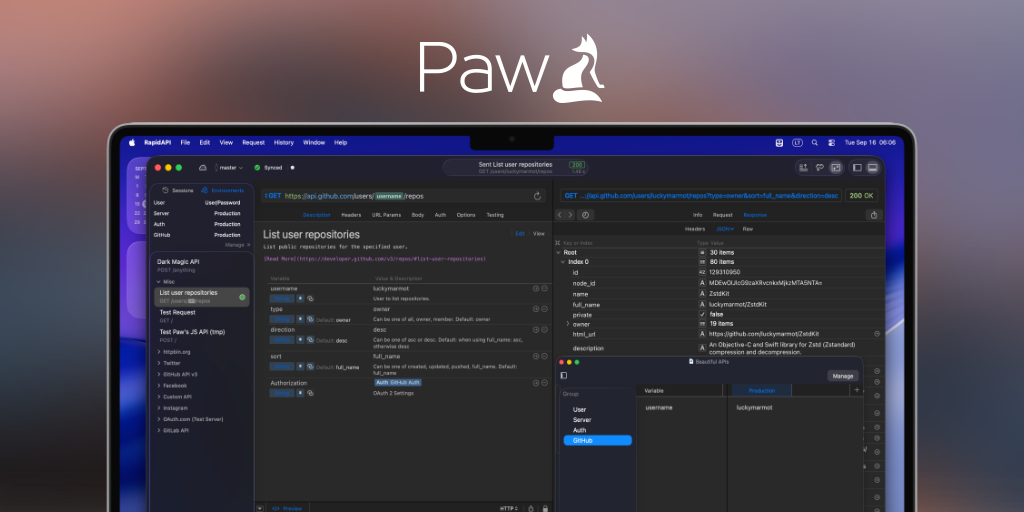
Also, Projects are just Paw files. Inside the files you can group and subgroup requests, too. Unless you meant something else?
Can you list some of the important for you features that Insomnia lacks? (I'm not affiliated w/ Insomnia however I'm curious what makes Paw stand out to you.)
And, if it helps, you can rename a request in Paw by clicking on its name in the sidebar while you have the request selected or clicking on the name where it shows up as a title in the Description panel in the middle of the screen.
By the way, you can double-click a request to rename it :)
It's cross platform like postman so I can use it on my linux box and recommend it to all of our team members and it's not a pain in the ass.
Surprisingly I thought I'd place a lot of value on the native mac look and feel for this app but it really doesn't make a large difference.
Am I just missing a setting here? Seems like this is a fairly big omission, Postman even supports copying over your headers (e.g. auth token) when you follow a link.
Also, if you want it sooner, Insomnia is open source so it's possible to help grow the project. I think the only other app that's open source is Advanced REST Client but it's still a Chrome app (I think).
OS must be crazy for you.
As I say, I'm unresolved on the matter. Really nice electron apps like Insomnia are prompting a rethink.
Switched to using Insomnia from Postman since it was showcased in HN.
You should really try them both to figure out which one best suites you.
P.S. I'm the developer of Insomnia.
Also, I'm glad I found you! Long-time user of Paw, but going to make the switch to Insomnia. Question, can I just type a JS object into request body and you stringify the JSON for me? Is that something you would accept as a PR if not?
I also disliked Postman's UI, but it wasn't a deal broker. I'm not in love with Insomnia's UI, either, but I like Insomnia because it reliably sends the right request.
Paw has a lot of power behind it, otherwise if you're just doing basic POST requests, stick to httpie. The code generators and extensions are nice. Easily switching between environments (e.g. dev, staging, prod). History of run requests. Tying values from other requests into other requests—e.g. get an auth token from a login request, and use that in a header in all other requests. I still only use a fairly basic amount of the features too. It's a very polished app, and the devs seem good too.
It's free, and cross-platform. And the team sharing capabilities are cheaper than Paw's. It's odd that Paw seems to bill its single platform nature as a feature.
There's some great FOSS alternatives too!
Postman may or may not call it native, I did here, and then tried to clarify what I meant since I realised it's nativeness depended on context.
Packaged applications still work in ChromeOS but soon packaged apps are going away from Windows/OSX.
FWIW, I do use macOS, I just thought it was an odd 'feature', not least because it makes it unportable and contributes to lock-in.
Just a cool feature I learnt recently.
GET /things -> GET /things/{things.first.id} -> PUT /things/{things.first.id} -> DELETE /things/{things.first.id}
1) Copy request as curl from the Chrome Inspector
2) Import curl command into Paw via their importer
3) Inspect request, play around with parameters etc.
That is a really great feature of Paw and saves a lot of time and is worth the money for it. I also discovered some bugs and reported them and they were usually fixed in the next release and the developer is fast and responsive about them.
I found and loved Paw right up until they broke the way GET parameters work. I want to be able to edit them as part of the URL string and removing that option is obnoxious.
I still use it nearly every day, but every time I go to edit the URL and it switches to the GET param editor I cringe.
Also, I've had a PR open to fix their cURL generators escaping since June…
- https://github.com/luckymarmot/Paw-cURLCodeGenerator/pull/13
Insomnia is good and better option than Postman and a free alternative. The OSS looks promising as well. It doesn't really matter if it's packed as a web app but electron based apps have decent quality across platforms.
> the usefulness of the export will depend on the extent to which the Paw-user "dressed up" the request objects
I'd jump on Paw for the whole team as the $10/mo for the entire team for syncing is very attractive vs Postman Pro $8/user/mo (hell, I'd pay it myself) but I am the only macOS user (the rest on linux) and while we can debate the value of electron apps all day long they do serve a purpose.
For API specification we have OpenAPI specification[1] (formerly known as Swagger specification).
It has vars and rich text editing like Paw, i.e. you can build complex transforms by nesting what we call text items. Here is a blog post how this is done in practice: https://blog.websecurify.com/2017/02/hacking-node-serialize....
We are still working on the UX but there are a lot of cool features in the pipeline.
There are a few little utilities, like the Regex tester, that are definitely neat and well made, but given the once a month I actually need that functionality, I'll just use a crappy web app for it.
Most of the software I found to be the 3rd best in its category (or worse), for example, It doesn't have OmniFocus or Things, it has a bunch of to-do list apps I've never heard of that all have poor design and UX. Besides that there's a lot of the soft of system enhancer software that I thought made my computer go faster when I was younger but that I've now realised is mostly pointless.
For me to resubscribe to SetApp, I'd want to see best-in-class apps like Things, OmniFocus, SublimeText (or even BBEdit, I'm not a fan, but it's a good Mac app), RapidWeaver (again, not for me, but good for many), Transmit, Coda, Delicious Library, etc. I'd probably pay more than $10 for that sort of selection.
‣ HazeOver (dims any window without focus by a simply-configurable amount)
‣ Mosaic (window position/size management), TextSoap (quick text-cleansing recipes)
‣ Timing (track time spent in all apps/paths for client billing)
‣ Marked (Markdown editor with live preview)
‣ Paw
I also use: ‣ Gemini (dupe file finder)
‣ Chronicle (bill organizer)
‣ NetSpot (wifi analyzer)
For me, it's definitely worth it.Have used postman for years with no issues and recently have started using this which I think is actually great especially if you have zsh and fzf for searching what you have run previously on terminal:
We collaborate in shared tmux sessions quite a bit, though, so being able to open a pane and run it for others to view is legit.
Having used Paw, it is for those that must have a UI that looks like a traditional Mac app.
Nothing more of value there.
Charles is fine (I prefer mitmproxy/mitmdump).
But I guess that it is as useful and complete, as it is ugly. If you don't care for the eye candy, this is the tool to use.
If it were $19, the professional looking UI would have had me pull the trigger, but $50 is way on the other side of of my price sensitivity.
In other words, if it's good enough for me to spend $20 on a license, it's good enough for me to spend $50.
There is of course, value, but there $50 price point I reserve for things absolutely critical, with little good competition - for Example Tower, or OmniFocus.
I value apps that try to be a good citizen on the macOS desktop, though, which puts Paw above Postman in my view. It’s likely that many don’t care about this aspect at all so I can see where overall value stacks up differently for others.
See panic.com and omnigroup.com for other examples.
The value doesn't appear to be there for me.
I'd rather buy Paw.
Edit: Sorry, see comment. Thanks!
Check out this thread from one of the other times it was posted: https://news.ycombinator.com/item?id=12190047