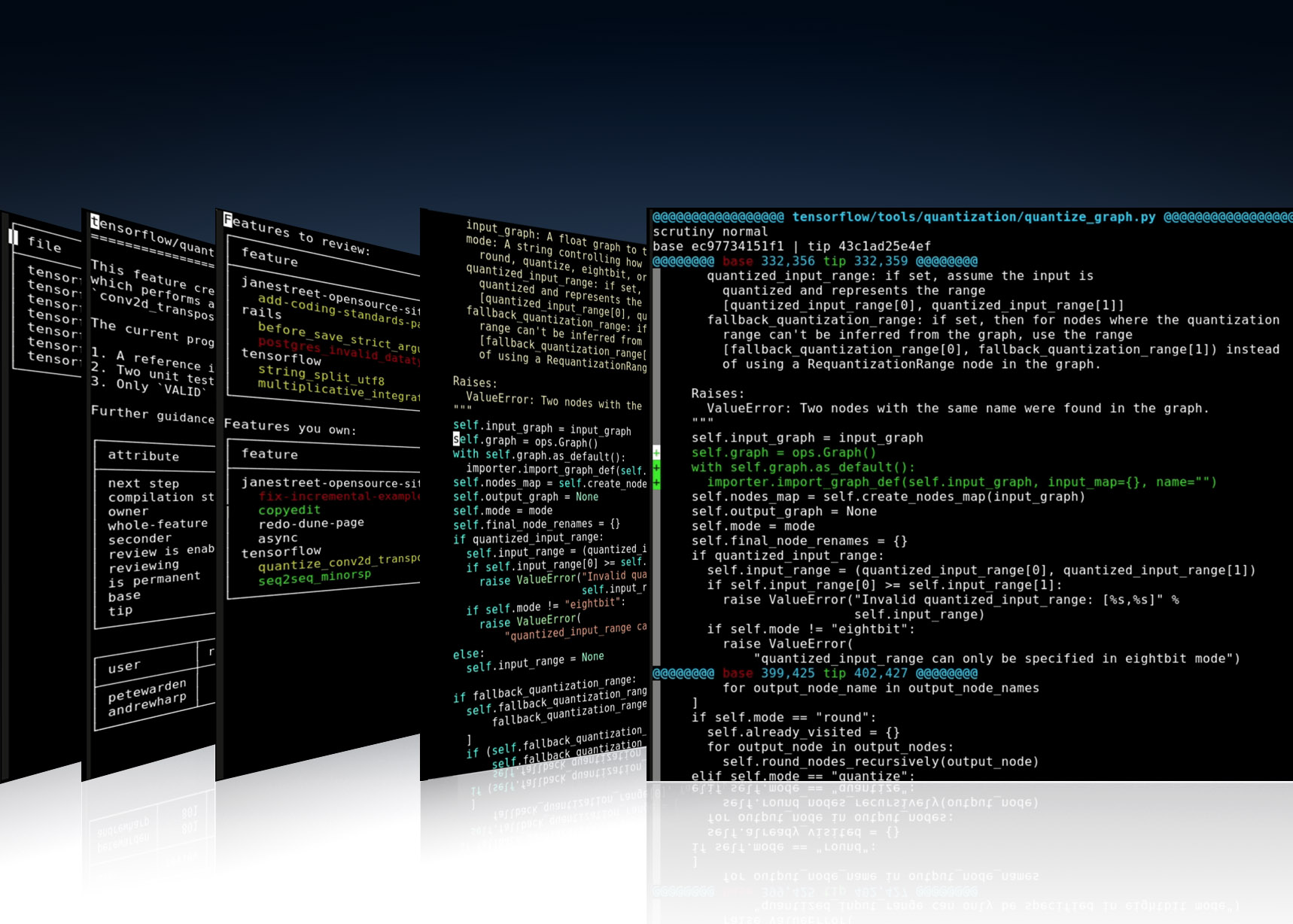
Putting the I back in IDE: Towards a Github Explorer
Imagine a system for editing and reviewing code where:
Jane Street Blog
297 points · by yminsky · 8y ago · 144 comments
I see this is built on top of Emacs, but it looks like it's entirely custom. It would be interesting to build something like this integrating with standard Emacs features. For example, merge requests could show up in an orgmode agenda list, and reviewing the merge request could be done through a layer on top of magit. You could also go a step further and offer an orgmode-like interface for working with tickets/issues.
Outside of the text-based UI world, GitLab has a neat feature called Review Apps [0] that lets you preview branches/merge requests for web projects, but this takes things a step further by letting you make changes and run locally.
Isn't that just svn? Why force a git-shaped peg into an svn-shaped hole?
Admittedly, 99% of people are using git as a centralised source control system, and outside of branching/merging there hasn't been much of a change in workflow for many. I've not used their system, so I don't know how well this svn-like system works, but every time I think back to svn all I can think of is how painful this workflow was.
You can also create a worktree for a quick experiment (eg how many conflicts when I merge X and Y) and just rm it when you're done.
Sure, all these things can be achieved with git stash and git reset... but they are both difficult to keep track of and will cause your IDE to run its expensive reindexing.
It's kind of like how you could use pushd/popd and open subshells to work in one shell, but people prefer to just open another terminal window.
Jane Street is a cutting-edge technology corporation, but their internal tools use 80*25 text-mode UIs just like the ones you'd find on a 1984 IBM PC/AT.
It's not the company's fault: we developers are stuck in the tar pit of an unfortunate local maximum with all these tools built around text streams printed into a window that emulates a late '70s terminal.
A long time ago, I worked for a company wanting to sell advertising devices with an accompanying booking UI to Titan - we had a shiny web booking system; they had their crufty old 80x25 text mode system.
Turns out that 80x25 text mode system was orders of magnitude faster for the day to day workflow of booking ads on devices, etc.
I've seen two AS/400 via Telnet(-like) systems replaced with a modern GUI (first case) and a web based GUI (second case) and aside from all the usual problems associated with an en masse migration they ended up been far slower for the end user.
TUI's with complete keyboard shortcuts are just hard to beat for domain specific software.
Things like "Click Orders - Click Open - Click Create New Order" vs SHIFT+F9.
The other thing is that once your users have learnt the shortcuts they become internalised and they don't even think about them anymore.
I've seen developers where you'd need crowbars and grease to seperate them from vim advocating for replacing a TUI with a web GUI.
That one did make me giggle from the sheer level of irony.
Gui's are often preferred for the speed at which new hires can use them. In environments with high turnover this is important. You can have the best of both worlds with a GUI that has good shortcuts and clever cursor placement. I agree though that most gui implementations have not put enough effort into this.
No, only a subset is "stuck" not using the most fancy and shiniest. Janestreet seems to be interested in this particular subset.
Maybe they found a correlation between robustness and efficiency, and not fooling around with tooling for the sake of optics too much. After all, finding correlations is what they do.
If you want to argue "behind times," argue inefficiency, but I think you will come up short on arguments. Not only do they get to have an efficient workflow, they also get to weed out developers whose opinions would make for a poor fit naturally.
Wow, that's aggressive. Such a policy would "weed out" people like Alan Kay or Bret Victor over a trivial difference in opinion about UI efficiency.
Are you sure creating a monoculture of thought around this single issue makes sense for a company?
If you do Ocaml, you do emacs, if you do emacs, you do GNU (or some other sane unix). Anything else means you're stealing your own or company time.
> a trivial difference in opinion about UI efficiency.
That's one way to look at it. Another is that the quest for UI efficiency is a timesink and an upgrade threadmill susceptible to fashions. The counter to that is to learn it once, learn it well, and be done with it for the rest of your career. Emacs fits that profile just about perfectly.
On the contrary, I think Jane Street's entire modus operandi is doing things in a novel way, to attract/keep talent (and this is self perpetuating). There are many firms as successful as Jane Street, or more so, that use completely boring, but functional tools: Java, C++, Visual Studio, IntelliJ, and so on. But Jane Street PR is through the roof - everyone knows it, everyone wants to work there, whether any of it is practical or not. It's a counter-example to the mantra of "choose boring tools".
Those of us that made a pilgrimage in other more graphics friendly environments, Xerox, ETHZ, Amiga, Atari, ...., have long left the 70's AT&T concept of programing behind.
I'd like to see more progress made in real desktop interfaces.
Come to the macOS/Windows developer culture.
There are a lot of workflows and I personally don't think it's on an IDE to enforce that. Yeah sure it's "integrated" but it's to the extreme which I somewhat disagree with.
If their workflow and emacs scripts were open sourced, I could actually try it and watch my tongue but since it's all proprietary all I can really say is good for you, thanks for sharing but I probably wouldn't use it myself.
It's a good thing this ideology of tools that simplify the process is spreading. But it's not novel.
This article sounds like the author never used Visual Studio.
It's quite funny sometimes when you show someone modern functionality in a modern IDE and they have to accept that the people making IDEs are, basically, not all morons (which is a sort of hidden assumption for many of these attitudes).
And it's easy to not notice productivity gains you've missed for years.
In my opinion Emacs/Vim:
- except for some specific roles: Emacs -> Lisp development, Vim -> to be honest, not sure what to say, what is Vim's strong suit? except for core editing commands
- and unless you put in a ton of hours into Emacs/Vim: a lot more than you need to put into mastering a powerful IDE
don't have as many features or don't reach the level of quality offered by modern, mainstream IDEs, for their respective languages. By this I mean that you need to bundle a ton of plugins into these editors and their plugin ecosystems are not as well integrated and as mature as the finished product provided by these IDE creators.
And for most devs who roll their own on top of Emacs and Vim, the balancing out between editor speed and IDE features is really, really hard. I think maybe 1% of the devs actually doing this are more productive, many of the others are fooling themselves, or as you said, haven't had the time to re-check the alternatives.
That being said, generic programmable editors like Emacs or Vim serve as nice catch-alls for those times when you don't have the proper "high-tech" tool. For example you're using a DSL, a niche language, etc.
Now I can't imagine working without Visual Studio Code because all those seemingly little features add up and what do you mean I can seamlessly use Git to manage my code or easily rename variables and functions without breaking stuff WHAT
It lets you view a pull request's changes right there in a standard IDE window, so that you can get full code navigation features during code review, including stuff like peeking the docstring or implementation of any functions the code references. Or, if you notice something amiss while reviewing your changes before submitting a pull request, you can just make the change, re-run tests, and commit, without ever leaving the diff viewer. Or being able to just toggle gitblame annotations on and off right there in the editor.
It's nothing worth switching platforms or programming languages over, but, since switching away from .NET and seeing the gulf between the level of seamlessness you get out of Visual Studio and what's available in other IDEs, I can now see why they've come to have such a poor reputation. Visual Studio isn't exactly lightweight, but it manages to pack in enough cool tricks to justify itself.
(Until you install ReSharper. Then it becomes as memory-hungry and unstable as everyone else.)
You can say that again. These really polished software products such as Microsoft Office (don't laugh!), IntelliJ, Visual Studio Code, 7-Zip, Chrome, Firefox have tons of hidden features you can easily miss and that have tons of thought put into them.
For example I started using Visual Studio Code and I accidentally clicked things in the status bar. Did you know that the text there is actually buttons? They take you to the command bar, where they have a pre-filtered list of commands which set their respective options (!!!). That's power user UX Nirvana, embedding discoverability and teaching in a subtle way that doesn't interfere with your normal workflow.
You don't know what you're doing? You click the menus and your life is just fine. You read the Welcome page and maybe change some user settings, with full auto completion (!!!), or maybe you click around the app, and like a modern game with a physics engine, the app reacts to your action, doesn't just sit there like a slab of rock.
I'd chalk it down to Visual Studio only running on one operating system, not being particularly useful for developing apps that aren't targeted at that platform, and having a very high price tag.
(The last two have changed, but only recently.)
I'm a career-long .NET dev and I've wanted to step away and begin learning C++ on a non-Windows platform with VIM and my only attempts were met with so much frustration that I gave up. To be clear, I believe in the power of VIM, I just never got acclimated to it.
Maybe this year is the year I stop making excuses and just learn.
P.S. I see lots of arguments elsewhere about whether VIM is an IDE. Either way I think your first point stands in my case @oblio.
Use dotnet core on Windows, with Visual Studio.
Use dotnet core on Windows, with Visual Studio Code.
Use dotnet core on Linux, with Visual Studio Code, etc.
Then maybe try dotnet core on Linux, with Vim.
But don't believe the hype. I use Vim as an editor because I do a lot of scripting. I use it even on Windows. But I use it because I'm already used to most of its commands, I have a decent config file for it (somewhat lean, not that many plugins) and for my job I need to know it cause I often interact with various systems which use it.
Despite being a touch typist and knowing most of the commands, I'm still a Vim heathen. That is, I don't use numbered yank buffers, I just use the default one, I also remapped Ctrl-c, Ctrl-v to do visual block operations for when I'm too lazy to come up with fancy selections, etc.
Anyway, my point is, using Vim might not pay off fully. My brain just isn't wired to work in Vim commands. And I know and use w, W, b, B, f, t, folds, blah, blah. I definitely don't use it to "magician" level.
You know what? I think in the end it doesn't matter. The only time Vim's nature actually helps is when I pre-process some sort of text data dumps.
For the other moments I'm thinking way more than I'm writing or editing. So it's not the text editor that's the blocking point.
Damn blocking IO. Getting outputs from the brain is hard and slow!
Stack Exchange often makes the difference, but unfortunately many of both the questions and their answers are version-specific, but do not state the version they apply to.
There is a real art to making an IDE in which how to do all the common things is easy to find, and all the more esoteric features are discoverable. Maybe game designers could help?
I also like to play with the UI, they're generally quite configurable, you can move windows, panels, show/hide buttons, etc.
By using these two tricks I generally get the core stuff quickly and then I branch out.
This is the first time I hear of this functionality. And it would be great to do that even in a disintegrated way, like, from the command line.
I like VS as an IDE. The TFS integration is a nightmare in my opinion.
How would have you liked me to expose the prior art on Visual Studio, other than state that it existed, that it was very nice, and that it was a bit strange it was not mentioned in the article?
I might have misunderstood some technical nuance in the article but I could honestly use the exactly same statements as in the first two bullet points to describe my workflow with VS.
This is not with Git though, so that might complexify the process. Maybe someone who is working with Git repos using a Visual Studio integrated tool can comment on this detail.
Released in 1990.
Not sure about the code review aspect though. I haven't tried any of the code review plugins (gerrit etc). They could be good if they integrate with diff viewer, as it is IMO one of IntelliJ's best features.
Check out Upsource for code reviews. It's pretty much exactly what you would expect from a JetBrains-built code review tool.
But can the reviewer easily run the code they have just edited?
And does changing branches require a full rebuild?
Just one example of that - recently I needed to create some UUIDs to use in my code. Previously, I would have googled a UUID generator or used uuid on the command line and then pasted the output into my editor. With Emacs, I was able to easily insert the UUID directly into my code using `C-u M-! uuidgen` (that keyboard shortcut inserts the output of the given command at the current cursor location).
There are emacs packages for tree views[0] and tabs[1], but as you note the built-in buffer management is more powerful. Stuff like Helm or Ivy is even better!
There's also an emacs uuidgen package, which can generate a uuid & insert it with M-x uuidgen; you could of course bind it to a key sequence if you use it frequently.
Even with Atom finding files is way faster than clicking through the tree viewer.
There's even a dozen of generator presets integrated, you can just easily invoke them from your keyboard, without pressing all modifier keys at once.
And PyCharm even has all the keyboard navigation as well, you can even get emacs or vi keybindings, if you wish, I only use the mouse when the app's already running and I'm going through the log.
So for example although the (very old) version of Emacs (/usr/bin/emacs) that comes with OS X was built in such a way that it can communicate with the user only via the terminal, the following command line will install a GUI-capable Emacs:
brew tap railwaycat/emacsmacport && brew update && brew install emacs-mac
(The simpler command line `brew update && brew install emacs` would install a GUI-capable Emacs, too, but delivers the pure-FSF version of Emacs, which for mac for many years now has been buggier than the FSF version plus Mitsuharu's patches, which is what the first command line delivers. In the past there have been times when `brew install emacs` would install an Emacs that is just not usable because of bugs while `brew install emacs-mac` would install and Emacs that works fine.)
Whether or not the code Jane Street added to Emacs can be used with a pointing device I do not know.
When you need to open a shell in a certain directory, do you use cd or do you navigate using a GUI? I much prefer the tab-completion I get with the former, especially in hierarchies with high branching factor.
Just like using CLIs does not preclude using a mouse, using GUIs does not preclude using keyboard shortcuts ;)
Quick Explorer example (sometimes I mix and match, maybe I want to show something to a colleague):
explorer . # does what you'd expect; alternatively Win-e
Alt-d # focus path in Explorer
Start typing, Explorer autocompletes stuff
Enter
Tab around, if need be, to change panels
And this is with what is, basically, the dumbest common GUI file manager out there :)
Really depends on the workflow. If I know where I'm navigating then I prefer cd, if I don't then a gui is better than a cd/ls loop. Fortunately programs like ranger cover the latter quite well too.
This is how I do all my file navigation.
You can turn on mouse support for terminal apps like Vim and Emacs and still click things like the file viewer, scroll text with two fingers and resize windows with a mouse.
You just have to configure it.
This to my mind is the real difference between classic editors like Vim and Emacs and GUI IDEs.
With the terminal editors you can be at least sure that you'll get a comprehensive keyboard interface system, I haven't always found that with GUI IDEs especially when it comes to third party plugins.
Another reasons why I prefer GUI are auto complete, tooltips and context menus. Also for some documents like xml, also when working with other people’s code, I find it useful to collapse/expand blocks of text.
All these features pretty much require a GUI-based editor.
For auto-complete, vanilla emacs has dynamic abbreviations; there are several packages for fancier auto-completion; company-mode, for example, works just fine in the terminal, as well of course as in the GUI (X11, macOS or Windows).
Likewise with tooltips, which in the terminal generally are generally displayed in a special region of the terminal instead.
Likewise with context menus, which can be shown just fine in a VT100 terminal.
Likewise with expanding & collapsing text ('folding'). Org-mode, to take just one example, is built on folding — and is easily one of modern emacs's killer features.
Seriously, give emacs a shot. Both Prelude & spacemacs are excellent configs for it.
Are there any advantages over Visual Studio + Visual Assist, for C++ or C# languages?
Because I see many disadvantages.
About text editor features, your workarounds have flaws compared to good GUI. For tooltips, that special region of the terminal is physically separate from the cursor. For folding, a separate, visually distinct indicators of what’s folded/unfolded help navigating the code faster.
Another text editor feature hard to do in text mode is spell checking for strings and comments. Color is already used for syntax highlighting, so wavy red underlines come handy.
But visual studio is more than an editor, it includes a build system, debuggers and profilers, package manager, and many more related features. Everything comes already integrated and just works out of the box.
Tooltips work in the terminal, they're just text after all. See Vim + YouCompleteMe (which, as the name indicates, also provides auto-complete): https://camo.githubusercontent.com/1f3f922431d5363224b20e994...
> I find it useful to collapse/expand blocks of text
For that you don't even need plugins, folding has been a standard feature for many years
e.g. I'm using ZSH specifically for it's command line autocomplete stuff. Emacs has helm for context narrowing and really good support for context menus. Vim will let you collapse/expand blocks of text including in XML using a mouse in a terminal window.
For spelling errors Vim will give you an straight red underline in the terminal and squiggly underline in its "GUI" versions. I assume that Emacs is the same.
I'm not suggesting you leave VS by the way. I'm just saying that your GUI only examples aren't GUI only.
But then most command-line editors are actually GUIs in the terminal with excellent keyboard support.
They show documentation (pulled from comments) for functions, classes and arguments.
> and context menus
For context-sensitive commands I use once per week or less often, so I don’t bother memorizing keyboard shortcuts for them.
> most command-line editors are actually GUIs in the terminal
Most developers don’t use command line editors. Here’s recent data from this year: https://insights.stackoverflow.com/survey/2018#development-e... As you see, 4 most popular editors are VS Code, Visual Studio, Notepad++ and Sublime Text, all of them are GUI applications. Only 26% developers use Vim, 4% Emacs.
Emacs supports all of those things out of the box as well.
At least has colors instead of having everything in green.
Really the extent people go to avoid using modern developer tools.
For me, efficiency is a synonym of Xerox PARC’s vision of computing, not improved teletypes.
And, unlike some of its competitors, it's free and easily user-extensible.