298 points · by vermaden · 8y ago · 157 comments
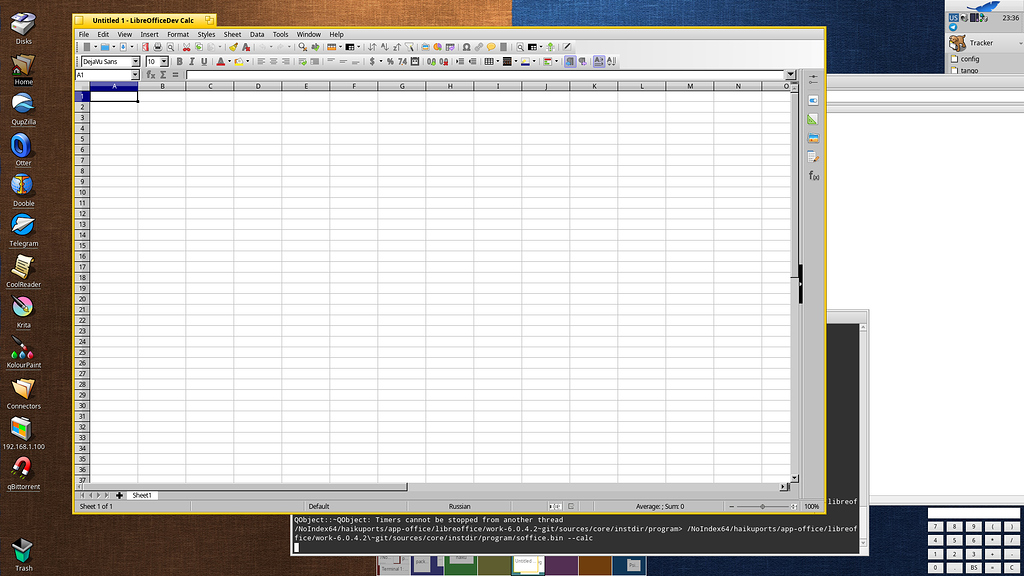
EDIT: congratulations with LibreOffice port, that does make a difference in terms of usability.
Probably because you're on the VESA driver, which can only use whatever resolutions are embedded in your GPU. The `radeon_hd` driver works best, and on those you can scale to a lot more resolutions; I know some users who run at 1440p.
> and having no multi-user capacity
That's not quite true; we have POSIX multiuser already, so you can `useradd`, `chown`, ssh in to other users, etc. The GUI does not support multiuser yet, but that's partially for BeOS compatibility (on 32-bit), and partially because nobody has had any time to work on it (all other platforms.)
As to multi-user without GUI on Haiku, while I can see that this would technically work (and it's nice to know the capacity is there) it also leaves behind the strongest asset of Haiku which I think is the UI.
We do have an intel_extreme driver, but it's not as mature than the radeon_hd driver, mostly because Intel's graphics hardware is a lot more complex to handle than AMD's. It works on most chipsets up to Haswell and then the Atom SoCs, but anything after that (Broadwell and beyond), it's doesn't really. I have a Broadwell device it doesn't work properly on, and was trying to fix it, but haven't really gotten anywhere yet.
Patches wanted & accepted...
Depends on what you mean by "modern computing environment". I mean, my computers are mine, an no-one else uses them. I know very few people that share their computer with other users (but maybe it's just my bubble).
Another story entirely for those who use a smartphone/tablet for their personal computing (the target use of Haiku).
That's only half of what a multi-user system does though. The other half is about fine-grained privilege management.
One of the reasons (not the only reason by any stretch but a contributing factor certainly) why Windows has so many more problems with viruses than other OS's is that under windows you're basically either a user or an admin, there's no in between. Crucially, there's also nothing lower.
Under linux[1] systems, it's totally possible to define a user that can read and write from one specific folder in the file system tree but not it's ancestor nodes, read from the keyboard but not the mouse and absolutely nothing else. All of those problems that windows has with random programs being keyloggers are eminently solvable on linux because you can make a custom user that cannot use networking or listen to the keyboard as appropriate, and then launch the process using that user.
Anyway, how well used all these capabilities are depends a lot on the person administering the linux system, but windows is extremely reactive in this fashion. Desktop linux users tend not to run outgoing firewalls, for example, they just don't allow software that they don't trust to access the network.
[1] anyone know how to write star-nix on hacker news without it making everything italics?
Useful in a networked corporate environment, a lot less so on a personal computer.
> All of those problems that windows has with random programs being keyloggers are eminently solvable on linux because you can make a custom user that cannot use networking or listen to the keyboard as appropriate, and then launch the process using that user.
You can do that on Windows and have been able to since at least Vista. the only reason I disqualify XP is that I wrote a keylogger for it so I know for a fact that you can grab raw keyboard input from any user session. Even before that though NTFS offered a fine grained access control mechanism for files and folders.
> Desktop linux users tend not to run outgoing firewalls, for example, they just don't allow software that they don't trust to access the network.
My experience is that they just don't run software that wasn't sourced from their distribution's package repositories. That is certainly an advantage of the appstore model, but you have to admit it is significantly more limiting that being able to get the latest version of something by downloading it from the vendor's website.
But i disagree with the part about how Linux users behave: from my experience Linux users, at least home/desktop Linux users, behave pretty much the same way as Windows users.
Only have one single * in the entire post.
[X] Not sane
[X] Already complained
[X] Issue acknowledged
[X] Complaint filed probably over a year ago at this point
[X] Given up; incentivized to build alternative to HN (know what I want, but currently have no time unfortunately)
EDIT: I added Unicode checkmarks to my post, and they got eaten. [X] Cherry+icing on cake - seriously, wow.
When I grew up having a computer was a big thing and we certainly didn't have one for each person in my home we had a family computer which i think cost around 1K in 1995 or around 1700 adjusted for inflation.
I think that as computers have gotten progressively cheaper it ought to be increasingly likely to have a computer per person but I feel like the family computer ought to still to some degree to be a thing but have no stats to back this intuition.
However even with one user it would be good to have a login to protect data from at least casual snooping. Ideally since laptops have become more common than desktops full disk encryption ought to be sort of a minimum requirement. Maybe someone can port luks.
Harder but zfs would also be neat as well as it includes encryption.
Fair enough, and I see your point. The first computer we got arrived in my house the same year, but we used to run windows 3.1 on that thing, and it certainly didn't have different user for different members of the family :)
also, my father was so scared of me and my brother screwing up, that, when given the opportunity to have Windows 95 he installed it on a different partition and we dual-booted windows 95 and 3.11. Me and brother were only allowed on dos/win3.11. I doubt it was a sound idea, technologically-wise,but at the time I was like 8-9 years old, and was mostly interested in starting doom 2
So that was how my father implemented users at the time.
I've worked places where the roles of people was more important than the people, themselves. So if you were performing a particular role you'd sit in a different seat/at a different computer. We all had out specialties, but knew enough about each other's work to pop in and out.
This is often the case in time-sensitive operations, or when the computers are merely controlling something else larger or more important (mining operations machinery, steel mills, television stations, etc...)
In a more traditional office environment, your computer is your own; like your desk or your red stapler. IT can log in to a shell remotely. This is the scenario that Haiku seems to be focused on.
One is not necessarily better than the other. Just different. Different environments require different methods.
On the other hand, when I let someone else use my PC (wife/child/friend), I would like them to run in another environment. Also when trying random downloaded applications. In this scenario, multi user makes sense.
Multiuser is on the agenda for Haiku R2, and seeing how well they resolved the package management system, I expect multiuser R2 will be a thing of beauty.
For example, this is blackbox 0.60.0 window manager, released around 2000: https://www.linux.org.ru/gallery/screenshots/19788
Almost 20 years later, the "blackbox" package is still around: https://packages.ubuntu.com/bionic/blackbox . You can install it, choose it in the dropdown from the login screen and start using it. Or get a version of Ubuntu with this stuff pre-configured (like xubuntu or lubuntu)
And the best part? You have all the modern software -- browsers, editors, compilers. You can be fully productive and enjoy the stable UI
That said, what document viewer do I use when I want to read a PDF? Evince was the standard GTK/Gnome option, but it has hamburgerized everything to a state of being unusable. I recently discovered Atril, but I literally have to search DuckDuckGo for "evince xfce mate" every time I need to remember what it's called.
Both Firefox and Chromium have buried everything in hamburger obfuscation land as well. I could name more.
In short, even with my significantly customized Linux desktop, UX-ism still bites me. Yes I can find alternatives for a lot of things. No, I don't imagine Haiku being productive for me in the near term. But... Haiku does offer something of a complete thesis of how desktop UI should work. That desktop UI is firmly situated in the 1990s, but I'm increasingly of the opinion that is a good thing.
For images, you can always try feh or imagemagic's "display". Or if you want a bit more UI, "geeque" (which is based on gimageview, and still has not changed the design much)
For web browsers, I am afraid you don't have many options if you want to use modern web apps. The web evolves too fast for that. There are still independent browsers (like netsurf), but I gave up on them and just use chrome.
I doubt that Haiku can ever be practical, unless you live completely offline. Even PDF format keeps evolving -- version 2.0 was released in 2017 -- so you cannot keep maintaining versions just for a single OS.
And once you start porting entire programs from different platforms (like LibreOffice), the platform's unique UI traits will slowly disappear. Who will notice the unique kernel if it has POSIX compat layer and GTK?
By default, sure. With Firefox it's trivial to permanently enable a traditional menu bar. Though that's not, I suppose, trivially-discoverable.
You should give Zathura a try :)
As for a browser with a normal UI, Firefox comes hamburgerized out of the box but you can easily bring it back to relative sanity by making the menubar always visible and choosing the "compact" mode from the density option.
GNUStep is my grandest regret for Linux. If I could wave a magic wand, all the mindshare spent on the early KDE vs. Gnome wars would have been dedicated to making a first class NeXT-like desktop environment and applications with display Postscript and the whole nine yards.
I tried I3WM at one point, but even with the ability to have tabs I just didn't end up with enough pixel space.
Still, for the vast majority of people trying Linux, the recommendation is "use Ubuntu" which means "use Gnome." And the number of people trying Linux is relatively small.
If Haiku's implementation was complete, and ran on the range of hardware people want to use, and ran the apps people want (a lot of ifs in that statement), I could see "use Haiku" being a viable option for a lot of folks. I remember non-technical and technical people alike being very excited when encountering BeOS back in the day.
To be clear, I think the most likely future is crappier desktops for the masses. Windows is downright baffling to use with the unified start menu / advertising billboard / hide-the-control-panel interface. With every release, macOS makes at least one regression in terms of stability, security, usability, or performance and gives us some new useless feature to "defaults write NSGlobalDomain NSPleaseJustLetMeWorkInPeace -bool true." And Linux == Ubuntu == Gnome, which is the Philip Glass of interfaces.
I realize I'm ranting now. BeOS was a happy place for me. I just like to fantasize that Haiku could be such a place again. :-)
> Linux-based distributions stack up software – the Linux kernel, the X Window System, and various DEs with disparate toolkits such as GTK+ and Qt – that do not necessarily share the same guidelines and/or goals. This lack of consistency and overall vision manifests itself in increased complexity, insufficient integration, and inefficient solutions, making the use of your computer more complicated than it should actually be.
> Instead, Haiku has a single focus on personal computing and is driven by a unified vision for the whole OS. That, we believe, enables Haiku to provide a leaner, cleaner and more efficient system capable of providing a better user experience that is simple and uniform throughout.
I wasn't too familiar with C++ or filesystems to comment on the veracity of the claims, but my understanding is they also exposed some seriously good APIs for the time and a neat filesystem. But as an end-user I would raise that there were a few very avant-garde apps - to me at least.
But that was over 15 years ago... Everything has been moving forward fast since. Hardware (an iPhone 4 was as powerful as Deep Blue), software, languages, libraries, network speeds, computing paradigms, etc.
Put another way, it's basically ... cool, but meh.
As a former BeOS user for a while, I've been looking every now and then at Haiku out of curiosity, hoping it would soon come out and pick up momentum. But in all honesty, and as much as I respect the impressive work the team poured into it, progress has been so slow and there has been so much to catch up with since that I suspect it'll be too little too late to make any difference by the time there's a stable release. Then again, who knows...
Would I prefer a Linux distribution with a window manager/desktop based on Haiku/BeOS? Probably. A modern one that supported HiDPI would be amazing. One can dream...
If more and more software continues to be ported though, I’m not wedded to any one kernel. If I could do my entire job in Haiku, I would. It’s amazing to watch it get better and better as the years go on!
It is a clone of BeOS which was much faster/responsive than Linux or Windows at the time (probably due to its use of multithreading).
It is an OS which target desktops, so it's a bit more integrated and coherent than the collection of software that Linux has. But they decided to not use Linux/*BSD as their base kernel so they are in perpetual alpha/beta..
I'm still very impressed by the community, and I wish you all the best!
> The system currently can be built to run on the follwing systems: > Intel IA-32 (x86) - Tested on desktops through 4-way servers > Sega Dreamcast - Hitachi SH-4 > PPC based machines - G3/G4 Macs, Pegasos
Sega Dreamcast!
LibreOffice is on Haiku
Haiku is complete
The web browsers available to Haiku are all based on a recent version of WebKit (As of now we have merged commits from upstream dating from 2018), the same engine in Safari and it also allowed QtWebKit-based apps to run, previously Otto browser and Qupzilla until they migrated to QtWebEngine (based on the Blink engine which we don't have yet). So to me, that seems to be modern for a web browser that has HTML5 and can also play YouTube videos.
Also, I have just replied to your comment on a recent 64 bit Haiku nightly in WebPositive.
https://cn.pling.com/img/hive/content-pre2/5965-2.png
https://discuss.haiku-os.org/uploads/default/original/2X/e/e...
[1] https://i.imgur.com/emP3Jk4.png (not my shot)
I haven't reached that point myself; I'm still missing WiFi support on my laptop (hence why there's so many commits from me working on that area of the system recently ;) But I'm getting close.
EDIT: I'm asking specifically a command-line package.
HaikuPorts (https://github.com/haikuports/haikuports) is what handles the bulk of the work to get applications up and running. I guess the Ninja recipe (https://github.com/haikuports/haikuports/blob/master/dev-uti...) and patchset (https://github.com/haikuports/haikuports/blob/master/dev-uti...) are pretty typical for a CLI app, and the Qupzilla recipe (https://github.com/haikuports/haikuports/blob/master/www-cli...) and patchset (https://github.com/haikuports/haikuports/blob/master/www-cli...) are roughly typical for a Qt app.
If you have some specific application you're trying to port, joining Freenode#haiku and then asking around may be worth your time. :)
From my perspective, the project seemed to have been taken over by Linux Desktop people, introduced a package manager, and I completely lost interest in it. In that respect, it's basically a much less functional Linux distro.
Joking aside, I know the package manager was somehow a sticking point for people when it was merged in a pretty unpolished state, but at this point I'm not sure what the complaints are. Even most of the regular errors or problem states people associate with package managers don't occur all that often on Haiku.
And I also note the people who did the most work on the LibreOffice port say they would not even have attempted it without the package manager, so there's that.
Package management is an awful paradigm for application management. I'm not familiar with Haiku's implementation, but the only reason anyone needs a package manager is if they intend on having a complex web of dependencies and spreading an application's files all over the hierarchy. In other words, they're a UNIX system. Implementations are almost always reliant on a centrally managed appstore-like repository that developers have to deal with to distribute software in the "official" way, often don't allow multiple concurrent instance of the same application to be install (different versions, for instance), are completely inflexible in regards to where applications are installed (so portability is right out), etc.
Many of the problems I have with package managers were expressed by parts of the Haiku community when it introduced one. It appears that the developers disregarded these concerns because they like package management in Linux. Fine, they're the one's working on it, they can do what they want, but I don't have to like or praise that decision.
> And I also note the people who did the most work on the LibreOffice port say they would not even have attempted it without the package manager, so there's that.
Says a lot about the system then doesn't it? Windows has a portable LibreOffice, even Linux has an AppImage.
So I would say that by introducing this package manager has actually helped the project gain many usable applications which Haiku previously didn't have for some time.
The same way the portable Windows version does, or the Linux AppImage does. It isn't rocket science.
It didn't come from the Apple gods. The same ones who made two attempts to rewrite an OS with preemption and protected memory support before punting and buying one instead. Clearly they know best about how to structure an OS.
Nice to see that this project didn't die and is making some decent progress.
From the project home page [0]:
> Haiku is an open-source operating system that specifically targets personal computing. Inspired by the BeOS, Haiku is fast, simple to use, easy to learn and yet very powerful.
From the wiki page [1]:
> Haiku is a free and open-source operating system compatible with the now discontinued BeOS. Its development began in 2001, and the operating system became self-hosting in 2008. The first alpha release was made in September 2009, and the most recent was November 2012; development is ongoing as of 2018 with nightly releases.
And see also our FAQ, since a lot of these questions wind up getting asked on these HN threads: https://www.haiku-os.org/about/faq/
Is that how it works?
At least as of version 6, LibreOffice actually has a ribbon bar-mode, but enabling it was non-trivial, and disabling it was even harder. I hated it even more than the MS Office ribbon bar; but I am obviously biased. It would be interesting to hear from someone who likes the ribbon bar how LibreOffice's version compares against MS?