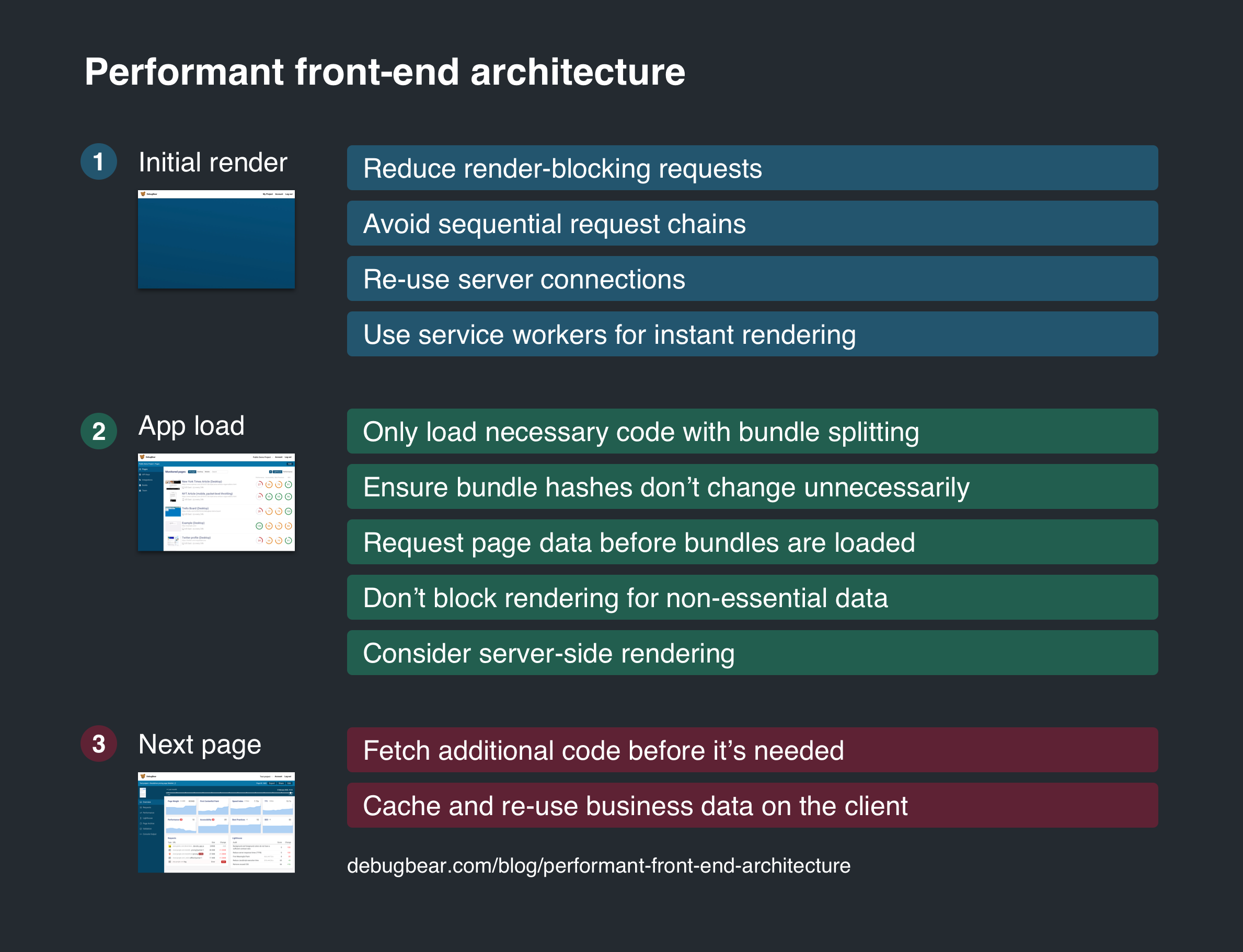
Performant Front-end Architecture | DebugBear
Make your client-side apps load fast and provide a good user experience.
debugbear.com
305 points · by mostlystatic · 6y ago · 114 comments
It's very easy to write fast JavaScript, with React or pick-your-framework. I would argue that these frameworks go out of their way to help you do that. But carelessly throwing modules at your problem is not going to get you that.
There are many reasons why SPAs can be slow. Whether that is due to truly lazy developers, overly tight deadlines, or management that just doesn't care is often left out of these discussions.
Everyone likes to complain about SPAs, as if terrible load times are a fundamental trait of frontend frameworks. That is not at all the case.
I disagree. SPA frameworks attempt to re-implement browser UI and DOM within Javascript. Of course the result is buggy and slow.
The browser already has a UI and DOM framework. Use it. (Yes, I know it's ugly. Such is life.)
SPA frameworks don't re-implement the DOM, they provide an interface to the DOM that is more usable. That may or may not have significant overhead, but it's not a given.
You have these benchmarks to show that "vanilla JS" is faster, but that's not real-world application code. Because of the usability issues, application authors are way more likely to not write optimal vanilla code. In particular, any DOM modification is extremely slow, so redundant modifications are very wasteful. Avoiding those is something that a framework/virtual-dom can do for you, to let you write simpler code.
Furthermore, anybody who writes a real application ends up abstracting the DOM interface, so they're already halfway at an ad-hoc framework. Not abstracting the DOM would result in an insane amount of boilerplate code, which would hamper developer productivity, which would result in even less time spent considering performance.
Disclaimer: All of this is true for applications, not for simple websites with minimal dynamic interaction. You're likely better off rendering those server-side and then attaching a couple of event handlers on page load.
Thus React. I can think of it in a functional pattern and let it abstract the DOM/UI for me, ofc I understand there's a cost to it but that cost will greatly be overshadowed development & maintenance costs.
You can use intercooler.js to wire in very usable modern UX with very little overhead, relying on the native, screaming fast DOM implementation.
Buggy and inefficient stuff sometimes makes sense to a business, this is true.
It's just AJAX and HTML fragments.
I removed my links although I think they're complementary to the article.
I hate load times for apps, especially as I know it should be instant and all sites I architecture load instantly.
The goal was to keep an average of <3.0s for the first meaningful paint, after login. Before login, all pages were treated with the same respect you'd treat any marketing page; render what you can as fast as you can.
Back with AngularJS, when code-splitting and lazy-loading modules/controllers wasn't an option, you had to get creative. Since moving to Vue, initial page load has never been an issue.
Can’t agree more. If your engineering team spent several sprints to focus on improving the app load time, it has to be something highly impactful on your conversion rate. Otherwise it’s just a waste of resources.
This was a decade ago so I don't remember the exact specifics. The dip was high enough that we basically stopped everything else and immediately investigated.
If you go from 10sec to 1 sec, absolutely.
If you go from 1sec to 100ms, maybe.
If you go from 100ms to 10ms, unlikely.
Assuming "fast enough for a good user experience", expecially early on in a product lifecycle, I prefer to focus on development speed than product speed.
I get your point. This is an outlier, but hear me out:
For some of the workloads I run on https://workers.dev, I can tell you that going from 100ms to 10ms is something I look for every single day. I am also very interested in anything that takes the memory usage down into KBs from high MBs, say.
I'm pretty sure dismissive comments such as yours lead us to this bad place.
1) Use a framework/language that is optimized by default instead one that is slow by default. Ex: Svelte only recalculate only the part of the UI affected by a change. Most of the other frameworks recalculate the whole virtual DOM.
2) When you can write something fast or slow in the same amount of time go for the fast one. It seems trivial even mentioning it but sometimes people with "make it work first, make it better later" do not even spend few seconds pondering this.
Also in my experience, those thousands of React components are going to be a source of new problems. The more of them you have, the more likely you’ll run into frustrating limitations that contorts your code to an unmanageable mess.
What I can say is measure before just blindly following a checklist.
Chrome devtools performance and audit tools are awesome.
Measure, fix biggest bottleneck, repeat.
This post has some great recommendations but things could be simpler. Like use http cache headers instead of service workers. They help both the cdn and the browser. Use immutable urls for assets.
The best way to improve perf is to simply load less JS and CSS. Less is more. It’s not always possible but helps trim down large swaths of network load when you can keep things simple.
So many apps are lacking, so many built on outdated/inferior tech. Currently there's just too much knowledge to consume.
That may be good when a checklist is accurate.
Unfortunately models work in the constraints and simplifing assumptions they were built in.
"Web development" it is a pretty large subject to cover. Best practices for dynimic site that is image heavy do not match best practice for systems that is heavy in static content.
A check list for web delopment is going to be pretty messy if you want to account of all cases.
But maybe it is worth giving it a try...
Now nobody who follows the checklist completely could be doing so blindly.
So you update all your apps/websites to the latest/superior tech?
It enables some cool options, like pre-rendering static content with the generate flag. You can use it as a static site generator, or wrap dynamic stuff in a <client-only> component and only that portion will be rendered client-side.
Service workers & PWA stuff, code splitting and dynamic routes, its all made pretty easy.
I've been finding it quite easy to build performant front-ends with nuxt. It is opinionated, and it abstracts away the webpack config, so it certainly isn't perfect for everything. But for me, it has really been hitting a sweet spot.
The first sentence uses "fast and user-friendly" which is much clearer.
When someone uses this word, I can't help but feel that they are trying to gain the approval/validation of people who like to hear that something "performs well", without having to support the assertion with any concrete substantiation.
I get that the right person to lead a large organization might not be technical, but you'd hope they'd delegate those calls to someone who is. Not try to figure it out personally based on what they read in a trade publication for "visionary thought leaders."
What does "it" mean above? Devoid of context, it could be just about anything.
Check out this Unity blog post I just came across: "Achieve beautiful, scalable, and performant graphics with the Universal Render Pipeline"
What exactly are "performant graphics"? Does that mean high frame-rate? High-poly? Extremely vibrant colors? HDR? Can run on a 486 with software rendering?
It doesn't tell me anything, and is essentially "vocabulary clickbait" - it "sounds good", without really communicating anything. This is why I despise this word.
It is demonstrably worse than phrases like "low latency" which clarify the desired property of the system being discussed.
I'm not a huge fan of "high performance" but at least I kind of know what "high performance computing" means (usually systems that are capable of processing massive data sets with high throughput.)
In contrast, "performant" as it is commonly (mis)used doesn't seem have a precise meaning other than "good according to some unspecified metric."
"Performs well" doing... what, exactly? And how is "performance" measured? (Some basic and often conflicting measures include latency, throughput, power/cooling, reliability, cost...)
In this case - load fewer and/or smaller resources.
DNS lookup
Establishing a TCP connection
Establishing an SSL connection”
This takes more than three roundtrips and I wish the author would have mentioned 0-RTT options in quic and TLS 1.3
Why would you need a service worker for this? Doesn't the regular browser cache achieve the same thing?
I don't think that's what the example is showing, though.
Do you know what the advantage of that is over serving the full cached HTML page layout and then fetching the content HTML from inside the page?
Service workers give you more control about what's in the cache, for example you can serve a stale version of the HTML and then fetch an up-to-date version in the background. But since last year you can also use `Cache-Control: max-age=1234, stale-while-revalidate=86400`, so it should be possible with the HTTP cache as well now.
https://www.youtube.com/playlist?list=PLPxbbTqCLbGHPxZpw4xj_...
That analysis is from 10 years ago. Again, the landscape is different and spending time on this is a borderline foolish discussion (interesting from a technical perspective). It matters if you are the owners of a business, in the mass-retail space. Save yourself the time, add to your features or verticals.
Yes, 5s is still fine.
It seems like your argument isn't that it's fine across the board, but rather that it's tolerable in a few circumstances. If I try and load a website that is packed with features but loads slowly and maybe has a choppy experience, I'm going to go somewhere else if I can. It's only in the few circumstances that you can't go somewhere else will you be relatively fine.
If you are running a marketing or sales oriented site, you want to minimize friction.
It sounds like you are doing more of a “captive user” app, similar to the government/healthcare oriented stuff I have been working on the last few years. In that case, you still want to tune things a bit, but you do have goals and criteria which might not match this article.
Make sure things which can be cached are. (And don’t sweat the size of static assets too much, the second visit is just an HTTP header swap)
Minimize the number of requests.
Schedule requests for supplemental data in a component or form to load after the primary data.
Minimize the size of dynamic data messages, though this can be hard when you work with devs who like very long names.
Accept the fact that many of your web clients may have round trip latency well over 200 milliseconds, as well as the occasional multi second delay or request loss, and plan to work around that without hanging.