109 points · by bergie · 15y ago · 42 comments
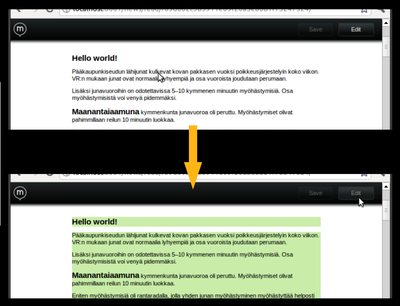
Plone has always let you edit content via the web in the context of the normal web pages, not a separate admin mode.
Additionally for at least 4 years, Plone has also had a feature where you can click on various page parts (title, description, body text, image, etc) and edit inline without entering the full page edit mode. This is not enabled by default, but it is available.
The Plone 5 is scheduled to allow full control of page layout and creation of content types on the fly and in the context of the page. Take a look at
http://blip.tv/file/4310018
It starts getting interesting about 11 minutes in.So in this case the author has tackled that abomination that is ContentEditable and likely aged himself ten years in the process so that you can edit text on a page with no <textarea> tags in sight.
As anybody who's had the misfortune of being sucked into the ContentEditable TimeSink Vortex will tell you, that's probably not a very good idea when all you're trying to do is edit text. But from a purely technical standpoint, he has indeed done what the title describes.
Their is a big difference in inline editable functionality and your typical forms for add/edit/delete functionality.
IE surprisingly has the best implementation, measured by how often you have to write specific code to insert/remove/re-insert/manually move the caret, etc. just to make a simple command work on a piece of selected text. Actually, it might not be such a surprise since they had it working back in IE5.
Webkit is quirky, but at least you can generally hack things into working.
Firefox seems like they simply stubbed out the functions so that they could check off the box on their "HTML5 Compatibility Chart", then never implemented them. It's completely unusable, and many trivial things simply throw non-catchable exceptions at you and refuse to work. Bugzilla is full of open bugs on the most basic things, with comments from, for instance, the Google Docs team about how they simply can't support certain features until Firefox finishes implementing ContentEditable.
I ask, because I tried to once. After a bunch of unsuccessful shoehorning, and marveling at how they could write an entire megabyte of javascript and still not end up with a working editor, I gave up and rolled my own.
It actually made diving into ContentEditable seem like the less painful choice.
https://github.com/bergie/midgardmvc_ui_create - the reference UI implementation for Midgard Create
https://github.com/bergie/VIE - JavaScript library used for making RDFa-annotated content editable
https://github.com/alohaeditor/Aloha-Editor - usable HTML5 contentEditable implementation
https://github.com/midgardproject/midgardmvc_core - the PHP framework used with the UI reference implementation
If you want to implement this UI, or something similar to your web system, just let me know. I'm usually on Freenode #midgard and #iks channels.
The edit-in-place model as demonstrated in this post makes so much sense. It seems crazy to have a CMS with a separate backend when the backend can be the frontend.
I've found that new WordPress users are confused as to why, for example, the text they type in the post editor is set in a serif typeface when their site is displayed in sans-serif, or when their H2 tags are larger in the post editor than on the site itself. And those are only tiny examples -- I'd guess that a large proportion of new user (dis)orientation is related to the enforced disconnected backend that the majority of content management systems adopt.
I think WordPress et al could hugely benefit from a pure edit-in-place model, with overlays or sidebars for any non-visible configuration like permalinks, draft posts, and email settings. WordPress 3.1 moved the admin bar onto the front page; perhaps this is a sign that more of the backend is to follow?
In our first prototypes we were experimenting with inline editing, but we actually decided against it.
The really good thing with allowing editing right on the site is that it matches non-technical end-users conceptual model of a website far, far better than some abstract admin backend for their content.
This is a big deal, since for many users even something as seemingly simple as Wordpress can be really hard to explain. They just don't intuitively understand that there's a database somewhere with content that are then sucked into their website and displayed. And when they want to edit something on their site, they don't want to go somewhere else to look for it.
The bad thing, in my opinion, with actually doing inline editing, is that the end users conceptual model is actually wrong. There really is a difference between content and design. The same content can often be displayed in many different places and used in different ways.
Sometimes you have an article with a long text and big photo, but choose to only show the first paragraph of the text as an excerpt on the front page together with a thumbnail version of the photo. Or you truncate the title to a short version to show a teaser for the article in a small box in the sidebar, etc, etc.
If the user clicks on the excerpt of his long text to edit it, inline editing starts getting problematic. Do you allow him to edit only the first paragraph inline, leaving the user unaware that he might make the next paragraph in the article sound really weird if he change it? Or do you expand it to the full text with the risk that the design will get completely mangled?
Some of these problems are solvable if you limit how the designer can use the content and what HTML/CSS he can write (CSS can really mess with inline editing as well - just think about overflow: hidden or white-space:nowrap).
That's why we went for a small miniform triggered by clicking directly on the content you want to edit, but with a link to the full form for that content. We want to gently guide the user towards the right mental model of how their website works, without forcing them to go search for the right content in a backend interface whenever they want to edit something.
Absolutely. In my experience "normal" users are much less confused - and more likely to actually manage their content - when they can edit their content in context instead of in an entirely separate interface.
Concrete5 CMS is pretty good at this - though the code behind the scenes is a bit wonky. This UI looks quite nice as well, but again behind the scenes... And I've yet to see a Rails CMS implement this at all (though I'm keeping my fingers crossed - please HN prove me wrong).
There is already a WordPress plugin in works... https://github.com/Jotschi/Aloha-Editor-Wordpress-Plugin
In my experience the rendering system and editing system probably have very different performance and scalability requirements.
I agree that having the edited content looking visually different from the rendered content is usually a bad thing.
It's me btw :)
I am having a shot at it with django. Rather early yet, but doing something like this is the goal. It only really exists on svn right now http://codefisher.org/svn/djangopress/
http://www.sitecore.net/en/Products/Sitecore-CMS/Editorial-T...
Perhaps it only works with the default theme.
2.Is the API for the JSON/REST backend documented anywhere?
It is awesome to see someone implement this architecture.
I have been working on a similar concept for quite a while, but didn't have time to build anything more that prototypes and proof-of-concepts.
2. We're passing JSON-LD (http://json-ld.org/) over the standard Backbone.sync API (http://documentcloud.github.com/backbone/#Sync). But for other systems that can be replaced with a different JS implementation to the fit the API conventions of the back-end you talk with. Just override Backbone.sync
If you're working on something similar, then our JS libs will probably be handy: https://github.com/bergie/VIE
Others are starting to find workarounds by using a hidden textfield that captures input. I haven't tested them on a tablet or mobile phone yet, though. See the Ace editor and Codemirror 2: http://codemirror.net/2/internals.html http://ace.ajax.org/ (yes I know those are code editors, not wywsiwyg rich text editors, but I'm just pointing to solutions that might possibly work better on mobile platforms)
Another, perhaps kludgier workaround is to use a floating css keyboard for mobile users to enter text.
* Wait for Apple to fix this issue (there is a bug open)
* Implement a form-based workaround or do a on-screen keyboard in JavaScript
* Do something completely different. We've had quite good experiences in publishing from mobile devices via email
When we asked for feedback, there was a comment that was particularly interesting where the user said he'd pay for something like that if he could edit his regular website with it. Basically a CMS.
It was such a good idea that we built it and it's available at http://www.designhamster.com/. Basically, you just add a class="EDIT" attribute to any div you want to make editable. We plan on making a real post to Hacker News about it later. This version is actually making the DIV editable instead of an iFrame.
There is a live demo on that page where you can click on a box with some text in it and try it out on the DH home page; however, to get a real feel for it, I'd suggest using the free signup so you get an idea how it works in a page.
Note: DesignHamster is live and accepting customers but we aren't going to promote until we improve the interface. This will be done in 2 weeks. It is completely usable now though for projects.
So, you are using Aloha editor. It's kind of cool but still buggy (I'm sure this will be cleaned up) and I understand it's quite heavy. I think we did ours in 66KB + mootools.
If you are wondering, making an editor from scratch is HUGE work. To get bold, italic, headings, bullets, and everything else that is built into the browser's execCommand list for working with contenteditable gets you a lot of cool stuff for almost zero pain. It's fun, enjoyable and fast to build. This gives you the false impression that the rest will be just as easy. Unfortunately, not even close.
Every browser is different is just the beginning. There are bugs galore in each browser. Some of the worst offenders are from our favorite browsers like Chrome and Safari too. Try and backspace from a paragraph into a heading and you'll get these weird inline SPAN that fake the formatting of the H1/P tag without actually being one. In many instances, IE has the sanest behavior. To fix this, we override the handling of delete, backspace and enter depending on the browser. If the browser handles it correctly, we don't touch it. But if it doesn't, we modify the DOM directly.
In other areas like selecting an image, IE uses a completely different selection object type for images than text. This has to be handled specially too.
Many commands not built in require manipulation of the DOM. But unfortunately that kills your UNDO. So if you want to keep undo working, you have to build your own UNDO stack.
Then there are just plain weird bugs. I think there was one where if you have an image in a P tag with nothing else, in one of the browsers, your cursor can't move passed it. So to fix it, we had to insert an invisible space.
For us, the editor is one of the most valuable assets of the company which is why we have spend, probably over a man-year working and improving our editor. We are getting better at it but it's still not perfect. We want the editor to be a prime differentiator of our product so we are willing to put in the work; however, be warned that working directly on creating an editor is a lot of work.