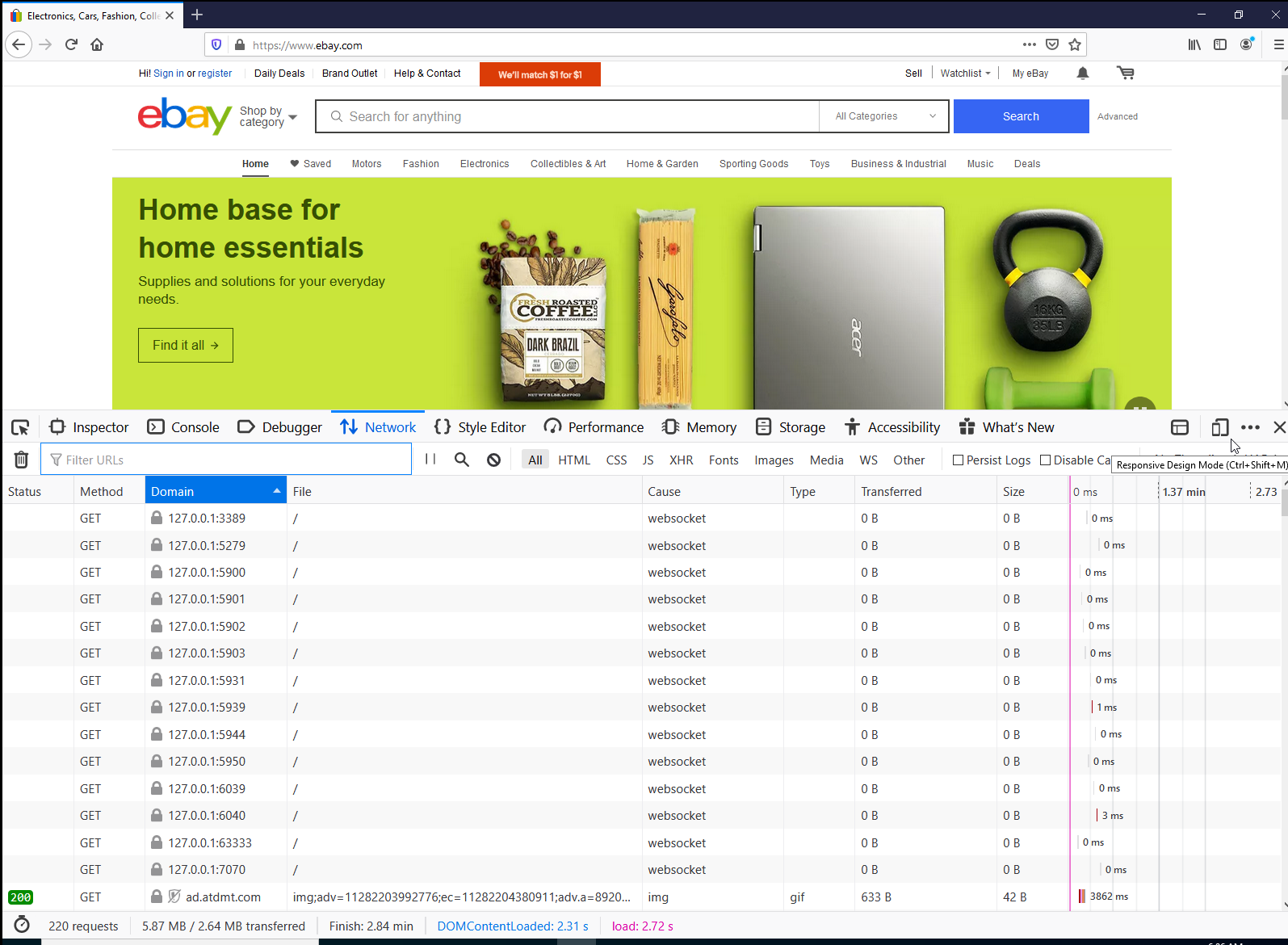
Why is This Website Port Scanning me
Investigation of the practice of port scanning site visitors for fingerprinting and tracking.
Null Sweep
1294 points · by BCharlie · 6y ago · 430 comments
If you are not using Tor Browser and want to fix the security hole without disabling WebSocket completely, running the web browser in a separate network namespace is a workaround - you get a loopback interface which is independent from the main namespace, and you create a NAT interface within the network namespace to allow outgoing traffic. It's also a possibility for a website to probe other machines, such as the setting page on your router. For better protection, you should block all the local addresses defined by RFC1918 via netfilter/iptables as well.
For developers who needs less restrictive blocking for debugging, you can run multiple Firefox processes in different profiles (firefox -P --new-instance), each running in a different network namespace - to make it easy, you can code everything in a shell script and create desktop icons for them. I normally use an ad-blocked and 3rd-party-cookies-blocked profile for web browsing, but a naked Firefox profile for development.
Sorry to invoke the meme, but Opera did it first[0], in Opera 9.50 (2008). I don't have a good reference to hand, but [1] is a developer complaining about this. [Edit: [2] covers the feature in some detail.]
Opera also blocked access to private IP addresses (so there were three tiers: public IPs, private IPs, localhost; higher tiers could communicate with lower ones, so the block was only unidirectional).
IE10+/EdgeHTML-based-Edge (and I know there was some talk about blocking this in Chromium-based Edge) also blocks it, so that too is prior art to the Tor change.
[0]: https://w3cmemes.tumblr.com/post/62942106027/if-you-can-thin...
[1]: https://stackoverflow.com/questions/1836215/access-to-127-0-...
[2]: https://web.archive.org/web/20140302021701/http://my.opera.c...
One is clearly that you need to communicate the requesting IP deep enough into the network stack to the point where you get the DNS response (if there is one), which means there's a fair bit of work to ensure this is done everywhere;
Another is it's known to break corporate websites (https://internal.bigcorp.com/ on a public IP expecting to be able to access private IPs on their intranet), and smaller browsers are reluctant to lose corporate users by changing long-standing behaviour;
Then there's the WebRTC question: if two users on the same local network start a WebRTC call, do we want all this traffic to go to via first point where the public IP is known? For the majority of users the answer is no. And as long as that's possible, there's a (very limited) means of local communication. (But if it's limited to only things that respond to the WebRTC handshake, we're already in a much better place!)
This website used to run Java applet. This applet was signed and it could access restricted APIs to access USB device. So website talked to applet and applet talked to USB device to sign data.
After major web browsers disabled Java applets, they implemented another approach. Now user must install a software which runs a web server on 127.0.0.1. This webserver listens on a specific port and uses web socket to communicate.
So government website now uses JavaScript to connect to 127.0.0.1:12345 using websocket. And then it uses that connection to interact with USB device.
So an ability for external website to connect to 127.0.0.1 actually is essential for this use-case.
My guess is that there are plenty of other websites which use local web server to interact with locally installed software. I know at least one another such a website: Blizzard website. It runs web server in its game launcher and website can communicate with it.
PS also they have to install custom trusted certificate because browser requires wss from https and there's no easy way to get a legitimate certificate for that kind of use.
As someone less tech savvy but still concerned, are there any guides available on how to do this?
[1] https://firejail.wordpress.com/
[2] https://firejail.wordpress.com/documentation-2/firefox-guide...
If anything, this should require very explicit permission granting from the user. I’d prefer it be something more like an undocumented toggle accessible solely to developer types.
That's too little. All access from a different origin should be blocked by default, not only to local nets.
How shall origin be defined? I can envision the likes of Microsoft which have many, many second-level domains making calls between them.
We can’t allow the site itself to grant access. How would this be managed, other than “please stop and think what a domain name is supposed to be before spraying your product across twelve of them?”
(Which is in turn made harder by IPv6 public addressing, where you can’t just block the private IP range because you might not be behind a NAT in the first place, instead only behind a firewall. So your address A::B, can route to your Intranet peer A::C, which isn’t public-routable, but is a public address. But there’s nothing, other than the firewall, that says that that’s not a public address. It’s a hard problem!)
The process is different enough from cookies to warrant another large discussion about how to do it, with plenty of trial and errors. But the stakes are much lower, as in the worst case the user will get a dialog, instead of a site being broken.
That a script is able to gather information about an origin that did not it in seems like a serious bug to me.
I don't think you need to overdo it in terms of making the warning red, etc. Just a popup will really discourage people from trying to use this for fingerprinting.
BTW the site says:
"Port scanning is malicious." I don't agree. There are many many things that can look like a port scan but are not malicious, most notably NAT traversal attempts by WebRTC, games, chat apps, and so on.
It's not against the law. It might be _shady_ but it's not illegal. When I'm teaching cyber intro classes, I let folks know portscanning is NOT illegal but shady. It's like going to a business after hours. It's not illegal to rattle doors and windows to see if they're locked. The police might have a different take on it, but it's not illegal.
While it can be used to get information to bad things, it itself can be used for good things too.
I’d be all for a user notification that says “fnord.com wants to access 192.168.0.10 on tcp/443, which seems to be a web server on your home/work network. Are you sure you want to allow this?” I’d want to see this for each new access request, such that port scanning would not be a use case that was supported.
Sure, have an about:config toggle to shut this off, with appropriate warnings.
I find it very surprising that now any random website can access it with no oversight. Why worry about spectre and meltdown when such blatant backdoors are implemented in browsers?!
For instance, if I'm running a local chat application and need it to communicate with the web version, why does the website need to be able to port scan to accomplish this? I can think of other ways to accomplish this that are a lot more secure.
But I think if same-origin were enforced more strictly, they could have found another way.
Here's an interesting tangential article about how they get around obstacles with SSL certs for localhost: https://letsencrypt.org/docs/certificates-for-localhost/
Your bot is running a redis server locally, it allows local connections, because it's just a bot, boom.
Taking it a bit further, if we have really smart people involved: the timing of the attempted connections/rejections tell you something about the system that you can use to detect bots/scrapers.
Another example of this being used in the past is to scan for chrome extensions that scrape site content as well. I believe LinkedIn might have gotten hit hard for trying something similar but they were using extension URLs not localhost. Some extensions do spin up localhost services though.
Such as?
A port scanner running on a webpage without the users knowlege is never legitimate.
So the question is what legitimate reason is there for a port scanner running in a web browser with the users knowledge?
I don't get upset if someone opens and closes a socket to my VPS to see if something's there. My VPS is exposed to the internet. If a socket opens, it should be secure anyways. There's the chance nginx has an unknown zero day, but if I wanted to avoid that, I'd firewall it.
Things are a little less nice if you open a socket and start sending data to see what's there, assuming the server doesn't respond with a banner.
It shouldn't matter what malware is on a client device as long as the client has authenticated; the server/company/ebay should be protecting their API from abuse at the API layer, not the client layer.
Know your network.
Though port scanning can be (and maybe even frequently is) done with malicious intent by looking for misconfigured/bugged servers, I disagree that it's inherently malicious. Port scanning is just about checking to see what services a host is offering you. It's like going to a random shop at a mall and asking what services they provide. Would asking about their services be malicious?
It feels like the reason asking about services is considered malicious is because shops frequently give out info to the public that they shouldn't have. It's like:
client: What services do you provide?
shop owner: Well, I can provide you with a list of all my clients along with their personal information they entrusted to me.
So, is the client being malicious for asking or is the shop owner the one that was in the wrong for mistakenly providing that info to the public?
I feel the only reason we don't blame the shop owner is because even though he's the one that mistakenly discloses private info, sometimes he's just following a script written by a random programmer unassociated with him. Maybe the response was a mistake on the programmers part, maybe it was a mistake in how the shop owner used the script (a configuration error). In the end, it's simpler to blame the client for asking out-of-the-box questions (after all, most clients just come in to ask if you're giving out flyers/pamphlets because that's what everybody does) and so they don't feel responsible for the response that results.
I can provide a shop that also offers things different than http(s) with open access to the public. It shouldn't be a crime/violation to ask me if I offer them.
I dislike the growing idea that HTTP is a core part of the internet, and not just the most popular part. The difference lies in if we're going to see legislation that dictates proper use of the lower networking layers like TCP/IP by stuff of the upper layers like HTTP. I'd really hate to see something along the lines of "it's illegal to use a TCP port unless it was specified as available to the public in some (possibly js-rendered) part of an HTTP response."
Even in California, the resources that you can access and consume from a port scan of a browser visiting your site are essentially the same as you'd get from running Javascript on your page. A legal claim based on those scans seems very far-fetched.
Message board nerds seem totally convinced of the idea that computer crime law tracks the state of the art in offensive computer security, but the two concepts aren't directly connected at all.
I speak both for myself and, I think, for a lot of security researchers both academic and professional when I say that I am very, very nervous poking at a website that hasn't given me permission to, say, check if an input that generated a crazy error is, say, letting me inject SQL, while at the same time I am never scared about port scanning things. There are companies, well-respected companies, that do nothing but port scan everything on the whole Internet.
In this case, eBay is the shop, and I'm the customer. It's like walking into eBay and when I walk in I have to empty out all of my pockets and open my phone screen to show them that no one is telling me what to shop for (VNC).
If you want to continue using that analogy, then you have to consider that everybody is blind and deaf, and checking to see what's locked is the only way to know if something is available.
But you can see what ports/doors are available. TCP doors are defined in the RFC and they are numbered 0-65535. Those are the ones available.
Port scanning still is analogous to trying all these doors and see which one are open.
Just because it is a lot of doors to choose from doesn't make it very different. That's why guests ask a host where the bathroom is.
When you visit a website, it's not very cool for that site to check which of all your TCP ports are open. It's none of their business.
I don't think this part of the analogy is accurate. There are no "authorized personnel only" ports
The first half of the analogy is good though.
> including the ones that say "authorized personnel only", "private", "do not enter"
Basically, to answer you separately, an analogy like that doesn't represent TCP accurately. In your analogy, you can
1) see from afar for visual cues indicating whether access is being given to you, and
2) try opening it.
Your argument is that doing 2 is invasive, because they can do 1.
However, in TCP, you can only try to make the connection. There is no see from afar. If I give you an IP address, there's no standard way for you to tell me whether FTP is available, without trying to connect to the port! That's your only choice!
So, yes, "I was trying to find out which [service is available]" is a very valid reason.
> Port scanning is a brute force, over-reaching probing technique.
It certainly is brute-force, and that sucks. I think there's a network service / protocol called Portmapper/rpcbind[2] that lists the services available and port numbers they're on. I only know that NFS uses it, but nothing else. If that were standard, then I'd agree port scanning is over-reaching. As it stands, though, I don't consider it over-reaching when it's the only TCP mechanism to see what's available online.
> Though port scanning can be (and maybe even frequently is) done with malicious intent
I agree that it's wrong for eBay to be doing this. What I disagree with is specifically the statement "Port Scanning is Malicious".
Unless it asks for explicit consent for a security audit or something.
I have to wonder what value eBay would get from port scanning its customers. Is it part of an attempt to detect bots/attackers? Is malware running on their server trying to determine if the client is likely vulnerable to some propagation method?
I'd say 90% of the time the powers that be at the company had no idea someone was running that software, or that it was still running at their company, and then someone moved a firewall and the system was exposed to more than intended. Then they'd turn it of ... and find another similar tool running somewhere else.
It could be a simple as a test or security system run amok.
This demonstrates the absurdity of the CFAA more than anything else. Sorry for sounding like a broken record but the CFAA is not salvageable and MUST be repealed.
As for the CFAA that's seemingly down to how aggressive the prosecutor is feeling about your case. I don't think it should be there's no real access happening and unless it's extremely aggressive and degrades network connectivity it's hard to argue there's any real damage done.
Criminal law is usually not this simple, as most criminal laws will take into account the mental state of the person performing the action.
You can get to the same answer axiomatically from the text and case history of CFAA (a port scan literally can't grant you the access a CFAA claim needs to prove you intended), but that's obviously treacherous for non-experts to do; instead, the empirical demonstration should be conclusive here.
I don't know why this scan is occurring, but fingerprinting is the most obvious guess, and intrusive fingerprinting performed by real companies is usually about ATO prevention, which means they're not going to tell you any more about it (ATO defense is an arms race).
From the article:
> Looking at the list of ports they are scanning, they are looking for VNC services being run on the host, which is the same thing that was reported for bank sites.
> VNC is sometimes run as part of bot nets or viruses as a way to remotely log into a users computer. There are several malware services that leverage VNC for these purposes.
That’s what these sites are doing.
That one you linked is a messed up case. There is a phenomenal podcast that interviews those guys and walks through their engagement. https://darknetdiaries.com/episode/59/
Shodan is outside your network's firewall, therefore only able to access services you've exposed to the wider web.
If I understand the article, the websocket scan eBay is doing is trying to connect to local listeners on your laptop, behind your network's firewall and possibly even behind your laptop's firewall.
One time, I port scanned my public IP (of my ISP) from an EC2 box, and I got an email from EC2 saying they received an abuse complaint from the ISP for port scanning activity.
Not an eBay employee, but used to work in fraud detection. Two very obvious related guesses from my experience:
1. Fingerprinting a user to help identify account takeover (ATO). Open port signatures is probably a pretty good signal for that kind of thing (and it doesn't seem to be measured in https://panopticlick.eff.org/).
> However it is also a valid tool used by administrators for remote access to machines, or by some end user support software, so the presence of VNC is a poor indicator of malware.
2. In a Bayesian sense, this probably isn't right. I don't know what eBay's traffic looks like but I'm willing to bet that all other things being equal, traffic coming from a machine with an open VNC port is riskier. Fraud detection is a game of probabilities, so the existence of a valid user showing a particular characteristic doesn't mean that the characteristic isn't useful in a fraud model. The example I always give is that when I was doing this (quite some time ago), we could have had a 99% accuracy rate for a simple rule banning IPs from Turkey, Ghana, Nigeria, and Vietnam. It's not because there weren't any valid users from those countries, it's just that the fraudsters where overwhelmingly likely to be using IPs from those countries.
Some more info here: https://medium.com/@brannondorsey/attacking-private-networks...
Example code: https://github.com/brannondorsey/dns-rebind-toolkit
A malicious DNS rebind server: https://github.com/brannondorsey/whonow
Disclaimer: I performed some of this research a few years ago. So those resource suggestions are my own, but they feel very relevant here.
HOWEVER -- how the hell is localhost port scanning allowed to happen without my permission?!
This feels no different from a website trying to check the existence of named directories on my file system or something.
Does WebSockets not require permission to function at all, or shouldn't it be limited to some kind of CORS-type policy or something to connect without a permissions dialog? Or even if it's allowed to port scan the entire public internet, at least block your local machine and network without explicit permission?
Edit: https://defuse.ca/in-browser-port-scanning.htm
There doesn't seem to be a way to access anything locally, just test for open ports. I use SSH tunneling a lot and was having a minor freak out.
https://portswigger.net/research/exposing-intranets-with-rel...
(In the private/loopback IP ranges we should really just make those requests always fail, but I addressed that in another comment as to why that's not trivial.)
1) Will I ever actually use this
2) How is this gonna screw me over
WebSockets, WebBluetooth, WebAssembly, Web-You-Can-Access-my-Accelerometer-and-Battery, haven't ever wanted to use those. Ever. For anything. For any reason. (Edit 3: Oh yeah, I forgot! WebRTC!)
Edit: Fantastic. You can't disable it in Firefox. So what, does Firefox need a freaking iptables implementation now? [1]
1 - https://bugzilla.mozilla.org/show_bug.cgi?id=1091016
"The only theoretical reason for the WebSocket pref these days is the possibility to disable it easily in case there is a security issue found in the protocol itself or so."
The protocol itself is the security issue. ALL OF IT.
Edit 2: So I don't have the time to investigate every new fad when it comes out. I originally thought WebSockets were raw sockets, but they aren't. Firefox blocks access to port 22 -- I was hoping all privileged ports, but it seems just those. Opening a WebSocket to netcat dumps out a HTTP request, so it seems unlikely that you'd be able to talk with anything that doesn't talk HTTP and WebSockets. Firefox also seemingly blocks access to 192.168/24 and 10/8.
This makes me less angry. But what STILL make me angry is that I have to sit and research about some stupid thing that I don't want and can't turn off. Sooner or later, some web dev is gonna argue that all sites should be loaded over WebSockets because his bloated javascript stack performs marginally better, and then WebSockets won't be something I can turn off. Websites will just whitepage.
Edit 4: Done researching this now. I went to ebay on Firefox, and wasn't getting websocket scans. But I've got a stack of uBlock and NoScript... maybe that's interfering with it some how? Opened up a stock config for google-chrome -- that's my browser for "some dumb new web tech that isn't working in Firefox" -- not seeing any scans when I open up inspector and click "WS".
Regardless, his point still stands. You can totally use WebSockets as a port scanner for localhost, assuming the Content Security Policy allows it. Now I gotta go update my nginx configs...
You’ve never used a web-app chat client?
> WebBluetooth
APIs like these don’t exist for the sake of regular unprivileged web-apps. They exist for the sake of browser extensions (or browser “apps”, or apps within a browser-projector like Electron), specifically in order to be used to add driver-like or service-like capabilities to devices like Chromebooks where the browser is the OS.
That's not really true, though: they're part of the Chrome team's belief in not limiting the capabilities of the web as a platform for app development (on the basis of "if you lack one feature the app needs, the entire app ends up native"). This is a large part of Project Fugu: https://developers.google.com/web/updates/capabilities
BOSH? Awkward, but it works without websockets.
I'm pretty surprised however, that a nearly 10 year old standard is being considered as "superflous" as newer technology like WebBluetooth and WebUSB. What we had before Websockets wasn't really long polling, it was Flash.
Yes, fundamentally, on a technical level, there’s not much difference between holding open an HTTP connection in long-polling, vs. holding open a websocket connection.
But the abstractions presented by webserver gateway interfaces (e.g. CGI, prefork process-per-connection language-module embeds), languages/web frameworks (e.g. Ruby on Rails), and platforms (e.g. Heroku) back then, just didn’t support long polling efficiently.
HTTP backends, back then, were all built on an assumption of serialized queuing of HTTP requests—with each web server/web stack/worker thread serving requests one-at-a-time, getting each request out of the way as quickly as possible. There was no concept of IO asynchrony. Web servers were request loops, not event reactors. Libuv didn’t exist yet; nginx didn’t exist yet. The standard web server was Apache, and Apache couldn’t “yield” from a request that was idle.
And, as such, providers like Heroku would queue at the load-balancer, and only proxy a single open request to your web backend at a time, under the presumption that it wouldn’t be able to handle concurrent load. So you had to pay for 2x the CPUs (e.g. Heroku “dynos”) if you wanted to be able to hold 2x the connections open!
Entire third-party businesses (e.g. https://pusher.com/) were built around the hosting of custom web servers that were written in an event-driven architecture, and so were able to host these pools of long-polling connections. But they were freakin’ expensive, because even they didn’t scale very well.
Eventually, it was realized that the just-introduced Node.js could do IO asynchrony pretty well, and people started building explicit “websocket servers” in Node, culminating in the https://socket.io/ library. Back then, you couldn’t just put your regular HTTP load-balancer in front of your websocket backend, because your regular HTTP load-balancer almost certainly didn’t support held-open connections. You needed to host socket.io on a separate host/port, directly open to the internet. (This was one of the driving forces of Node’s adoption: as long as you were putting a Node app directly on the Internet, you may as well just put the rest of your HTTP app in there as well, and make the “websocket backend” into your whole backend.)
Sure, these days, every backend, load-balancer, and NAT middlebox can handle long-polling just fine. But we got there with a decade of struggle, and “legacy”-but-not-really code that used WebSockets because they guaranteed the semantics that long-polling couldn’t.
(I should mention, though, that WebSockets still have some advantages in the modern environment; namely, idle WebSockets are known to be idle at the runtime level, and so, unlike with a long-polling HTTP request, a mobile device can relax its wakeup-timer intervals when the only network connections it’s holding open are idle WebSockets.)
Nope. Not once. And I've been using the web since Mosaic.
I see business web sites offering to chat with me all the time. I ignore them. If I want to chat, I'll let you know.
Apple's business-to-Messages thing works so well, I hope it puts the scammy webchat companies out of business.
Though, honestly, I prefer the web-chat customer service for my bank/cellphone provider/etc. to calling them on the phone. I don't want to wait an hour on hold with my phone using up both battery and minutes; I want to just leave a window open on my computer and have it ding when they're ready.
A decade ago people use comet for this, with php and apache! Every single ongoing comet connection occupy an apache process, a significant resource hog, yet people still use it because they have no other choice. These days we have websocket but I bet comet can be implemented with minimal resource penalty these days thanks to proliferation of async webserver support in modern backend stacks.
Chrome the browser is a stalking horse/test harness for ChromeOS.
Back in the 90's if you wanted an ohms law calculator you had to go download a poorly written program from some random website. Network admins started locking down what you could download, run, and install due to security problems. Flash became a hit and they started piling on features in the browser so you could run things dynamically without having to download something.
Fast forward almost 30 years and the browser has become so full featured it is practically a weak OS sandbox that allows you to run just about anything. It was originally being extended to avoid that in the first place, and here we are almost back to square one.
The big disadvantage of the browser is of course that there's huge competitive pressure, and most users prefer usability over security. Keeping things secure without asking the user about their intentions every step is a huge challenge (see also Windows UAC, which struggles with the same problem).
I'm no expert, but I am computer savvy. My experience is that more security ALWAYS limits functionality that I want. I get around it all with VMs and snapshots. I have totally wide open VMs that have no host access and just reset to the snapshot when I shut them down. the irony is that it is not only harder to choose functionality today, when you want it, but also harder to choose security. The choices are made for you. it is infuriating.
Also uBlock has an option "Prevent WebRTC from leaking IP adresses".
WebRTC should be disabled by default or firefox should ask explicitly like with webcam-access.
There have already been reports where sites use your browser as a peer in a P2P-network (without your consent). This can be really problematic depending on where you live.
A local IP?
But WebBluetooth, ASM, etc are all fairly insane. WebRTC feels like a massive security issue (I've seen a demo of someone using WebRTC to find computers on an internal network at a security conference years ago. Even if that hole is fixed, it's still a hacky solution to video streaming behind NAT).
I agree; most of this stuff needs to have ways to disable it, in the base configuration screen of the browser (not hidden somewhere in about:config).
Last I checked (> 1 year ago) it was WONTFIX because of some very idiotic (IMO) reasoning. I keep it permanently disabled and have never missed it (media.peerconnection.enabled in Firefox btw).
"If you're not paying, you're the product" has its own form of economic inflation.
I'm not familiar with Mastodon or WSS. Can you describe how using WSS make the end user's experience better? What would be different if web sockets weren't used?
There are other FOSS ActiviyPub servers such as Pleroma (written in Elixir), Pixelfed (Instagram type interface) and PeerTube (distributed video). ActivityPub is a protocol (like e-mail/SMTP) for subscribing and replying to posts. ActiviyPub is just used for the backend (how servers communicate with other servers; like SMTP sending e-mail or RSS readers polling RSS).
Mastodon uses websockets to stream posts to the client/web browser. People who make mobile apps and desktop clients also tend to use WSS. It does fall back to regular HTTP polling in case WSS fails. Pleroma and others also re-implement the mastodon API. It means you can have different front-end web clients (Pleroma-fe, soapbox-fe, etc) on top of different backends (Mastodon/Pleroma).
The advantage of WSS is being able to stream new statuses with a socket, rather than polling constantly for new updates.
If you get on a Mastodon/Pleroma/Pixelfed instance (there are hundreds out there or you can setup your own), you can follow me at @djsumdog@hitchhiker.social
Personally, I'm looking forward to the point that web apps are capable enough to let PWAs do absolutely anything an Android or iOS application could do.
Can anyone expand on why this technique isn’t more common? I’m so sick of seeing folks reinvent HTTP (poorly) on top of WebSockets. I get if extreme low latency is (allegedly) a requirement.
Hard answer: WS has been around for longer, and it's had more "marketing" for lack of a better word -- more people know about it and know how to use it. Retooling existing WS-using code to use HTTP/2 pipes would be a considerable effort with little to no perceived benefit to most users and teams.
Speculative answer: most web developers live closer to the application and presentation layers, and there's resistance to learning technologies that involve HTTP connection management e.g. in nginx (not to say that there are none of these, there are just fewer of us). WS was at the right place at the right time with a good high-level interface available to the client, and gained traction because of this.
https://bugzilla.mozilla.org/show_bug.cgi?id=906896 https://bugs.chromium.org/p/chromium/issues/detail?id=275955
Because WebSockets is 10 years old and HTTP/2 is 5 years old, and that's not including support in major frameworks for SSE.
Not everything needs to run in a browser.
This wouldn’t be a meaningful security improvement for anyone.
Chrome OS was far ahead of its time, both in its general user hostility and in its excessive resource consumption for seemingly mundane tasks. Like when your roommate's YouTube streaming makes your Excel-like app horribly slow, because your new spreadsheet app needs high-speed internet for no obvious reason.
BTW, WebRTC and WebAssembly were great for crypto mining trojans embedded into ads. Before, they had to port their crypto miner to JavaScript by hand. By now, you can just cross-compile it. The progress of technology ... helps only the technology, but not you, the disposable user in front of the screen :p
No, cross-compilers to JS are and were thing too, and were used by cryptominers.
I don't need WebRTC for chat, because IRC is still working just fine.
I don't need WebRTC for video calls, because Skype is still working just fine.
I don't need WebRTC and WebAssembly for online gaming, because I have Steam to install games locally. Plus latency and performance of games emscripten-ed to wasm tends to be atrocious.
So the only uses where I have seen the new Web* APIs in my life was obnoxious ads and newspaper websites trying to shove recommendations and notifications into my face.
What would you want to cross-compile that couldn't be done much better by building a proper local app?
umatrix is the layer7 firewall you're looking for, it can block websocket connections, cross-domain ones in particular are quite easy.
Google Maps.
But you can also operate umatrix in a blacklist-based approach, i.e. simply let most requests through except the categories you deem problematic (e.g. cross-site websockets in this case)
I'm finding this to be my main problem. I have a fairly solid computer repair/troubleshooting background but can't keep up with the layers of crap that are pasted on top of modern software.
An ongoing list of "features" being added to web browsers and how to get rid of them would be hugely helpful, but I've never found a centralized site for this topic, it's all just scattered around various tech sites.
I get that adding lots of user controls makes state management difficult, but there are tried and true ways to do this; users need the browser to work for them, not the other way around.
I mean, there's a lot in about:config that the settings panel doesn't support.
Web browsers are the new cross-platform runtime, better to get used to it.
1. Why are web browsers becoming application platforms? Web browsers are document readers, and we should treat them as such.
2. Why does Zoom (or Slack, or insert-thing-here) want me to download a native app? I should be able to do it in my web browser!
I sympathize with both philosophies, but they cannot co-exist.
Parent is asking for granular access control over these very advanced and double-edged features, which is a perfectly valid request.
Having permissions is the norm for native apps on mobile, and it's slowly becoming the norm also on desktop, finally.
Browsers are the new OS, they have to implement permissions too without anything enabled by default.
Does Zoom, Slack, or insert-thing-here need the technical ability to portscan localhost in the manner of this blog post? Well, Zoom had their vulnerability making web requests to their app bound to localhost, but did they need to be able to do it? They could get the job done without that functionality.
They already have both an app and a web-only experience. (They try to hide the latter by only presenting the option when the former has evidently failed, but it's still there.) So, it has it both ways by your 1 & 2. Almost as if users should be able to choose.
AFAIK this is only partly true, if the web server does not support the websocket protocol, you cannot connect to it [0].
So if I am understanding this correctly, WebSockets only support a small subset of HTTP and it should therefore not be possible to use them to connect to "classic" HTTP servers or to send GET or POST requests to it.
[0] https://developer.mozilla.org/en-US/docs/Web/API/WebSockets_...
Binding to 127.0.0.1 is a nicely cross-platform way to do inter-process communication (I've done so in the past to mitigate JVM startup/warmup issues).
I've never written this code defensively, because if you run programs that throw random shit at locally-bound ports, that's your responsibility. The web community has decided it's a good idea to give arbitrary websites that capability. It's true that the 'random shit' may only take the form of WebSocket requests, but this is only a minor comfort.
From my perspective, this needs to be locked down.
edit: On second thought, you have always been able to trigger similar requests by e.g. just setting the src attribute of an image: Opera aside, browsers apparently never implemented proper cross-network protections. So from now on, I'll be extra careful to make sure all my servers can handle unexpected, potentially malicious HTTP requests even when bound to 127.0.0.1.
That said, I still do think this is something that needs fixing on the browser-side.
Chrome, OTOH, will happily open a websocket to these IP ranges. Another good reason not to use Chrome.
Why is “I can use websockets on a private network” a bad thing?
...Just in case you missed it and you’re using Linux, from the article...
“I thought it might be because I run Linux, so I created a new Windows VM and sure enough, I saw the port scan occurring in the browser tools from the ebay home page”
With some polish and maintenance it could serve as base for a simple(r) browser for the masses. It is essentially a small wrapper around WebKit, which is far from simple, but it has the benefit of great support for modern web features.
In Firefox:
LocalStorage - about:config Dom.storage.enabled
Canvas - block JS via noscript
DRM - Preferences->Disable DRM content checkbox
WebRTC - about:config media.peerconnection.enabled;
As a side note, noscript has been an eye-opener for how many things are loaded when I open anywebsite! It's been fast, but I've been getting annoyed by guessing what to enable to move past a blank webpage. And WTF is newrelic and why does half of my internet browsing use it?
The web is now a no-install app delivery platform, it makes sense for these things to exist.
"This website is trying to access services on your local PC, do you want to allow?"
Or at least as blockers should have a rule for it.
I know timing oracles are difficult to avoid in many cases - but the technique shown here seems to actually exploit different kinds of exceptions being thrown by the browser.
This seems like a straight-up bug and pretty serious security vulnerability to me.
Notice the missing piece? Neither of those allow the user to control these things.
At the end of the day, it is reasonable to assume that localhost access is a valid security barrier in the general networking sense. Making an exception for certain types of networked applications is just adding a pitfall for some dev to fall into. Good process design has to take into account the inevitability of human error, and leverage things like "forget safe" rather then "remember safe" (forgetting a step should fail safely, with an error or incorrect but still safe behavior, then unsafely, with an exploit or an explosion)
Using websockets or XHR to transverse internet firewalls is browsers transversing security barriers as a feature, and needs to go the way of the mic access, with a per-site prompt.
EDIT: revisiting my comment (and the wikipedia article linked), a reflection or amplification attack in this context is sending traffic and generating (perhaps much more) traffic from a different source than yours as part of an attack. For example, you could spoof the IP address of the HTTP packets and cause the server to port scan another machine -> little traffic (HTTP request) causing a lot of traffic (port scanning). As part of a DDOS attack, a botnet for example could use this to amplify their attack and masquerade the source.
[1] https://en.wikipedia.org/wiki/Denial-of-service_attack#Refle...
At the bottom of that post it says the code was added on 2008-04-16 19:07:46 +0000.
*$websocket
*$websocket
  ~site.com$websocket
  *,~site.com$websocket
*$websocket,domain=~site1.com
*$websocket,domain=~site1.com|site2.com|...
* 127.0.0.1 * blocked
This is kinda gross practice overall.
* * xhr block
    * * * block
    * * cookie block
    * * css allow
    * * frame block
    * * image allow
    * 1st-party * allow
    * 1st-party css allow
    * 1st-party frame allow
    * 1st-party image allow
I'm not saying that's okay. I still don't want them scanning ports on my machine. There might be some services that offer a websocket connection like Plex for example, or the Kinect driver, or Leap Motion. I also don't want them cataloguing ports that are open.
https://github.com/samyk/poisontap
See also, https://www.theregister.co.uk/2010/01/05/geo_location_steali...
I think behind the scenes they keep log of some sort of fraud risk, e.g. geoip different from billing country, suddenly a new operating system, vnc/teamviewer running would probably flag your account (even for benign purposes, e.g. you can get your money back or purchase cancelled if that info can prove your transaction was actually unauthorized).
I worked on a ecommerce where the previous developers implemented a rudimentary "score" system like that so that suspicious orders would be put in queue for phone verification (this was pre gdpr)
Either way it seems easy to mitigate at the browser level: block all requests to localhost that don't originate from a page served on localhost. It's not that different from the CORS policy.
I really want the OS to prevent this by default and require permission from the user. I want apps (probably only possible on iOS/Android) to have to list the sites they'll connect to, that list will have to be reasonably small 10-30 sites with special exceptions for browsers
This would have 2 positive affects. #1 it would prevent the apps from scanning the network. #2 it would effectively force apps to launch the user's browser for external links instead of an embedded browser in which they can spy on all activity.
How would you feel is someone was walking on busy car parking and checking if doors of the cars are open? It' what port scanning is, checking if the car has open door.
More like sending a "hi, can I enter?" signal to a self-driving taxi that has been left waiting in a public arena.
Don't put a server online with a public IP if you don't want to receive those signals. Don't send "hi yes you can enter!" responses when you get the query, if you don't want to let people in.
This doesn't seem to be done very often, and the public cases usually seem to be pretty ugly (Zoom). But I could see it being useful. Imagine for example an app for browsing S3 directories, that could also detect if you're running a minio server and allow you to connect to it, and transfer data back and forth between your different backends.
https://datatracker.ietf.org/meeting/96/materials/slides-96-...
I hope they consider it still valid and not close it.
These are the blocked ports: https://github.com/chromium/chromium/blob/83.0.4103.53/net/b...
Accessing localhost and LAN addresses works perfectly fine, except for those ports.
I am going to patch Bromite so that it doesn't allow any access to localhost nor private networks.
Perhaps they simply forgot to cover also the WebSockets case, or the discussion on the related bug was not allowing for expanding the coverage.
1) return the same error message for all failures (unless some opt-in / launch flag is set)
2) fiddle with the timing slightly to make timing attacks less useful? (how long is a localhost TLS connection? 100ms? I think devs can wait a handful of frames for their failure response.)
I have no idea how many legitimate apps are leveraging some kind of localhost connection -- it sounds like an unusual use case but I can certainly imagine some enterprise app that ties into desktop services or programs by that route.
EDIT: Of course banning them outright or requiring specific user whitelisting of domains would work as well. Just trying to get away with the smallest change.
But since this is pretty rare, a message saying: "this website is trying to connect to services running on your computer - allow/deny?" would be pretty easy to implement and solve this for good. Sites that need this already require you to jump through hoops, so one more popup would be fine, but sites that do this for other reasons would probably not want to risk a popup.
Theres lots of scanning/attacks you can do using the web browser as your scanning tool. Its troubling that major sites are starting to use some of these techniques, but these techniques have been readily available to attackers with open source tooling.
I think it's long overdue for browser to find a way to mitigate these sorts of attack vectors. If the security folks can't justify it due to BeEF, maybe the privacy folks can using articles like this.
new WebSocket("ws://127.0.0.1:8080")
Run this to see the packet:
nc -lp 8080
I wonder if that is in line with the same origin policy.
On the other hand, maybe the same is possible by creating an image with src="http://127.0.0.1/hello.jpg" and looking at the onload/onerror event?
<img src="http://127.0.0.1:8080">
If the user has a web-socket-server running (for example because he is a developer) could the page read from it?
Can a page read from any web socket server on the internet?
Only if that server chooses to accept the request, which it can decide based on the Origin header.
Personally, I was more concerned with getting spurious requests on ports bound to 127.0.0.1 (which I've been using for IPC), but that issue already existed before the introduction of WebSockets.
WebSockets of course do make things like port scanning easier, but as others have pointed out, you could already do that with a bit of ingenuity eg through tracking response times.
"Whether the port scan is used as part of an infection or part of e-commerce or bank "security checks", it is clearly malicious behavior and may fall on the wrong side of the law."
Though I really don't know what ebay or banks or any site might be doing, it seems like it's almost certainly a defensive thing looking for signs of trouble. I don't know if I'd call it malicious. Isn't this totally harmless in this case? That is, eBay portscans me, how is this malicious?
E.g. Asterisk nowadays allows enabling SIP protocol access over websocket so that you can run a javascript VoIP client from inside a browser [1] (and WebRTC for the media layer).
[1] https://wiki.asterisk.org/wiki/display/AST/Asterisk+Builtin+...
A bank knowing if someone else is watching your screen is a decent security measure.
Firefox and the illusion of privacy
(1)https://www.remembertheusers.com/2018/03/0455-firefox-and-th...
    try {
      var socket = new WebSocket('ws://localhost:808');
    }
    catch (ex) {
      console.log(ex) // control does not reach here
} socket.onerror = (...args) => console.log('async error', ...args)But how would I go about monitoring which ports are being scanned on Linux?
No tool doing this comes to mind
> it seems many sites are port scanning visitors for dubious reasons.
Claims that in the intro, but then admits ebay is scanning for VPNs, which probably means it's doing fraud detection, which is definitely not a dubious reason, and is probably actually beneficial to the customer.
Trying to open a connection on the other hand it's like trying to open the door. That should be considered as a violation.
I'd strengthen pfundstein's claim; port scanning intrinsically works by trying to open connections. That isn't enough "like" any particular physical thing to make it a correct analogy; it isn't knocking, or walking in, or opening, or anything else. But one thing we can say, without using analogies, is that it is definitely an active effort, an action deliberately taken, not something passive like "looking" is in the real world. That is not on its own proof that it is wrong... I am merely saying, it is certainly active, not passive.
I'm referring to the literal, probably-hundreds-of-person-hours actions taken to create this functionality. This is relevant to both ethical and legal analyses. No analogy.
I think it comes under the Criminal Attempts Act 1981. But it might come down to whether you gather information, if you test a port, intending later - if successful - to attempt an exploit, then that seems like it could be unlawful (under the Law of England & Wales). Keeping a record of ports found with services could be sufficient to demonstrate intent.
[Just to be clear, I'm not endorsing/condemning the law here.]
What are the intents of people doing scan? I don't see any legitimate reason for scanning random people computers or servers that are not yours.
That sounds pretty suspicious to me. At least you need the consent of the house’s owner.
You might be doing a legitimate survey (as part of a locksmith business, say)?
But a port scanner running inside the browser on my local machine is equivalent to someone sneaking into my house and going through each room seeing what valuables are there.
Giving arbitrary websites the ability to run arbitrary code on your machine is just asking for trouble. It's like someone who opens and executes every email attachment they receive. Try out NoScript temp-whitelist only mode that blocks by default and requires manual permission giving.
I disagree, there is no security mechanism in port numbers. It's just a door that opens for you or not. Checking whether a door opens for you does in no way imply that you're perhaps planning a crime.