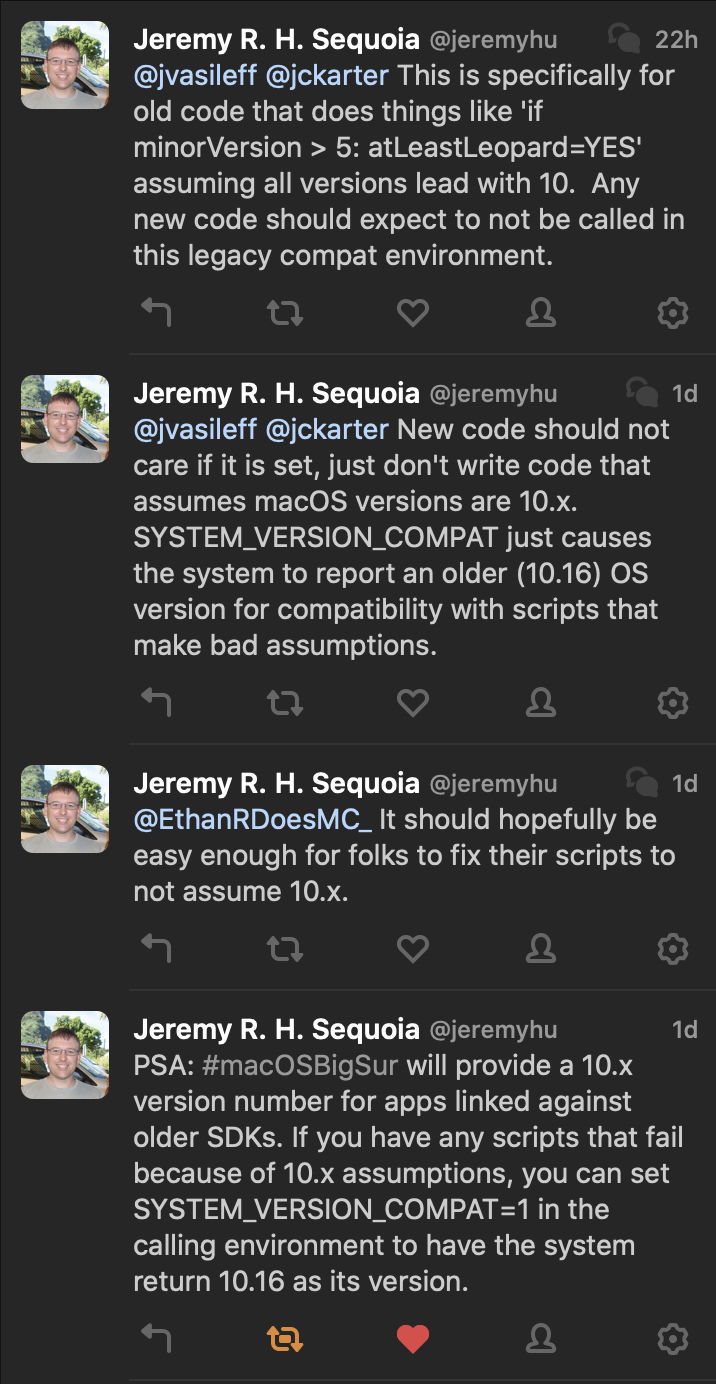
Big Sur is both 10.16 and 11.0 – it’s official
macOS 11.0 will identify itself differently according to the SDK used, and an environment variable does the same for scripts.
The Eclectic Light Company
221 points · by miles · 6y ago · 204 comments
Let the former be a monotonically increasing (say 64-bt) integer, and the latter be a free-form string. This way, marketing folks are free to call one version "macOS 10.16 Big Sur", followed by "macOS 11.0 Big Sur Pro Max", "macOS 10.32 Pro SE", etc. w/o developers pondering over whether "Pro SE" > "Pro Max". As for API, maybe something like getProductVersion() for the internal version, and getProductName() for the external version. Heck, be facetious and let the latter return a string like "!!! DO NOT USE FOR VERSION COMPARISON USE getProductVersion() INSTEAD !!!\07\07\07macOS 10.16 Big Sur".
Yes, lazy developers will get it wrong, similar to how they use gettimeofday()[1] instead of clock_gettime(CLOCK_MONOTONIC, ...)[2]. In their defense, often software switch between versioning conventions such that what's the "right" thing to do is unclear.
[0] Such appropriation is everywhere. Don't get me started on how Porsche Taycan, an electric car, has a "Turbo" model. It probably doesn't even come with blinker fluid standard.
[1] https://pubs.opengroup.org/onlinepubs/9699919799/functions/g...
[2] https://pubs.opengroup.org/onlinepubs/9699919799/functions/c...
CFBundleVersion: The version of the build that identifies an iteration of the bundle. This key is a machine-readable string composed of one to three period-separated integers, such as 10.14.1. The string can only contain numeric characters (0-9) and periods.
https://developer.apple.com/documentation/bundleresources/in...
CFBundleShortVersionString: The release or version number of the bundle. This key is a user-visible string for the version of the bundle. The required format is three period-separated integers, such as 10.14.1. The string can only contain numeric characters (0-9) and periods.
https://developer.apple.com/documentation/bundleresources/in...
Android similarly has versionName and versionCode.
The problem is that no matter what, someone somewhere is going to parse something that was never intended for non-human consumption. Or code ends up making assumptions that it shouldn't about a machine-readable version.
I have code which parses CFBundleVersion. It assumes the version follows Apple's docs. But guess what? CFBundleVersion is just a string and nothing enforces Apple's guidance so I was surprised (I shouldn't have been) to have to deal with an internally distributed iOS app that had the word "debug" tacked on to the end of its CFBundleVersion.
Android's "versionCode" is an ever-increasing number, you must submit a higher versionCode than your previous build.
CFBundleVersion can be set back to 0 with each CFBundleShortVersionString change.
Normally I just set both to a build number on whatever CI I use (for something like a cordova cross-platform app) and then increase CFBundleShortVersionString & versionName using the tag name (or a custom version name I give a release).
Hacks like this, to allow a single "version" of an app to have multiple APKs, but wait, versionCode has to be unique. I know, we'll do this:
> In the following example, the APK for the x86 ABI would get a versionCode of 2004 and the x86_64 ABI would get 3004. Assigning version codes in large increments, such as 1000, allows you to later assign unique version codes if you need to update your app. For example, if defaultConfig.versionCode iterates to 5 in a subsequent update, Gradle would assign a versionCode of 2005 to the x86 APK and 3005 to the x86_64 APK.
https://developer.android.com/studio/build/configure-apk-spl...
Sigh. Nothing is ever easy. We make assumptions when we design our systems without realizing it and then paint ourselves into these silly corners to not break things.
About this mac -> click on the version number text and it will appear.
20: Major version (happens to match the XNU kernel version)
A: Train (First “point” release, although that is not how marketing does it)
4: Audience (Developer seed)
300: Build number (300 builds since the train started)
b: Mastering version (forked from mainline two builds ago for polishing)
There is meaning to the separate numbers in the version, there’s a guarantee they aren’t going to remove api if the third number increases but they might if the second one increases. The first one only increases with truly big changes such as this move to ARM.
Using an integer doesn’t work because point releases where the third number increases are not monotonous, 10.15.20 might be released while 11.0.0 is already out. Apple does maintain the previous release with security updates while there already is a newer current release.
Note that Windows is a big mess with Windows 10 build 2004 (because they want to avoid confusion with Server 2003) which is version 19041.329, or perhaps 10.0.19041.329. It’s almost the same scheme but with large numbers you can’t remember and are hard to find in the documentation.
https://www.reddit.com/r/technology/comments/2hwlrk/new_wind...
I thought it was because they wanted to go to 10, like Mac OS X. Same as the Xbox 360 was called that because they didn’t want to bring out the Xbox 2 when Sony was bringing out the PS3.
Windows 3.1 - Build 103
Windows 95 - Build 950
Windows NT - Build 1381
Windows 98 - Build 2222A
Windows 2000 - Build 2195
Windows XP - Build 2600
Windows Vista - Build 6002
Windows 7 - Build 7601
Windows 8 - Build 9200
Windows 10 (1909) - Build 18363
Windows 10 (2004) - Build 19041
Source: https://en.wikipedia.org/wiki/List_of_Microsoft_Windows_vers...
What was displayed to the user was hex-edited into the CD image after it passed QA, according to the whims of marketing, and we treated it as pure text.
If you ask what version of Windows you are running, for example with GetVersionEx, Windows will report Windows 8.0. This is true unless your application marks compatibility with a newer version in its manifest, at which point Windows will report whatever the newest version in your manifest is, or whatever version Windows actually is, whichever of the two is older.
I don't understand the logic here. We're talking about the new version of your target OS. You will presumably always need to support it eventually.
IMO if you're large enough to have a testing and validation process at all, you should be including at least the public beta builds in those tests.. By the time it hits RTM if you don't at least know if your software works you're doing it wrong.
Also, if your software is regularly breaking with OS releases and you're not doing something that requires you to be deep in the internals, you're almost certainly doing something significantly wrong and should figure out what that is. The only software I consistently experience breakage with on updates is also the one where their tech support insists that we're being paranoid for refusing to give their users local admin privileges just to run it. I don't think for a second that's a coincidence.
Maybe not, you might be able to skip a version that had poor adoption. Windows ME, Windows Vista, IE7 and TLS 1.1 never had a very high market share, because people put off updating so long that better things came along.
(Even more so where updating to explicitly support the new version means dropping old versions.)
"Mozilla/5.0 (Macintosh; Intel Mac OS X 10_16) AppleWebKit/605.1.15 (KHTML, like Gecko) Version/14.0 Safari/605.1.15"
- Sites that try to detect mobile by looking at "ARM" in user-agent string
- Sites that try to parse the macOS minor version for some reason and would be confused to see something like "11_0"
BTW, user-agent is a hell anyway. Just looking at this user-agent that OP posted, macOS still identifies itself as "Mac OS X", still is based on Mozilla/5.0(!), still identifies itself as KHTML enginee (compatible with Gecko), and so on...
Browser makers tried to do that by providing feature detection, but the weight of legacy code and developers already used to using the user agent strings has made killing it impossible.
Edit: As pointed out in another comment here, it seems like Google is killing it (or planning to). [1]
[1]: https://www.zdnet.com/article/google-to-phase-out-user-agent...
But the many attempts to freeze the existing UA are for the purpose of stopping people testing through the UA
Because it only affect graphic, you can't really detect whether you are affected by it or not from js.
The best thing you can do it guess the browser from user-agent and apply the workaround anyway. Or you can pray for the apple to fix their sh*t (given what they have done in the past, it is unlikely).
This is why we have some more developers spending time on creating FOSS libraries that parse user agent strings and tell you exactly what the browser claims to be, with attributes like browser name, OS, version, browser engine, etc. All these libraries need updates (or at least a cursory look) whenever a new browser version is released so that they can continue identifying browsers correctly. All those people, bless them for this work, could be doing something else in an alternate universe.
Notwithstanding feature detection and graceful downgrades, browser user agent strings seem to be very commonly used to decide the behavior of many websites.
In the vast majority of use cases, these values should not be used to detect platform features - actual feature detection should be used instead.
Allow me stop you there. The User-Agent string is semantically meaningless.
Everyone does this, which is kinda why we need to get rid of user agents and replace it with feature detection (and css that works everywhere for people who don't want to run Javascript).
Assuming things like that continue to happen, what are web developers supposed to do?
I propose a Real-Agent header that includes browser name and version, os name and version, cpu type (maybe) and desktop/mobile flag (maybe). Or separate headers for each name/version data, I don't care, I just know I need real data sometimes, and some new weird server request pattern isn't going to work well. Then continue to send shakespearean sonnets in user-agent for all I care.
"Mozilla/5.0 (Macintosh; Intel Mac OS X 10_15_4) AppleWebKit/605.1.15 (KHTML, like Gecko) Version/13.1.1 Safari/605.1.15"
Why is this bad? Well for one example, because sometimes you use version numbers not exactly. Consider the statement: "Applies to 11.0 and higher". Depending on how the OS identifies itself this will be valid or not. On the same OS.
Or consider reporting, if under some conditions the Mac identifies itself as 10.16 and in others as 11, you're going to have them in 2 different buckets even though they're the same thing.
Really, they should have made a choice, one or the other. If software wasn't compatible because of this it should just be updated. Apple never said it would always be 10.x.
I don't really understand why they're doing this as Apple normally has no issue telling developers to fix it or stuff it. They never cared about backwards compatibility before. If having 11.x was not that important to them to upset a lot of stuff, they should have just stuck with 10.16.
This is not true. While they may not have the slavish devotion to backwards compatibility that Microsoft has, even Apple implements app-specific hacks to keep non-compliant software compatible with newer versions of macOS https://worthdoingbadly.com/appkitcompat/
This is not a rational metric for what a "full version tick" should look like. OS X was arguably a different operating system than Mac OS 9. If that was the bar to cross, Linux would still be 1.xx.xx and Windows would be Windows 3.xxx.
Considering they had a major break in backwards compatibility last year when they dropped 32 bit support, that was arguably the better year to do a major version tick.
  $ uname -a
  Linux h0nk 4.19.0-9-amd64 #1 SMP Debian 4.19.118-2 (2020-04-29) x86_64 GNU/Linux
  $ setarch --uname-2.6
  $ uname -a
  Linux h0nk 2.6.79-9-amd64 #1 SMP Debian 4.19.118-2 (2020-04-29) x86_64 GNU/Linux
  $ _
Not mine. It's an extra piece of cognitive burden and another opportunity for misconfiguration.
The ease of mind of the current developer is far less important than software not breakly widely for users because previous developers made bad assumptions about version strings.
I wonder why they don't announce a deprecation of the old versioning schema, and give developers time before switching, instead of just doing both at the same time with little to no warning. They've done that with lots of other technical migrations and even then, there is still plenty of controversy–see Catalina 32-bit support. Is there any reason to believe that doing a migration outright is safer, when the stepped approach has already proven difficult?
The least charitable guess I can come up with is that this was a mistake that they can't walk back for technical reasons, so are just fixing forward.
If it were up to me, I'd announce that a future version of macOS will increment the major version and that will be moving to semver/calver/whatever-other-protocol, and do it when the current place name marketing strategy runs its course, as did the cat name marketing strategy. That would also give a few more years to get any major UI/system changes ready to drop for macOS 11. Just my 2¢.
Giving more "time" solves nothing for all the programs out there that cannot or will not be updated for whatever reason.
This wasn't a mistake on Apple's part, it's just working around bad programming practice by developers. But there's no reason why users should suffer for it.
Going forward, expect the major version number to change each year, like iOS. But for apps built against older versions of the SDK, the major version will always be 10.
Windows, on the other hand, updates its appearance (and adds (or removes) gimmicks) with each major release - even completely upending the UX fundamentals in Windows 8.
Also consider that we used to have to reformat/reinstall computer OSs more regularly in the past - and having to do reinstalls makes you think about your computer UX as you spend time changing the settings from the defaults to your custom preferences. I remember having to reinstall Windows 95-98 every 6-9 months, and Windows XP once every year or so. Since Windows 7 things have been a lot more stable - my current Windows 10 install would have been ~4 years old now if it weren’t for me losing all my documents in the October 2018 update... (all I got was $400 from MS, ugh)
> The user agent for Opera 10 (eg Mac platform, English locale) will be as follows: Opera/9.80 (Macintosh; Intel Mac OS X; U; en) Presto/2.2.15 Version/10.00
> When we released the Opera 10 alpha in December last year, we gave it a Opera/10.00 (Macintosh; Intel Mac OS X; U; en) Presto/2.2.0 user agent string. [...] It appears that a considerable amount of browser sniffing scripts are not quite ready for this change to double digits, as they detect only the first digit of the user agent string: in such a scenario, Opera 10 is interpreted as Opera 1.
https://maqentaer.com/devopera-static-backup/http/dev.opera....
Since TLS 1.3, the version number in Client Hello package has been permanently frozen as TLS 1.0 to prevent breakage.
There is also a story that the copyright string in some old software by microsoft is permanently frozen for the same purpose.
Which is actually reported as SSL 3.1 "to prevent breakage".
I hope it’s the former, as that will make yearly updates to macOS more consistent with iOS, iPadOS, tvOS, and watchOS.
I couldn't tell you why but it greatly bothers me.
But sure, I believe them. If they could give a few product examples.
If you ask Win32 for its version number you get a VERSION structure with Major/Minor/Build fields - not a string.
Windows faked its reported version information to software for compatibility purposes since Windows XP (opt-in) and since Windows 8 (opt-out, using application manifests) - so any program that doesn’t claim support for Windows 8, 10, etc is stuck in “Windows Vista mode” - so even if software was doing an osMarketingName.StartsWith(“Windows 9”) check it would be straightforward to make it work.
Windows 7 and Windows Server 2008 R2 both are 6.1 build 7600, for example.
Also, suppose you check the version for compatibility checking, what do you do if you get a version that you don’t know about, say “6.4, build 7709”? You can give up and declare your program doesn’t work with this version, but that may lead to lots of support calls when Microsoft rolls out a service pack. So, instead, programs try to guess from the version string what OS they run on.
And yes, ideally, programs check for features (https://docs.microsoft.com/en-us/windows/win32/sysinfo/opera...). Unfortunately the world isn’t perfect.
> Windows 95 browser agent string: Mozilla/4.0 (compatible; MSIE 5.5; Windows 95; BCD2000)
Back then browser agent checking was used a lot more.
So a good reason to name it "10" instead of "9" is to differentiate it from Windows 95/98 for code that did things like:
> browser.contains("Windows 9")
Need to backup and do a clean install I guess
what can it be?