Firefox 86 Introduces Total Cookie Protection – Mozilla Security Blog
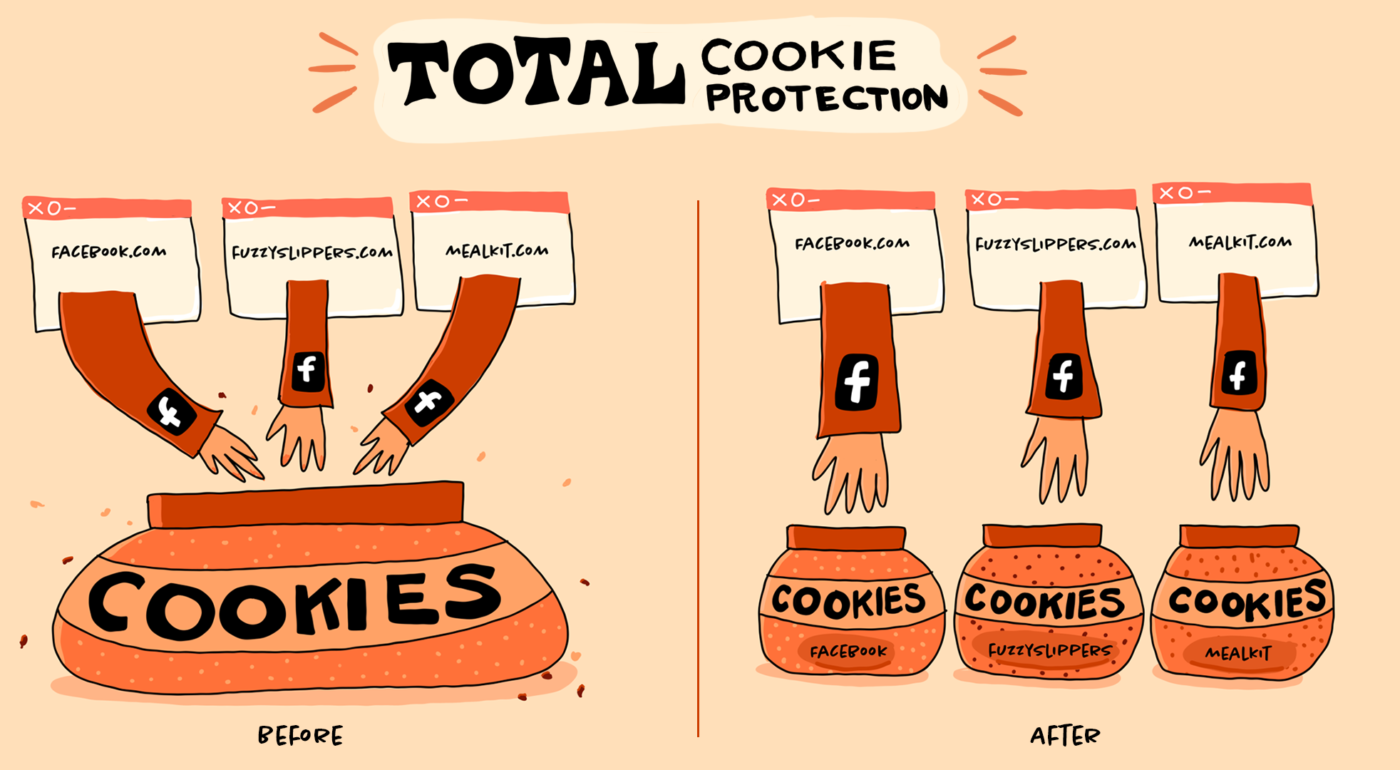
Total Cookie Protection is a major anti-tracking advance in Firefox that confines cookies to the site where they were created.
Mozilla Security Blog
1527 points · by todsacerdoti · 5y ago · 427 comments
Would be great to have some more details about it: in particular, how do I turn it off if I prefer to add any exceptions manually.
Edit 1: Mozilla Hacks blog [1] has a bit more but still doesn't answer the question:
> In order to resolve these compatibility issues of State Partitioning, we allow the state to be unpartitioned in certain cases. When unpartitioning is taking effect, we will stop using double-keying and revert the ordinary (first-party) key.
What are these "certain cases?"
Edit 2: Reading on, there's this bit about storage access grants heuristics [2] linked from the blog. But is that really it, or is there a hardcoded whitelist as well? If so, it'd be great to see it.
This bit in particular is ambiguous in how it's supposed to work exactly (who's "we" here):
> If we discover that an origin is abusing this heuristic to gain tracking access, that origin will have the additional requirement that it must have received user interaction as a first party within the past 30 days.
1. https://hacks.mozilla.org/2021/02/introducing-state-partitio...
2. https://developer.mozilla.org/en-US/docs/Mozilla/Firefox/Pri...
This is a great question and I’m glad you found the answer, you probably understand that for many blog posts we avoid going into too much technical detail.
To answer your final question, there is no hardcoded allow-list for State Partitioning. The heuristics as described on MDN are accurate.
I don't see why we can have full-blown web apps but our text needs to be very specifically just text these days.
I've only recently discovered that Markdown has footnotes, and I've gone to down adding footnotes everywhere.
I use Jekyll + markdown on my website, and I now have lots of fun adding footnotes to my writing.
I added a "footnote tutorial" for readers on https://josh.works/turing-backend-prep-01-intro#why-this-rub..., to help them learn how to navigate the footnotes.
I _love_ your library, and I love the problem that you're solving with it.
Along the way, I've looked at Gwern's sidenotes[0] and Nate Berkapec's "footnotes"/sidenotes [1].
I eventually want to do something more "in-line", like what you've down with Expounder, but I've been satiated with markdown footnotes for now.
[0]: https://www.gwern.net/Sidenotes# [1]: https://www.nateberkopec.com/blog/2017/03/10/how-i-made-self...
If I were reading a technical text, I would definitely end up reading most paragraphs at least twice. It would make no sense to keep the expounded terms in the second time; I'd be tempted to hide them back as soon as I was finished with them the first time.
But I see there is a css class which is nice.
Just a simple rgba(x,x,x,0.5) where the x’s are the usual yellow height.
Be it topographic emphasize or coloring, there should be an hint. And clicking the text thus emphasized should collapse it.
That's my opinion, otherwise, nice done.
Mozilla who? That’s where we are now.
If cookies from another bucket should be shared with other sites, or might be seen when requested by a cross-site load from another site, ask the user a four choice question.
"Allow (site) to see cookies from (site)?"
Always Allow, Just this time, Ask later, Always Deny
Would be great to know how are those concerns handled?
I guess that clears it up.
Not really... for a highly technical issue like this, at a minimum you should link to the technical details.
There really is no excuse for making every reader of your blog who wants to know the details dig for them independently.
imo, at least.
I've been a FPI user for years as a best-effort to reign in tracking but there are a common few sites that just break with FPI (50% of the time PayPal checkout doesn't work). Even if "Total Cookie Protection" is only 98% as effective as FPI, I'm making the switch.
EDIT: FPI = first-party isolation
Given Firefoxs low adoption, I fear that website owner will just ignore that their excessive tracking breaks their site in Firefox... “Works in Chrome... good enough”
Facebook and Google will be excepted? This makes it a joke, sadly.
This move is aimed at killing other AdTech companies which rely on 3rd party cookies to track users.
They painting this as a 'PRIVACY' move, after they have already found other ways of tracking users across websites and devices.
(on mac) Firefox > Preferences > Privacy & Security > Custom
Your answer seems to be about how to turn off "Enhanced Tracking Protection"/"Total Cookie Protection" or parts of it (resulting in weaker protection). I want to keep it enabled and disable the exceptions (for stronger protection), i.e. the opposite.
I haven't installed the new version yet, so can't say for sure, but as far as I know there is no setting for this in that menu. [1]
If I misunderstood what you meant, please elaborate.
1. https://support.mozilla.org/en-US/kb/enhanced-tracking-prote...
For greenhorn web developers, you could say the same thing about TLS certificates. Why weren't they always free?
Well, another reason is because TLS (and formerly SSL) wasn't (weren't) just about encryption, but about a "web of trust." Encryption alone isn't trust.
Many things about web technologies have changed over time; and it's easy to say that any individual piece of functionality should have worked this or that way all along, but the original intent of many web features and how those features are used today can be very different.
One day industry standards may dictate that we don't even process HTTPS requests in a way where the client's IP address is fully exposed to the server. Someone along the way might decide that a trusted agent should serve pages back on behalf of a client, for all clients.
After all, why should a third-party pixel.png request expose me browsing another website?! How absurd. Don't you think? And yet, we do it every day.
Which is a nice principle, but given corporate and government incentives, the trust provided was lackluster at best. The PKI is pretty much broken because of it.
In the end, all it did is incur an unaffordable cost for hobbyist bloggers and other netizens.
Which fair it’s trading one PKI for another but web servers vastly outnumber authoritative DNS servers. But DKIM gets along fine without it so we probably could too.
I think the whole idea of sharing cookies across origins was a conceptual mistake right from the beginning, because it is also responsible for quite a lot of security vectors which had to be fixed by other mechanics like the SOP (Same Origin Policy) which in turn required mechanics like CORS (Cross Origin Resource Sharing).
And with all those mechanics in place, modern browsers are pretty tied up and are significantly reduced in their abilities compared to other HTTP/S clients. So when you want to build a PWA (Progressive Web App) that can use a configurable backend (as in federated), you will run into all kinds if problems, that can all be traced back to the decision to share cookies across origins.
Why is HTTP/2 Server Push being rescinded?
Why do user agents not provide additional types for <script> based on runtime installations?
Why isn't there a renderer API that allows me to use painted trees in <canvas>, but there is a bluetooth API that no one uses?
That those mistakes were not done deliberately and with good intentions is a completely different story and that in hindsight everything looks so clear is also well known ;-)
"Web of trust" is a pretty specific term that doesn't apply to TLS/SSL: https://en.wikipedia.org/wiki/Web_of_trust
Did you mean to say "public key infrastructure" (PKI)?
I may be confusing the terms "chain of trust" and "web of trust," but to my best knowledge, I don't recall EVs being sold on the former term.
My apologies. I hope there are folks out there who have a better recollection who can piece this together.
Not in the corners of the web I frequent. I've been blocking 3rd party cookies for years and the only site that's broken was some Pearson online homework site.
This isn't simply "blocking third party cookies", it's "even an iframe has no access to the other state partition". The third party cookie is allowed to exist but it cannot leak to other sites. However, this leak prevention breaks plenty of other things if one is not careful (Mozilla was, there is a heuristic).
why this is not the default behavior already?
To be honest though, browser fingerprinting makes this mostly irrelevant unless you carefully use a script blocker with a whitelist too. Any domain that includes trackers that drop third party cookies almost certainly includes scripts that can fingerprint you and send results to a server without using a third party cookie.
If they had used the same domain for their products historically and just separate subdomains they wouldn't have to make this trade off, but it probably also helps with third-party ad networks/segmentation to get folks to turn it on anyways.
Solving a problem isn't irrelevant just because there are other problems; there's definitely more to do, but this still has value.
SSO via OAuth still works fine, because OAuth uses redirects instead of cookies.
With shared cookies nothing stops site A from taking a copy of your cookie and using it to impersonate you on site B. With redirect based login the identity provider has to authorize each application that is being accessed and each site has its own session cookies.
The main problem is dealing with globally revoking access but that's usually solved with shorter termed session cookies that periodically need to be refreshed from the identity provider.
This is making them have to allocate resources to achieve the same effect. Like taking lojack off of your car and phone, and making 'Them' have to tail you and scour security footage like in the old days. It's more expensive. Expensive things do not scale, so you have to prioritize who is worth the cost. People who are under legitimate suspicion of causing harm. Less 'by-catch' to use a commercial fishing concept.
When it's cheap to harass everyone, nobody is 'safe'. But when terrorists can't be tracked at all, nobody is 'safe' either. So we have checks and balances.
In my case, I strip all cookies and sensitive headers. One must keep in mind that the browser will treat it as a first-party request and the security implications that has. You may have to filter or modify cookies/headers.
https://jeremypoole.ca/posts/protecting_api_keys_on_the_fron...
> In addition, Total Cookie Protection makes a limited exception for cross-site cookies when they are needed for non-tracking purposes, such as those used by popular third-party login providers. Only when Total Cookie Protection detects that you intend to use a provider, will it give that provider permission to use a cross-site cookie specifically for the site you’re currently visiting. Such momentary exceptions allow for strong privacy protection without affecting your browsing experience.
That's exactly why I have to toggle it. Anyone that uses auth0, and many publications sites (follow a link to a PDF, get redirected to `/cookie-absent` instead) fall foul.
Similarly the OpenID Connect Session Management feature (check_session_iframe) also depends on the ability to use third party cookies.
This functionality is needed to be able to detect if user logged out from front-end code without relying on having any back end code that could receive either a front-channel or back-channel signout notification and send it back.
In the absence of that a pure SPA with no backend could only detect the logout if access tokens are stateful, and they get an error message back that the token refers to an ended session.
Some people get really cranky if a single sign out feature does not actually sign you out of everything.
Forgive me ... do I understand that there is a true/false setting in Firefox named "privacy.firstparty.isolate" that you like to toggle from time to time ... and you use an extension to do that ?
I don't do much browser customization and use only one extension (uBlock Origin) but ... couldn't I toggle a single Firefox setting with a simple command line ?
Why would you need an extension to do that ?
Genuinely curious ...
On startup it's enabled (i.e. do isolate) via a config file, so I could change it there with a shell script. I think though that I'd have to restart Firefox for it to take effect.
The extension gives me a handy button in the toolbar that's red (danger) when it's off (i.e. not isolating) that I can just click to toggle.
Yes it's a tiny job for an extension, but do one thing well right? Also, to be honest, it's easier that it's there than switching to or pulling up a new shell.
Afk to confirm, but pretty sure this is the one I use: https://github.com/mozfreddyb/webext-firstpartyisolation
It's not particularly fun to implement. It's not hard, but the heuristics are enough of a nudge that it can create weird experiences for users.
"I thought I already signed in, but after I navigate, I have to click sign in again, and a window pops up and then I'm automatically signed in? Why?"
Edit: Yeah, seems so.
https://developer.mozilla.org/en-US/docs/Mozilla/Firefox/Pri...
See also: https://webkit.org/blog/8124/introducing-storage-access-api/
/j
And what's the migration path for users who have been using that setting previously?
Can I now disable it? Do I have to disable it?
1. By allowing third party cookies, but compartmentalizing them by the first-party site that sent the request (a much better name for this feature would be "per-site cookie containers", "total cookie protection" is completely uninformative).
2. By using a heuristic to selectively allow cookies to be accessed across the container boundary if they are actually needed, e.g. for logins.
To answer your question, this doesn't make sense as "day one behavior" because it's basically a patch to work around a historical problem with as little breakage as possible. If you were setting up cookie permissions on day one, knowing what we know now, you wouldn't kneecap third party cookies, you'd disable them entirely. Mozilla is trying to make third party cookies useless for 99% of what they're used for: if that's how you feel about third party cookies, you'd just not implement them.
Incidentally, I do block all third party cookies by default and have for years. That's a much stronger approach than the compartmentalization that Mozilla is attempting. I can count on one hand the number of sites I've seen break because of this, most of them are happy to let these cookies fail silently.
BGP and SS7 are other famous examples.
I'm not arguing to give up. Rather, I'm more convinced in investing in privacy NGOs like noyb.eu and make it expensive to toy with my privacy.
they don't even have to. Just store two (or N) sets of cookie trails as they already do. This will waste a few MB of storage on the client side and do nothing to Ad/privacy.
Sites never shared the ID anyway, specially since GDPR-et-al.
AD tech works like this: you send a hash of one ID and on the backend attach all the profile info (nobody will ever share that with partners, because that is gold), then the other side just assign their own hash of their ID and also keep all their targeting info on their backend. The only thing that matters is that party A ID123 is known to match party B IDabc. Note that those IDs are transient and set at random, because party A and party B doesn't want to give up their secret info by matching IDs from multiple sites. That is called cookie match. it does NOT depend on a single cookie jar. It doesn't even depend on cookies! why do you think most Ads (and google search result links -ha!) have those weird hashs appended? zero cookies needed)
Another thing that helps even more than 3rd party cookie is multi-site referrer, but google killed that on both chromium and firefox a long time ago (firefox still have the about:config way to disable/set to single-site, set to multi-site-domain-only, but good luck finding a single human who changes that setting by selecting magic numbers)
(Disclosure: I work on ads at Google, speaking only for myself)
Just saying that it won't matter much if removed from the equation.
I mean, if something makes your life easier, you would be a fool to not use it. but that is like saying not having a ferrari prevents you from driving to the store.
Just show 1st class useful controls on the browser UI for cookies and the problem solves itself. what EU cookie law should have been.
Every user understands "site A wants to store a save file" "site A wants to access save file". Nobody understands cookies and same-origin and cors.
What I care as a EU citizen: Are you collecting and storing information that can directly or indirectly identify me? Yes, tracking and profiling are included in this.
You want to store some session cookies, so you remember my shopping cart? Go ahead!
You want to store some cookies, so you remember I was logged in? Sure!
You want to use every available technological loophole to follow my every path on the Internet? Errrr, no thanks!
This move is aimed at killing other AdTech companies which rely on 3rd party cookies to track users.
They painting this as a 'PRIVACY' move, after they have already found other ways of tracking users across websites and devices.
This should have always been the only way it worked. Every website should run like if it was opened in a separate browser.
> third-party login providers
Don't use these, it's a trap.
Except if you're setting up SSO for your company's employees. Using a 3rd party login provider is a necessity. You shouldn't trust employees to create unique / strong passwords for every individual service they login to.
It lets us offer SSO with whatever Auth0 supports as a freebie add-on, instead of "well, we could work with your platform but it's gonna cost you."
I don't see how it's a trap, except that we have to pay auth0 a monthly fee to handle our authentications instead of having some number of hours a month spent maintaining and securing our customers' logins and integrations.
SSO is a must in any big organisation, there are tens or hundred of applications.
People are incredibly and consistently bad with security. You really need a way to be able to cancel all accesses in one swoop for any individual.
But SSO centralizes access management. For instance, with one switch I can set password requirements, require 2FA, and grant/revoke access to all of an employee's services when they join the company or leave.
Pretty hard to avoid in many cases. Logging in to your Microsoft account for Office (Teams, Outlook, et al.) uses a login service, as does Google, and practically all services that span across multiple domains. Which includes all of the major ones, at this point.
Good that Firefox gives us this option, given how the web has evolved!
Do they actually do this? Also don't most of the big ones allow you to opt-out of personalized ads.
I like this because it's easier to have strong 2FA with backup codes on a few well protected accounts, than to do it for every tiny site.
The "Sign-in with Google" button is makes it much quicker to create an account and slightly quicker to log in.
Also, I can rely on my Google 2FA rather than setting up and filling in a different TOTP for each site. Something like U2F or WebAuthn would make the filling-in part more convenient, but even sites that offer 2FA usually don't offer those. (And many sites don't even offer 2FA.)
Using 1Password's 2FA feature would make TOTP more convenient, but I'm a little nervous about putting 2FA in 1Password. This might be overly-conservative thinking, though.
> This should have always been the only way it worked. Every website should run like if it was opened in a separate browser.
FYI: Extension "Temporary Containers" does this: https://addons.mozilla.org/en-US/firefox/addon/temporary-con...
One big advantage is that I now have way more addons installed on Firefox that would otherwise make Chrome utterly slow and unusable.
This seems to indicates there's not faster alternatives around anymore, but the last time I tried FF (4-6 months ago) I couldn't make the transition because the lag was pretty obvious when coming from Chrome based browsers. Is this not the case anymore?
I use Brave + Ublock exclusively.
I've used Firefox since 2006, and Chrome always seemed heavier, laggier and uglier. Maybe it's the snappy iOS-like animation when you scroll to the bottom of the page that makes it seem snappier?
I still used Firefox a lot for various reasons (and still do), but I'm not blind to how it performed.
[1] https://bugzilla.mozilla.org/show_bug.cgi?id=1595998 [2] https://bugzilla.mozilla.org/show_bug.cgi?id=1415923 [3] https://bugzilla.mozilla.org/show_bug.cgi?id=1489785
I really want Firefox to work for me and I'd love to drop Chrome, but last time FF made big noise about performance improvements I tried it out and Gmail was still unusably slow.
For me, the way Google is keeping Gmail terrible for other browsers is exactly the reason to not use Chrome. No way I'm OK with that.
I even use it on my phone. The mobile version is definitely worse than Chrome, but it has plugins (or it used to! nowadays it only support a few popular ones which is a shame) and also I can send tabs from my phone to my computer (which is a better place to read articles anyways).
I didn't find noticeable difference between FF and Chrome based browsers(Vivaldi, Edge) on macOS(although Safari runs circles around them) after using them extensively. I used each of them for a separate project with several common websites loaded in them, there were different quirks for each browser(especially reg tab hibernation) but latency was not one of them.
On Linux FF seems definitely faster than Chromium, although there are occasional DNS errors which stops loading the web pages altogether(likely result of my own doing). I've stopped having different browsers for different projects and just use FF for all.
On Android with Chrome, not just Chrome but even WebView using it is astonishingly fast(e.g. DDG browser), I presume it's because of data saver feature. On de-googled android like LineageOS, FF/Fennec seems to be on same level as Chromium and DDG is faster here as well.
On iOS, everything is Safari.
I don't use Windows much, but I've seen others mentioning Edge seems to be faster than Chrome recently.
The stumbling block for me as FireFox user is I am increasingly bumping into web apps that preform poorly in FF but are fine in Chrome for one reason or another. One instance I bump into a lot is ElasticSearches Kibana runs like trash in FF for some reason.
Except on Facebook. My Facebook tab is incredibly laggy, and gets more and more laggy the longer I leave it open. I'm one of those users that tends to keep 50+ tabs open, and I have to close and reopen the Facebook tab at least once a day to keep it from becoming a nearly frozen mess. Even then, if a video is playing and I click it to make it fill the window, it takes several seconds for it to happen. And with an i9-9900K, 32 GB of RAM, RTX 3080, and a 1 TB NVMe drive, my computer is definitely no slouch.
In a way I see it as a win, I really really hate opening it on desktop.
I feel that most people complaining about slow browsers have no blocker installed.
I find the majority of their privacy claims dubious and dangerously misleading for those that don't know any better. If they were serious about privacy they'd offer uBlock Origin (or equivalent functionality) preinstalled by default.
Their current countermeasures such as containers, tracking protection and this cookie thing is trivial to bypass with browser fingerprinting and IP address tracking if you have a global view of the Internet (which Facebook and Google do have).
I get you about the updates. It's a risk-reward ratio I accept because firefox + noscript + always starting in a private session is way more helpful than the update problem is harmful. Using a VPN a lot of the time helps, too. There is no solution I know of that is perfect. My threat model is pretty relaxed, though, so what I do is mostly for my peace of mind. You have reminded me that I should start spoofing my user agent again.
But it is extremely misleading for them to be shouting "privacy" at every opportunity while the truth is that their browser leaks personal data like a sieve in the default configuration. This would give a false sense of security to non-technical people who don't have the skills to see through these lies.
Sorry for the somewhat angry comment, but I honestly can’t understand this mentality.
I'm not saying Chrome is any better, but at least Chrome doesn't toot the "privacy" horn at every opportunity.
Brave does have some kind of blocker built-in which might actually help even if it's not perfect.
I haven't experienced this since the rapid release schedule started. They're pretty silent now.
Are there any other config changes you would recommend to Firefox to harden it?
"neither Mozilla nor Pocket ever receives a copy of your browser history. When personalization does occur, recommendations rely on a process of story sorting and filtering that happens locally in your personal copy of Firefox."
https://help.getpocket.com/article/1142-firefox-new-tab-reco...
I went through my entire list of cookies once, 400 at least and started perma blocking all those I didn’t recognize. It was beautiful. I can’t do the same in Firefox.
I’m not feeling very good about this move where third party cookies are isolated by website. There are lots of websites separated across multiple domain names sometimes unrelated. (Sharepoint, office 365) they will have difficulty.
And then there are special login websites and others like dish network telling CNN you have a subscription with them.
This breaks. And creates a predetermined list of who can do what.
If I understand your description correctly, you can definitely do this in Firefox also. Preferences/Privacy & Security/Cookies and Site Data.
I did this in Firefox before Chrome was even a thing. This has been supported natively without add-ons since at least 3.5, if not even earlier.
http://kb.mozillazine.org/Websites_report_cookies_are_disabl...
If anyone wants to see these protections in action, www.clerk.dev leverages the Storage Access API in development mode - where we need to share session data across localhost and a clerk-owned domain.
With this launch, developers are now prompted to explicitly allow third-party cookie access in Firefox.
(In production mode, the prompt isn't thrown because our cookies are set in a first party context.)
A quick check reveals that while ublock origin seems to be the most popular, it's by far not the only popular add-on to block ads https://addons.mozilla.org/en-US/firefox/search/?q=adblock ; so why include ublock origin specifically? Especially since it has become much more than a simple adblocker (script blocking capabilities for example), why not something else? Why not integrate an ad-blocker developed completely by mozilla?
Why not include NoScript + Containers by default? And some UserAgent Switch capability? And more fine grained cookie storage options (currently available via add-ons), et cetera?
When you start integrating capabilities currently being offered by add-ons, the questions are :
- where to stop
- how to discriminate what to include, what not
- how will users and developers feel (for example the user who wants to use his favorite add-on, which now is not developed anymore because almost no one bothers to install it since functionality X has become part of the browser)
- how to deal with edge cases (the one site which breaks because of ad-block is the reason a non-technical person might simply install chrome and move on with their life)
- is the increasing complexity worth it? to what degree is it?
A lot of the other ad blocking extensions are malicious and collude with the advertising industry through some kind of whitelist program. Their license might also not be permissive enough to allow this.
> Why not include NoScript + Containers by default?
NoScript requires lots of manual intervention, uBlock Origin with the default lists is still seamless and rarely causes breakage thus very little need for manual intervention.
I am not convinced that Containers does anything at all. Browser fingerprinting & IP address tracking defeats it very easily.
> And some UserAgent Switch capability
This is absolutely needed and I'm baffled this isn't offered natively, though this would be less for privacy and more as a developer tool.
> And more fine grained cookie storage options (currently available via add-ons), et cetera?
I find the whole craze around cookies overblown. Your IP address is a relatively persistent cookie you can't clear. The only way is to prevent requests made to the malicious actors to begin with, with some kind of blacklist like what uBlock Origin provides.
> how to discriminate what to include, what not
I'd argue that if your mission is to make the web better and protect people's privacy then including a proper ad blocker is a no brainer.
> does it do any good
That is up to discussion with the add-on author (the author of UBO has repeatedly declined donations and seems to be doing his efforts out of passion and/or hatred for ads, so he should be onboard), but otherwise, the secret sauce isn't really the blocker per-se but the blocklists such as EasyList/Fanboy's lists, and Mozilla has enough resources to reimplement a compatible client from scratch if needed.
> how to deal with edge cases
Contribute back to the lists to fix any edge-cases by adjusting an over-reaching blocking rule, and offer an easy way for users to temporarily disable the blocking on a per-site basis.
In my personal opinion, no one should be connecting to the internet in this day and age without using a VPN service wherever possible.
Once you look into where Mozilla gets their money from, you'll find millions of reasons.
And in the past, Mozilla has stated that bundling ad blocking with the browser would 'hurt the Internet'.
Mozilla plasters the word "privacy" everywhere and yet opens their own website on first run and after every update which includes Google Analytics, from the same company that's known to violate people's privacy on a large scale and profit from it.
Browser fingerprinting and IP-based tracking is reliable enough that blocking cookies is absolutely useless in this day and age against an omnipresent adversary such as Google & Facebook. Blocking their request uBlock Origin-style is the only way to go and claiming to protect your privacy otherwise is very misleading.
Does this break our setup? And how do we tell users to un-break it? And is there a way to tell Mozilla via directives that we have a private list of sites we'd like to share a1.com cookies in?
User clicks log in at p1.com, they get forwarded to a1.com which checks their (now first-party) cookies, then once they're logged in they get forwarded back to p1.com with a token in an URL parameter.
Even without third party cookie blocking, if you're at p1.com and you click to log in with a1.com but you're not logged into a1.com yet, you get forwarded to a1.com to sign in.
So with third party cookies blocked, it's no less secure than it was before.
Not sure how Firefox handles this but I guess it would be easy to detect a redirect from a1.com to p1.com and recognize this as a use-case where a third-party cookie from p1.com should be sent for a request originating from a1.com.
That said it's probably more privacy-friendly to append an access token as a hash parameter to the URL when redirecting and extract it via JS, which will not be affected by cookie limitations.
Another example is you're signed into website A, and while on website B, iframes to website A behave in such a way that you're not signed in, and you cannot sign in.
This is because the download is from googleusercontent.com while your browser remains at drive.google.com the whole time - and to download private files, googleusercontent.com expects you to have a login cookie. If you block third-party cookies the download gets stuck in a redirect loop, sending you to get a cookie over and over again.
Google is aware of this but hasn't fixed it.
1) One of my local banks (who use weird third-party hosted modules for some of their functionality).
2) Verizon.
3) T-Mobile
If I were a normal user, any one of these ("I have to do _what_ to see my FIOS bill?") could be a show-stopper.
Which is what makes it hard to turn this on by default without driving away users.
It's google. I'm talking about google.
A lot of websites depends on this via auth0, cloud identity, cognito... and the experience becomes subtly broken in a way that you need to be extremely technically savvy (a developer that has a whole lot of auth experience) to understand.
How does this work out? Say I want to launch a new popular login provider - how do I get past the Firefox gatekeeper?
In the Firefox storage access policy, we have defined several heuristics to address Web compatibility issues. The heuristics are designed to catch the most common scenarios of using third-party storage on the web (outside of tracking) and allow storage access in order to make websites continue normally. For example, in Single-Sign-On flows it is common to open a popup that allows the user to sign in, and transmit that sign-in information back to the website that opened the popup. Firefox will detect this case and automatically grant storage access.
Note that these heuristics are not designed for the long term. Using the Storage Access API is the recommended solution for websites that need unpartitioned access. We will continually evaluate the necessity of the restrictions and remove them as appropriate. Therefore, developers should not rely on them now or in the future.
I don't think it's been updated yet for this new Firefox feature.
For example, first-party cookies used to implement analytics are included. See https://en.wikipedia.org/wiki/Privacy_and_Electronic_Communi...
So every time you see one of these huge banners it is the deliberate effort by the website owner to trick you into accepting the tracking.
It's not a trick, it's just that the easiest path for all sites to comply is to obtain blanket consent for everything.
Classic perverse incentive.
Next step: fire the incompetent people staffing the various data protection agencies and replace them with someone that would actually enforce said law.
I use containers for sites like AWS where it doesn't understand the concept that I might want to switch regions or accounts but only in some tabs so that I can work on multiple parts of the network.
This obviously does nothing for that.
All my YouTube views are firmly disassociated from my account, so recommendations will only be impacted based on geographic data. News sites can't remember if I've been there before, other than using IP addresses.
Containers makes this a breeze.
In addition, at least Firefox only has a single private session. So if I open a site in one private window and another in a different one, they're in the same session, sharing cookies etc. Not so with different containers.
If you want to reject all cookies and allow-list only a handful of sites, youll need to go into privacy settings and choose a "custom" option to reject all cookies. presumably you're knowledgeable if youre here but if not, theres a scary warning that tells you doing this will "cause websites to break." Once thats done, reload your tabs and realize that if you choose "allow all cookies" at a later date, switching back to the "custom" setting doesnt return you to your former "block all cookies," just the watery default of blocking some cookies.
now if you want to allow-list a site, good luck. You cant use add-ons to do it and theres no menu option to quickly accomplish this anymore. open your settings again, under privacy, and custom settings again, and youre faced with a form to enter your new site. once you add the site to the list, you must hit save. Yes, the site is in the list now, but unless you hit save, you didnt add it.
Now arguably firefox cracked down on cookie block/allow capability at the behest of google and advertisers some years ago but to see them doubling back on the cookie issue --not to fix the blocklist feature but to nanny-state your cookie preferences even further-- is a real slap in the face.
stop tip toeing around the issue to appease advertisers. Let us block what we want to quickly and easily.
1. User visits site-a.com, which sets a cookie containing 'ThisIsUser9'
2. site-a.com also rewrites every external URL on the page, with a new param '&adtrack=ThisIsUser9'
3. User clicks on external link on site-a.com and goes to site-b.com
4. site-b.com's server sees the adtrack param on the end of the URL and sets a cookie 'ThisIsUser9' and also adds the adtrack param to all external URLs on the returned page.
5. Advertising company works with site-a and site-b (and many many other sites) to build up a persistent profile of your browsing habits.
We can't stop this, even with this new FF cookie isolation. Those of us who care will install an extension to strip known trackers from all URLs, and 90% of all other web users, will still be tracked as usual.
Face it, the private web is lost. :(
I can at least SEE that siteA passes my information to siteB. Or at least that it passes something (e.g. a huge base64 chunk in the url). That's a big step forward. I can also block the referrer headers so it's not visible in siteA url itself. If I want to navigate from SiteA to SiteB and the url doesn't look "expected", I can choose to not click it. Tracking that only takes place in URLS and only when I click things, isn't nearly as scary or problematic as cookies.
most of the time I go direct to a URL by typing in the address bar
> Face it, the private web is lost.
this reads like marketing for Eric Schmidt https://www.eff.org/deeplinks/2009/12/google-ceo-eric-schmid...
No, I don't think anyone does that with every damn link. I sure don't.
Or will it take regulations to remove targeted ads?
OTOH on-premises ads, like inside Facebook, or on Google's results page, should remain pretty targeted.
"That’s because the prevailing behavior of web browsers allows cookies to be shared between websites, thereby enabling those who would spy on you to “tag” your browser and track you as you browse."
Is that true though? I thought it was well known that you can only access cookies from your own domain: https://stackoverflow.com/questions/12370495/share-a-cookie-...
That's where ad networks come in. A cookie set by <adtracker> when you're browsing say nytimes.com, will be sent to that <adtracker> when you're browsing say reddit.com and that's how the adtracker know's it's the same person on both sites.
Now, if Mozilla would allow Firefox to be configured such that it doesn’t call home or update itself in any way, that would be nice also, as I don’t see why Mozilla needs to know about me either.
Doesn't this push advertisers towards fingerprinting which we absolutely don't have any good countermeasures against yet?
Looked like you loose quite a bit of functionality. Would be nice to have tor-browser like safety and a permission for "use advanced browser stuff that might enable fingerprinting" so you can trust certain sites where you need it.
edit: watching this now :)
For example, a site a.example.org may save a cookie for domain .example.org, and b.example.org would be able to read it. Site A would then be able to provide some information for Site B to consume, such as logged in state or ID.
From the sounds of it, this total cookie protection feature will essentially not allow this implementation to work.
A quick example of the top of my head being github.io...
My company only officially supports Chrome. Why? Because most users only browse via chrome. Why? Because my company only officially supports chrome…
Unfortunately, every time I try, the usability and flows are - for me - lacking. Like, not being able to easily add and edit search engines (adding search for amazon, youtube, etc), history and bookmarks not opening in full tab by default, closed tabs and windows being separated on history...
A trivial example of missing UI polish - when you open "About Firefox" after restarting the browser, the window always appears in the top left for a split second, then moves to the center.
Oh, so like Facebook and Google?
That being said, if I understood right, as long as you don't use sso it shouldn't allow them.
Basically, everything is isolated to the first party domain (the domain of the URL in the address bar), including content caches, HTTP/2 connections, local storage, preferences, etc.
Even though I had "Top Sites" already deselected, I had to temporarily select that options in order to deselect the "Sponsored Top Sites" option.
Most people don't even succeed implementing CSS 2.1, though. It takes a non-neglible amount of time.
Classy call-out
At least cookies give you some control. The alternative seems worse.
In short, should I say we are talking about TCP/IP ?
p.s. Firefox ftw :).
This is almost the type of change in a browser that should require browser vendors to start providing a backwards compatibility mode.
https://blog.mozilla.org/blog/2021/01/08/we-need-more-than-d...
E: Hey use Firefox!
O: OK, I'll give it a try!
O: Hey, why doesn't X site work properly with Firefox?
Firefox: Introduces something making it more likely that another site doesn't work
O: Hey, now Y site doesn't work either!
E: Hey, just wait a second you can-
O: Sorry, I don't have time for this, I'm switching back to Chrome.
IMHO - Firefox's #1 priority should be making sure every site in the the first 10,000 of Alexa work equally as well with Firefox as it does with Chrome, period.
What good is amazing privacy stuff if your userbase is rapidly dwindling?
list of sites that don't work (many, if not most of these work on Chrome without issue):
https://webcompat.com/issues?page=1&per_page=50&state=open&s...
It's still very minor and I can't even come up with a 2nd example off the top of my head but it does definitely happen from time to time.
If anything these few cases only makes me value Firefox even more, I don't want to enable the Chrome monopoly.
Even GSuite works better for me in Firefox. Slides stays smooth even when scrolling through large presentations and it never locks up (like Chrome does).
firefox doesn't exist to "win" the browser wars. it doesn't even exist to give users the best possible browsing experience, although that's certainly a primary goal and in my experience they're doing well.
the #1 reason that firefox exists is so that mozilla can have a seat at the WHATWG table -- because very important decisions about the fabric of the world wide web happen there, and the other seats all belong to apple, google, and microsoft.
mozilla is the closest thing we (the users -- not just firefox users, but all web users) have to a "representative" in the WHATWG, because mozilla doesn't answer to shareholders.
> What good is amazing privacy stuff if your userbase is rapidly dwindling?
aside from a noticeable dip when the new chromium-edge started shipping with windows, firefox browser usage on desktop has been pretty steady for the past 5 years.
the value in adding privacy features is that it solidifies a certain use of the protocols, making it harder for WHATWG to make spec changes that undermine the provided security.