Bash Patterns I Use Weekly
5 bash tricks I find myself using often that I wish I
will-keleher.com
278 points · by gcmeplz · 5y ago · 112 comments
git bisect is great and worth trying; it does what you're doing in your bash loop, plus faster and with more capabilities such as logging, visualizing, skipping, etc.
The syntax is: $ git bisect run <command> [arguments]
If you are looking for a limit or the failing part of a file have a look at: https://gitlab.com/ole.tange/tangetools/-/tree/master/find-f...
grep -l -r pattern /path/to/files | while read x; do echo $x; done
This uses bash read to split the input line into words, then each word can be accessed in the loop with variable `$x`. Pipe friendly and doesn't use a subshell so no unexpected scoping issues. It also doesn't require futzing around with arrays or the like.
One place I do use bash for loops is when iterating over args, e.g. if you create a bash function:
    function my_func() {
        for arg; do
            echo $arg
        done
    }
Also, bash expansions (https://www.gnu.org/software/bash/manual/html_node/Shell-Par...) can save you a ton of time for various common operations on variables.
Here's what it can look like. Some functions I wrote to bulk-process git repos. Notice they accept arguments and stdin:
  # ID all git repos anywhere under this directory
  ls_git_projects ~/src/bitbucket |
      # filter ones not updated for pre-set num days
      take_stale |
      # proc repo applies the given op. (a function in this case) to each repo
      proc_repos git_fetch
The best part is sourcing pipeline-friendly functions into a shell session allows me to mix-and-match them with regular unix tools.
Overall, I believe (and my code will betray it) functional programming style is a pretty fine way to live in shell!
for loops were exactly the pain point that lead me to write my own shell > 6 years ago.
I can now iterate through structured data (be it JSON, YAML, CSV, `ps` output, log file entries, or whatever) and each item is pulled intelligently rather than having to conciously consider a tonne of dumb edge cases like "what if my file names have spaces in them"
eg
    » open https://api.github.com/repos/lmorg/murex/issues -> foreach issue { out "$issue[number]: $issue[title]" }
    380: Fail if variable is missing
    379: Backslashes and code comments
    378: Improve testing facility documentation
    377: v2.4 release
    361: Deprecate `swivel-table` and `swivel-datatype`
    360: `sort` converts everything to a string
    340: `append` and `prepend` should `ReadArrayWithType`
Docs on `foreach`: https://murex.rocks/docs/commands/foreach.html
  PS> (irm https://api.github.com/repos/lmorg/murex/issues) | % { echo "$($_.number): $($_.title)" }
  380: Fail if variable is missing
  379: Backslashes and code comments
  378: Improve testing facility documentation
  377: v2.4 release
  361: Deprecate `swivel-table` and `swivel-datatype`
  360: `sort` converts everything to a string
  340: `append` and `prepend` should `ReadArrayWithType`
  PS> (irm https://api.github.com/repos/lmorg/murex/issues) | format-table number, title

  number title
  ------ -----
     380 Fail if variable is missing
     379 Backslashes and code comments
     378 Improve testing facility documentation
     377 v2.4 release
     361 Deprecate `swivel-table` and `swivel-datatype`
     360 `sort` converts everything to a string
     340 `append` and `prepend` should `ReadArrayWithType`
Murex aims to give Powershell-style types but still working seamlessly with existing CLI tools. An attempt at the best of both worlds. But I'll let others be the judge of that.
It's also worth noting that Powershell wasn't available for Linux when I first built murex so it wasn't an option even if I wanted it to be.
The problem with the pipe-while-read pattern is that you can't modify variables in the loop, since it runs in a subshell.
BTW, the problem I mentioned earlier can be avoided by using `< <()`:
  $ x=1
  $ seq 5 | while read n; do (( x++ )); done
  $ echo $x
  1
  $ while read n; do (( x++ )); done < <(seq 5)
  $ echo $x
  6
Both OSH and zsh behave that way by default, which was tangential to a point in the latest release notes https://news.ycombinator.com/item?id=29292187
Another trick I've seen in POSIX shell is to add a subshell after the pipeline until the last time you want to read the variable. Like
    cat foo.txt | ( while read line; do
      f=$line
    done

    echo "we're still in the subshell f=$f"
)If those files came as arguments, you can use a for-loop as long as they're kept in an array:
for f in "${files[@]}";
for-loops seem preferable for working with filenames. If a command is generating the list, then something like `xargs -0` is preferable.
for f in ‘ls’;
https://bash.cyberciti.biz/guide/$IFS
Something I wish I'd learned 23 years ago instead of 3 years ago :(
   preexec ()
   {
       # shellcheck disable=2034
       _CMD_START="$(date +%s)"
   }

   trap 'preexec; trap - DEBUG' DEBUG

   PROMPT_COMMAND="_CMD_STOP=\$(date +%s)
       let _CMD_ELAPSED=_CMD_STOP-_CMD_START

       if [ \$_CMD_ELAPSED -gt 5 ]; then
           _TIME_STR=\" (\${_CMD_ELAPSED}s)\"
       else
           _TIME_STR=''
       fi; "

    PS1="\n\u@\h \w\$_TIME_STR\n\\$ "

    PROMPT_COMMAND+="trap 'preexec; trap - DEBUG' DEBUG"
I didn't know about `$SECONDS` so I'm going to change it to use that.
Also:
    REPORTTIME
    If nonnegative, commands whose combined user and system execution times (measured in seconds) are greater than this value have timing statistics printed for them.
    some_command &
    some_other_command &
waitIn bash you can fix that by looping around, checking for status 127, and using `-n` (which waits for the first job of the set to complete), but not all shells have `-n`.
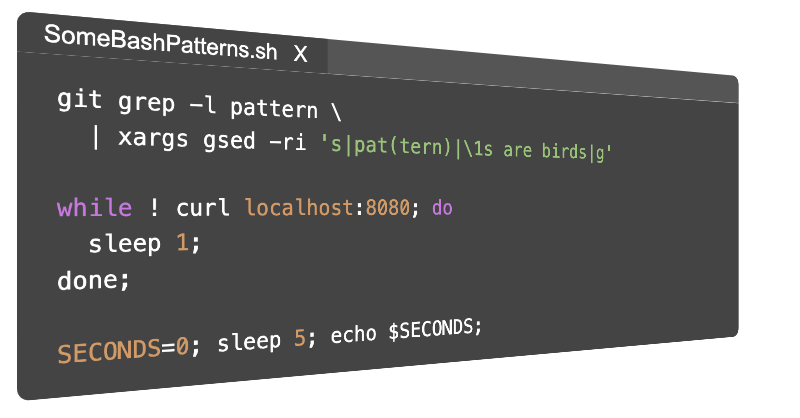
  > 1. Find and replace a pattern in a codebase with capture groups
  > git grep -l pattern | xargs gsed -ri 's|pat(tern)|\1s are birds|g'
IDEA is nice if you have IDEA.
"But not everyone uses Bash" - very correct (more fond of zsh, personally), but this article is specifically about Bash.
uh, yeah, you did need it, that's why you came up with "2. Track down a commit when a command started failing". Seriously though, git bisect is really useful to track down that bug in O(log n) rather than O(n).
I wish my usage of bisect were that trivial, though. Usually I need to find a bug in a giant web app. Which means finding a good commit, doing the npm install/start dance, etc. for each round.
Phrasing makes it sound like you were doing it manually, so if you didn't know, you can just drop a script in the directory, say, "check.sh":
  #!/bin/bash
  if ! pod install; then
      exit 125
  fi
  do-the-actual-test
git bisect run ./check.sh
When you're running a script, what is the expected behaviour if you just run it with no arguments? I think it shouldn't make any changes to your system, and it should print out a help message with common options. Is there anything else you expect a script to do?
Do you prefer a script that has a set of default assumptions about how it's going to work? If you need to modify that, you pass in parameters.
Do you expect that a script will lay out the changes it's about to make, then ask for confirmation? Or should it just get out of your way and do what it was written to do?
I'm asking all these fairly basic questions because I'm trying to put together a list of things everyone expects from a script. Not exactly patterns per se, more conventions or standard behaviours.
Most scripts I use, custom-made or not, should be clear enough in their name for what they do. If in doubt, always call with --help/-h. But for example, it doesn't make sense that something like 'update-ca-certificates' requires arguments to execute: it's clear from the name it's going to change something.
> Do you prefer a script that has a set of default assumptions about how it's going to work? If you need to modify that, you pass in parameters.
It depends. If there's a "default" way to call the script, then yes. For example, in the 'update-ca-certificates' example, just use some defaults so I don't need to read more documentation about where the certificates are stored or how to do things.
> Do you expect that a script will lay out the changes it's about to make, then ask for confirmation? Or should it just get out of your way and do what it was written to do?
I don't care too much, but give me options to switch. If it does everything without asking, give me a "--dry-run" option or something that lets me check before doing anything. On the other hand, if it's asking a lot, let me specify "--yes" as apt does so that it doesn't ask me anything in automated installs or things like that.
It's one thing if your script reads some stuff and prints output. Defaulting to the current working directory (or whatever makes sense) is fine.
If the script is reading config from a config file or envvars then it should still probably get some kind of confirmation if it's going to make any kind of change (of course with an option to auot-confirm via a flag like --yes).
For really destructive changes it should default to dry run and require an explicit —-execute flag but for less destructive changes I think a path as input on the command line is enough confirmation.
That being said, if it’s an unknown script I’d just read it. And if it’s a binary I’d pass —-help.
Commands that halt halfway through and expect user confirmation should definitely have an option to skip that behavior. I want to be able to use anything in a script of my own.
It's been discussed here on HN before.
A good and descriptive name comes first, then the action and the people that may have to run it are next.
    > SECONDS
    bash: SECONDS: command not found
    > SECONDS=0; sleep 5; echo $SECONDS;
    5
    > echo "Your command completed after $SECONDS seconds";
    Your command completed after 41 seconds
    > echo "Your command completed after $SECONDS seconds";
    Your command completed after 51 seconds
    > echo "Your command completed after $SECONDS seconds";
Your command completed after 53 secondshttps://www.oreilly.com/library/view/shell-scripting-expert/...
It seems like a throwback to a previous time, but honestly can't remember when that was. Maybe back to a time when I hoped this was what blogging could be.
The simplest thing I know that is able to do that is coccinelle, but even coccinelle is not handy enough.
See https://xkcd.com/927/ How standards proliferate
https://gist.github.com/jaysoffian/0eda35a6a41f500ba5c458f02...
Uses perl instead of gsed, defaults to fixed strings but supports perl regexes, properly handles filenames with whitespace.
The cURL project said it never properly suported HTTP/1.1 pipelining and in 2019 it said it was removed once and for all.
https://daniel.haxx.se/blog/2019/04/06/curl-says-bye-bye-to-...
Anyway, curl is not needed. One can write a small program in their language of choice to generate HTTP/1.1, but even a simple shell script will work. Even more, we get easy control over SNI which curl binary does have have.
There are different and more concise ways, but below is an example, using the IFS technique.
This also shows the use of sed's "P" and "D" commands (credit: Eric Pement's sed one-liners).
Assumes valid, non-malicious URLs, all with same host.
Usage: 1.sh < URLs.txt
       #!/bin/sh
       (IFS=/;while read w x y z;do
       case $w in http:|https:);;*)exit;esac;
       case $x in "");;*)exit;esac;
       echo $y > .host
       printf '%s\r\n' "GET /$z HTTP/1.1";
       printf '%s\r\n' "Host: $y";
       # add more headers here if desired;
       printf 'Connection: keep-alive\r\n\r\n';done|sed 'N;$!P;$!D;$d';
       printf 'Connection: close\r\n\r\n';
       ) >.http
       read x < .host;
       # SNI;
       #openssl s_client -connect $x:443 -ign_eof -servername $x < .http;
       # no SNI;
       openssl s_client -connect $x:443 -ign_eof -noservername < .http;
exec rm .host .http; #!/bin/sh
IFS=/;while read w x y z;do
v=$(echo x|tr x '\34');
case $w in http:|https:);;*)exit;esac;
case $x in "");;*)exit;esac;
echo $y > .host
printf '%s\r\n' "GET /$z HTTP/1.1";
printf '%s\r\n' "Host: $y";
printf 'Connection: keep-alive'$v$v;done \
|sed '$s/keep-alive/close/'|tr '\34\34' '\r\n' > .http;
read x < .host;
# SNI;
#openssl s_client -connect $x:443 -ign_eof -servername $x < .http;
# no SNI;
openssl s_client -connect $x:443 -ign_eof -noservername < .http;
exec rm .host .http; case $x in "");;*)exit;esac
test ${#x} = 0||exitFor example, compare the retrieval speed of the above to something like
sed -n '/^http/s/^/url=/p' URLs.txt|curl -K- --http1.1> When fed mutiple URLs, the curl binary will open multiple TCP connections, consuming more resources on the host.
Which I felt was a bit of an unfair thing to say.
I have no issue with the rest :)
   for route in foo bar baz do
   curl localhost:8080/$route
   done
  stuff="foo bar baz"
  for route in $stuff; do
  echo curl localhost:8080/$route
  done
I think it's one reason I dislike lists like this- a newb might look at these and stuff them into their toolkit without really knowing why they don't work. It slows down learning. Plus, faulty tooling can be unnecessarily destructive.
  stuff=("foo foo" "bar" "baz")
  for route in "${stuff[@]}"; do
    curl localhost:8080/"$route"
done stuff=("foo" "bar" "baz");
array_length=${#stuff[@]};
for i in $(seq 0 $array_length); do
curl localhost:8080/${stuff[i]}
done
[edit]: trying to get formatting correct
However, your technique also works, with some tweaks:
* The loop goes one index too far, and can be fixed with seq 0 $(( array_length - 1 ))
* There should be quotes around ${stuff[i]} in case it has spaces
Thirteen Incorrect Ways and Two Awkward Ways to Use Arrays http://www.oilshell.org/blog/2016/11/06.html
In Oil the syntax is simplified to
    const stuff = %("foo foo" bar baz)
    for route in @stuff {
      curl localhost:8080/$route  # no quotes needed
}Should you need to handle spaces, it is often much easier to go with newline separated strings and use "| while read".
This contruction has the added benefit of the data not needing to fit in your environment. This can be a real issue, and is not at all obvious when it happens.
  IFS=' ' read -ra routes <<<"${stuff}"
  for route in "${routes[@]}"; do
    curl localhost:8080/"$route"
doneHere's a few examples from my command history:
  for ((i=0;i<49;i++)); do wget https://neocities.org/sitemap/sites-$i.xml.gz ; done

  for f in img*.png; do echo $f; convert $f -dither Riemersma -colors 12 -remap netscape: dit_$f; done
  all: cmd1 cmd2

  cmd1:
      sleep 5

  cmd2:
      sleep 10
make -j[n] cat file
cat file | grep something[0] https://en.wikipedia.org/wiki/Cat_(Unix)#Useless_use_of_cat
I definitely use this all the time. Also, generating the list of things over which to iterate using the output of a command:
for thing in $(cat file_with_one_thing_per_line) ; do ... xargs -n1 command < file_with_one_thing_per_lineTo start with, if you ever feel the need to write a O(n) for loop for finding which commit broke your build, you DID need git-bisect.
Definitely DONT'T wait for PIDs like that and if you do want to write code like that, maybe actually use the arrays bash provides?
If your complaint is that for a in b c d; do ...; done is unclear, then maybe also use lists there, because what's definitely LESS clear is putting things in a variable and relying on splitting.
And most importantly, DO quote things (except when it's unnecessary).
If you know more than others, that's wonderful and it's great to share some of what you know so the rest of us can learn. But please do it without putdowns, and please do it in a way people can actually learn from. "Definitely DONT'T wait for PIDs like that" doesn't actually explain anything.
What pattern would you recommend for waiting for PIDs / parallelizing commands & preserving exit codes? Fair point about arrays being a better fit rather than a string there.
`wait` can take no parameters this means that if you just ran a bunch of things in the background in your script and want to wait for all of them to finish, you don't need to track the PIDs or a loop, you can just `wait`.
`wait` is a bash builtin (in this case) and as such it has no parameter limit (although I am told that actually there are some weird limits but it's very unlikely you will be able to spawn enough processes at once from a bash script to hit the limits). Given an array `pids` you can just do: `wait "${pids[@]}"`
The only problem with the two above approaches is that in the former case, wait loses the return status and in the second case wait loses all but the status of the last ID you pass it, so the third option is:
    pids=()
    do_thing_1 &
    pids+=("$!")
    do_thing_2 &
    pids+=("$!")
    for pid in "${pids[@]}"; do
        wait "$pid" || status=$?
    done
    exit "${status-0}"