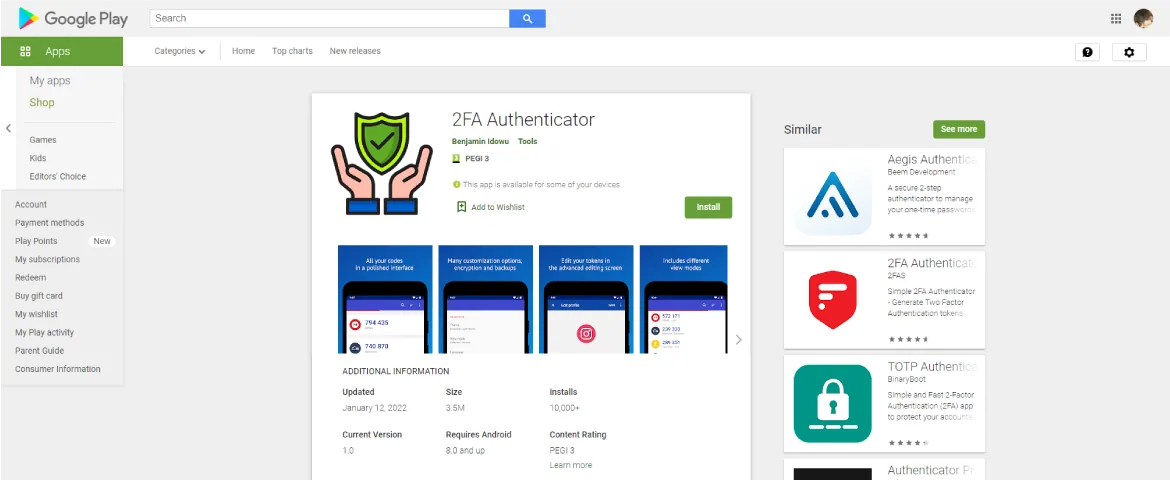
Malicious app on Google Play drops banking malware on users’ devices
Pradeo’s researchers discovered a malicious mobile application called 2FA Authenticator distributed on Google Play and installed by 10K+ users.
blog.pradeo.com
104 points · by caaqil · 4y ago · 38 comments
I would have thought that the list on Google Play is computed from the binary so it cannot be fake.
Is it really true that you can just leave out permissions in this list and then just get them once people install your app?
The app from the post had a list of permissions declared in the manifest, and on first look it seem to match what play store shows.
In any case: no, you can't leave out permissions and use them later. If you don't declare them, you can't use them. (At least not by normal means, it is possible with adb and root, and also by installing extra apps).
- one labeled as "2FA Authenticator permissions disclosed on Google Play"
- and the other as "2FA Authenticator permissions requested"
They even made "disclosed" and "requested" bold to stress that there'd be a difference, and in fact the former list of permissions is shorter than the latter?
You said that some permissions are "ignored". Is that the explanation?
Where is a list of all Android permissions which are "ignored", i.e. not told to the user when installing apps?
From the screenshots it looks like the permission to install software is part of whats lacking to be disclosed.
That has a rather big security impact, why does Google ignore it?
I can't believe Android is that insecure :(
Unfortunately, every spammy/scammy app came along for the ride and now you're fairly dependent on Google's scanning of the apps to catch the bad actors which has been shown time and time again to be insufficient.
[1] However, they never needed access to things like your contacts or networking... but for Google to flag apps that did things like that, their own apps would likely either be flagged or called out for hypocrisy given their own 'kitchen sink' app permissions.
As I said, play store list groups and sometimes ignores common permissions. I've tried to find a this-goes-here list that explains how are they grouped without luck, the only thing you can easily find is the full list (https://developer.android.com/reference/android/Manifest.per...) and the play store groups (https://support.google.com/googleplay/answer/9431959), so let me try to guess.
Camera is camera, that's obvious. Disable keyward is disable lock screen. Foreground service is probably ignored, maybe the word "service" is hard to explain? Internet is full network access. Query all packages is ignored. This is a relatively new permission that allows you to see what apps are installed, on android 10 and below it wasn't necessary to declare it, you could always get the list. Receive boot completed is run at startup. Request install packages seems ignored, which is odd but maybe because you can only request, the user must accept to install it in any case (no app can install anything on their own, unless root or system app). System alert window is draw over apps. Biometric and fingerprint are ignored, odd too. Wakelock is prevent from sleeping.
So, the "hidden" ones are foreground service, request install packages, biometric and fingerprint, as I said I tried to find a description of how the play store is grouped, but failed to do so :( sorry.
List of perms from the article: > Collect and send users’ application list and localization to its perpetrators, so they can leverage the information to perform attacks targeted towards individuals in specific countries that use specific mobile applications, instead of massive untargeted attack campaigns that would risk exposing them,
Yeah okay, giving access to the internet to an app enables the app to know what is the country of the user. Even knowing the language of the app know that. I'm sorry, but seriously, what are we supposed to do against that?
> Disable the keylock and any associated password security,
Listed on play store
> Download third-party applications under the shape of alleged updates
This doesn't allow to download apps silently. Every time you install or update a new app, this makes a huge annoying confusing popup, where you need to know where to click, and there are three such places! I even hate Google for how complicated it is. Criticizing Android for this is stupid.
> Freely perform activities even when the app is shut off,
I honestly don't know what they are talking about, that's pretty much always the case for all apps, there is no permission for that...? This is of course an issue wrt power drain, and Android is taking new counter measures against that power drain regularly. But that's just a power drain nothing else.
> Overlay other mobile applications’ interface using a critical permission called SYSTEM_ALERT_WINDOW for which Google specifies “Very few apps should use this permission; these windows are intended for system-level interaction with the user.”
This has indeed be very controversial. There are many great features that can be built with this. But the handling of this at Google has precisely been that apps need to be whitelisted manually Google-side to be allowed this permission, or go through a super complicated menu to enable it.
Overall, I have a very hard time believing this malware is anything but a PoC made by the anti-virus seller itself.
Edit:
One thing I forgot to mention. Many permissions in Android (like in iPhone) are DYNAMIC. Which means that user NEED to EXPLICITLY approve the usage of those permissions.
Google Play Store lists only the permissions that are granted without user's explicit approval.
You can't get a permission that's not in your app manifest without root access.
Seeing as the app appears to install apps silently, it probably manages to exploit devices with outdated security to elevate its system permissions. Altering the installed binary and system permission table are probably the easiest way to use the standard Android API to install software in the background, because doing so programmatically is a pain.
Is it really possible for app developers to leave out permissions in the list of requested permissions on Google Play and then get them nevertheless when the app is actually installed?
See my other reply for a more lengthy description: https://news.ycombinator.com/item?id=30126488
Both provide some minimal level of malware protection but make no guarantees and rely on users to scrutinize app sources.
Apple makes somewhat stronger claims of protection so there may be an argument for a higher level of responsibility on iOS and MacOS:
>...users can access these apps on their Apple devices without undue fear of viruses, malware, or unauthorized attacks....
>...all apps are sandboxed—to provide the tightest controls...
>...helps to ensure that these apps are free of known malware...
>...macOS includes state-of-the-art antivirus protection to block—and if necessary remove—malware.
[0]I'm still not sure that a claim of legal liability would hold up in court though.
[0] https://support.apple.com/guide/security/app-security-overvi...
For other products the accountability is always on the manufacturer/creator of the product - why, in software, do you all demand that big tech censors and polices what you're allowed to consume instead of actually punishing the wrongdoers who created malicious and dangerous software? Why can they just get away with zero accountability and you don't even spare a millisecond of thought?
Google Play hides some permissions on its own, but very basic one (like the one allowing access to internet). That's it.
The dangerous permissions mentioned in the article need to be manually enabled by the user, after installing the application.
As a matter of fact sometimes the websites are so much better too, like Amazon, which doesn't even have a "Find.." function in the app. I really wish we could done be with these apps and everything just ran in the browser, except maybe apps that need some low level api or something.