131 points · by sorcercode · 4y ago · 85 comments
* https://backreference.org/2010/02/10/idiomatic-awk/ — how to write more idiomatic (and usually shorter and more efficient) awk programs
* https://learnbyexample.github.io/learn_gnuawk/preface.html — my ebook on GNU awk one-liners, plenty of examples and exercises
* https://www.grymoire.com/Unix/Awk.html — covers information about different `awk` versions as well
* https://earthly.dev/blog/awk-examples/ — start with short Awk one-liners and build towards a simple program to process book reviews
https://www.google.com/search?q=site%3Aarchive.org+the+awk+p...
I think this is more comprehensible, and is also more robust because it actually specifies the field you're looking for rather than just any line with quotes:
gawk -F'"' '/^ name:/ {print $2}' appVersion.gradle
(hacker news is clobbering the spaces after ^)
Indent with 2 spaces to get code formatting: https://news.ycombinator.com/formatdoc
Personally, I’d probably rather use sed here:
sed -nE 's/^\s*name:\s*"([^"]*)"\s*$/\1/p"
While that regex is more complex, it is also safer and more explicit. grep -oP -m1 'name:\s*"\K[^"]+'Explanations for the beginner and intermediate regex and grep user:
`-o`: Only return the match, instead of the entire line
`-P`: use Perl compatible regex
`-m` max-count, Stop reading a file after NUM matching lines.
And now for the regex:
`name:`: find the exact match
`\s*"`: Zero or more spaces leading up to and including an double quote
`\K`: This was the kicker for me. "resets the starting point of the reported match. Any previously consumed characters are no longer included in the final match" - basically tells the regex engine that the characters _before_ `\K` needs to be there in order to form a match, but it should only return the characters _after_ `\K` as the match. This is super handy! Is there a "reverse \K"?
`[^"]+`: One or more characters that are not a double quote. This basically means "Find the line that has a key called "name" and return all the characters after the first double quote and until the last double quote"
The word "often" in the parent comment implies there are times when GNU grep is not better suited than sed with ERE. (I often use flex instead of sed.)
For example,
https://debbugs.gnu.org/cgi/bugreport.cgi?bug=44754
Or from the 3.8 manual:
6.1 Known Bugs
Large repetition counts in the `{n,m}' construct may cause grep to use lots of memory. In addition, certain other obscure regular expressions require exponential time and space, and may cause grep to run out of memory.
Back-references can greatly slow down matching, as they can generate exponentially many matching possibilities that can consume both time and memory to explore. Also, the POSIX specification for back-references is at times unclear. Furthermore, many regular expression implementations have back-reference bugs that can cause programs to return incorrect answers or even crash, and fixing these bugs has often been low-priority: for example, as of 2021 the GNU C library bug database contained back-reference bugs 52, 10844, 11053, 24269 and 25322, with little sign of forthcoming fixes. Luckily, back-references are rarely useful and it should be little trouble to avoid them in practical applications.
match($0, /...(...).../, arr) { ...refer to arr[i]... }
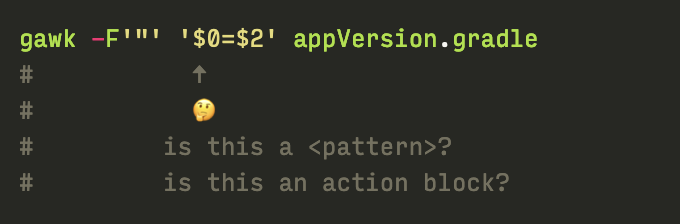
But you can't write: /...(...).../ { ...refer to a capture group somehow... }The key to legible awk I’ve found is to not rely on the defaults that awk assumes.
(but it’s quite the mental exercise to decipher it). Feels like regex but less painful
On a tiny file the speed won't matter at all - but on a big file (let's say, you're looking thru log files with hundreds of gigs in size).
The $0=$2 solution has to find the second field and test it for truthiness for every line, while the regex one only has to do that for those matching the regex, and matching that regex will be fast for most lines (skipping spaces and then testing for a fixed string ‘name’ is easy)
Regardless, the regex solution is more robust and maintainable.
Depending on how this get used, I might add code to detect the ‘appVersion’ start and end lines, set/clear a flag there and only match the ‘name’ lines when that flag is set to make it even more robust (who knows what other lines might contain ‘name’ now or in the future?)
Yesterday, someone in chat wanted to extract special comments from their source code and turn them into a script for GDB to run. That way they could set a break point like this:
void func(void) {
//d break
}
They had a working script, but it was slow, and I felt like most of the heavy lifting could be done with a short Awk command: awk -F'//d[[:space:]]+' \
'NF > 1 {print FILENAME ":" FNR " " $2}' \
source/*.c
This one command find all of those special comments in all of your source files. For example, it might print out something like: source/main.c:105 break
source/lib.c:23 break
The idea of using //d[[:space:]]+ as the field separator was not obvious, like many Awk tricks are to people who don't use Awk often (that includes me).(One of the other cases I've heard for using Awk is for deploying scripts in environments where you're not permitted to install new programs or do shell scripting, but somehow an Awk script is excepted from the rules.)
When feasible, I try to write POSIX-compliant awk, so the script could have been written as:
awk '/\/\/d / {gsub(/.*\/\/d /, ""); print FILENAME ":" FNR " " $0; }' source/*.cBecause otherwise it is useless. It has the same fate as AHK scripting and similar little languages. The language may be okay for its task, but if you cannot or do not use it for other things (unlike e.g. perl) at least from time to time, chances that you will learn and remember it are low. People know sed because regexps are everywhere. People use perl instead of awk, because they have a muscle memory for it. They may know [, find and glob for their relative generic-ness. They ignore awk and ahk because these are too niche to pay enough attention to. You either find a snippet or just move on.
If you are not constrained by a single line in a script, it’s easier to feed a heredoc into an interpreter of choice.
I use ahk scripts to arrange my windows for me and some other simple hotkey things. Wouldn't use it for "real" programming stuff though.
Are you suggesting that "dumb verbose code" might not be legible (I suppose that's technically possible, but seems unlikely to happen by accident)?
Or are you implying that Perl consists of "hieroglyphics" and so is not a suitable language for writing legible code? This, I think, would miss the point - deepsun was saying that, in both Perl and in awk, readers prefer legible code over cleverness - to claim that Perl cannot be legible at _all_ requires a little more justification, and would probably be disputed on the grounds that familiarity with a language's conventions is often a prerequisite for legibility.
Feels like the reasoning should be something like; either learning it makes you more efficient, or it doesn't make you more efficient. If it does, learn it, if it doesn't, don't, regardless of your background.
Let's be honest, CS students do have time to try thing, do vim tutor or regex golf (yeah, add regex to the list too) and other stuff like that. Once you're working, you loose some agency. And gain some.
Recently at a daily, i proposed to help write my coworker's regex. He is a fine dev/ops guy, but self taught (ex electronics guy) and miss some basics that aren't useful 99% of the time. He could've written his regex without help, but this is typically the case where getting more efficient isn't really worth the cost once you're working.
You forgot emacs.
I enable the sidenotes based on how “wide” your current viewport is. I’ve just personally found they don’t work as well on smaller screens.
I wrote it with simple jQuery. Happy to share if anyone is interested and don’t want to have to write it from scratch.
But also do not match this data format in the first quote. Match "name:" instead if that is what you mean. This makes the intention clear.
For matching text, just use grep is that is what most people would expect:
grep -m 1 "name:" appVersion.gradle | grep -o "[0-9.]"
You can shorten it to one regexp if you use an extended format that can handle backrefs if the context would make that clearer.E.g. I hate the so called "useless use of cat." I uselessly use cat all the dang time; visualizing the pipeline is infinity more useful then, what, "elegance?" Who cares?
sed 15q
instead of head -n 15, s/// is clearer than a cut sometimes. if you're starting unix, learning sed/awk is enough to do everything.As in, starting the pipeline with "cat" every time makes intuitive sense more than taking the time to figure out which command to start with?
https://duckduckgo.com/?t=ffcm&q=Cat+Ping&iax=images&ia=imag...
I think good awk scripts lie somewhere between "This is atrociously overfit to this file" and "this is so general you should have done it in python/perl/etc".
Of course there are legitimate uses for both super-specific and super-general awk scripts, but finding the right compromise is what makes a good awk script. You want your script to be concise yet robust to changes in the input files. Also, readability and maintainability are really important if you plan to add it to an important script.
Short awk != good awk.
I suppose that is subjective, but I think this is terrible code.
The fact that someone had to write a lengthy blogpost to figure out what it was doing should be an obvious warning against it.
Write code for readability / comprehensibility.
In this case, once you realize how the defaults stack, whoever came up with the one liner indeed has come up with something clever. Also the exercise in understanding the defaults cements the understanding of awk and as others have pointed out enables you to write much cleaner awk.