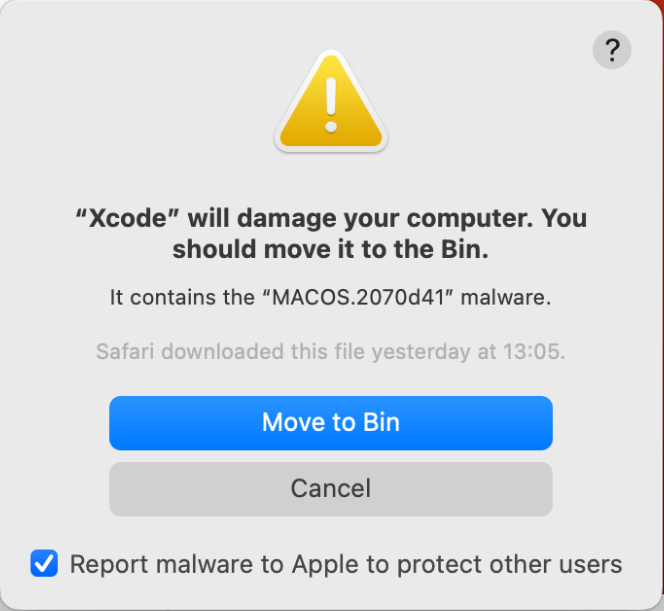
How do you know when macOS detects and remediates malware?
macOS may alert you when you’re trying to open or run a file, with an alert informing you that malware was detected. But what about in scans?
The Eclectic Light Company
175 points · by zdw · 3y ago · 111 comments
It's a pretty clear dump of the contents of https://developer.apple.com/documentation/endpointsecurity/e..., just like every other endpoint security event. This tool is intended for users who are familiar with the Endpoint Security framework and want quick access to an entitled binary for testing purposes.
The author needs to understand that 1. developer APIs exist and are meant for developers, and 2. the OS is never going to be designed to be introspectable to someone like him and his users, because that would be an incredibly stupid way to design an OS. If you want to peek at what is going on, use the existing APIs and package it up as an app for your users to use. Exposing raw events like the author wants is neither useful or actionable for most users.
> the great majority of users are oblivious of the detection and remediation of malware on their Macs, which occurs in complete secrecy
This is a problem that Apple could solve but chooses not to. Everything the author is doing is admittedly a poor workaround for Apple's lack of user notification.
Anyone remember those old ads of PC vs Mac and Mac not getting viruses? Because, I do...
It's incredibly intellectually lazy to suggest 'marketing'.
Apple's ideology has always been that regular, everyday computer users shouldn't have to concern themselves with low-level details of system administration in order to write a book or edit a video or whatever it is they're doing.
In addition, unless they have some breakthrough, elegant or innovative way of addressing stuff, they leave it to 3rd-party developers.
It's also myopic to complain about something as low-level as malware remediation while glossing over the fact that Apple enabled end-to-end encryption for iCloud [1] and gave users who aren't system administrators or security experts the ability to protect themselves if they are the target of a state level attacker [2].
Addressing security/privacy at this level is a very Apple thing to do.
In my opinion, it should be a no-brainer: end-to-end encryption and protection from state-level attackers vs a widget that alerts me the OS zapped a malware download.
As far as malware on macOS goes, having the operating system deal with this unbeknown to the user is actually a good thing for those everyday, regular users, who would probably screw things up worse if they had to play some direct role in this.
BUT for system administrators, developers and power users, the APIs and command line tools are there for them to get into the weeds of malware remediation if they want to.
[1]: https://www.apple.com/newsroom/2022/12/apple-advances-user-s...
[2]: https://www.apple.com/newsroom/2022/07/apple-expands-commitm...
I mean, in a perfect world all of this would be perfectly exposed to users and they would know every single action their computer takes. I don’t actually disagree that putting in some effort to better surface how XProtect works could be valuable. But the current situation is generally fine and the accusations that Apple is trying to hide this stuff from you do not seem well supported.
You still seem to be missing the point. This is about end users not developers.
This is a UI problem, not an API problem. You want to make a technical point, because you're a technical person, but you're missing the forest for the trees, because this isn't a particularly technical problem. This is a typical Apple problem of paternalism, Apple believing that Apple should take care of everything, and users shouldn't worry their pretty little heads about anything.
> I mean, in a perfect world all of this would be perfectly exposed to users and they would know every single action their computer takes.
We're not talking about "every single action", we're talking about the OS detecting malware on an end user's Mac and then... not bothering to tell them about this fact. Imagine if you went to the doctor for a physical, took some tests, the tests indicated you had an STD, and then... the doctor just gave you some drugs and didn't bother to tell you that you had an STD. That would be malpractice. You'd want to know. You'd need to know. Because one doesn't just "randomly get" either an STD or malware. How you got it (and especially who you got it from) is just as important as that you got it.
> Nobody says the system firewall runs in “complete secrecy” either even though it doesn’t warn you when it blocks connections.
1) You have to manually enable the firewall. It's disabled by default on macOS.
2) Unlike malware, you can just "randomly get" connection attempts from the internet. Attackers are probing everything. I can see that in my web server logs.
I make a simple claim: if macOS takes action to remediate malware then it ought to tell the user. Simple question: Do you agree or disagree with that claim?
All of the discussion about logging and endpoint security is because the author has determined in testing that macOS actually fails to tell the user when it remediates malware.
To follow my earlier analogy, this is like talking about how to do your own STD tests when your doctor neglects to tell you whether you got an STD. But you doctor should really tell you, and then you wouldn't need your own tests. But you seem overly focused on the tests rather than the telling.
It looks like HN's URL truncation is mangling the link in the post above. I think it's meant to go to https://is.gd/hneoxB (using a URL shortener to work around the bug), but when the full URL is posted, (https://developer.apple.com/documentation/endpointsecurity/e...), it gets truncated after the first letter of the last path segment.
EDIT: For some reason, when you put the URL in parentheses, it's correctly handled once again.
Perhaps apple made the (reasonable) decision to not alert people to background detection/remediations so as to not get users used to such alerts?
A lot of Apple users still believe that macOS is superiors when it comes to security. But reality looks more like:
https://in.mashable.com/tech/11411/sorry-mac-owners-a-new-re...
No news:
https://www.theguardian.com/technology/blog/2009/mar/20/brow...
Great! This is how consumer products should work. If I were to see "hey a thing happened but I resolved it" alerts from the 500+ currently-running processes on my computer, I'd throw it out the window.
Virus almost running on your PC is not a routine product feature that should be swept under the rug - at best it's bad security hygiene, at worst it's symptomatic of a targeted/ongoing compromise.
When you actively open an infected or malicious file you do get alerted - those are the alerts shown in TFA.
Could be the PDF example still too, if XProtect misses it on initial file scan, but then Remediator picks it up later. Not sure if they use different detection engines (database matching on the file vs active process heuristics)?
or to not share it with others!
Huh? The malware getting removed is not evidence that no harm occurred. Perhaps the malware stole something of importance. If that something was just power and network (e.g., for a DDoS farm), then it's of little importance, but if that something was keystrokes, then it could be a major importance. The user not knowing is a real problem.
Not to worry! Because XProtect and similar have such a narrow scope, it is unlikely to protect against targeted attacks anyway.
Maybe on macOS it is, and the only reason it isn't broadly knows is because Apple is sweeping this under the rug?
The same dumbness exists on windows where it would silently remove files like keygens with its 'antivirus' making it a mandatory drill to disable it completely (no easy task too) on any new installation. Even worse you would sometimes forget that it does that and then be dumbfounded for about 30 minutes as to why the file is in the archive but not on the filesystem after its extraction.
Apple can do what it wants on their devices. You can't.
But you're generously allowed by Apple to pay money for that. Isn't that great?
https://www.thewindowsclub.com/wp-content/uploads/2018/09/Wi...
Ever tried installing a printer?
No, Apple wouldn't do that. Never! Big Apple promise.
Just because the malware has been removed (or not), does not mean the problem was resolved.
If a keylogger already got your passwords and you'll never find that out then the fact it's no longer logging keystrokes is not much comfort to you as a victim.
There's no way for a user to be able to correct her behavior or even be aware of problems without some kind of notification.
macOS has some really exceptional internationalization.
I recently discovered that it supports Zuni. There are only a few thousand Zuni-speakers in the world.
System Settings → General → Language and Region → Preferred Languages → + → scroll..scroll..scroll → Shiwi'ma/Zuni
Ubuntu is pretty good on that aspect as well, that's why I prefer it for my parents compared to Windows which is spotty in a lot of places. As an example "Windows Update" isn't translated and does not mean anything in a foreign language.
Kidding aside if you're somewhat competent with macs and you can read, little snitch should be the first piece of software you install on any mac. It's not malware protection but it does at least make you aware of stuff wanting to do weird crap on your computer.
Also, I'd argue, there's still a wide gap in knowledge requirement, as well as ease of use between LS and some homebrew tcpdump based solution.
It is difficult to set up, but it's still possible. One of the main reasons I use Little Snitch is to stop Apple from phoning home to Cupertino so much, to take some control back for myself.
There are a ton of background processes on the Mac that can be blocked with no negative consequences AFAICT. Occasionally I trip myself up, but I'm willing to accept that consequence.
I've sometimes thought of publishing my Little Snitch setup, but the problem is that I'm typically 1 major macOS version behind, including now. A lot tends to change from version to version.
For instance it was blocking requests from Python started by Sublime Text without prompting me about it (and there was no reject/drop rule in place that matched, it just didn't prompt), really annoying.
Anyone experienced similar problems using LS on Ventura?
https://www.jamf.com/products/jamf-protect/
Doesn't help for the average user, but the software does exist.
Defender ATP gives great reporting but the performance impact on endpoints is obscene. During onboarding for Developers we go through the Xcode Command Line Tools and Homebrew installation, if ATP has already been installed it adds somewhere between 20 and 40 minutes to the installation time.
I’ll get some pricing for Jamf Protect and if it’s competitively priced I’ll see about moving us over. I’d much rather be using something built-in than a poorly optimised solution.
On my old 16” 2019 MBP, ATP used to legitimately cause a ~10C increase in “idle” temps. Not a huge fan.
If you are a security researcher, it seems like you have other tools at your disposal.
Kinda feels like they want to make a best-effort at preventing malware without making a big deal of it.
Settings > Malware Remediation > Events
Not a complicated UI to design.
I suspect the other reply that pointed to Apple wanting to sweep Mac malware under the rug is far more likely.
“trash” in USA
“bin” in UK
¹ https://eclecticlight.co/consolation-t2m2-and-log-utilities/
EDIT: I see from the comments I wasn't adequately clear: yes, I get the notification but it's hardly a "block" as the the comment I was replying to said. It is by design trivial to bypass.
https://support.apple.com/en-au/guide/security/sec5599b66df/...
This is separate from the 30% App Store commission.
For example, try installing librewolf via homebrew.
> If you try to open an app that isn’t registered with Apple by an identified developer, you get a warning dialog.