git-sim: Visually simulate Git operations in your own repos
git-sim: Visually simulate Git operations in your own repos with a single terminal command
Initial Commit
447 points · by todsacerdoti · 3y ago · 180 comments
I believe the core issue is devs like above never take the time to “grok” Git. I believe part of this is due to the lack of a tool like above to teach easily, but also because devs want to ignore the “how” of their tool working to find out the exact commands they need to run in their current situation.
One could argue users should not need to understand how their tool works to use it effectively and this is a leaky abstraction. Others could argue some commands are not intuitive (git reset can do many things, and git rebase swapping ours/theirs comes to mind). I don’t claim Git is perfect, and sometimes I need to Google to learn more than I wanted to, to get out of an obscure scenario (e.g. someone put classified intelligence into a repository we need to transfer to a lower classification network; how do I rewrite the entire history while correcting this error that occurred 487 commits ago?). However, understanding the tree structure of Git, what git rebase does under the covers, what branches and tags are, how remotes work, how merging works, etc. would go a LONG way. The folk I worked with struggled to pick it up.
The problem I have with git us that it's just too complicated. When I'm juggling project complexities and design complexities and implementation complexities, I frequently don't want to have to deal with git too.
I understand how to stage and check in and squash, and branch and merge, and how to manage remotes. But last week I still managed to get a new repo into a state where I couldn't push local changes to github without doing a pull first, and I couldn't do a pull without (apparently) first updating the remote. I had a hard deadline and ended up deleting the repo and starting fresh. Nothing much was lost. I never had this trouble with tfs...
Maybe I'm just not clever enough, but I've never come across a dev tool with as much surface complexity as git.
(Not a git hater. Use it every day. Have had a personal github profile for a decade. Etc etc.)
We now have a large selection of tools that allow you to visualize what's going on (I use git-kraken), as well as google for help on doing something that isn't in muscle memory.
But, really, SO MUCH pain and suffering could have been resolved by refactoring the damn commands to something more coherent and consistent. Git people sometimes call this "porcelain"-- which I guess is an apt name because it makes one think of a toilet (but an improvement to a hole in the ground).
Git Kraken is excellent, though Git has a page on various GUIs, many of which are free with no restrictions: https://git-scm.com/downloads/guis
Personally, on Windows I like SourceTree: https://www.sourcetreeapp.com/
Some that have worked with SVN back in the day like TortoiseGit: https://tortoisegit.org/
On *nix Git Cola seems to do the job for me: https://git-cola.github.io/
Then again, the most complex workflow I've worked with was Git Flow and I didn't need anything more advanced than that. Come to think of it, I don't really do rebases often either and mostly just take advantage of squashing commits through GitLab/Gitea and such, when needed. But hey, that's also valid, using Git in a way where you get version control but mostly keep the technical details out of your way (though Git LFS and certain cases with particular line endings being needed does make you drop down occasionally).
it's like tar or rsync or ffmpeg. Yes, it's hard to keep track of all the command line flags etc. but thanks to the internet we don't need to. it's far more useful to understand the underlying concepts.
I'm amazed how many people who have used SVN or CVS just assume git works like that but with different commands. And, of course, they get very screwed up. (GitHub contributes to this problem, too, with their own set of commands like "forks" and "pull requests" that aren't really a part of git.)
One you understand the Merkle DAG that's at the heart of git, understanding the rest is simple. Yes the commands are named badly, but get past that and it's a great system.
You can't even get a simple gitk-style graph visualization on Github. Which is a website. After so many years, I really think all the blame for developer confusion can be laid at Github's feet.
It's almost pure happenstance that Linus's idea of Git being distributed lent itself to the Cloud hosting business model. And the hardest thing to teach is the mental mapping of local and remote refs.
So this isn't just Git being too complicated. It's a confluence of several factors that would never have been possible if Git had never happned.
Github is largely to "blame" for this. It mostly only exposes the happy path and using git kind of like any other VCS, but above all it ossifies the idea of git repositories being centralized (both because the canonical repo is always on github.com but also because of the forking/ownership model). A lot of the power (and sharp edges, and messiness) of git are in scenarios where everybody has a local repo and nobody's is really "canonical".
Git is really well-suited to development of the linux kernel. It's not.. amazingly well-suited for the job that 95% of people these days press it into?
Tags could be utilised for naming commits which would make it much easier to reason about where in the process of your development you are instead of referencing commits by hash. Hashes are hard to remember after all.
Branches are so cheap in git that there's little to no reason to not use a million branches to name every step in a process if you need to, and yeah if you need a long-term name for a specific commit local-only lightweight tags are handy for that. (I find lightweight versus annotated an often easy enough distinction between tags intended for local development and tags intended for release markers. This also seems to be intentional in git UX because of the way `git describe` by default skips lightweight tags.)
I believe the same, and it's not just a problem you see with git, it's all over the place. Some developers seems eager to use something so they just skim the documentation in order to do the least amount of reading and understanding in order to implement something, but often miss some fundamental detail and have to jump back. Or, they fundamentally misunderstand the tool at all, but push forward with their own idea what the tool is, rather than stepping back and start learning again.
That's especially true in technology, where whole armies of people are working to complicate things as fast as possible. For the best of reasons, of course. But when I started out, I could read one short book and have a pretty good understanding of my computer's processor, and from there it wasn't much further to understanding the whole computer. Now I could spend days just understanding, say, processor cache strategies [1]. A field that is super interesting, but if I am to get any of my actual work done, I can't afford to dig into that and the many, many other similar subtopics. I'm going to get a casual understanding of something, do my best to make something useful, and only dig in further when I'm forced to.
When I do have to dig in, it comes in two cases for me. One is where there is something necessary complexity that I would have to learn about regardless. E.g., if something is too slow, I need to learn about what happens under the hood to do proper performance tuning. Great, fine, I will learn it.
But then there's the other bucket, which includes unnecessary complexity, bad abstractions, poorly considered UX, and the like. For me, git is clearly in that bucket. I intentionally have very simple development flows. Git can do a great deal, 98% of which I not only don't need, I actively don't want. [2] So I'm going do my best to remain ignorant of its inner workings, stick with my small number of commands, and very occasionally refer to "Oh Shit, Git!?!" [3] And I'm perfectly happy with that until it gets replaced with a technology that better matches the domain.
[1] e.g.: https://chipsandcheese.com/2022/05/21/igpu-cache-setups-comp...
[2] An example of what I don't want: https://www.tiktok.com/t/ZTRpPPuKf/
Conflating the two, like you do, is elitism.
"If you just stopped and read to understand...", a-ha, sure, I'll do that for every one of the no less than 500 tools I've used over the course of my career and will never get anything done on time.
There's no time. We got real work to do and no we can't switch to a company that gives us this time. There's a big world outside the Silicon Valley.
GIT is a huge UX failure and seeing people pretend otherwise makes me question my -- or their -- sanity.
Wanting to understand things before using them is hardly elitism, not sure why you would think that.
Just like you probably don't want to fix bugs without understand the cause, it's hard to use a tool correctly unless you know how the tool works.
When I see a doctor, I expect them to be familiar with the latest medical research. I expect they will treat my illnesses with modern medicines and employ the right tools, correctly, and understand how they work at a sufficient level of depth to do the job correctly. For example, I used to make electrical medical staplers; surgeons need not care about how RTOSes work, but they need to know how to interact with the software enough to do their job. Similarly, I'm not saying we all ought to be able to build Git from scratch. I'm saying we ought to master it to the extent necessary. If your use case is committing alone on a single branch, learn "git commit". But for most devs, understanding the tree structure that Git uses to store data and what basic operations are doing "under the covers" builds a mental model that makes Git easy.
We have to have the time to learn the tools that help us do our jobs well. You can neglect that duty to do "real work", as much as a doctor can neglect learning how to use a scalpel so they can "get on with the surgery".
A better thing to say is "yeah we've been saddled with this horrible tool, yeah we know it sucks, but it'll suck a bit less when you learn it. Oh and sorry if you're not a professional developer and have to use git, I hope we can do better next time."
1) Making Computer Science programs in universities overly simple. When I was in college, I tutored students in CS. When I started college, the CS 101 course was taught in Java, and when I finished, it was being taught in Python. There was an immense gap between the understanding of the Python-first vs. Java-first students.
The Java-first students understood fundamental concepts like arrays, passing parameters by reference vs. by value, "OOP" concepts, and other common paradigms in languages. The Python-first students would use "lists" and "dictionaries" for many problems without understanding that those structures impacted the time complexity of their solutions, or that they used memory allocation, reallocation, hashing, etc. Python is great for hacking together a non-fault-tolerant program that does X as quickly as possible, but I saw it damage the way the students thought about computing.
It made the students think it ought to be easy. It made them think that they should be able to write, in nearly plain English, what they wanted the computer to do, and that it ought to do it. It made them think they should be able to intuitively be able to code without spending any amount of time learning the craft, and that they could do anything an advanced programmer could do by typing a few lines of simple code. They were less willing to accept that sometimes problems are hard, sometimes they would have to think, and sometimes they would have to write more than a for loop to solve problems. The Java students' problem sets covered implementation of data structures and complex applications, while the Python students struggled to put together even the implementation.
For a humorous and broader explanation of this subject, see James Mickens' excellent article The Night Watch [0]. For example: "That being said, if you find yourself drinking a martini and writing programs in garbage-collected, object-oriented Esperanto, be aware that the only reason that the Esperanto runtime works is because there are systems people who have exchanged any hope of losing their virginity for the exciting opportunity to think about hex numbers and their relationships with the operating system, the hardware, and ancient blood rituals that Bjarne Stroustrup performed at Stonehenge."
2) Bad documentation, and bad users of documentation. I dislike documentation that neglects how the tool works and instead creates a cookbook that its users can copy verbatim. It has similar effects to what I described above. Developers that use this type of documentation find themselves helpless when they encounter a problem they've not memorized the solution to. I think it also creates a learned helplessness wherein users cannot question the model the tool uses or think outside that model to solve complex problems. I prefer documentation that teaches the ethos of the subject in question so that I can understand better and imagine new solutions.
I've also heard the complaint that Git's documentation is awful; some say that it is only useful if you know already know where what you are looking for is, and useless if not. In other words, it lacks an "apropos" (aka "man -k") equivalent. This is my gripe with "wiki" style documentation. It is scattered and unsearchable and has no cohesion. We as developers need to do a better job creating documentation that is searchable, coherent, and useful to new and experienced users alike. Various sections of documentation should have ample cross-references to help users understand the connection between parts of the system to help them form a mental model of how tooling works.
[0]: https://www.usenix.org/system/files/1311_05-08_mickens.pdf
Edit: wording
I learned git at 45yo after many years using ClearCase (even licensed as CC admin) and .. I really liked learning git, I do admit that it took me two full days of self study to start groking git but I wouldn't call it 'struggling'.
Obviously it depends a lot of your background.. git is the 5th version controls I've used , while it is far from being perfect (submodules.. :-( ), it's my favourite.
It's like teaching someone to drive a car using LOGO.
The way to teach Git is:
1. Explain the mental model (correctly). Basically a commit is a snapshot with deduplication to avoid huge file sizes.
2. Show them how to use a good Git GUI. There are a lot of bad ones. I would recommend Git Extensions (terrible name but it's actually quite good). Or maybe GitX on Mac.
3. Let them learn the CLI slowly in their own time.
I’ll take a look at Git Extensions, thanks for the recommendation! Some of our devs took to using the integration with VS Code, which I didn’t like because I didn’t understand how its terminology (e.g. “sync” mapped to underlying Git operations). Others tried the Git GUI which I found very confusing.
I focused on the graphical operations and then tried to show them what commands they could run to execute those operations. Next time I’m in the situation, maybe I’ll adopt a GUI-first approach.
[0] there is one operation where gui is more convenient for me - exploring branches in gui or GitLab ("repository -> graph") has no equivalent in cli that I know of (interestingly, GitHub doesn't have that either, but many gui tools do).
The git CLI for the vast majority of things isn't difficult once you have a basic understanding of DVCS. 95% of the time fetch, pull, push, checkout and commit are all you need.
I admit that Hg had a far nicer an more consistent CLI, and it was my preference back in the day. But it lost for a few reasons - one of which was that it made the 90% easier, but the 10% far harder.
A big reason I wanted to pursue this idea is exactly what you mentioned - a lack of ability to easily create presentation-quality Git structures that can apply specifically to the situation a user is in, NOW.
A super annoying thing about troubleshooting Git issues is when you find a similar solution online but it's done in someone's random repo which could be very different that yours. Your whiteboard sessions are another good example down this line of thought.
Though that's only true of the core, with tags being additional decorations and renames inferred. The simple core delegates complexity.
I think designing a nicer git UX is not easy. Even if we oversimplify commit to cp your working directory together with a path to the previous commit (to form a tree of "branches"), then the abstraction for operations like rebase to manipulate that tree is not quite intrinsically simple.
BTW Tools can be used without proper understanding, like arithmetic without commuting, associating or distributing. While a workable pidgin aids adoption, it's fair to argue for the power of understanding, especially of something clean and coherent and whole. Git's core is like that; the add-ons (like tags) aren't; and the UX seems arbitrary and accreted.
But I do think that there's room for a better mechanism for orchestrating "macros" or building other workflows on top of git. I know a lot of developers who'd love the ability to pretend they're using p4.
> Heptapod is a community driven effort to bring Mercurial SCM support to GitLab™, started by Octobus, a company providing professional services around Mercurial.
I found GitExtensions (windows) which I used at my last job to be VERY useful, as it is git, properly, the way it was designed, but in GUI format. It taught me a lot about how to actually use git.
Now I dont use the GUI, its too slow to click around when I know the command.
I dont get the git hate. Then again, I also dont get the "C++ is too complex/complicated" debate, either, so maybe I just have a higher tolerance for terrible design.
Or maybe git just is a very powerful tool and takes more than half a year of half-assed use to learn.
Teaching some basic things like rebase vs. merge, how to git bisect, how to pull with rebase, update a branch with rebase before merging it, stashing changes, etc. got me and the team I lead at $CURRENT_WORKPLACE very, very far.
I can recommend to stop complaining about git, find someone who knows how to use it, and just ask until you get it. Its worth it
And also distributed version control is complicated. Git isn't as intuitive on the happy paths as perhaps it could have been and shows its slightly rushed initial development, but no tool that allows such flexibility can ever be truly simple. And in its defense, it wasn't originally designed to be a super-simple glossy tool. The technical advantages of it simply outweighed the slightly clunky interface, and that interface has improved since then.
I do recommend to use the "git lola" alias to give an easy gestalt of the repo state if you're ever unsure what's going on.
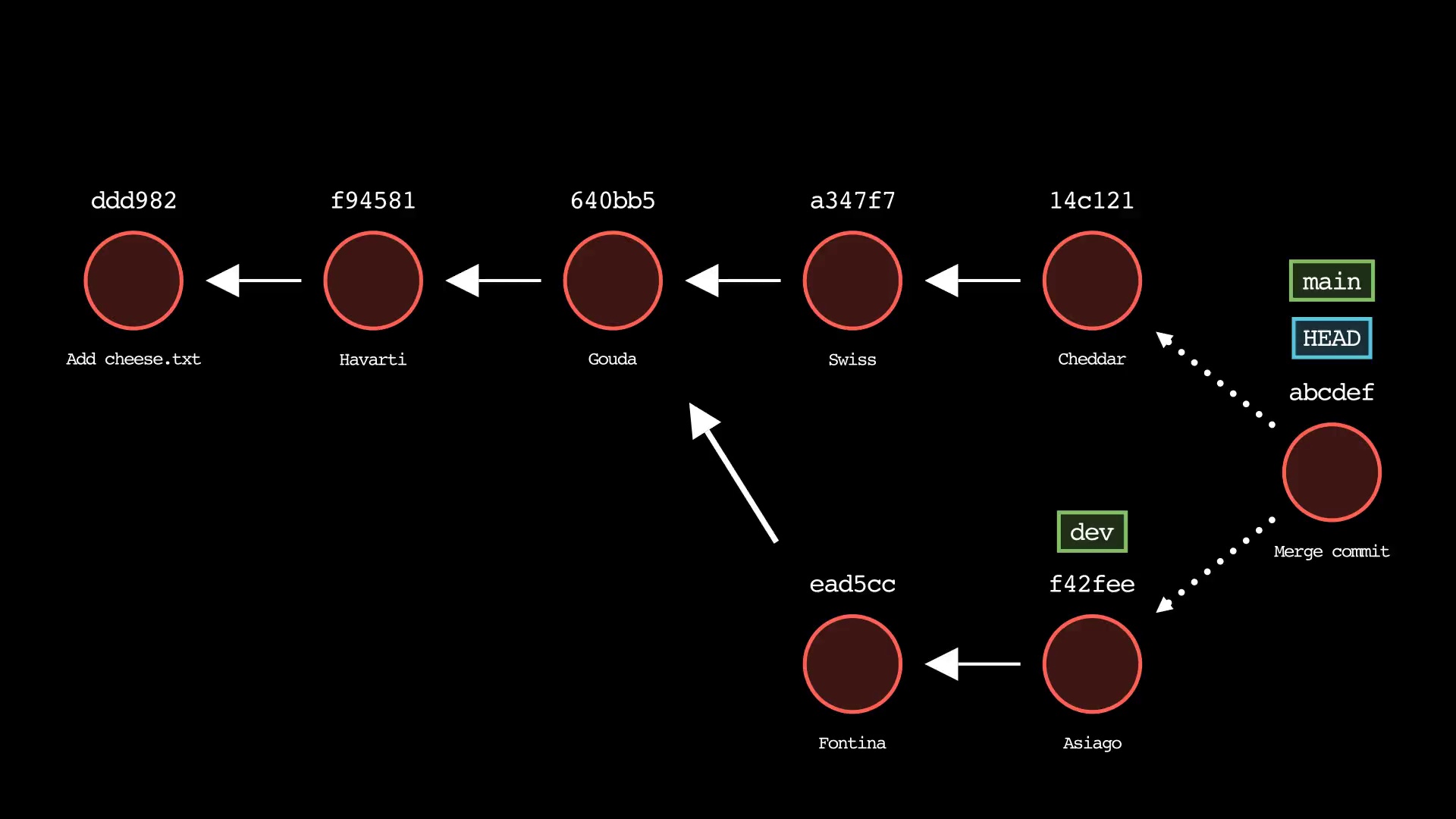
However the fact that time flows in the opposite direction of the parent/child relationships, is inevitable based on Git's design.
They make it look like it flows right to left even though time (or at least sequence) flows left to right.
    1. In the static output, put a dashed, or shadowed marker corresponding "frame 0" of the animation, e.g. in the git reset example, show where "HEAD" was before (perhaps even add an arrow)

    2. Make it possible to 'remember' a set progress, of git commands - and replay them. (I.e. simulation looks ok, now apply them on real git)

3. Make it possible to visualize actual git log in the same style as simulation.I generally have a good mental model of my repo and I try to KISS as much as possible, but I can see the value of this in a teaching scenario, for example (as well as on extremely complex git situations).
Check out the quickstart page as well, seems to have more content[1].
Alternative would be: clone the repo, do your changes, run gitk to be sure.
Which has advantage that result looks exactly the same as it will in production (no new diagram type b/c only using git and gitk), with zero risk that sim differs from reality.
Hehe jk you make a fair point, and in fact I do have a bunch of work left to do to make sure my simulations do match up with Git's behavior as closely as possible.
One big benefit I was going for with Git-Sim though is to interrupt the developer workflow as little as possible.
Changing directories, running a new clone (which could take a mildly annoying amount of time), and running gitk is a pretty big context-switch.
I'm really missing support for remotes. There are lots of tools for local-only development (like https://gitexercises.fracz.com/), but very few allow to demonstrate stuff like "Syncing a GitHub fork with the original repository" which involves two remotes and three copies of the same branch at the very least.
My initial goals for this tool are to purely simulate actions on Git repos without actually modifying them, but I might be flexible on that going forward, as I mention in the article with the --execute flag.
One way around this could be to create a new temporary directory in /tmp, copy .git over there and symlink the rest, then run whatever operation in the newly copied workspace and compare it with the original.
Then you can mutate things however you want and the original stays the same.
Will need to think about it more...
I think this is what we need more of for new git users. I struggled for the longest with git until I came across learngitbranching[0]. I believe having an interactive/visual experience while I typed in commands is what I needed, and what most people need.
I tell junior developers they should take a day to learn this and more often than not they dismiss me. Meanwhile these people will run into git conflicts or something and their strategy is to "save their work somewhere else and redownload the repo"[1]. I know of a "senior developer" that will do that. I basically told him, in my eyes, if you don't know how to use git, you are not a senior. Or a bad senior at a minimum. See the stack overflow survey. Git is used basically by all developers. How do you expect to be a good developer by dismissing such a ubiquitous tool. I think I can make an exception for people who aren't using git at their current company and any company before.
Not that there's anything wrong with that, is there?
As a "bad senior developer" who uses git daily, one of the things that I love about git is that in the end everything is regular files. So there's nothing wrong with just copying your git repository elsewhere, re-cloning it, and fixing your fuckup by hand. No need to feel guilty about it.
Your comment sounds like criticizing somebody that does not know all the keyboard shortcuts that you do.
Do you disagree that it's a fundamental tool to being a developer(today), or do you disagree that it's necessary to know fundamental developer tools to be a good senior developer?
> If you are to be a senior leading others, you should be able to explain this to juniors so they don't shoot themselves in the foot.
Firstly, not all seniors are managers. Secondly, it is not a good use of a senior engineer's time to be teaching fundamentals to a junior developer. I am a decent developer, a passable manager, and a poor teacher. It's much better for me to point my team in the direction of existing tools.
> Do you disagree that it's a fundamental tool to being a developer(today), or do you disagree that it's necessary to know fundamental developer tools to be a good senior developer?
Other VCS tools exist, it's possible to have gone a decade in the industry as an effective developer without using git. Many large companies use Perforce, other companies use internal tools. I disagree that it's necessary to understand the working model of fundamental tools to use them. We don't require truck drivers to understand the difference between the Otto and Diesel cycles to drive a truck, why is it ok to force developers to undersatnd the many, many, many different operations that `git checkout` can perform depending on the state of your repository/what you've asked it to do?
Would be great to get any feedback you might have if you get the chance to install/test it out.
One idea I really like for avoiding VCS operation anxiety for beginners and experts alike is a filesystem layer that allows revert to any historical state. You just have your bash prompt output the current snapshot number, and then can use that as the revert target if there's a botched rebase or so. Unfortunately I do not know of a nicely packaged way to do this, or how to do it at all with OSS tools (but I bet it is feasible!).
That is what the ref-log is designed to do, but in my experience with git the risk is not about getting historical content, because git is very good about that: it's the current operation that's the risk
If I had any advice for beginners, it'd be to commit early and often, because git is disciplined about managing commits, but is a razor blade about anything in the working copy. There is no ref-log for "but I just typed that..." unless you told git to save it in something with a sha
ref-log doesn't save you in so many situations. As you point out, you have to commit all the time for it to save you. Even then, git repo corruption is possible and then you are hosed.
For example:
* a hard reset clears your working copy changes
* you pop a stash you didn't mean to, atop your working copy changes. Now your working copy changes are intermixed with the stash and you have to manually decouple them.
* you accidentally stage hunks to your index and its tricky to unstage them because they are adjacent to other hunks
Such a tool also saves you from accidentally saving over your work in the text editor. It generally makes it so that you don't need to be as careful.
So, generally, git commands that affect your working copy are not undo-able and can be very time consuming to undo if you have no proper time machine underneath your repo. I happily have experienced the bliss of having this reassurance, but it is only within a proprietary env.
If we're only concerned with local changes I'd rather introduce beginners to `reset`, experts will already be doing something similar dependent on circumstance.
    git reset --hard

    git tag BEFORE
    git reset --hard BEFORE

    git reset --hard ORIG_HEAD

    git reflog
git reset --hard HEAD@{<N>}Ironic, I know.
I was considering adding some more detailed text-based output on the command-line detailing what was going on, but I didn't think about adding it directly into the image/video.
Yes I feel your pain with Homebrew which can take forever just to check for updates on installed packages, before it even gets to installing anything new.
I know the current installation method of having to first install Manim's dependencies is not ideal, but in most of my testing it was relatively painless.
However going forward I am going to be looking for ways to make it a single install instead of various steps that differ across platforms.
So far seems good, initially i was getting some very slow animation times but adding the `--low-quality` flag seems to work well.
I am planning to do an internal session in my company on Git, and will be using this tool to help them visualise some of the concepts :)
Yes --low-quality works for testing but the fastest way would be to first test without the --animate flag at all, so you just get a final image of the command's effect.
Then once you get that you can add the --animate flag to generate your final video to share.
And awesome to hear it will be used for your company session! I love teaching people about Git. Feel free to share the tool with them so they can try it out as well!
  error: subprocess-exited-with-error

  × Building wheel for manimpango (pyproject.toml) did not run successfully.
  │ exit code: 1
  ╰─> [27 lines of output]
      Error in sitecustomize; set PYTHONVERBOSE for traceback:
      AssertionError:
      running bdist_wheel
      running build
      running build_py
      creating build
      creating build/lib.macosx-13-arm64-cpython-310
      creating build/lib.macosx-13-arm64-cpython-310/manimpango
      copying manimpango/_version.py -> build/lib.macosx-13-arm64-cpython-310/manimpango
      copying manimpango/__init__.py -> build/lib.macosx-13-arm64-cpython-310/manimpango
      copying manimpango/utils.py -> build/lib.macosx-13-arm64-cpython-310/manimpango
      copying manimpango/cmanimpango.pxd -> build/lib.macosx-13-arm64-cpython-310/manimpango
      copying manimpango/cairo.pxd -> build/lib.macosx-13-arm64-cpython-310/manimpango
      copying manimpango/register_font.pxd -> build/lib.macosx-13-arm64-cpython-310/manimpango
      copying manimpango/pango.pxd -> build/lib.macosx-13-arm64-cpython-310/manimpango
      copying manimpango/glib.pxd -> build/lib.macosx-13-arm64-cpython-310/manimpango
      copying manimpango/enums.pyx -> build/lib.macosx-13-arm64-cpython-310/manimpango
      copying manimpango/register_font.pyx -> build/lib.macosx-13-arm64-cpython-310/manimpango
      copying manimpango/cmanimpango.pyx -> build/lib.macosx-13-arm64-cpython-310/manimpango
      running build_ext
      building 'manimpango.cmanimpango' extension
      creating build/temp.macosx-13-arm64-cpython-310
      creating build/temp.macosx-13-arm64-cpython-310/manimpango
      clang -Wno-unused-result -Wsign-compare -Wunreachable-code -fno-common -dynamic -DNDEBUG -g -fwrapv -O3 -Wall -isysroot /Library/Developer/CommandLineTools/SDKs/MacOSX13.sdk -I/opt/homebrew/opt/openssl/include -I/opt/homebrew/Cellar/pango/1.50.12/include/pango-1.0 -I/opt/homebrew/Cellar/harfbuzz/6.0.0_1/include/harfbuzz -I/opt/homebrew/Cellar/pango/1.50.12/include/pango-1.0 -I/opt/homebrew/Cellar/glib/2.74.5/include -I/opt/homebrew/Cellar/fribidi/1.0.12/include/fribidi -I/opt/homebrew/Cellar/harfbuzz/6.0.0_1/include/harfbuzz -I/opt/homebrew/Cellar/graphite2/1.3.14/include -I/opt/homebrew/Cellar/cairo/1.16.0_5/include/cairo -I/opt/homebrew/Cellar/glib/2.74.5/include -I/opt/homebrew/Cellar/glib/2.74.5/include/glib-2.0 -I/opt/homebrew/Cellar/glib/2.74.5/lib/glib-2.0/include -I/opt/homebrew/opt/gettext/include -I/opt/homebrew/Cellar/pcre2/10.42/include -I/opt/homebrew/Cellar/pixman/0.42.2/include/pixman-1 -I/opt/homebrew/Cellar/fontconfig/2.14.1/include -I/opt/homebrew/opt/freetype/include/freetype2 -I/opt/homebrew/Cellar/libpng/1.6.39/include/libpng16 -I/opt/homebrew/Cellar/libxcb/1.15/include -I/opt/homebrew/Cellar/libxrender/0.9.11/include -I/opt/homebrew/Cellar/libxext/1.3.5/include -I/opt/homebrew/Cellar/libx11/1.8.3/include -I/opt/homebrew/Cellar/libxcb/1.15/include -I/opt/homebrew/Cellar/libxau/1.0.11/include -I/opt/homebrew/Cellar/libxdmcp/1.1.4/include -I/opt/homebrew/Cellar/xorgproto/2022.2/include -I/Library/Developer/CommandLineTools/SDKs/MacOSX12.sdk/usr/include/ffi -I/opt/homebrew/Cellar/pango/1.50.12/include/pango-1.0 -I/opt/homebrew/Cellar/harfbuzz/6.0.0_1/include/harfbuzz -I/opt/homebrew/Cellar/pango/1.50.12/include/pango-1.0 -I/opt/homebrew/Cellar/glib/2.74.5/include -I/opt/homebrew/Cellar/fribidi/1.0.12/include/fribidi -I/opt/homebrew/Cellar/cairo/1.16.0_5/include/cairo -I/opt/homebrew/Cellar/pixman/0.42.2/include/pixman-1 -I/opt/homebrew/Cellar/libpng/1.6.39/include/libpng16 -I/opt/homebrew/Cellar/libxcb/1.15/include -I/opt/homebrew/Cellar/libxrender/0.9.11/include -I/opt/homebrew/Cellar/libxext/1.3.5/include -I/opt/homebrew/Cellar/libx11/1.8.3/include -I/opt/homebrew/Cellar/libxcb/1.15/include -I/opt/homebrew/Cellar/libxau/1.0.11/include -I/opt/homebrew/Cellar/libxdmcp/1.1.4/include -I/opt/homebrew/Cellar/glib/2.74.5/include -I/opt/homebrew/Cellar/harfbuzz/6.0.0_1/include/harfbuzz -I/opt/homebrew/Cellar/graphite2/1.3.14/include -I/opt/homebrew/Cellar/glib/2.74.5/include/glib-2.0 -I/opt/homebrew/Cellar/glib/2.74.5/lib/glib-2.0/include -I/opt/homebrew/opt/gettext/include -I/opt/homebrew/Cellar/pcre2/10.42/include -I/opt/homebrew/Cellar/fontconfig/2.14.1/include -I/opt/homebrew/opt/freetype/include/freetype2 -I/opt/homebrew/Cellar/xorgproto/2022.2/include -I/Library/Developer/CommandLineTools/SDKs/MacOSX12.sdk/usr/include/ffi -I/opt/homebrew/opt/python@3.10/Frameworks/Python.framework/Versions/3.10/include/python3.10 -c manimpango/cmanimpango.c -o build/temp.macosx-13-arm64-cpython-310/manimpango/cmanimpango.o
      clang: error: no such file or directory: 'manimpango/cmanimpango.c'
      clang: error: no input files
      error: command '/usr/bin/clang' failed with exit code 1
      [end of output]

  note: This error originates from a subprocess, and is likely not a problem with pip.
  ERROR: Failed building wheel for manimpango
  Building wheel for srt (setup.py) ... done
  Created wheel for srt: filename=srt-3.5.2-py3-none-any.whl size=22467 sha256=ef7a967b7b3225064d5e8eecf84934ec066e759d288fcddbe104d26954b1df35
  Stored in directory: /Users/me/Library/Caches/pip/wheels/2b/4a/52/216182e898297499cfe0947127f551712c4169ea2e69bcf9d7
  Successfully built click-default-group srt
  Failed to build manimpango
  ERROR: Could not build wheels for manimpango, which is required to install pyproject.toml-based projects
But glad you got it working too!
- Thank you Master, finally I see the light and understand the the fork or chopsticks dilemma is a fallacy. Millions of jedi knights can't be wrong after all.