Bitwarden design flaw: Server side iterations
Bitwarden is a hot candidate for a LastPass replacement. Looking into how they encrypt data, it doesn’t do things that much better however.
Almost Secure
474 points · by lawgimenez · 3y ago · 259 comments
https://neilmadden.blog/2023/01/09/on-pbkdf2-iterations/
Both Bitwarden and LastPass should improve this situation by making the iteration count automatically increase over time. For LastPass though, there are... A lot of concerns. The breach, how it was handled, persistent issues with the security of their browser extension (many, including an RCE at one point) and of course the fact that not everything in the vault is actually encrypted.
KeePass XC or 1password may prove to be better options from a strict security practices standpoint, but from what I've seen I don't suspect Bitwarden has a pattern of bad security practices overall. It does seem like there are opportunities to make it better, though.
Ultimately, I think it's just not good enough. Even if you're updating iteration counts automatically (which is clearly not a safe assumption, and to be fair not something we did in EnvKey v1 either), and even with safeguards against weak passphrases, using human-generated passphrases as a single line of defense is just fundamentally weak.
That's why in EnvKey v2, we switched to using high entropy device-based keys for our root encryption keys. It's a similar model to SSH, except that on Mac and Windows the keys get stored in the OS keychain rather than in the file system. Also like SSH, a passphrase can optionally be added on top of the device key.
The downside (or upside, depending how you look at it) is that new devices must be specifically granted access. You can't just log in and decrypt on a new device with only your passphrase. But the security is much stronger, and you also avoid all this song and dance around key stretching iterations.
I suppose the user must have printed the real root password / secret key / whatever and put the paper somewhere in a safe. That password should allow to reinstate access when all hardware is lost. But it should not be required daily.
They require email authentication to redeem, so a recovery key by itself isn't sufficient to access an account, though of course they do need to be protected.
An org admin can also re-invite a user that loses access this way. The only scenario where you're really in trouble is if you're the only admin, you lose access to your only authorized device, and you lose access to your recovery key.
That said, one area that Keybase compromised on that we haven't is offering a web interface. It's well known among security and encryption people that you can't do serious end-to-end encryption in a web app--an attacker with access to the server can just modify the html/js payload, rendering the encryption pointless.
Of course, web interfaces are convenient and users want them, so many products give in on this for the sake of UX even though it fully undermines the zero-trust model. EnvKey hasn't though. It has a desktop app and a CLI--there's no web interface.
Also, W3C should finally get it into the WebCrypto API, but it seems like whoever is responsible for it just let's that API rot. There are fast wasm implementations, though.
The way I see it it's the other way around. The only complexity cost that lives here is that you need to distinguish between different derivation configurations. Whether that configuration tells you to use PBKDF2-200000 or Argon2-64M-4-1 doesn't matter, and you'll have to add a clause to the code either way. On the flipside, the memory-hardness allows you to increase the cost for the attacker a lot more than for the user.
> WASM Argon2 implementations are at least multiple times slower than native IIRC
I haven't looked this up, but my suspicion is that it's still better than a WebCrypto PBKDF2 configuration taking the same time for the user, measured in Wh for the attacker.
Does Argon2 have support for the various platforms that Bitwarden (or other platforms) need? You need support for browser (javascript most likely), iOS, Mac, Windows, and Android at minimum.
On top of that, are the implementations all equal or is one behind in terms of speed or support? You have to have everything else fall to the lowest common denominator. My guess is that that will be browser based implementations.
This is why so many password managers continue to use PBKDF2, because it has widespread support, particularly in browsers. Until Argon2 (or others) have support that matches it, many products won't use it because it brings with it all sorts of issues.
Cache hardness might be more appropriate for situations where multiple devices are involved. Then the user just has to wait for a while if things go bad...
Bitwarden does let you increase the number of PBKDF2 iterations through a setting, they they also provide this warning:
> Warning: Setting your KDF iterations too high could result in poor performance when logging into (and unlocking) Bitwarden on devices with slower CPUs. We recommend that you increase the value in increments of 50,000 and then test all of your devices.
Translation: upping this could make your old device very slow.
I'm not sure I'd want to be receiving end of a whole pile of users complaining Bitwarden is becoming unusable on their current devices because they silently upped it, so I'm be leery of upping for existing users too.
As for the server side key issue highlighted in the article: they have a point; it could be done better. But it's already pretty good, and if that's the only issue it's the least of my concerns. It's only a concern if a hacker got read access to the server, but read access means they've been compromised. And if they've been compromised those same people might have write access. If someone gets write access to Bitwarden's servers, then all bets are off. They can just modify the javascript to send themselves my unencrypted key.
Then there is the /dev/mem thing. The bottom line is if someone has access to your machines RAM, then you can likely see the entire database unencrypted. Is your Windows desktop "corporate managed"? If so, I'm looking at you, sir. While Linux / Android / iOS are more protective of their users than Microsoft (who seems hell bent on selling their soul to their corporate customers), they aren't whole pile better. They may not sell their soul to high paying corporate customers, but they will still do whatever their governments ask and you will be none the wiser.
The bottom line is all these proprietary solutions suffer from this "we won't let you see but we promise you can trust us" flaw. I refused to use LastPass because it was hopeless in that respect, and later their promises turned out to be hollow. With Bitwarden there is a lot less trust involved because we can inspect the code they promise we are running.
- This only occurs when performing key derivation, i.e. when you're unlocking. It does not matter once the key is in memory. Therefore, it's actually OK if it takes a few seconds. When unlocking with biometrics, the key derivation function is not used, so on mobile devices, this occurs even less often.
- PBKDF2 is very fast. A few hundred thousand iterations is not going to be a noticeable hitch on old SoCs anymore. I actually suspect the real problem was JavaScript/webextensions/the web vault. However, it's probably a non-issue now that all browsers have decent WebCrypto implementations with PBKDF2 support. The difference between JS and native code is very noticeable with cryptographic code. Even then, it might be less of a problem now with improvements to JavaScript engines and WASM.
I generally pick open source solutions over closed source ones, and Bitwarden does check that box, but to be fair, so does KeePass XC and compatible mobile companions. I like Bitwarden as an easy tool to recommend to friends, but for power users KeePass XC is certainly worth a look. They came out looking pretty good when security researchers began approaching ways to attack the clients themselves:
I do not use biometric because they fail a lot on me (fuzzy fingerprints due to stuff)
It's not even a nitpicky complaint I'm dropping in the internet, it does really bother me absolutely every time. Making it even slower, please no.
Unless I'm missing something, to me that is one of the biggest failures. It is even laid out in their technical and organizational measures document.
They tout on their website that they get third party assurance testing done and yet none of it matters if we can’t see the actual reports.
I just can’t believe more people aren’t enraged about it. Or that people aren’t seeking to sue, purely based on that. Zero trust architecture is fine if you’re breached that’s the whole point, but saying that the information within the vault is encrypted when parts of it aren’t is downright malicious.
That's true.
> Because truthfully, the PBKDF2 iterations count issue was relatively unimportant.
IIRC, some people's LastPass vaults were set to use a very old default of a single PBKDF2 iteration, which I understand is basically nothing, nowadays.
Plenty of master password changes in the past several years, so plenty of opportunities for it to have been automatically set higher. The only reason I hadn't set it higher myself is I didn't know it was a setting at all.
I've updated it to 600,000 iterations and so far don't see any noticeable impact on performance, both on desktop (using the Firefox extension) and on mobile (iOS).
[1] 28 characters in a single case, 23 characters if both upper and lower case are used, 22 characters if you include numbers, 12 words if you use a word list of 2000 words and sample uniformly
I don't think that is practical for most users - 12 words (or 10 taken from a 10k list) - or 22 random alphanumeric characters - is hard to remember - and long enough that they are difficult to type correctly. 70 bits might be a more sensible goal - but still long. (6/7 words, 12 characters from a set of 62).
This is the "trust anchor", so something the user needs to remember and type in - from what I've seen - remembering/representing and inputting 128 random bits is tricky.
And with modest stretching and a salt, probably overkill anyway.
As for 70 bits password, it might be enough, but you need a lot of iterations (2^58) if you want to completely make up for the lost security margin. Which will also be unusably slow in practice.
When I see that I read: "With our knowledge of security and encryption, which by the way is much greater than yours, we consider that 100,000 is a perfectly safe number and a good middle point so go ahead and use it".
Am I wrong to think like that? My Master password is a battery-horse-staple thing, but not with 12 words as some other commenter says; that's absurdly long and would be too difficult for me to remember. I usually strive for around 18-20 characters, that's already in the verge of me forgetting it. I use incorrect or derived words of my own (so not really existing in dictionaries).
[1] https://cheatsheetseries.owasp.org/cheatsheets/Password_Stor...
> Making changes in a session with a “stale” encryption key will cause data corruption that will make your data unrecoverable.
https://community.bitwarden.com/t/increasing-kdf-interations...
https://news.ycombinator.com/item?id=34152181
EDIT: Look below, this actually applies to changing master password.
This is incorrect.
https://bitwarden.com/help/what-encryption-is-used/#changing...
> When you change the iteration count, you'll be logged out of all clients. Though the risk involved in rotating your encryption key does not exist when changing KDF iteration count, we still recommend exporting your vault beforehand.
From what I read, changing the number of iterations is safe to do.
iirc locking with BW doesn’t do what one might expect wrt encryption state.
Those first 5000 iterations added over 12 bits of entropy.
The article is complaining about not adding an extra 100,000 iterations which would double the difficulty, so he's effectively berating them over 1 bit of entropy.
When you do this reset and sign back into your devices/browser plugins, you will need to go into the Bitwarden Settings on each one and set a few options again - notably timeout (defaults back to Browser Restart, change back to a time you're comfortable with), Biometric Unlock and PIN. All of those are local settings to each Bitwarden client/endpoint, so you need to do them on each device.
That might be a little too much “like I’m 5”, but that’s the general idea. Hashing is easy one way but it still requires compute cycles to do each iteration. We don’t want to make it excessively expensive for us.
You're trying to keep something safe and all you've got is a weirdly infinite collection of cardboard boxes. So you have this brilliant idea... you get a dozen boxes and put your treasure in one of them.
That's great, it's certainly safer than leaving it laying out. It'll take someone at least like... a minute to go check all dozen boxes and find your treasure. But it still only takes you mere seconds because you know which box to open.
Except you'd really rather your treasure stay safe for longer than a minute. So you take all your boxes and put them inside other boxes. And put those boxes inside other boxes like nesting dolls. You nest each one a dozen times.
So now if someone wants to come and find your treasure, they need to open all 144 boxes to find it! But you still only need to open 12 because you know which stack to look in.
The iteration count is basically just how deeply you plan to nest your boxes.
In more concrete terms, increasing the iteration count is just a knob to control how much cpu/memory resources it takes to compute a hash. You want to turn it up enough to make brute forcing prohibitively expensive (make it as high as you can), but not so much that calculating the single correct hash to verify is too expensive (don't make it too high or else it will take too long to check your password at sign-in). People are saying this should go up over time because computing resources generally become more readily available (faster/cheaper), making both brute forcing easier as well as allowing you to perform more iterations to compute the correct hash on commodity hardware without it taking unusably long.
PBKDF2 directly might be some sort of multiverse locked box? Store a "safe key" in a box, in a box, in a box, in a box, in a box... in an iteration of boxes.
Every key in the universe is able open the first box, and every other box. But each key opens up a different multiverse of boxes. The problem for the attacker is they have to open every box, in a box, in a box... in succession to get to a "safe key" stored in that multiverse, which looks like a safe key and quacks like a safe key, but might not be the right safe key.
Maybe not quite right, as the "safe key" is really just another box in the end, but that doesn't make much sense... unlike a box of multiverse of boxes =)
With plain derivation, the map takes you directly from the password to the key. With an extra iteration, the map just points to a place on the map where a trail starts.
If you want to guess the key, by guessing the password - now you have to first walk to were the password points on the map, then follow the path (the iterations) - then dig and see if the key is there. Then you can try the key in the chest (the encrypted data).
The iterations (length of path) adds a certain, predictable, amount of work in order to find the key. It does not make it harder to guess the password, just harder to get the key from the password - and so it makes it harder to check if you've guessed the right password (try the key in the lock) - because there's extra work to be done.
Now you could compare memory-hard paths and compute-hard paths by adding elevation and distance to the analogy (different types of hard work).
This should absolutely be application managed and gradually increased over time.
Also: while I understand that FIPS is the reason why we are stuck with PBKDF2 in the case of the more enterprisy password managers, wouldn’t it still be FIPS compliant to do some scrypt or argon rounds on top as a means of not constantly having to update the PBKDF2 iteration count (assuming that scrypt and argon are more resilient to hardware brute-forcing)?
One issue I could see with that is that because it’s the encryption key it’s going to lock out all your “live” devices, so an explicit step is an easy opportunity to warn them.
The second issue is that the transcryption would have to be done on login, which is a pretty shit UX as the user logs in then immediately gets locked out for however long it takes to convert the store (then again for most people I’d assume the payload is not enormous).
> assuming that scrypt and argon are more resilient to hardware brute-forcing
They are but needing to update the work factor as hardware progresses remains. In fact scrypt and argon have more work factor knobs than pbkdf2, which only has the iterations count.
how so? The iteration count must be part of the non-encrypted parts of the vault data. If a client is offline, it will use its locally stored vault with the old (lower) iteration count. If it's online, it will have the updated vault with the higher iteration count.
> The second issue is that the transcryption would have to be done on login, which is a pretty shit UX as the user logs in then immediately gets locked out for however long it takes to convert the store (then again for most people I’d assume the payload is not enormous).
You could do this asynchronously in the background: Decrypt the vault, store it in memory (which all password managers do for some amount of time in order to provide any UI), re-encrypt, store to disk, send blob (which will continue an unencrypted iteration count) to server.
But this is the complicated case where the vault is re-keyed. What would totally be sufficient is to re-encrypt the same value key using a new hash derived from the same password, only with more rounds which means that the bulk of the vault blob won't change - only the password-derived key and the iteration count.
If any of this happens simultaneously on multiple machines, treat it the same way as you already treat editing conflicts (I'm not offering guidance there - this is a hard problem that each cloud provider is already solving one way or another).
> They are but needing to update the work factor as hardware progresses remains. In fact scrypt and argon have more work factor knobs than pbkdf2, which only has the iterations count.
Given the current state of the art and given these two algorithms, I think it would need to happen significantly less often than with PBKDF2, so if there's something that would need to cause the UI to re-lock immediately after unlock as you think (and I'm not sure about) then having argon or scrypt in the loop means you have more time between causes of shitty UX.
The iteration count affects the encryption key, and bitwarden neither has the old encryption key nor the actual password to derive either.
So the vault has to be updated at the first device connection after updating the iterations count, and any other device will have to derive the new encryption key and log back in.
Because end user devices vary a lot in speed.
"Do you want your security to be:"
a) "It only secures pr0n from my aunt" (1s for fetching a password) b) "Not great, not terrible": (5s for fetching a password) c) "Pretty Good Protectivity": (10s for fetching a password) d) "The CIA haunts me and my name is Edward: (24 minutes for fetching a password)
Even on slow devices, password managers can employ techniques to help like only using the full count of rounds for a cold start but then re-encrypting the key for the vault key with fewer rounds but only keep that copy locally.
That way a user of a very slow device only needs to wait for, say, 10s once on first unlock.
While this is a downgrade in security, it's still better because now the key with the small amount of iterations is confined to the one device, not available on the server where an attacker can get bulk access.
Of course, devices where 1M PBKDF2 iterations take so long that it's noticeable are probably also old enough to be full of unpatched (due to EOL) security holes which makes such devices the weakest link anyways, but this would still be a better situation because this way not all users are punished because of one user's slow device.
"Higher values offer more protection, but opening the database will take longer".
I highly recommend keepassxc to everyone instead of these password-solutions-of-the-day that are coming and going so fast it's hard to remember all of them.
> The key derivation function SHALL use an approved one-way function such as Keyed Hash Message Authentication Code (HMAC) [FIPS 198-1], any approved hash function in SP 800-107, Secure Hash Algorithm 3 (SHA-3) [FIPS 202], CMAC [SP 800-38B] or Keccak Message Authentication Code (KMAC), Customizable SHAKE (cSHAKE), or ParallelHash [SP 800-185].
Those options are authorized by FIPS. The main consequence of this is that there are FIPS-validated implementations available, which are what you want if you're selling to the government.
Apple gets it, devs don't. In this space, 1Password is least worst, yet is still more confusing than the average user quite understands.
Apple isn't a most valuable company because they want to control you. They're a most valuable company because their engineers blend software and hardware into experiences for end users not for engineers.
So much more software would be so much more successful if usability and adoption were as prioritized as utility and configurability.
Syncing password managers solve all these issues and, if they do encryption right, there is nothing that could possibly happen even if they are hacked and an attacker gains access to my encrypted data.
The doing it right part is why I was asking my questions with regards to PBKDF2.
This feels off topic a little, but in all the discussion of password managers lately, I seldom hear people talk about the web browser being a good/bad idea. It almost feels like they are slipping through the cracks of the conversation.
For the record, I no longer use that platform for important passwords or secrets, ("driver carries no cash")
To say nothing of the fact that, if they used some method to divine your Windows password, then they've probably already done the same for your password manager's password. And even if they only had your Windows password somehow, they could just install a keylogger to get your master password anyway. And even if you 2FA your password manager, the keylogger can still intercept any other password and take over any non-2FA'd accounts.
Once, I was given the primary Google account and as I was going through and updating security items on that account I discovered the previous owner had been using Google's password feature and I could login to a whole slew of his personal accounts (Not just the "Login with Google" ones). Of course, I just deleted all those - but the risk of centralization was certainly highlighted in that moment.
If it is true a few extra characters is as good as having sky-high iterations, the guidance should be on 'forcing' users choose long-enough passwords, not in this nitpicking over the 'right' # of iterations.
The cost scales exponentially with the length of the password, assuming a random password (stops scaling when you reach the hash size I think).
Both are important because you can't freely increase the password length, they become more annoying to enter and remember.
If we choose our password from only ~24 chars then you can get the same effect of 100K iterations form just 4 more characters, or ~1 more dictionary word.
That doesn't seem excessive
The values you see are:
ae1fb1a0b0ee --> ???
f10abddc10a0 --> ???
What you're going to do is start bruteforcing letters until you find the matching passwords. You know that the passwords are hashed with 100k iterations, but you don't know how long the password is.
First you start with a, b, c, d, ... z. That's 26 combinations.
Then you do aa, ab, ac, ad, ... zz. That's another 26^2 (676) combinations.
The next length of aaa, aab, aac, ... zzz is >17k combinations and it keeps increasing exponentially.
Increasing the number of iterations applies a linear multiplier to the time. If it take 26ms to bruteforce all the one character hashes with 1000 iterations, it will take 2600ms with 100,000 iterations.
But increasing the password length adds a multiplier of 26 with each new character (and that's only assuming single case letters). Adding 4 extra letters is actually an improvement of over 450,000x (26^4).
(Assuming you are using the printable ASCII character set, that's actually 95^4 = 81,450,635x)
Also, teaching users enough of this to do it well is basically impossible. You have to have a threat model that includes your users being fairly shit at passwords. Especially when your product is solving the problem of users being shit at passwords.
Expected time to break = 1/2 * 36^L * iterations / (hashes per second your adversary can do)
So you'd want to pick how long you want this to remain secure (~50 years is probably beyond good enough). For hashes, a _very_ conservative choice might be something like the hashes per second done in all of Bitcoin, worldwide. One arbitrary result in Google suggests that that is 286,767,038,956,306,900,000 H/s.
If I did the math right, that works out to 17-18 characters long for 1000 iterations. The number of hashes per second there is obviously way too big, but I'm uncomfortable picking a lower one without doing more research than I'm interested in doing. There's probably a recommendation from some security experts out there somewhere, but I'd imagine it's going to be a bit of a struggle to get one of them to tell you anything except "use more than 1000 iterations".
All those scenarios happen for me every couple of weeks and it's what's keeping me from using really long passwords with high complexity.
If you are asking if the length of the password by itself be sufficient to create a secure password, then the answer is mostly no. You need many iterations of the hashing process otherwise brute force attacks become trivial given today's hardware.
For a given user, the client then receives from the server not key derivation parameters, but the version of the account. The client then maps that version to the precompiled derivation parameters.
Of course a server can then misreport a user's account version to something lower than it actually is. There are two solutions we implement here:
1. Deprecate older versions as quickly as possible after new protocol version rollouts. Older versions begin to get rejected by clients and clients will not allow sign in to proceed.
2. Allow an optional sign-in flag users can check called "Strict sign in" that forces the client to reject any server provided version that is not specifically the latest version. This means that if a user checks this option and the server reports a version != 004, the sign in will be rejected and the client will not perform any sort of handshake with the server.
More here: https://standardnotes.com/help/security/encryption
This seems like a serious flaw that completely undermines setting a custom value, no? If an attacker gets temporary control of a bitwarden server then they can get your password in a more easily crackable form no matter what you set.
That would be pretty poor UX.
So yes, it's a flaw. But I don't see an acceptable mitigation for it, as all clients will have to be compatible with passwords for accounts that were last logged into 10 years ago when [super_low_iteration_number] was still considered an acceptable value. And the server will have to be able to tell the client "This account was last logged into 10 years ago. We're going to increase the number of iterations right after this, but just one last time, send me the password after hashing it 5,000 times."
Then 10 years from now, CPU's will have sped up a LOT so that will only take 0.2 seconds or whatever. With normal users, you could update the # of iterations every year, but that requires a login to occur so that the "new" password hash can be sent by the client. With a user who only logs in every 10 years, you have to support the # of iterations that existed when the user last logged in.
[0]: https://cheatsheetseries.owasp.org/cheatsheets/Password_Stor...
Bitwarden's API likely doesn't permit anybody to access the encrypted blobs of anybody. You have to authenticate at the server to be able to access your blob. Since the iterations might be low for producing the master key and therefore the master password hash, the server must treat the master password hash as just another password and therefore iterate the hash quite often (100,000x).
Assuming no malicious insider or an outside attacker gets their hands on the encrypted blobs this is the most important attack prevention.
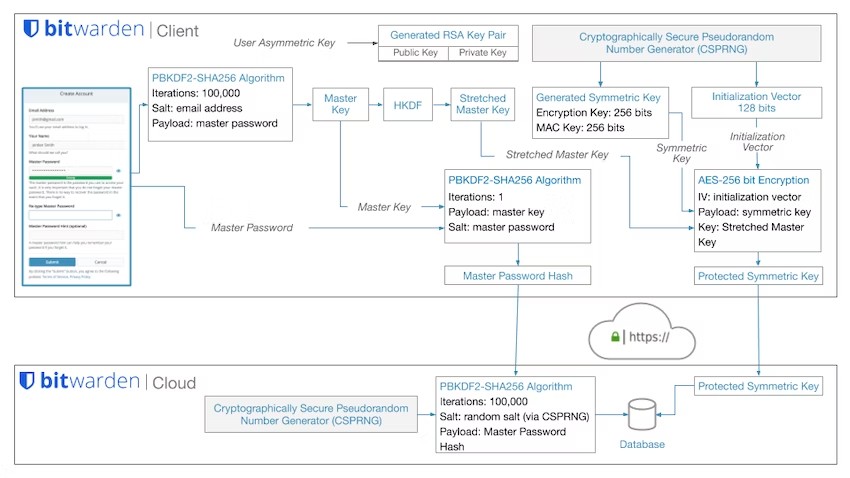
So only the password hash itself gets the extra iterations. The diagram and the text of the whitepaper seem to be at odds, though. The diagram doesn't show extra iterations for the encryption key, but the whitepaper says:
> PBKDF-SHA256 is used to derive the encryption key from your Master Password. Then this key is salted and hashed for authenticating with the Bitwarden servers. The default iteration count used with PBKDF2 is 100,001 iterations on the client (this client-side iteration count is configurable from your account settings), and then an additional 100,000 iterations when stored on our servers (for a total of 200,001 iterations by default).
> the 100,000 PBKDF2 iterations on the server side are only applied to the master password hash, not to the encryption key
The attacker doesn’t need to break the master password hash, so it’s irrelevant. This is elaborated in the link directly following the above quote:
> But that protection only works if the attackers are stupid enough to verify their master password guesses via the authentication hash.
I don't understand. As far as I know the key space of PBKDF2-SHA256 is 256 bits and the vaults are encrypted with 256 bit AES. Is the author arguing that Bitwarden is insecure because the attacker could (in a roundabout way) bruteforce 256 bit AES?
edit: I think I understand, the text didn't make it immediately obvious but I believe the author is talking about (configurable) 100k client-side iterations which are then used to obtain the "stretched master key" (from the diagram). This would render the 100k iterations done on the server pointless if an attacker already has a copy of the data, they only protect (slow down) the normal authentication flow.
- PBKDF2 (2.0 2007 RFC 2898, 2.1 2017 RFC 8018) <- This is here, although it was revised in 2017.
- bcrypt (1999)
- scrypt (2009)
- argon2id (2015) <- Have we not yet evolved to address threats here?
What about minimum resource complexity (mem-/CPU-/GPU-/FPGA-/ASIC-hard) guarantees on the client (assumed trusted, as much as one can trust)?
Picking one number out of the sky for today that doesn't evolve with technology doesn't make sense. Plus, it isn't necessarily something a human shouldn't be choosing for every use-case without a risk assessment. There should be a sanity-check lower bound that evolves with best-case performance coupled with a specific threat environment.
Calculator website with:
1. "Which algorithm?" (some choices)
2. "What type of data is it?" (Level 1 - 6 with familiar descriptions)
3. "How long does it need to be protected?" (1...100 years in almost log progression)
4. "How much is the data worth?" (some choices, or 1e2 ... 1e11 USD / other currencies)
5. "What would be the consequences of its disclosure?" (with familiar descriptions)
6. "What model of device will slower users have?" (some choices of new to old laptops and touch devices)
7. "Funding amount of highest reasonable threat actor?" (some choices, or 1e5 ... 1e12 USD / other currencies)
8.-11. "What is a(n) {un,}reasonable {un,}lock delay?" (ms)
And then output parameters (n, salt/nonce sizes, factors) and password complexity requirements valid for implementation now.
It would also be nice to output an algorithm generated to forecast values needed X years in the future with similar guarantees.
So when you enter your masterpassword, you first type the part of the password you remember, then long press the yubikey to get it to enter the long static password.
It's a nice option, but of course you need to back up this static pw somewhere or program a bunch of keys with it.
Eventually, a password manager's development environment will be compromised and bad actors will sneak a trojaned extension in, submitting it to Google and Mozilla and Microsoft and the rest. Your browser will update to that extension and the bad guys will get everything.
Self-hosting won't help, your homelab running vaultwarden in a docker container not exposed to the internet is no protection from this at all. 2FA won't help either when the extension itself is your enemy, it'll simply upload your entire unencrypted vault off to the bad guy on IRC or discord or whatever.
(2FA will help on individual sites supporting it, assuming you don't use your password manager to store 2FA tokens too. They all support that functionality, but you don't do that, right?)
The only way to avoid this outcome, which again is inevitable, it WILL happen eventually, is to laboriously copy/paste passwords from a separate password vault program that is not configured to autoupdate.
The thought of actually doing that makes me cringe, so I'm still using Bitwarden. I know it's coming, and hope it hits another more popular password vault first so everybody gets wise and figures out some solution to this problem. I also use Firefox which seems to have humans reviewing extensions, at least sometimes, and is less popular than Chrome.
If the customer/vault records can only be linked via the server side encryption the attackers with the vaulrs and list of user emails will have to test every email as salt (also reqires some care to ensure logs can't be used to correlate vaults and emails, but all the scenarios I've played out make me think this is possible). In fact I think they could physically separate the customer and vault databases entirely to different servers or datacenters.
Initially I thought this might be what Bitwarden does (it seemed pretty clever), but the database schema on github does indeed directly/explicitly link customers and vaults.
If the customer and vault datasets were independent, Bitwarden could further complicate attacks by filling the customer and vault databases with convincingly fake entries since the basic database attack surface would scale as the product of customers and vaults.
> Firefox Sync has a different flaw: its client-side password hashing uses merely 1,000 PBKDF2 iterations, a ridiculously low setting. So if someone compromises the production servers rather than merely the stored data, they will be able to intercept password hashes that are barely protected. The corresponding bug report has been open for the past six years and is still unresolved.
Is this not always going to be a flaw with server-side iterations? And therefore knocks down the first paragraph's contention that it's possible to do server-side iterations correctly?
This is an excellent step by step tutorial that tells you how to self host it: https://www.youtube.com/watch?v=eCJA1F72izc
Bitwarden can have my $10 a year.
I would say that in the case of analytics, there are more things to consider than price and ease of installation when considering self-hosting. By not self-hosting you are sending your users data to a 3rd party, which might have impact on their privacy or on the law compliance.
What you are referring to is essentially a compatible server implementation called "Vaultwarden" (formerly Bitwarden_rs), where the original company will see no money whatsoever.
It gives limited protection against a database breach.
Your password service should have as a minimum the following extra defences.
- Hardware encryption of the master password hashes.
- Breach detection such as poison records.
- Database access controls that limit the blast radius of an attack.
- All admins should require a hardware key to access the database.
I'm sure there are many more.
You can defend yourself with the following...
- by having a very random master password.
- 2fa everywhere
- password horcruxing - see https://kaizoku.dev/double-blind-passwords-aka-horcruxing
Their secret key mentioned in the article appears like it was worth the UX tradeoff. They also stand out for other reasons too.
Wouldn't though the master password hash be so long, that 100,000 iterations would be really hard to brute-force?
Looks like conflict of interest given the article contents.
You can do better if you have to do FUD.
One thing that is also worth mentioning for anyone nervous about their password security is that you can use a physical security key with the paid version of Bitwarden. I need to use a yubikey to log in to any new instance of Bitwarden and it's been working well.
Like in the Lastpass scenario, if someone gets a hold of your vault from a server side backup (or compromise), then your access control is bypassed, and won't make your vault harder to decrypt.
Using MFA is definitely good practice though, as in normal circumstances an attacker will be trying to get to your vault without server side access.
If you write it down, give it to somebody else, put it in the cloud, etc., the password isn't safe anymore.
If you can't remember your passwords, then use something else.
That's the theory of passwords, but it has been demonstrated that most people simply can't manage their passwords.
I have about 600 passwords stored in my password manager.
Without a password manager, I'd have to reuse passwords (either partially or fully) to manage all of that.
A much better option is to get my password manager to generate a random password for each of those sites.
My Hacker News password, for example, is 60 characters long and contains upper and lower case letters, numbers, and symbols.
Today we are using more and more accounts, almost every website or service seems to require an account for something. It's impossible to remember strong unique passwords for 300 different websites. Anyone with that many accounts who isn't using a password management system is almost guaranteed to be re-using the same passwords or patterns.
Data breaches have also become more common and accessible to bad actors, to the point a script kiddie or hacker could look up your email, see much of your old passwords, and use that to help bruteforce your current password for some important account.
Password management defends against this by allowing you to use random meaningless passwords for each website without needing to remember each one. There is no more human element in picking your password, and your old passwords become useless for any would-be intruders.
Not practical to remember hundreds of long, randomly generated passwords, so I use something else such as a password manager that only I can access.
But you really can't know if the system handles passwords correctly or just stores them as plain text into a database. And memorizing a unique password for each system you want to access seems like a hard task.
The iterations count regulates how fast an attacker can check a guess of the clear text.
- Change default Password Hash KDF Storage from 100_000 to 600_000 iterations
- Update Password Hash when the default iteration value is different
- Validate password_iterations
- Validate client-side KDF to prevent it from being set lower than 100_000
But the reason why I moved away from lastpass was because the only thing that was encrypted was the password, rather than the whole lot.
Hm but how will I remember that? Maybe I’ll use a different password manager… :)
I do that.
I use pass <https://www.passwordstore.org/> to store and get my BitWarden master PW. Pass is encrypted by a PGP key residing on my HW token/smart card and encrypted with a good but (for me) memorable PW.
In my case it's not really due to paranoia, but as I already had pass in use for critical and very important credentials before, and as I 1) was only evaluating BitWarden first and 2) did not want to remember two master passwords, so I went for this approach, and it works out quite well for how I use BitWarden (basically only on my workstation where I require my HW token anyway).
Unless you're in for the criminal acts (and their repercussion), i.e., stealing my token and my keys to wherever my workstation stands and then torturing out both, my workstations and key's PW from my mind, it won't really help you...
Or what did I really reveal with what actual real world implication that can compromise the security of (which?) systems I can access?
IMO, if your "security pipeline" can be compromised due to documenting it (not the credentials used to access it!), even publicly, it wasn't that good of a "security pipeline" in the first place.
Okay, here we go, let me be explicit: there's a Venn diagram I imagine in my head of two circles - first is "password managers that require a web ui and browser integration", second is "password managers written in a language and with an overall complexity that I'm comfortable with".
For certainly-informed users, there's ZERO overlap in 2023. what's super fun is that this comment would get entirely different scores in yah, every 2 years for the past decade+ now. (think abour Rust circa 2021, 2019, 2017, I feel confident saying... for well most, opinion has been shifting in a certain direction).
luckily recently there is a tool which is,
1. rust-written
2. pass, pass-totp, and pass-tomb compatible
3. hasn't yet broken the CLI UX in nearly every release like another prominent "safe-lang" re-write of pass. that's all I'll say because it turned into a many-paragraph rant otherwise.
I'm trying so hard to watch myself here, but it's just not that hard. Let's imagine what needs to break for me to compromise your WV account versus what you'd need to compromise my public-hosted git-repo-backed yubikey-hardended-gpg-encrypted pass accounts. "I'll post mine if you post yours?"
Also what is this new rusty pass app you speak of? Sounds cool but you didn't link it. :(
...and that is???
Yeah it definitely meets those requirements, being written in Rust, supporting pass, TOTP, Tombs amongst other things out of the box.
Though its CLI is slightly different than classic pass. That is on purpose in fact, to achieve a better UX and less ambiguous commands.
An Internet-connected data vault is subject to attack from anyone on the planet. A Post-It stuck to your monitor is only subject to attack from people who can visually look inside your office. Guess which is safer? Once you realize a Post-It is a better choice, and you can think of trivial ways to improve on that... why are people storing their passwords online?
Note also that Bitwarden provides its server software (and there is a great alternate implementation in vaultwarden); it doesn't have to be an "internet-connected data vault".
Your position is not vindicated by TFA, but I applaud your caution and you are like 10% less of an old man howling at the moon.
I think there's a role to play for things like KeePass when you need to share some secret values with family or team members, but it shouldn't be for high security things.
Two-factor authentication is probably our best practical defense right now, and generally the best way to do that is not to have your password saved anywhere: Two-factor is "something you know and something you have". If your passwords are stored somewhere, it's just two things you have.
If, like some Bitwarden users, you backup your 2FA tokens in your password manager, 2FA is just one thing you have. An using a password poor enough for you to remember and a two-factor token is better than just two separate apps on your phone.
Yes it would be better if the password manager were airgapped but that's a bad trade off in terms of user inefficiency and risk reduction IMO. In the same way, the reduction of attack surface by using post-its seems dulled by the consequent decrease in password complexity caused by people deciding their own passwords (since people subconsciously apply patterns to "random" strings they generate).
This isn't to say "post its are bad" or "password managers good" but I am pushing back at the categorical statement of "post its good, managers bad". It seems contingent on risk profile.
Now multiply the privacy/security implications of that when said company is pumped and dumped by a major VC.
> consider the fact that the threat model for a cloud-based password management solution should start with the vault being compromised. In fact, if password management is done correctly, I should be able to host my vault anywhere, even openly downloadable (open S3 bucket, unauthenticated HTTPS, etc.) without concern. I wouldn't do that, of course, but the point is the vault should be just that -- a vault, not a lockbox.
Pick a good password, pick good algorithms, and you should feel very comfortable about hosting an encrypted blob of data anywhere. Maybe you should worry a little if you're at risk of being specifically targeted by the NSA, but I doubt they've seriously broken any state-of-the-art crypto. At that point OS exploits and trojans are your real concern.
Especially because for the vast majority, the other strategy is going to be reusing the same password ~everywhere and if you're lucky the might use a special password for their bank or something.
I would say a notebook is worse than a password manager. It's not strictly worse in every way, but on the balance it's not a hard choice.
A notebook is better than most other not-a-password-manager solutions though. So it has that going for it.
If your notebook is destroyed (e.g. dog eats it, fire, water damage, et al) then all your passwords are gone. With most good password managers you can actually backup and store a copy of your vault data locally.
Sure, you need to know how to log into your email, but that isn't any more passwords to remember than the password manager master password.
I don't rely on just that, but between the reset flows and the browsers built-in password store, I don't really see what I gain by adding an external point of failure.
I mean, a browser "password store" _is_ a password manager. It's just usually not a very featureful one.