436 points · by superchink · 14y ago · 170 comments
- Efficiency: how fast can the user perform the task at hand?
- Intuitivity: how likely is it the user will understand how to use it without direct instruction? (based upon trial and error, previous experience, etc.)
- Consistency: how much is it like other patterns in the same UI/environment?
- Metaphor: how much does it 'feel' like other real-world objects and leverages how the user understands them already?
These are of course a sample of high level overlapping themes. This particular prototype is obviously optimizing for efficiency. It does so very well, but at a very, very deep cost to the others. It is an undiscoverable interface. It utterly destroys the direct manipulation illusion of the iPad. It causes the virtual keys to no longer be metaphorical buttons since you can drag across them for an effect. It is inconsistent with other use of gestures, particularly since you are controlling a cursor remotely much like you would with a mouse (likely a fire-able proposition at Apple!)
The thing that makes Apple's work so amazing is the balance they manage to strike between these things and so consistently get it right. For a power user, give me vim, Maya, Photoshop, and other tools that optimize for efficiency (much like this prototype does.) But when designing things that are meant to be universally available, a more subdued and balanced approach across these types of constraints is necessary.
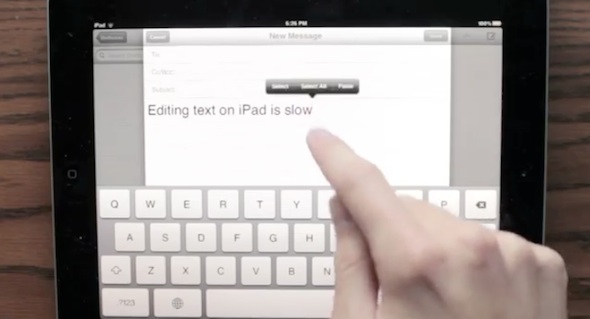
- focus to remove an app (people learn that from others )
- splitted keyboard left & right has invisible virtual keys
- double tab the button for process
- kill process by focusing on a process ( very useful when an app has crased, yet undiscoverable )
- double tab then slide left for volume
- screenshot with power + button
- take a photo with the volume button
Hidden features are very Apple-esque
no. especially if the app crashed all you are doing is removing the icon from the list.
Yet it's worth pointing out that a plain old $10 keyboard beats the iPad on every one of those. And it's not even close.
Yet people insist on putting lipstick on this pig, trying to believe that text editing on a tablet doesn't suck. They're great media consumption devices. Don't try to use them in contexts where they work poorly, nor fool yourself into thinking they can be "fixed".
Sorry, but this is a lazy and trite assertion. They are a extremely useful tools for visual designers and musicians for a start.
For musicians, I think it's a different story because the iPad usually augments an existing setup; it can be integrated with other devices to fill a specific need that can be solved by a touch interface into highly customized software. In this case, the iPad is actually allowing totally new interaction that wasn't possible before. This is much more useful than the visual designer's case, where previously established modes of interaction are simulated in an interface they weren't designed for.
The best analogy I've heard is vehicles. Trucks for heavy duty hauling, cars for ease and efficiency. Because of their form factors and feature differences, the utility of each vehicle is unique from the other.
It's almost obvious, if you think about it. Simple, really.
2009 called, they want their argument back. Lots and lots of people have created media (and even programs) on their iPads. From writers, to musicians, to programmers even (actually, just the other week, the first ever game created solely on the iPad was published to the App Store --it only needed external compilation and signature on XCode, all the actual coding and testing was done in the iPad).
>Don't try to use them in contexts where they work poorly
Really? Because for a "consumption device" I think my iPad is the best DAW controller available on the market for the money, to name just one use. It used to cost like $3000 for a comparable device just a few years ago.
And it's much more portable and distraction free to use with a bluetooth keyboard for writing than any laptop...
>nor fool yourself into thinking they can be "fixed".
Really? What exactly can't be fixed? We already have experiments with haptic feedback, and of course one can always use one with a wireless keyboard --you know, like the one Apple sells or the tens of keyboard+case combos.
Also, check out technologies like Blind Type (proximity to intended letter and word statistics based inference):
http://www.youtube.com/watch?v=7gDF4ocLhQM&feature=playe...!
Which was acquired by Google:
http://business2press.com/2010/10/01/google-blindtype-acquis...
Lots and lots of people have created programs in ed on a teletype. Something being possible doesn't equate to it being efficient.
> Really? What exactly can't be fixed?
Good, intuitive text editing with an on screen keyboard.
I have read a few articles about people creating documents and programs on their iPads. The one thing they have in common is they use external keyboards. No one uses the on screen keyboard for that kind of work.
So the question you have to ask is "will this get in the way of beginners and/or casual users?". Precisely because it's so unobtrusive and non-discoverable, I think the answer is "no".
Like the multitasking gestures on the iPad (which will never entirely replace the home button), this would be a complement to the intuitive, consistent and metaphorical (but inefficient) method of selecting text currently.
In fact precisely positioning a cursor is very nearly unworkable as a direct-manipulation task, since the target is so much smaller than a fingertip.
Why not have this be a setting that you can turn on? Or have the two ways to edit text on at the same time? There are two ways to input text right now with the voice recognition and the keyboard so why not two ways to select text?
The issue I have with the iPad keyboard is the way autosuggest works, not sure if that's related, but that's for another post.
If you accept that a virtual keyboard is direct manipulation, can you accept that swiping the virtual keyboard is analogous to pressing the arrow keys on a physical keyboard? Then it's all the same stuff. Illusion barely broken, if at all.
The main problem with this one is discoverability, but since most gestures are essentially undiscoverable, that hardly impugns it.
I think this is an excellent idea.
What would make more sense is to add faster direct manipulation gestures. There's opportunity for that, without throwing out the whole paradigm.
For example, today to select a range of text you:
1. Tap-and-hold to bring up the cursor magnifying glass
2. Let go to bring up the context menu
3. Tap "select" from the menu
4. Drag one of the endpoints to one end of the selection
5. Adjust the other endpoint if necessary
But why not this? 1. Tap-and-hold to bring up the cursor magnifying glass
2. While holding, use a second finger to drag out the desired selection!
Now that's something Apple might actually go for.The keyboard is already breaking the direct manipulation paradigm -- you type at the bottom of the screen and text appears somewhere else. This feature is useful exactly because it's not direct manipulation. You are typing text; being able to control the cursor while doing that is brilliant. Tapping the screen is pretty much equivalent to, on the desktop, taking your hands off the keyboard and using the mouse.
I don't have an iPad but I do have an iPhone and I've found cursor manipulation to be a very frustrating experience. Trying to manipulate the address bar in Safari, for example, makes me want to pull out my hair. The cursor control just isn't fine enough.
In the model above you press this area of letter buttons and slide your finger and some unrelated thing 'the cursor' moves around.
Maybe that's okay but it's not direct like the current UX
I agree however that the method in the video is not so feasible either, for exactly your reasoning.
Double-tap any text you are editing in order to select a word. That also allows you to drag the endpoints. Tapping with two fingers selects the whole paragraph.
In short: Tapping places the cursor (and brings up the keyboard if it isn’t already up), double-tapping selects a word, tapping with two fingers selects a paragraph. I couldn’t find any other gestures.
If you you double-tap and hold, you can immediately change the selection, but you are anchored to the word you selected (i.e. you can add characters to the left or the right but not both). Tapping and holding with two fingers allows you to change both endpoints with your two fingers.
Web views (and most other views of text you cannot edit) don’t work like that. In those, you tap and hold to select text. It’s a bit inconsistent, though: in iBooks (for example), tapping with two fingers will select whole paragraphs.
Someone should do a video like this showing all the native gestures. Maybe there is one but a quick google search doesn't find it for me.
A better thing to do would be to go out, make it, and get it on as many Android and jailbroken Apple devices as possible. Make it a 'must have' jailbreak app. It worked for notifications. If it's something that makes Android tablets easier to type on than the iPad that'll get their attention too.
The magnifying glass is used to set the exact cursor position, and can be invaluable when trying to position the cursor between similar looking letters on a mobile device.
There's lots of web pages where it's impossible to select text (sometimes turning off JS helps) on the iPad but the phone does it fine.
In some HTML text boxes it's just impossible to edit anything.
Selecting characters within a word is painful, it's far easier on the phone as it has an optical cursor - later Android phones have dropped this so I wonder if they're painful too.
I would like to try it myself on a device first.
I hope the developer is willing to either: a.) open source his demo so other devs can try it b.) publish the demo in the App Store (or Cydia if Apple says no)
It clearly is not confusing, as it is the same as every physical keyboard, and that is the point made in the parent. The claim is not "virtual keyboards should be identical to physical keyboards" any more than others are claiming "virtual keyboards should have nothing in common with physical keyboards".
Possibly shifting the case would be better, possibly not (is having the text jumping around helpful? Isn't the keyboard doing the minimal number of UI changes required to indicate what will happen? Does the international keyboard key literally print a globe?)
This is obviously a HUGE win. I agree that cursor motion really really sucks. And if there was an App that added this feature to the keyboard (is there?) then I'd certainly pay 0.99 for it. So that leaves me wondering about the whole viral bug report thing.
If I was being cynical I'd suggest that a there is probably a pending patent on it, and as soon as it is implemented blam! out comes the troll looking for his payout. While this seems crass and cynical in the tech world in the world of scripts and movies it is apparently a known, and defended against, tactic. Production companies being explicit to never suggest any ideas because doing so with out them asking (and pre-establishing the rights ownership thing) might leave them open to a 'stolen idea' lawsuit).
This seems... not possible to do via an app.
I took another look at the US patent process (having never patented any inventions in my 2009 desktop interaction concept), with a vague plan of "shopping" it around were it to be granted, but the cost versus the timeframe, combined with the slightly scummy feeling of trying to monetize a patent without actually building anything, ultimately stopped me.
If the latter of those reasons doesn't stop the author of this demo from springing some kind of patent trap, the former probably will.
Since soft keyboards have a ZILLION patents on them there is very little 'innovation' room. I'd wager these guys in Singapore would claim ownership of this 'feature' if their patent issues.
Look under features: "Swipe to move cursor (iOS4 or later)" http://rakkoentertainment.com/fastever/
So presumably he's filed for a patent on this technique?
Selecting text on a computer should not be patentable. But I bet it probably is because of how stupid the patent system is.Look at Swype on Android, it's both excellent and usable on any phone. There are tons of other alternative text input apps to choose from, too.
I've only had something like this happen once before, when I tried using some third-party controller hanging around a friend's office to try the game he was working on, and physically could not press the buttons because of a little ridge just above them, positioned perfectly to catch my thumbnail when I brought my thumb down.
tl,dr: if your product involves people poking at it, find a person with long fingernails and see if she can use it.
When editing text, you held down the Orange key and then drag your finger anywhere on the screen and the cursor followed. And to select text, you did the same thing with the Shift key instead.
Additionally, I wonder how text selection would work when typing with one hand. I rarely use an iPad the way it is shown here, laying on a table in landscape mode. Perhaps in addition to using shift, holding the two finger gesture could also initiate “select mode”. That way, selection can more easily be done using one hand.
Textastic on the iPad also has a great idea: they've implemented (not sure how) an extended keyboard, with an extra row of 5-way keys. Tap them and they give you the character in the middle of the key, touch and swipe towards one of the four corners and you get the character on that corner instead. It's amazing how much quicker this makes editing. The one thing it's missing is cursor movement keys (they have Home and End, but nothing finer grained), so I'd love to see it combined with features like those in the video.
SwipeShiftCaret is also a nice little tweak for typing better on iOS - it lets you swipe on the screen (although not on the keyboard) to move the cursor one character at a time: http://www.idownloadblog.com/2012/02/10/swipeshiftcaret/
It would be used for adding next/previous/done buttons to help navigate forms, for example. What Textastic does appears to be a more innovative or unique example.
This is currently available for touch devices but not that frequently used. I am not sure why?
Do people type faster because of predictive text?
Touch devices require a breakthrough in text input if they are ever to become useful for creative output of large chunks of text. We all learned to SMS using a 12 button mobile phone pad in the '90s, people have spent months and years learning vim and emacs (despite their lack of intuitivity, consistency and metaphor), why can't we get away from qwerty keyboards today?
I don't have any suggestions, but people must be coming up with better non-qwerty ideas all the time. Where are they?
The HTC Incredible has one. So do Blackberrys. It does exactly what the OP is asking for.
When I watched this video I was thinking "You mean this isn't how iPad typing works already?"
If I had an iPad, and typing worked this way, I wouldn't even notice it as a thing. Of course it would do this.
I don't understand why this person cares whether or not Apple agrees with them. The whole point of having a device capable of universal computation is to be able to make it do what you want without other people's permission.
A better use of time would be to implement this functionality for a computer that wasn't actively hostile to end-user extension. Android software keyboards sell quite a bit I believe.
(Note the project on Kickstarter that seeks to make and iPad look like a MacBook.)
If you can't attach a keyboard, why did they do this? (The) iPad would make a good portable display.
Of course, an iPad makes a good coffee table piece. Pick it up, touch the screen, gaze at it, put it down. Wow, amazing.
Dragging is also currently a correction thing. You can press 'E' then drag to 'T' if you that's what you meant. I don't know how many people use that feature though.
I find the iPad's text editing to be one of the biggest flaws of the device. Even on short things, like this comment, there's invariably some point where I've mistyped something by putting a space in one character early, and the only reasonable way I've found to correct it is to retype both words.
Should be finished in couple more hours. Anyone want to test it out and give me some feedback once I'm done?
In principle really like the idea of something like this- especially in the context of an app like yours where you're targeting long-document writers.
How's it feel to use in practice? I kind of liked the suggestion elsewhere here about needing 2 fingers to do the scrolling to prevent the cursor from accidentally running away.
I ran into a problem with the two-finger gesture, which is that Apple already use this for putting the keyboard into a split mode (see http://www.youtube.com/watch?v=PyQTkZjvSok). So I'm currently figuring out how do deal with that without preventing people from using the split keyboard. I've emailed the guy who did the video about how he did his implementation but haven't heard back yet.
I've been thinking about what else might be an alternative but am coming up short. More than 2 fingers would be impractical on an iPhone.
Question: In the video you linked to, the split-keyboard gesture looks quite specific... 2 separate fingers dragging away from or toward one another. I guess it's asking too much to hope that the device could distinguish between this kind of dragging and scroll-style dragging (2 fingers together, same direction)?
BTW I'm assuming this'll be up in the next beta sometime? Would love to play with it.
twitch
Try scrolling sidways with your touchpad when you have focus on the url-bar...
Hold control to scroll word by word.
I like that idea a lot.
It will be interesting to see how the bug reporter works in grabbing Apple's attention.
The other thing I hate about autocorrect is how I have to move my finger to the other side of the screen to say "no I don't want to correct to that". Android keyboards put the correction suggestions right above the keyboard for quick access. I have toubles typing the tiny blue "x" on the iPhone, and half the time accept the incorrect correction by mistake.
Taken together with the small screen, this making typing on an iPhone massively more frustrating than to the Android I switched from.
People seem to hold a grudge for autocorrect from the times of T9 prediction, because they keep typing in shortened text language and because they feel they lack control. This feeling is reinforced when you first use iOS as the autocorrect system comes with a generic pre-trained prediction database that might feel jarring at first, yet the system will learn progressively from you as you type, including virtual key sizes.
As an enthusiastic owner of all three iPad models, I've found that "wanting a keyboard" is a very good sign that whatever you're doing isn't a good fit for the iPad.
With that said, here's an iOS feature that'd be very easy to implement: application-level "passthrough" mode for physical keyboards. Not only would it allow for better "traditional" editors, the fact that iOS doesn't rely on the keyboard for OS-level navigation would make it a perfect vehicle for VNC and RDP clients with "transparent" keyboard support.
I could understand Apple prohibiting the use of such an API for accelerators "merely" to discourage half-assed ports of traditional WIMP apps, but why not allow the use of a physical keyboard as an "IT controller" just as they permit external controllers for games? It's simply unreasonable to insist that developers build a more "touch-based" interface to fundamentally non-touch-based remote systems, and nearly as unreasonable to expect professional programmers to adapt to a "touch-based" UI paradigm for _editing text_. The fact that the Cocoa text edit controls play well with Emacs-style key bindings is, for me at least, a HUGE advantage of OS X, one that'd be very hard to usefully duplicate in Windows.
Neat idea, but I don't see it happening.
Meanwhile, it probably would have sold tens of thousands of copies in the Android Market already.
edit: Wow, the article even includes futile instructions to spam Apple's feature tracker. I'm sure they appreciate that move.
I understand you spent a lot of money on the iPad. I don't understand the obsession with editing on it. If you need to edit text, then get a laptop.
Text editing is a round peg people keep trying to jam into an ipad's rectangular hole.
edit: I'm sorry you all spent so much money. You're still using the wrong tool.
Plus, my mom (and I assume many, many others) has completely switched over to an iPad and manages all of her emails on it. I'm sure she'd appreciate better editing features. I myself use my iPad to do some light email managing when I'm out, and I too have issues with how tedious editing text is; so an improvement is more than welcomed.
That doesn't mean we shouldn't improve text editing so it's slightly less painful for email (and other applications that involve small amounts of text editing.)
Although a pneumatic nailgun is faster than using a plain jane hammer, that doesn't make a hammer necessarily the wrong tool to use for a job.
Oh, and no one replying to you has said anything about money; only about your vague, substanceless remarks.
Editing text does not exclusively mean writing code or long documents. I and many others do a large chunk of casual web browsing, email, and messaging from iOS devices. Having better cursor movement to go back and fix a mistyped URL or quickly select a block of text from an email would be a huge improvement over the existing clunky behavior.
That said, I do not think there is anything wrong with using an iOS device for heavier text editing either. It is currently more inefficient than a laptop, but new interfaces may one day make it just as efficient as a traditional keyboard for text entry and manipulation.