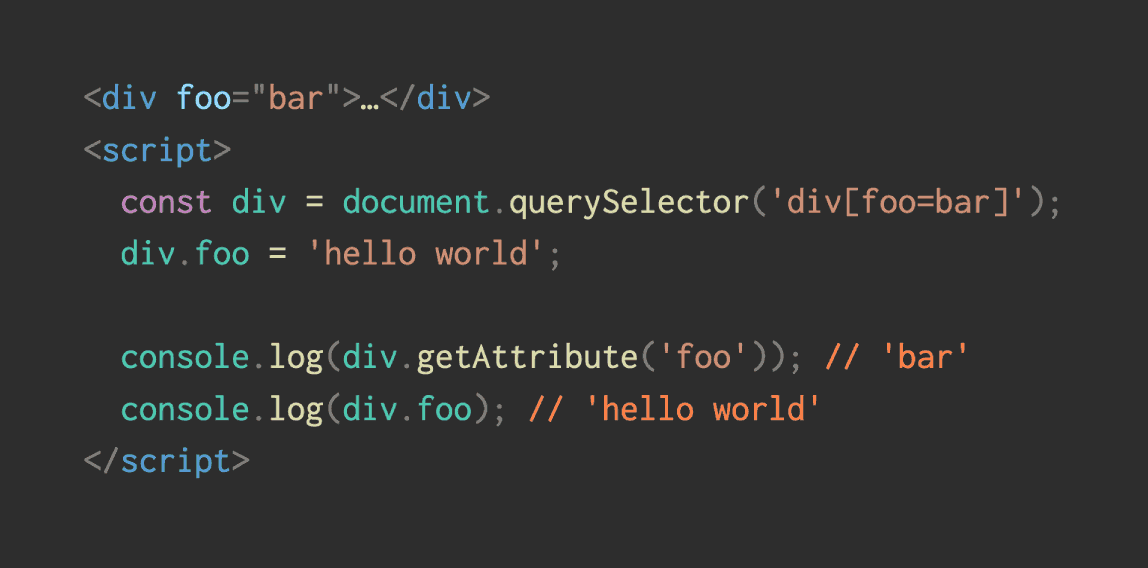
HTML attributes vs DOM properties
They
jakearchibald.com
397 points · by thunderbong · 2y ago · 152 comments
```
<div id="myDiv" data-payload="something"></div>
```
These data-attributes are then automatically available to JavaScript as a read+write property:
```
document.getElementById('myDiv').dataset.payload == "something"
```
However, one has to be mindful that HTML attributes use -kebab-case- while JavaScript uses camelCase. Thus
```
<div id="example-div" data-my-cool-data-attribute="fun"></div>
```
becomes
```
document.getElementById('example-div').dataset.myCoolDataAttribute == "fun"
```
``` document.getElementById('example-div').dataset.myID == "1" ```
becomes:
``` <div id="example-div" data-my-i-d="1"></div> ```
‘UI’ may be a better example :)
There's not really a good standard at all, but I think the _emerging_ practice is captured well here
> When using acronyms, use Pascal case or camel case for acronyms more than two characters long. For example, use HtmlButton or htmlButton . However, you should capitalize acronyms that consist of only two characters, such as System.IO instead of System.Io . Do not use abbreviations in identifiers or parameter names.
https://learn.microsoft.com/en-us/previous-versions/dotnet/n...
like thisI presume, the ability to get the exact camelCase capitalization you want is why the html spec does the conversion this way: https://html.spec.whatwg.org/multipage/dom.html#dom-dataset-...
Element.hasAttribute('data-thing')
Element.getAttribute('data-thing')
Element.setAttribute('data-thing', '...')
Much more clear what I'm doing without the awkward translating when I inevitably have to inspect/debug in the DOM.
Also https://developer.mozilla.org/en-US/docs/Web/HTML/Global_att..., which says:
> The data-* global attributes form a class of attributes called custom data attributes, that allow proprietary information to be exchanged between the HTML and its DOM representation by scripts.
Per https://news.ycombinator.com/formatdoc, you can put your URL in angle brackets to override HN's URL parser:
<https://developer.mozilla.org/en-US/docs/Web/HTML/Global_att...>
The problem with binding asterisks to URLs is that sometimes the asterisk denotes the opening or (more likely) closing of italicized text, like this:
The URL for Hacker News is https://news.ycombinator.com/
This happens relatively often - here are a few recent examples:
https://news.ycombinator.com/item?id=40391982
https://news.ycombinator.com/item?id=40324105
https://news.ycombinator.com/item?id=40317677
Arguably we could deal with this by binding the asterisk to the URL unless it's closing an italicized bit, but this wouldn't resolve the ambiguity completely—for example it wouldn't let you put <https://developer.mozilla.org/en-US/docs/Web/HTML/Global_att...> inside italics—so it's probably better not to chase the corner cases too hard. The angle bracket notation works, but only if people know about it of course!
By contexts here I’m not specifically talking about different Iframes — then it would be beholden to the same origin restrictions and probably have to use postmessage - but I mean in the context of a browser extension, where you create a parallel JavaScript execution context that has access to the same DOM
These are also called isolated worlds in the language of the dev tools protocol
This behaviour is all downside and no upside.
The spec should have simply defined a dom object and a javascript object to be one and the same, with attributes and properties being the same thing.
Acting this flippant isn’t helpful.
Could it be that this whole paradigm (which by the way has been devised for a different and much simpler use case, and abused forever since) isn't sustainable anymore?
If anything, it’s odd that they added these conveniences like reflection that make it more magical than it should be.
(Edited for clarity)
I agree that any sort of convention/rule here that’d be 100% fixed would’ve been better, but it wouldn’t be simple.
Sure, they maybe can't be serialized, but that isn't an issue.
<div onClick="func()">...</div>
Now, I'm not a JS developer, so my opinion shouldn't count for much, but that looks like a much less usable standard to me.
    // our document is like:
    // <foo bar="asdf">
    let foo = document.querySelector('foo');
    console.log('bar', foo.bar); // cool, prints asdf
    foo.bar = 'nice'; // <foo> element is now <foo bar="nice">
    foo.addEventListener('some-event', e => console.log(e)); // wait, what?
HTMLElement.addEventListener(foo, 'some-event', e => console.log(e));
Maybe I’ve just been writing backend code for too long. I see an interface like this and I figure there’s some weird shit going on under the hood, and some kind developer from the past gave me the best and safest wrapper she could.
A cynic might point out it added a lot of makework to the lives of its creators. And that this is why we can't have nice things like proper specs instead of 'living' ones.
So in a sense the name of getAttribute(name) is misleading: it's probably better renamed getAttributeValue(name), because it doesn't really return an attribute (in the sense of an Attr node), but the value of the `value` property of the attribute node (owned by the element on which it is called) whose name is `name`.
See:
https://developer.mozilla.org/en-US/docs/Web/API/Element/get...
https://developer.mozilla.org/en-US/docs/Web/API/Element/get...
You can't even move attribute nodes between elements. You can't event reorder attribute nodes within an element.
That can be a real concern in some cases (it came up recently in the context of "how do I move all the attributes on node A to node B, given that node A's attributes can be anything that can be created by the HTML parser?" c.f. https://software.hixie.ch/utilities/js/live-dom-viewer/?save... )
You can list attributes, get their name, namespace, value.
Attributes are persistent for the duration that the same root object of the given DOM tree remains available for access, such as not leaving the page.
Object properties only remain available until the given object is garbage collected.
The DOM node could be cloned, or go through serialisation and deserialisation, in which case it's now a completely different DOM node (although with the same attributes), so it won't have the non-default properties of the other node.
The DOM is a language agnostic tree model in memory. The DOM, or any node therein, is accessed via the DOM’s API. Accessing a single node in JavaScript generates a node object. That node object is an artifact in JavaScript language representing the DOM node at the moment of access.
A DOM node is a living mutable thing, but the JavaScript object representing that node is not. It’s a static object in JavaScript language. That is also why a node list is not an array.
The DOM is not an artifact of JavaScript. I can understand how this is confusing if you have never operated without a framework, but otherwise it’s really straightforward.
This is one of the reasons I abandoned my JavaScript career. Nobody knows what the DOM is, which is their only compile target, and yet everyone wants to an expert.
> A DOM node is a living mutable thing, but the JavaScript object representing that node is not.
The JavaScript object is mutable. The first example in the article shows this.
> That is also why a node list is not an array.
Modern APIs on the web return platform arrays (eg JavaScript arrays). https://webidl.spec.whatwg.org/#js-sequence - here's where the WebIDL spec specifies how to convert a sequence to a JavaScript array.
I'm fully aware of NodeList. There's a reason the spec calls them "old-style" https://dom.spec.whatwg.org/#old-style-collections
> I can understand how this is confusing if you have never operated without a framework, but otherwise it’s really straightforward
Sighhhhhh. I've been a web developer for over 20 years, and spent a decade on the Chrome team working on web platform features. Most of my career has been on the low-level parts of the platform.
Could it be possible that people are disagreeing with you, not because they're stupid, but because you're in the wrong? Please try to be open minded. Try creating some demos that test your opinions.
I found the take on attributes for default configuration to be an odd take. Think about "class" attribute for example. If it only ever showed the default, toggling classes would look really odd in the dom inspector / stringified html, either not showing an active class or showing an inactive one.
An alternative system would be where the browser adds and removes classes of its own, in response to things like hover/focus state. Thankfully it doesn't, and pseudo-classes are used instead.
Search for 'html properties' gives results mostly about attributes.
Setting 3 attributes on an html element:
<input id=good x=morning value=hn>
    <script>
        e = document.querySelector('input');
        console.log(e.id);
        console.log(e.x);
        console.log(e.value);
    </script>
    good
    undefined
    hn
https://developer.mozilla.org/en-US/docs/Web/HTML/Element/in...
It even calls "value" a property AND an attribute: "...access the respective HTMLInputElement object's value property. The value attribute is always..."
And HTMLInputElement lists "value" under "properties":
https://developer.mozilla.org/en-US/docs/Web/API/HTMLInputEl...
So maybe it's not as easy. Maybe <element some=thing> sometimes sets a property and sometimes sets an attribute.
In JavaScript, you have an HTMLInputElement with a "value" property [1]. Getting the "value" property of an HTMLInputElement reads from its <input> element's internal value, and setting the "value" property of an HTMLInputElement writes to its <input> element's internal value. (The "value" attribute remains unchanged, since it is only used for initialization.) The DOM object is just modeling the actual element.
In general, the property on the DOM object will not exist unless it is specifically documented to, such as "id" and "value".
[0] https://developer.mozilla.org/en-US/docs/Web/HTML/Element/in...
[1] https://developer.mozilla.org/en-US/docs/Web/API/HTMLInputEl...
For 'value', MDN says:
> it can be altered or retrieved at any time using JavaScript to access the respective HTMLInputElement object's value property
While it doesn't say it is implemented using a setter and a getter (I suspect because it doesn't need to go into such details that are confusing if you don't know this mechanism), I think this is what it implies. I believe this can be found in the spec of the Javascript implementation of DOM.
So it is as "easy" as it looks (note my phrasing totally allows you to find it looks difficult): for well-known HTML attributes, there are usually getters and setters for the corresponding DOM property. Usually, it's the same string, sometimes there's a conversion, for instance with booleans (for the open and the hidden attributes).
> When a property reflects an attribute, the attribute is the source of the data. When you set the property, it's updating the attribute. When you read from the property, it's reading the attribute.
value is different. From https://jakearchibald.com/2024/attributes-vs-properties/#val...
> the value property does not reflect the value attribute. Instead, the defaultValue property reflects the value attribute.
Follow the link for the full explanation.
There might be additional optimizations or storage features for certain attributes. For example for id, since you mention this attribute specifically, you pretty much want document.getElementById() to be fast, you probably don't want it to traverse the whole DOM tree each time is called, so there's likely an additional mapping from ids to DOM elements stored somewhere per document, that is to update each time the id attribute is changed (though the spec [1] does appear to say anything about the speed characteristics of getElementById; in practice I personally certainly assume it's quasi instantaneous when using it).
For other attributes, more generally, you need to store the attribute value, not the property value (which you can cache, though), because the property value can be coerced. For instance, hidden="hidden" or hidden="HIDDEN" both lead to .hidden == true. But you need the exact value for getAttribute or for HTML serialization.
[1] https://dom.spec.whatwg.org/#ref-for-dom-nonelementparentnod...
For complex types it is. But why and when do you need to store complex types in the DOM? Isn't that always a bad idea?
I'm a seasoned web dev, but haven't been working on complex frontend apps, because I believe complexity and frontend web don't go together. So I may very well miss some use-cases.
https://developer.mozilla.org/en-US/docs/Web/API/HTMLMediaEl...
It can look cleaner (matter of taste). It looks like a native JS assignment, and it's shorter.
For open and hidden, it's way more intuitive and convenient to set and get booleans than testing the existence of the corresponding HTML attribute (Still not a fan of this thing, years after having learned this).
(but maybe you meant "Why use domElement.randomprop instead of something like domElement.dataset.randomprop"?)
That would not work either:
> A control's value is its internal state. As such, it might not match the user's current input.
> For instance, if a user enters the word "three" into a numeric field that expects digits, the user's input would be the string "three" but the control's value would remain unchanged. Or, if a user enters the email address " awesome@example.com" (with leading whitespace) into an email field, the user's input would be the string " awesome@example.com" but the browser's UI for email fields might translate that into a value of "awesome@example.com" (without the leading whitespace).
From the standard: https://html.spec.whatwg.org/multipage/form-control-infrastr...
The serialisation isn't expected to represent page state. Imagine how that would work with <canvas>, or even things like event listeners.
If pseudos were extended to include all property state, DOM serialised or not, then we'd be onto something.
> The funny thing is, React popularised using className instead of class in what looks like an attribute. But, even though you're using the property name rather than the attribute name, React will set the class attribute under the hood.
Yeah, I never understood why they did this. className in their XML-like syntax is ugly and it doesn't seem like they needed to do this. They could have gone with class. They are parsing this with their custom JSX parser, and these things are not JS identifiers. IIRC you need to use {accolades} to put JS expressions (objects) there.
TL;DR: they’re not the same thing. Only sometimes they match (e.g. `id`) but often they don’t.
Something fun: JSX does not use attributes, even if they look like it. That’s why they have unusual naming/formatting (`htmlFor` and `className`)
https://developer.mozilla.org/en-US/docs/Glossary/IDL#conten...
If anything, web components make this behavior easier to control. They represent the ground truth rather than providing a leaky abstraction. The article demonstrates this in several places.
Since custom elements are still in the regular DOM you have to deal with this soon enough that writing a custom element is likely the time you'd learn about this.
And then you have to write many lines to deal with the impedance mismatch while you wouldn't in any component framework, including ensuring that both are synced in whatever form of serialization you come up with -- which ends up being an even greater mess usually... not to mention you also pay the de/serialization costs if you want to keep a real sync between them.
As you can see I have written more `attributeChangedCallback`s and property proxies than I'd like (which is zero).
I just want to reiterate: DOM objects do have properties, because they are JavaScript objects. You make it sound like they have properties because this is something the DOM API set. And unfortunately this is only the case for some special HTML attributes, not for all of them.
> the above only works because Element has an id getter & setter that 'reflects' the id attribute … It didn't work in the example at the start of the article, because foo isn't a spec-defined attribute, so there isn't a spec-defined foo property that reflects it.
This is where the distinction is made between merely setting a property on a JavaScript object, and cases where you're actually calling an HTML-spec'd getter that has side effects.
The whole "reflection" section of the article is dedicated to how these HTML-spec'd getters and setters change the behaviour from the basic JavaScript property operations shown at the start of the article, and how it differs from property to property.
"LOL", I suppose.