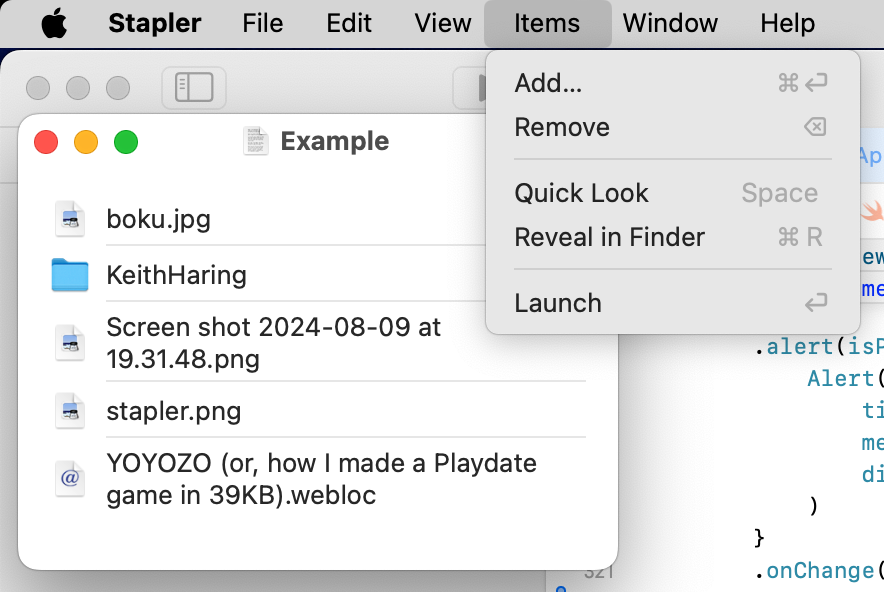
Stapler: I remade a 32 year old classic Macintosh app ⌘I Get Info
The latest version of this app is now available as a free download on the Mac App Store.More info on my apps website at: gingerbeardman.com/apps/stapler/
blog.gingerbeardman.com
219 points · by msephton · 2y ago · 70 comments
It still feels nuts to me that we have all this stuff and yet when entering/exiting 'work mode' I have to either leave everything running indefinitely or reposition all my work apps every time I launch them.
It’s especially bad when I need to restart the browser because then all the windows get collected into one space again. Also annoying that relaunching the browser reopens all those windows in the first place.
I like the idea of this app for launching a collection of apps together but the application is the wrong level of granularity. I don’t want all of my browser windows at once. I want just one of them along with the windows of other applications that match that task.
I bet there’s some combination of tools I could cobble together and customize to achieve this but I don’t want to work that hard at it. I really should be able to just open up a new space, open up and arrange all the windows I want to work with on tasks for that space, and then press save and give it a name.
Then I should be able to close that space and reopen it by name any time I like, with all of the windows exactly as I left them, regardless of whether or not any of those applications are open on other spaces.
Xerox Star & Smalltalk had the task-centric approach and Alan Kay @alankay has said that Steve Jobs/Apple missed that aspect in their takeaway from their visit: "(they) missed a few things about the GUI. For example, that it had unlimited and persistent “desktops” which could be used to sustain work/projects over time without having to tear down and build up, and without stovepiped apps, etc."
https://www.quora.com/What-was-it-like-to-be-at-Xerox-PARC-w...
So happy that I could remember enough of this story to find that link.
Neither of these are, of course, user-friendly for the vast majority of people. But they do afford some thoughts, concepts, and mechanisms which might be used in task-oriented UI design.
This is the browser's decision, not macOS's, though. At least for Firefox, you can turn it off ("Open previous windows and tabs" in General > Startup).
I guess what I really want isn’t possible without either ugly hacks or a total rearchitect of the operating system: the elimination of the “stovepipe” applications paradigm.
Applications should not own their windows, the operating system should. In practice this would mean an application is not a program you invoke by clicking on it. Instead it should be a library you install that tells the operating system how to read, display, edit, and write certain kinds of documents or document-like resources (such as web pages).
Then it would be easy for the operating system to offer unlimited persistent desktops that need to only remember which resources are open and a bit of metadata controlling the appearance of each window (position, shape, size, view setting).
There is an app called Stay that remembers positions of Windows based on the app, title, etc. I used it for a while, but not recently. https://cordlessdog.com/stay/
There is an app, Workspaces, I think, but it's not useful enough to bother using.
Probably should be a macos feature one day
What is an activity in KDE and what can I do with it? https://askubuntu.com/a/705835
I’ve been a Moom user for a long time, and the craziest thing to me is when they had to change⁽²⁾ from using a miniature rectangular grid for positioning and resizing a window to a slanted hexagonal grid because of a patent⁽³⁾.
Then leave the windows of an app open as you quit it. When you next launch the app its windows will restore to their previous size and position. If you close the windows first, then the app will restore to having no windows open.
May not work for every case.
I have a bunch on windows in an app, that tend to move to a different monitor after the machine goes to sleep.
Each window has a different title, which is something KM can act on, so I've made an action that moves each individual window to a specific place. I've tied this action to Alt-P (for "place"), so I can manually correct when they've drifted.
So it's not a generic "put all windows where I left them" solution, but it's a hell of a lot better than manually doing the same thing several times a day.
Apple does not provide APIs for that. A handful of apps control spaces, and all of them by automating GUI actions.
If I've one frustration with computer interfaces, dating back to the 1990s, it's this. If anything it's become worse with time as apps, both desktop and mobile though especially the latter, become more self-centric, to the point of having their own, non-filesystem-based, data silos. I understand some of the security reasons for this (apps are themselves increasingly untrusted and untrustworthy, and data-sharing is a significant risk). But it is extraordinarily frustrating when trying to work with multiple tools.
Modern MacOS is particularly pernicious in that I'm often working between multiple applications, but on the same project, and the friction of raising and lowering all app-associated windows as I cycle between these, often navigating to a workspace I'd not meant to go to, is quietly maddening.
The Linux / X-Windows notion of focus-follows-mouse addresses this somewhat. Your current app is whatever the mouse happens to be on top of. On MacOS this simply isn't available, though there are some ... hints of this. E.g., if I happen to have the mouse over a browser window I can scroll that window with the mouse. But if I then, say, hit Cmd-W to close that tab ... suddenly the actually focused app which I'd forgetten about gets a kick in its nethers. This happens to me several times a week, if not per day.
I don't know that Stapler is the true solution to this, but it does seem to track in that direction.
For example, the dominant atomic concept in Xerox Star was the document [1]. Documents are an abstraction just above files. A webpage is a document, but is made up of numerous files like the graphics, fonts, executable scripts, etc. Document oriented systems like Star also deemphasize applications. The system is supposed to open up the correct application(s) when you choose to interact with a document. But even with this as the core abstraction, the system still had to provide methods to work directly with files and applications.
Other systems, like Plan 9, nixes, MS-DOS, CP/M, etc. focus on the file as the atomic primitive and try to build around that. But when things moved to GUIs, many of the development teams focused on the Applications. Windows 3.x famously only showed users organized collections of applications, with file management as just another application. But Windows 3.x was sitting on top of DOS which oriented itself around files. The nixes in the meanwhile forgot about documents almost entirely.
Where I think they've failed to evolve is not in reimplementing these three things over and over, but in assembling them into useful, higher-level, abstractions. What I really think is missing is a way to assemble two higher-levels: workplaces which implement workflows.
Pipes and scripts sort of mimic workflows, and desktops sort of mimic workplaces, but these concepts have really stalled and there's almost no real system-level tooling for building these things, especially in a GUI. For example, scripts are really used as a kind of a way to assemble pipes into pseudo applications + automation, but it's hard to turn them into real workflow tools, and desktops just allow you to dump a bunch of application windows and files into one place, but there isn't any real scoping to it.
Thanks for filling in the gaps for all of us who don’t just use one app at a time!
[1]: https://bunchapp.co/
The documents saved by Stapler are also plain text (JSON). But because the app is trying to be a model citizen in the current model of macOS security/annoyance, it contains the file bookmarks that macOS gives us (which are binary blobs encoded as Base64 text, so incomprehensible to mere humans) rather than the human-readable file paths you might expect. Kind of annoying, but there we go!
I've had a desire for something like this (windows/linux) -- what would be cool is if it knew the window size and layouts?
So you could do a launch group that will do the whole desktops workspace - and can be saved (but also has a reset button to snap back to the layout if you mix things up. Support for a second desktop to launch then to - so you can throw one context cluster on each...)
---
Weren't you the one who lost all their archive content? What was the timeline with all of that?
If you want the Document to control the properies of the desktop, then I would write a little Automator app, shell script, Shortcut, etc. to do that and then add that to the Stapler Document. Use all available tools together.
---
Internet Archive: yes, that was me. Most of my account data is still gone. I don't think the deleted data will ever be restored. And so it goes. The blog post about that one has been updated with this info. Thanks for asking.
Most IT people around me, like myself, enjoy building things. A side project is a good opportunity to do so "just because", without bullshit you don't like - no bureaucracy or approval, no story points, no project meetings, no design documents, writing tests and documentation is up to you. You just sit down, do, and get the feeling of actually making progress in a reasonable time and at the end of the day, having built something. It's energizing.
Sometimes, it is about the product though, and you build yourself a nice tool because you aren't happy with what's out there. Of course, the two goals can often be combined - and at the very least, some useful product is a good excuse to practice the enjoyable hobby.
I tried adding a folder and Visual Studio Code as the things to open (because Visual Studio Code can open, well, anything, and this way I could at least start up a workspace) and got the same result.
LaunchList 0.8 (2009) is 880KB (Intel-only)
...but interestingly LaunchList contained an unused "test" icon file weighing 320KB(!) so really it is 560KB.
Edit: ah, I think you're referring to Mac OS X Classic Environment running old system in which you're running the old Desk Accessory. Matryoshka dolls!
The editor is a native macOS window that's kind of like list view in a file manager, or a spreadsheet, or a little folder...depending on your point of view. Plus some menu commands and keyboard equivalents.
The items in each list are macOS "bookmarks" which are a type of authorised/verified/secure alias (in fact, they're still called aliases in the code) that have been around for about 10–15 years. They contain the path plus a bunch more info. As macOS becomes more locked-down the recommended way of accessing files is to retrieve these bookmarks through the normal layers of system permissions and security. Without the bookmarks, for example just using plain text paths, I would not be able to show the full images in Quick Look or easily launch the list items. A key benefit is that the bookmark will still resolve if the file is moved somewhere else on the same disk, or even to a different volume!
Here's more info on file bookmarks: https://eclecticlight.co/2020/05/21/bookmarks-a-type-of-alia...
I store the items as JSON in the saved file, simply because I prefer it to XML (which is the main/default option). I wanted the files to still be human readable and editable to a degree.
The files are launched using the default app specified by that file, so it can be changed on a per-file basis. Individual images might open in an image editor, image viewer, app to run OCR, script to run OCR on it, etc.
Can we make it more like Stapler?