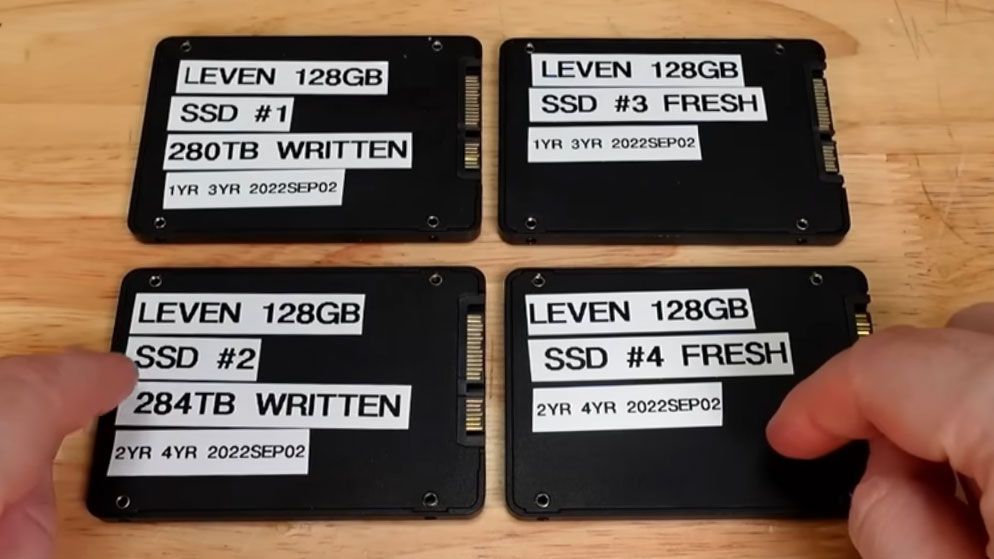
Unpowered SSD endurance investigation finds severe data loss and performance issues
YouTuber SSD tests reveals problems all round on two-year-old TLC drives.
Tom
123 points · by progval · 1y ago · 87 comments
Even though it's a cheap drive, it's rated endurance wasn't really that low. 600 cycles (1200TBW/2TB) is pretty common for consumer SSD: that's higher than 480x but not vastly higher.
Glad folks are chiming in with the temperature sensitivity notes. I have parts coming in for a much bigger home-cloud system, and was planning on putting it in the attic. But it's often >110°F in the summer up there! I don't know how much of a difference that would make, given that the system will be on 24/7; some folks seem to say having it powered on should be enough, others note that usually it's during read that cells are refreshed.
Doing an annual dd if=/nvme0n1 of=/dev/zero bs=$((1024*1024)) hadn't been the plan, but maybe it needs to be!
cat /dev/nvme0n1 > /dev/null
The fact that even the "fresh" drive, with just 1 cycle, is already showing some degradation is also concerning.
If you have specific random IO high performance needs, you can either
- get a SLC drive like https://news.solidigm.com/en-WW/230095-introducing-the-solid...
- make one yourself by hacking the firmware: https://news.ycombinator.com/item?id=40405578
Be careful when you use something "exotic", and do not trust drives that are too recent to be fully tested: I learned my lesson for M2 2230 drives https://www.reddit.com/r/zfs/comments/17pztue/warning_you_ma... which seems validated by the large numbers of similar experiences like https://github.com/openzfs/zfs/discussions/14793
Do you realize the irony of cautioning about buying off the shelf hardware but recommending hacking firmware yourself?
Edit: and to preempt the “but make it an option”. That requires support software they may not want to build and support requests from users complaining that toggling SLC mode lost all the data or toggling QLC mode back on did similarly. It’s a valid business decision to not support that kind of product feature.
The problem ofc is that with a tape you need to also have a backup tape drive on hand.
Overall if you get a good deal you can have a reliable backup setup for less than $1000 with 2 drives and a bunch of tape.
But this is only good if you have single digit of TBs or low double digit of TBs to backup since it’s slow and with a single tape drive you’ll have to swap tapes manually.
LTO5 is 1.5TB and LTO6 is 2.5TB (more with compression) it should be enough for most people.
All error correction has a limit. If too many errors build up, it becomes unrecoverable errors. But as long as you reread and fix them within the error correction region, it's fine.
zfs in mirror mode offers redundancy at the block level but scrub requires plugging the device
> All error correction has a limit. If too many errors build up, it becomes unrecoverable errors
There are software solutions. You can specify the redundancy you want.
For long term storage, if using a single media that you can't plug and scrub, I recommend par2 (https://en.wikipedia.org/wiki/Parchive?useskin=vector) over NTFS: there are many NTFS file recovery tools, and it shouldn't be too hard to roll your own solution to use the redundancy when a given sector can't be read
A few tens of TBs. Local, not cloud.
[0] Maybe 7 years ago. I don’t know if anything has changed since, e.g. honest, up-front labeling.
[0*] For those unfamiliar, SMR is Shingled Magnetic Recording. https://en.m.wikipedia.org/wiki/Shingled_magnetic_recording
https://www.ebay.com/itm/156749631079
These are reasonably low power, and can take up to 16GB of ECC ram which is fine for small local NAS applications. The cpu is socketed, so I've upgraded most of mine to 4 core / 8 thread Xeons. From rough memory of the last time I measured the power usage at idle, it was around 12w with the drives auto-spun down.
They also have a PCIe slot in the back, though it's older gen, but you'll be able to put a 10GbE card in it if that's your thing.
Software wise, TrueNAS works pretty well. Proxmox works "ok" too, but this isn't a good platform for virtualisation due to the maximum of 16GB ram.
Good question. There seems to be no way to tell whether or not we're gonna get junk when we buy hard drives. Manufacturers got caught putting SMR into NAS drives. Even if you deeply research things before buying, everything could change tomorrow.
Why is this so hard? Why can't we have a CMR drive that just works? That we can expect to last for 10 years? That properly reports I/O errors to the OS?
Please don't tell everyone so we can still keep buying them? ;)
There might be SMR drives in there, but I suspect not.
It was a mistake for the Hard Drive business community to push them so hard IMO. But these days the 20TB+ drives are all HAMR or other heat/energy assisted tech.
If you are buying 8TB or so, just make sure to avoid SMR but otherwise you're fine. Even then, SMR stores data fine, it's just really really slow.
Given the context of long term storage... why?
(Yes, I know some applications can be agnostic to SMR, but it should never be used in a general purpose drive).
Related: SSD as Long Term Storage Testing (132 points, 2023, 101 comments) https://news.ycombinator.com/item?id=35382252
What is the protocol you should use with SSDs that you’re storing? Should you:
- power up the SSD for an instant (or for some minutes?) without needing to read anything?
- or power up the cells where your data resides by reading the files you had created on the SSD?
- or rewrite the cells by reading your files, deleting them, and writing them back to the SSD?
partclone.filesystem --source /dev/sdx --clone --output /dev/nullThe correct protocol is to copy the data to a more durable medium and store that.
Any decent SSD will background rewrite itself over time at an appropriate rate. Detecting that it needs to do so after 2 years in storage seems trickier to get right (no realtime clock) and trickier to test.
I’d be curious to know how quickly the drives in the article “heal” themselves if left plugged in. There’s nothing wrong with the hardware, even if they did lose a few sectors.
If you really want to create a correct protocol, you can accelerate nand aging by sticking them in an oven at an appropriate temperature. (Aging speedup vs temperature curves are available for most nand devices.)
Perhaps the most interesting part of the experiment series has been just how much longer these cheap drives with tons of writes have been lasting compared to the testing requirements (especially with so much past write endurance on the one just now starting to exhibit trouble). Part of the impetus for the series seemed to be lots of claims on how quickly to expect massive problems without any actual experimental tests of consumer drives to actually back it up. Of course n=4 with 1 model of 1 brand drives but it's taken ~20x longer than some common assumptions to start seeing problems on a drive at 5x its endurance rating.
Yeah. Paper is the best long term storage medium, known to last for centuries.
https://wiki.archlinux.org/title/Paperkey
It's a good idea to have a backup copy of the encryption keys. Losing signing keys is not a big deal but losing encryption keys can lead to severe data loss.
Carve it into stone if you it need to last longer than the Romans.
This is similar, from 1634BC, but I don’t know what it says:
https://archive.org/details/mma_cuneiform_tablet_impressed_w...
(Edit: Allegedly if you use low-numbered storage blocks you’ll be okay, but the advertised capacity (both packaging and what it reports to OS) is a straight-up lie.)
Man, I’d (figuratively) kill for a startup to build a prosumer-friendly LTO drive. I don’t have anywhere near the hardware expertise myself, but I’d gladly plunk down the dosh for a drive if they weren’t thousands of dollars. Prosumers and enthusiasts deserve shelf-stable backup solutions at affordable rates.
> thousands of dollars
I know this varies a lot based on location, but if you're stateside, you can get perfectly functional used LTO6 drives for $200-$500 that support 6TB RW cartridges that you can still buy new for quite cheap (20pk of 6TB RW LTO6 carts[0] for $60), much cheaper than any other storage medium I'm aware of and still reasonably dense and capacious still by modern standards. Sure it's 3-4 generations behind the latest LTO's, and you might need to get yourself a SAS HBA/AIC to plug it in to a consumer system (those are quite cheap as well, don't need to get a full RAID controller), but all in that's still quite an affordable and approachable cold storage solution for prosumers. Is there a reason this wouldn't work for you? Granted, the autoloader/enclosed library units are still expensive as all hell, even the hold ones, and I'd recommend sticking to quantum over IBM/HPE for the drives given how restrictive the later can be over firmware/software, but just wanted to put it out there that you don't necessarily need to spend 4 figures to get a perfectly functional tape solution with many many TB's worth of storage.
0: https://buy.hpe.com/us/en/storage/storage-media/tape-media/l...
If the idea is to back up a hard drive, it's not nice to require big piles of tape to do it. Right now even the current LTO generation (LTO9, 18TB native capacity) can't back up the current highest capacity hard drives (28TB or more, not sure). In fact HDD is currently cheaper per TB (20GB drive at $229 at Newegg) than LTO6 tape ($30 for 2.5TB) even if the tape drive is free.
LTO would be interesting for regular users if the current generation drive cost $1000 or less new with warranty rather than as crap from ebay. It's too much of an enterprise thing now.
Also I wonder what is up with LTO tape density. IBM 3592 drives currently have capacity up to 50TB per tape in a cartridge the same size as an LTO cartridge, so they are a couple generations ahead of LTO. Of course that stuff is even more ridiculously expensive.
It only starts to go sideways when you step up to LTO7 and above or try to get an autoloading all-in-one library unit. Though you can get lucky if you're patient/persistent in your bargain hunting.
Are there any way we could fix those corrupted bit flip files with USB Flash?
There's also many many types of flash drives (well beyond just MLC/TLC/QLC), and there's a huge difference between no names, white labels, and budget ADATA's and the like, and an actual proper high end/enterprise SSD (and a whole spectrum in between). And No, 990/9100 Pro's from Samsung and other similar prosumer drives are not high end flash. Good enough for home gamers and most prosumers, absolutely! They would also likely yield significant improvements vs these levens in OP. I'm not trying to say those prosumer drives are bad drives. They aren't (The levens though, even new in box, absolutely are).
I'm merely saying that a small sample of some of the worst drives you can buy that are already beyond their stated wear and tear is frankly a poor sample to derive any real informed opinion on flash's potential or abilities. TL;DR: This really doesn't tell us much other than "bad flash is bad flash".