Can You Really Trust That Permission Pop-Up On macOS? (CVE-2025-31250) | Watch This Space
A security research blog.
Watch This Space
377 points · by nmgycombinator · 1y ago · 251 comments
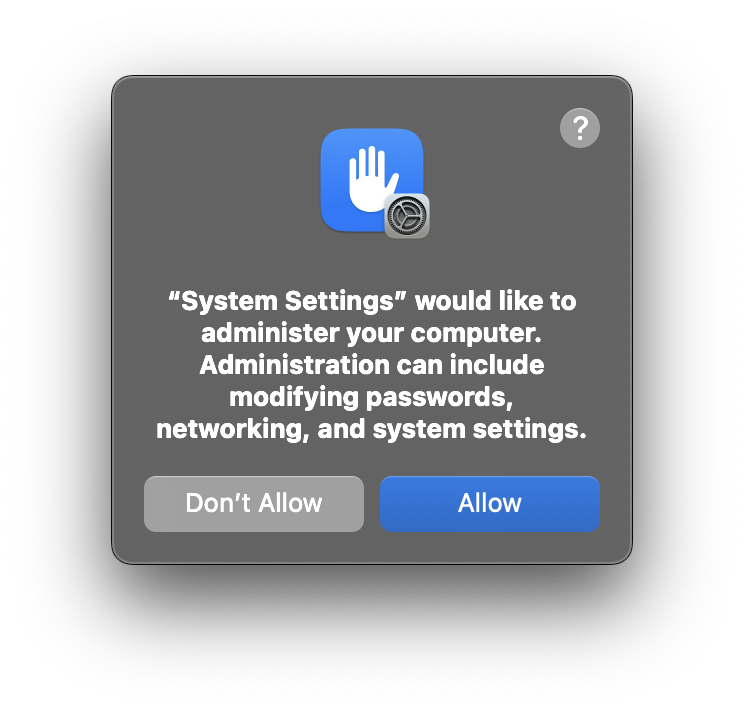
Anyone with basic skills can whip up a convincing replica of that popup on the Web, and the "bottom 80%" (at least) of users in technical savvy would not think to try dragging it out of the browser viewport or switching tabs to see if it is fake or real.
The only protection against this kind of stuff is to NOT teach users that legitimate software pops up random "enter your password" dialogs in front of your work without any prompting. That's what these dialogs are doing.
Display a colorful flashing icon in the menu bar. Use an interstitial secure screen like Windows does. Whatever. But the modern macOS 'security' UI is wildly bad.
The UX is different from the apps saying “Hey, open the preferences panel and give us XXX” and there you can see the app, the capability toggle, decide to turn it on, or even go back to turn it back off.
These experiences have been why I’ve not a big fan of “capabilities” as a concept. The UX around them is awful, and almost has to be.
“Enable <root my computer> to enjoy your new app fully. “ This is what you get if the vendors have any say in what the messages should be.
Not really helpful.
I don't think the UX has to be awful. The problem is just that they're kinda half baked on macos, and bolted on, and not really a first class citizen. There's no reason you couldn't have:
- A preferences dialog showing which long-lived capabilities you've granted to which application. (Which is almost exactly what the accessibility preferences pane already is.) Ideally this UI could have a log of ways in which the application has used that capability recently and the ability to revoke it. Maybe even the ability to review the app's use of the capability. Show the review score to other users when the app asks for the permission.
- A little blob of text saying why the application is asking for the specified permission. iOS requires this from all 3rd party apps. So its kinda weird that MacOS is missing explanatory text entirely on these popups.
- Clear indication of what would happen if you said no.
- Interdiction. In a good capability systems (eg SeL4), a capability object doesn't tell you what you can do with it. Eg, you can't ask a file handle which file its actually associated with. This means you can craft your own "virtual" capability which fakes the expected behaviour and pass that to an app instead. Any calls made using the capability come to you. Whenever phone apps ask for access to my contact address book, I'd love to be able to say yes, but give them access to like 100mb of fake entries instead.
- And on top of interdiction: logging, call whitelisting, "Little snitch", etc.
- More fine grained capabilities. I don't want to give any app a "root my computer" capability. I don't want that to be a thing applications ever need or get access to.
I think macos's problem is that its trying to bolt on capabilities after the fact. POSIX isn't built around capabilities. As a result, app developers don't think in terms of capabilities, and they expect their apps (new and old) to work without them. In a real capability based OS, fopen() should probably take a capability as a parameter. But making that change would require changing just about every program ever written for the platform. And modifying the standard library of all programming languages.
The capability systems you're mentioning sound cool, but they sound a lot more complex. And if that's true, and they aren't built with irreducible complexity, then it would be possible to work around it by just pulling out bits and pieces from the system and abusing them.
macOS doesn't show explanations because apps can come from outside the App Store meaning nobody is checking that the explanation is actually true, but users would reasonably assume someone has checked it.
Ditto for the explanation of what happens if you say no.
Fake entries would just be a very weird user experience if the user accidentally denied access, would freak people out, and be very un-Apple like.
macOS already has very fine grained capabilities. That's what the Privacy & Security pane shows you. In fact, on macOS every app is sandboxed out of the gate regardless of whether they opt in or not, and root is disempowered. This is better than other operating systems.
They are definitely not always awful.
Apple used to make fun of Vista's UAC, but they've ended up with the same patchwork of sudden prompts, and even weaker UI.
But here we are, detached modals, because of Apple's weird fetish for mobile UI on everything.
---
[0] https://kagi.com/proxy/latest?c=LsHiRSPxhD29sXqLhdI0j1EsQ98n...
They could probably add an opt-out step two for consumer level use where that step is also required for all root permissions requests. I would add a fast blink of the webcam light to prove trusted modal is open.
Currently it is incredibly clunky (they should put a notification at the top of the settings like for software updates), but you have some indication what app is triggering it and the dialogue could be hidden until it is time to review updates. Showing all entitlements and privacy settings should also be required any time a root password is requested with changes being noted as unusual, including changes in developer accounts.
I think that was the idea, at least.
I prefer UAC over whatever the hell Apple is doing. I've had days where I close my applications after a day of work and find two or three password prompts just hovering in the background. Were they important? Should I still permit them? Who knows!
It says it 'encrypts' your password, because it needs to access your Keychain. The dialog says this, but there is no way to opt out.
You are 100% wrong.
EDIT: https://apple.stackexchange.com/questions/467137/are-keychai...
If I downgrade myself to a non-admin user, and install apps into my home Applications, then I'm not bothered by permissions requests from apps to update themselves. Almost all of them can just do it, on their own, with non-admin permissions. The only exceptions I've found are Tailscale and other stuff that needs higher level OS integration.
Edit since upvotes: Non-admin user operation was recommended by the Pareto Security app, see info on this specific item: https://paretosecurity.com/mac/checks/not-using-admin
All Pareto security checks: https://paretosecurity.com/mac/checks
App: https://paretosecurity.com/mac and https://github.com/paretoSecurity/pareto-mac
Granted I haven’t seen the bug in awhile, but I also never saw acknowledgement of it being fixed so…
The only apps I run from /Applications that aren't part of the OS are the ones that still use "Installers" like Adobe apps, because I assume they spew crap all over anyway. I haven't tried moving those, but I wouldn't be surprised if they deeply cared.
[1] The idea being that I could then migrate more easily by copying the whole home directory, and thus all my apps that didn't require "installation" would come over.
Unrelated, but this is what I find so interesting and cool about the drag-and-drop to install method prevalent on macOS. People complain, but what I guess they don't realize is that all they're doing is moving a folder into their `Applications` folder and that the "wizard" way they're used to is far messier.
Granted, since I think it's up to the developers, they often seem to make the user drag and drop into the root `Applications` folder.
1. Apps can't tamper with each others files. Try writing an app that writes to another app's bundle, even if it's in $HOME, and you'll find you can't. One way to test this quickly is to ensure that your terminal app doesn't have "Manage applications" privilege in the settings app, restart it, then use vim to open a file in a bundle that appears to have user write permissions. You'll find it is read only.
2. root can't make arbitrary changes to the system unless you disable SIP (requires messing around in recovery mode terminals).
1. OK, so it requires terminal to have some entitlement first I guess. If you needed to grep some app's bundle in the past you probably gave it already.
2. many apps ask for admin user/password when updating. including say Docker. some developer software specifically says "we ask you this because we need to sudo"
stuff under SIP I think includes some stock apps, some top level /bin and the like, but everything else is fair game for root. Which is a lot. If you use MacPorts then all of that is under sudo
/Applications seems defense in depth for developer machines that often run untrusted code. Apps ask for admin to update & then I can deny it and go check the official site and stuff for download later
Not every single app installer, only those app installers written by incompetent devs.
Those written by educated devlopers give you the option to install "for all users" or "just me" (or words to that effect).
A previous version of this article mentioned below that this CVE was patched in macOS Sequoia 15.5 et al., but I was a bit mistaken in that. Despite being released today as well, it appears that macOS Ventura 13.7.6 and macOS Sonoma 14.7.6 are not patched against this vulnerability.
I wrote that sentence assuming that Apple would have included a patch in all of the releases. It was only later, when I checked the security release notes, that I saw I was not credited under the other two releases. I reached out to Apple to clarify if these releases were patched. As of writing, I have not heard back.
I chose to do my own testing and spun up a virtual machine. After some difficulties I got it updated to macOS Sonoma 14.7.6 and was able to compile and run my proof of concept. It still worked. I would assume the same is true for macOS Ventura 13.7.6. I'm not sure why Apple didn't include the patch in these two releases.
I will update the post when I have more information and/or context.
Last I checked there was no solution for this on Linux though. Heck I couldn't even find a way to switch it to use biometrics.
UAC on Windows opens up on the secure desktop, which is isolated in protected memory and not accessible to other processes. It's also visually distinct, hiding all other UI elements, and nothing else can present the actual secure desktop, only UAC can. Granted, I've seen some fairly convincing looking fake prompts (that regular users would fall for) but to me they were still obviously fake, and they were unable to hide all UI elements like UAC does.
The secure desktop for UAC is also supposed to help prevent cursor offsets and other attacks (replacing the system cursor with fake one that shows as if it's over the "no" button but is actually going to click on "yes").
macOS could really use something like that for it's prompts, and I don't know why any other OS hasn't implemented something like UAC's secure desktop.
There are ways to avoid the CTRL+ALT+DELETE safeguard, but it's a lot harder than it is to spoof a password prompt that looks like the OS one. It's kind of unfortunate that KDE went with the macOS/Windows XP approach rather than doing what Windows does.
Yes it has plenty of a stuff to complain about, and Microsoft keeps adding to it, yet it also has plenty of cool ideas.
We should explore more what alternative approaches are there to operating systems, instead of doing UNIX and Windows clones all the time.
macOS has not only elevation requests but entitlements. Using the local network is an entitlement. What macOS gets very wrong is any denied entitlements will re-prompt next time you perform that action with the app, which may simply be starting the app. It also does one entitlement at a time, i.e. if you have an app that requires screen sharing and camera, you'll get the first entitlement, restart app, go to do action you wanted again, second entitlement.
Both OSes have MoTW, but Apple goes beyond with the notarization warning/block.
macOS users are going to suffer from prompt fatigue. And the /r/macos "secure cus UNIX!" will be wrong on two points.
It's a double-edged sword in my opinion. I think it's good that the OS is looking out for the user in a lot of cases. I also understand how it can give the users pop-up fatigue.
1. iCloud nags never go away if you don't log into iCloud
2. Apple Music is just an advertisement by default and "conveniently" opens every sound file mimetype
3. Functionally useless subscription slopware like AppleTV+ comes installed by-default for no reason
4. Package management is a colossal clusterfuck that can't even enforce package parity across system architectures
5. Apple still doesn't trust their users enough to have modern amenities like a native Vulkan runtime or Nvidia GPU drivers
Vista was terrible, but it didn't suffer from this level of identity crisis.
Why, as someone from England — with arguably the best football league in the world — would I want to watch American Soccer? I don’t even watch the English league.
The menu is:
———————
* Search
* Home
* Apple TV+
* MLS
* Store
* Library
———————
Title: Channels & Apps
* This is where all the channels I have actually opted for live — separate from the Apple products that I don’t want
———————
Both Apple TV+ and MLS should not be on that menu permanently. And it should be possible to turn them off.
Not only that, but you get the advertisement every time it starts and then it doesn't play the actual file. So unless you join the service the process is: try to open the audio file, close the advert, go back to source, open the file again.
I don't get people who buy macs and refuse to login to iCloud.
You don't have to use iCloud for storage or anything else, all that can be disabled in settings.
The biggest benefit of logging into iCloud is protection if your device gets stolen. It means the thiefs can't just wipe and resell your device. It means you can track and remote-wipe it in Find My.
But the goalposts have moved a bit. At least macOS is not plagued with malicious processes like was common on windows. Or maybe I'm just careful?
I ran Windows XP for years without antivirus back in the early 2000s and so did others.
I say this as a dedicated macOS (Cocoa) developer since 2003.
I often wonder if this could also be exploited because it asks for a password and it keeps popping back up every time I click cancel.
[1]: https://developer.apple.com/documentation/servicemanagement/...
It contains no information that I can reasonably use to match a decision on whether or not to allow it, so I always click cancel on it.
Discord can be installed this way as well. It's (imo) a better usage experience than their Electron apps.
Nearly every Electron app is better this way.
I kinda like this angle. While Slack makes an effort to work basically everywhere with low effort, I wonder what would follow if it wasn't the case.
For instance if for some stupid legal reason Slack was banned from macos, how many people would just switch to another OS ? I'd bet it would be a non trivial amount of users at this point.
This idea of respecting user preference is not the way, though. For example, back when Skype existed, you couldn't remove its icon from the macOS menu bar, because (1) Microsoft didn't believe you had the right to choose to remove that item, and (2) macOS believes an app developer should have more control over what goes in my menu bar than I do.
its sold more as a way to store and all conversations than the ability to be a messaging application.
the original pitch was to make all information, even private conversation of previous employees, searchable.
Overall I think it's good paranoia to not grant root permissions to apps that do not clearly need them such as Slack.
I can see this happening, but it probably won't anytime soon. macOS is still open enough, and with the assumption that sometimes processes need root (see third-party Launch Daemons).
It would probably break quite a lot. But I wouldn't be surprised if they eventually gradually move macOS in that direction.
It’s like how my bank often calls and wants me to give them my personal info for ‘data protection’ before we can speak. These are legit bank calls, training people to give out personal info to strangers.
Regardless, yes it causes the exact issue you're talking about. I don't even read what the popups say anymore, I'm just blindly hitting an accept button.
When you make an iOS app and requested permission for something - photo library or location etc. you MUST write out a sentence of what you’ll use it for which is shown to the user.
Why not the same for Mac apps?
If it’s an expected call or they give me a good reason to, I’ll call their listed contact number back.
So far I have not missed out on anything of consequence by refusing to identify myself to someone who initiated contact with me.
I've been ignoring both for literally years.
2024-05-04 I leave several additional update messages as I continue testing my PoC
2025-05-12 The patch is released
I told him that the MacOS permissions dialog could easily be spoofed, and that Macs should have a secret phrase or icon that you choose that they’d display inside these dialogs, and prevent their screen capture like what they had been doing with their recent DRM features.
Never heard back from him
And it never got implemented. Any program can still continue to spoof it and grab your system password.
Vista used the “the background dims quite a bit” to try to deal with that.
The phrase would be managed through a system screen, like a login screen
So I guess sometimes the permission system works.
congratulations on the credit
and they also paid you $1,000,000 or whatever their top bug bounty payout is right?
I miss being able to play games. I miss having a phone without lock-ins and security vulnerabilities that do not get patched.
I assume that is with 15.5...
Correct.
I had an interesting experience of this with a normal/non-technical user when my wife asked for help setting up some money remittance app. Early in the install it popped up some dialog, something about whether you wanted to transfer money via credit card or...except she clicked the "OK" button before I could read more than that. As in, she clicked it literally as fast as she could process there was a pop-up and move her finger there.
I asked her why she clicked the pop-up away without reading it, it might have been important...and she literally began to argue with me that there hadn't been a pop-up and what was I talking about.
Just like how our brain has learned to edit out blinking, it seems like (at least in some circumstances) her brain has learned to edit out pop-ups and essentially muscle memory is clicking "Okay" as fast as possible to get back to whatever she was doing.