276 points · by tatersolid · 1y ago · 263 comments
Does anyone know the state of the standard wrt this? I know that they planned on doing something about it, just haven't kept up.
Every vendor I see offering a solution has no documented export option at all. Yes, you can use the legacy method to login, but an authentication stream that is not used regularly is one that will break, or will ask for a factor that I no longer have access to (I wouldn't know this because I only use passkeys.)
I also expect that there will be sites that only accept passkeys eventually, even if the spec says you shoudln't.
But yes, you can export passkeys. They take this format in the backed up JSON:
{
"passwordHistory": null,
"revisionDate": "2025-05-15T11:10:37.341Z",
"creationDate": "2025-05-15T11:10:37.134Z",
"deletedDate": null,
"id": "3b90b785-efb7-491b-92e8-525b446df781",
"organizationId": null,
"folderId": null,
"type": 1,
"reprompt": 0,
"name": "passkeys.io",
"notes": null,
"favorite": false,
"login": {
"fido2Credentials": [
{
"credentialId": "f167c754-5a4c-4c4a-b5e5-6faf18bde5a6",
"keyType": "public-key",
"keyAlgorithm": "ECDSA",
"keyCurve": "P-256",
"keyValue": "MIGHAgEAMBMGByqGSM49AgEGCCqGSM49AwEHBG0wawIBAQQgMnNsrXAHP50Glhs1vBPgCFVv3jj-nuZ9gHVRdGg2anehRANCAATtK7xFvDIn8mAOCniczaG5ytAE_eBR0kkgd5lFVahpI6tQ5U-nBAkgqvlmtObrWDNu0-RgiCgYnOLXFPEyda4j",
"rpId": "www.passkeys.io",
"userHandle": "47GTTn99QtyNUGaMFMzH2A",
"userName": "<masked against scrapers>",
"counter": "0",
"rpName": "passkeys.io",
"userDisplayName": "<masked against scrapers>",
"discoverable": "true",
"creationDate": "2025-05-15T11:10:37.645Z"
}
],
"uris": [
{
"match": null,
"uri": "https://www.passkeys.io/"
}
],
"username": "<masked against scrapers>",
"password": null,
"totp": null
},
"collectionIds": null
}
(I have deleted the account on passkeys.io so don't bother trying to hack my demo account)As for the lack of documented export options: that's kind of the point for many passkey providers. You can't export the key from a Yubikey, you can't export the keys from a smart card, you can't export the keys from an RFID dongle*, and in the same vein you cannot export the keys from many passkey providers.
What you can (or at least should be able to) do, is add a backup key. That can be someone else's PC/account in case your house burns down, or a physical Yubikey you store in a fire safe somewhere, whatever mitigations you need. You could also use a tiered setup; if you use hardware tokens to sign into your relatives' Apple/Google/Microsoft/1Password account, you can in turn use their cloud tokens to sign into whatever services they use. That way, you hand out some trust to their authentication provider, but in exchange managing physical backup keys becomes a lot easier as you don't need to open your safe every time you create a credential for an important website. You can use such a physical recovery key even if your relative prefers to log in with username+password.
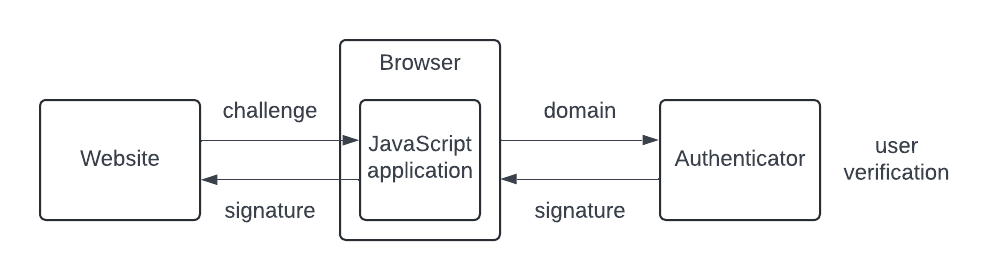
I think that there are some objections about allowing user-friendly way to export passkeys as it's contradicts with their nature. But in the end they are exportable.
May be someone would build pure software implementation as browser extension which would allow export-import as PEM files and to hell with purists.
I've weighed the risks and decided that I'm more comfortable relying on Bitwarden for the most critical service than I am hosting in on my own hardware and counting on my own skills to keep it available. I self host plenty of other things, but having `rm -rf /`'d my hard drive before I don't trust myself more than I trust the folks at Bitwarden.
If you have old Google creds on your Yubikey, you may have to first remove those creds from your account (because there are older and newer protocol choices, and with the old protocols enabled Google will not support passwordless login).
Multiple yubikeys are required if you would like to have backups; there is no syncing between keys.
For support matrices, see [1].
> there is no syncing between keys
This seems like a key failure point to me and why I've been a tad resistant[0]. If there isn't some form of automatic backup then I guarantee I will not have a sync when I need it the most.There is a similar problem even in OTPs. I switched phones not too long ago and some OTPs didn't properly transfer. I actually lost some accounts due to this, luckily nothing critical (I checked critical things but it's easy to let other things slip). The problem is that registering a new OTP removes the old ones. In some cases I've used recovery codes and in others the codes failed. IDK if I used the wrong order or what, but I copy-paste them into bitwarden, and I expect this is typical behavior.
99% of the time everything works perfectly fine. But that 1% is a HUGE disruption. With keys, I would even be okay if I had to plug my main key into a dock to sync them. Not as good as a safe, but better than nothing. I feel like we're trying to design software safes like we design physical safes. But if you lose your combo to a physical safe you always have destructive means to get in. With digital, we seem to forget how common locksmiths are. Googling, numbers seem kinda low but I'm not in a big city and there are at least 4 that I pass by through my typical weekly driving. So it seems that this issue is prolific enough we need to better account for actual human behavior.
[0] Don't get me wrong, I love them but I'm not willing to not undermine them via OTP creds because I need some other way in.
Actually it is a feature. The whole point of the Yubikey is that you can't extract the key. Syncing keys would mean extracting them, which would defeat the purpose of the Yubikey.
Now I am not saying that it is a feature you want. That's why there are other kinds of passkeys. My point is that it is not a flaw in Yubikeys, it is by design.
As I understand things, passkeys come in a few different varieties.
You can buy a yubikey if you want the credential tied to one specific physical device. Figure out your own backup strategy, such as spare yubikeys or printed recovery codes or whatever.
Or you can use apple/google/microsoft if you want your passkeys backed up to your cloud account. This means passkeys are basically the "Log In With Google" button, but with extra steps.
I feel like if I must choose between a 99% reliable syncing solution, and a non-existent automatic syncing solution that requires manual syncing, I would still choose the latter for its mental simplicity.
Eg. My Microsoft desktop, my Google phone, my Apple laptop all have passkeys setup individually that allow login to my various accounts such as my Google account.
So they aren't at all synced. They are all from different vendors but they can all login since i set them all up as passkeys. It's easy to do this too. Setup one site for passkey login via phone, go to that site on your desktop and select "auth via phone passkey" and use the phone passkey and then once logged in on the desktop go to account setup and select "Create a passkey on this device". The end result is you have multiple hardware security keys, namely your phone, desktop and laptop.
I back up my 12 word seed phrase, and then I can restore any and all my TOTP/FIDO/passkeys with another one if needed.
Searching online I found an answer on Stack Overflow stating that a PIN is required in this case: https://stackoverflow.com/a/79471904 How did you bypass it? I also find it idiotic that it is required. A PIN is just a password in another name, so we are back to using Yubikeys as the second factor in 2FA rather than a password replacement.
You need to buy a newer Yubikey with biometrics to make this work. I assume you have an older Yubikey and Google is getting to the standard by asking for a PIN.
I have a https://www.yubico.com/products/yubikey-bio-series/ and it works with Google exactly like you want it to, no PIN required. It's completely understandable to require a PIN if you don't have one of these though.
Effectively you have a secret that you are using to authenticate yourself. With pass keys managed by a vendor, you are trusting that vendor to manage your secret. If they are able to give your secret to someone else, then they can no longer confirm who all knows your secret.
I'm sure you can come up with a protocol where you can fan out access to the secret in a way that requires fanning back messages to you. But I don't see any clear way to do so that doesn't increase the communication burden on everyone.
I'm also sure smarter people than me can surprise me with something, here. But secrets that can be shared historically tend to not be secrets for long.
the spec actually supports this, it's called caBLE
Asked differently, how does this get a vendor out of the picture?
But the FIDO alliance is apparently working on that: https://fidoalliance.org/fido-alliance-publishes-new-specifi...
I also have to confess this is clearly less convenient than having Apple or Google manage them for me.
[1] https://fidoalliance.org/specifications-credential-exchange-...
https://github.com/fido-alliance/credential-exchange-feedbac...
I am worried about providers blocking exports “because security”. That’s Apple’s favorite argument
That’s one way to look at it: passkeys are just a more convenient form of authentication compared to passwords. Although in my mind you’re arguably not achieving a whole lot considering the security bottle neck is still the same, being the login to your password manager.
I use physical Yubikeys so I’m a bit out of the loop here, but are there any methods for protecting your root password to your password manager in this scenario?
What if you lose your device? Do you install alternate passkeys in a second device? Do you have to do that for every site and service?
Many password managers do just that.
By a far and away WORTH the subscription, for me!
In effect, though, 1Password is both something you have (the device with 1P logged in, login requires a Security Key that you don't memorize) and something you know (the master password) or are (typically biometrics can be used to unlock for a period after entering the master password.)
Pretty much all the problems related to passwords are solved by passkeys, having them synced between your devices does not impact that.
> But how can websites know whether its users are using secure authenticators? Authenticators can cryptographically prove certain facts about their origins, like who manufactured it, by generating an attestation statement when the user creates a passkey; this statement is backed by a certificate chain signed by the manufacturer.
How many scummy companies trot out "Let me protect you from yourself" to justify taking away their users' freedoms?
Exporting/transporting keys seems to be optional on the part of implementors, but my solution has been to use Bitwarden, so I at least get cross platform keys.
One of the developers already threatened to use it against keepass when they built an export feature he didn't agree with.
From a corporate compliance perspective, I need to ensure that employee keys are stored in a FIPS-compliant TPM and unexportable. Key loss is not an issue because we have, ya know, an IT department. The only way I can ensure this happens is by whitelisting AAGUIDs and enforcing attestation.
With these factors I can also get out of the MFA hellhole (because I can prove that whitelisted vendor X already performs MFA on-device without me having to manage it: for example, WHFB requires something you have (keys in your TPM) and either something you are (face scan / fingerprint) or something you know (PIN), without me having to store/verify any of those factors or otherwise manage them). Same goes for passkeys stored in MS Authenticator on iOS/Android.
The problem is that Passkeys really conflate two separate feature sets:
1. Synchronized password replacements. They _have_ to be represented as accessible clear-text to be synced between devices, at least during transit. So they can be stolen, for example, by malware that scans RAM for keys.
2. Keys that never leave a hardened hardware devices. Since they never leave the device, they can't be synced. But they're completely secure.
Apple doesn't support it at all anymore; Google only supports it for non-synchronized credentials (which are arguably not passkeys). Bitwarden obviously doesn't either (it can't, as a pure software implementation).
> One of the developers already threatened to use it against keepass when they built an export feature he didn't agree with.
Developer of what? There's no competing software solution that supports attestation, and hardware authenticators complement software ones, rather than compete with them.
Shameless plug: Here's one that is "something you know" :) https://github.com/lxgr/brainchain
It derives all keypairs from a passphrase, and rederives the private key from the key handle, similar to "stateless" hardware authenticators.
Please don't use it for anything important – it's a fundamentally bad idea, similar to "brain wallets"; I only implemented it to figure out whether it was possible, and to improve my own understanding of the WebAuthN and FIDO specifications.
If you then purchased passkeys that supported a custom seed, you could then replicate this seed to as many keys as you needed.
There are always security tradeoffs, but this was a mechanism to store something in the real world that had about 115 bits of entropy, as 'Something you know'
Most password managers and passkey implementations solve that problem by either requiring additional entropy (such as 1Password's "secret key") and/or rate limiting retrieval attempts using some zero knowledge based PAKE server-side (i.e. you can only retrieve the encrypted database if you can prove knowledge of the password, and attempts are rate limited).
My project does neither, so unless your passphrase is very high entropy, this approach is not secure. (And if it is high entropy – where are you storing that in turn?)
A password manager.
Neat project!
How well does password recovery work in those scenarios?
You might argue "but if they still have the recovery methods isn't my account only as secure as those" and to that i'd point out that you're still way ahead with passkeys simply by not entering passwords on a routine basis. The recovery methods tend to be two factor as well, just without passkeys as one of the two factors (hence email+password) so still a win over password alone in any case.
Passkeys should be thought of as no different to the old two factor authenticators. I mean that's literally what they are, essentially the latest fido standard that allows devices such as your phone to be a hardware security key in its own right. These always had ways to do account recovery with all the providers.
Basically, when the system prompts to pick a key, click the "log in with phone" button, unlock your phone, and select the account/click "OK" to authenticate. The first time you do this, you need to scan a QR code to pair the phone to your computer, but after that you can use your phone whenever you need it.
Passkeys on Linux (and probably even more so on the more niche systems like the *BSDs) can use some love, especially when it comes to CTAP2. Chromebooks are probably the only Linux devices with native support for that.
If you want to safeguard against a fire, use a passkey provider that does exports (i.e. Bitwarden, KeepassXC) and then treat those exports the same as your password database file.
It's also not a good idea to store the backup at home – house fires are unfortunately a thing, and chances are you might not have time to grab either your main or your backup key.
It seems like they're synced between devices using client-side encryption, with keys derived from your phone's lock code (typically only 4-6 digits). Is it possible that the passkeys are fully random, but then encrypted with far less than 128/256 bits of actual entropy while being synchronized between devices?
Could it be possible to brute force the keys server-side (IIUC, derived from 4-6 digit pins) with non-excessive amounts of compute? What am I missing?
Generally, a one-time password is an additional security measure that prevents someone from going to a website and simply using obtained credentials (eg from a leak) or brute-forcing them. An attacker needs the second factor.
If you store your 2FA secret alongside your password in a password manager, you still gain protection from these attacks. And it's very convenient. However, you also increase your attack surface: if they break into your password manager, your done.
If your threat model allows it (mine does), this is still very secure and also very convenient.
I know many people who still reuse passwords, which certainly have been leaked, and are probably protected only by 2FA.
As long as their vault is properly secured (with actual MFA) that shouldn't be too much of a risk, until they get hit with a virus, of course.
https://community.bitwarden.com/t/special-vault-search-keywo...
Maybe it's just a Bitwarden issue.
The 2FA issue isn't such for me. As I explained in a different comment, 2FA pins are copied automatically and are thus just a "ctrl+v" away.
Or treat it as an opportunity to try to avoid "vendor lock-in"/increase redundancy by using all three to have 3+ passkeys in every service. Windows 11 can act as useful a bridge for bootstrapping all of your keys into a service: register for a site first on iOS or Android, use Windows 11 bluetooth to login via the first passkey, add a Windows passkey, and use Windows 11 bluetooth again to add the third. (Or some combo of that with the Windows iCloud Passwords app and/or Chrome.)
Support is far from universal, but it's definitely getting better. Unfortunately, protocols such as CTAP2 don't seem to have been implemented on Linux, so it lacks the "log in using your phone" prompt that makes them super useful on proprietary operating systems (like fingerprint/touch ID, but without needing to add every device manually).
Not implemented.
...Unless I misunderstood what you're talking about. When I put in a passkey, 1p just asks me to press a button, not re-unlock.
I remember this being an anti-MITM measure for u2f
Most large websites are hosted behind a CDN or a load balancer, which terminate the TLS session and is a MITM between the customer and the actual backend server. The problem is similar to TLS Client Certificate - you can't forward these to the backend now, and the load balancer is not smart enough to validate the data so it is impossible to use it.
In recent years (~5 years), AWS ALB and competitors gained the client certificate support now which pass the certificate information to your application in HTTP headers - instead of a standardized way of reading client certificate the servers has to read from non-standard headers.
If passkeys is also passed as HTTP payload, I don't see believe that the LB would read the payload anytime soon. It might become a selling feature for IDP-as-a-service like Auth0 that you can't do it with IaaS.
Passkeys just feel like a standard written by large tech companies as a flywheel technology to keep me locked into whatever hardware and software ecosystem I'm already in since seemingly no one besides maybe Bitwarden supports exporting them. Which seems pointless, because I don't know of any platform that supports importing them.
I am also getting tired of corporate white knight nerds defending trillion dollar companies telling me that portability isn't a concern.
FIDO/WebAuthn/Passkeys protect you against phishing, because of the origin binding mentioned in the article. On the phishing site, the required credential cannot be generated, and so no matter how convincing it is you can't accidentally give them a credential to forward.
Phishing is what these systems were trying to defend against.
Now if you were to say that the move from plain FIDO tied to a hardware key to passkeys tied to a Google account was a lock-in ploy ---- then I might be more inclined to agree.
It's not an acceptable trade-off. And the answer isn't, "Those third-parties shouldn't be asking for your password and TOTP," because that's not a realistic premise.
To me this seems harder to pull off than a fraudulent password reset (either via social engineering, or a hacked email account). My TOTP fell in the drink a few years back, and some accounts very hard to reset and others were too easy.
I suppose I might want to stop using 1Password someday, but it still has all my passwords as well so I can just fallback to those. And, honestly, only a fraction of the sites I have in 1Password have PassKeys available.
What I hate much more is sites that don’t have passwords and require you to log in via email every time. It drives me NUTS.
This is crazy and should be outlawed. Honestly, it's so annoying...
Compared to everything else, they are so much of a nicer experience. I despise the "click the link we just emailed you" so much. And MFA is a pain, and still has security issues: https://blog.talosintelligence.com/state-of-the-art-phishing...
I really don't get all the hate for Passkeys on HN...
It feels like the first step in a vendor lock-in strategy. Basically boils down to that. That's essentially my issue anyway.
You can’t copy a passkey to a different password manager, but you can create a new one for the same account, which is usually just as good.
> seemingly no one besides maybe Bitwarden supports exporting them. Which seems pointless, because I don't know of any platform that supports importing them
That may still change in the future :-). The thing is that the technology allows it, which is good, right?
Passkeys kind of take that concept, but make it suck. No backups. Terrible interoperability.
The other day I attempted to create one on my Mac with Firefox. The system passkey popup came up and made me scan a QR code with my iPhone that had to be connected to the internet. Bitwarden (my iOS passkey manager, that part works well) did open, but after selecting the profile to create the passkey in, it errored out. No passkey for me.
I've since disabled passkey support and we have no plans to attempt a new rollout anytime soon.
As far as I can tell the only people that have "successfully" rolled out passkeys are the companies with effectively zero user support and they just refuse to support passkeys at all, so if they don't work for a particular user: whatever.
TOTP is fully rolled out and well supported. Troubleshooting it is "hard", but at least it's possible.
TOTP troubleshooting basically boils down to 3 things:
* Server time
* User Phone/device time(most users opt to use their phone to generate TOTP, but we don't care)
* More than one TOTP saved for a given site(i.e. they didn't replace the old and created a new TOTP shared key) or not saved at all.
Our tech/user support helpdesk can handle this but it took a lot of training. We built special tools. We still get requests from them when they get overwhelmed with the complexity.
Passkey troubleshooting:
* Mobile network, including bluetooth
* Server network connectivity
* Computer/device network, including BT connectivity to mobile device.
Most tech support can't handle that much complexity at once. Shoot, most developers and tech "whiz" people can't either. The error messages one does get, if they are lucky, are very general and not helpful at all(last I checked).
Passkeys are not currently fit for production where you have to support the users. I hope they get there.
1Password is the only client/device implementation of Passkeys that pretty much just works. It saves the passkey in the 1p vault, and the 1p vault can be synced across devices.
It's something else that is unrelated to your password that you have to provide in order to log in, is that not the definition of a factor of authentication ?
Because it's phishable ?
I hope Passkeys will become deployable, but the last few times we tried public key auth over web, it hasn't really work out all that well. However nobody but the DOD has been able to support it, and they only support it by brute force. It's not really deployable by anyone else. TLS client certs were never even tried seriously the UX was never remotely good enough. I fear Passkeys will be basically the same problem. UX is fine on the happy path, but the unhappy path is littered with broken at every turn.
I remember those QR codes and needing to use my phone when I tried passkeys a couple years ago when I was on an older Mac that didn't have hardware support for biometrics.
Every since I got a Mac with that support passkey creation has worked fine entirely on the Mac.
I don't want vendor lockin and I don't want proprietary third party cloud based backup/recovery.
Today with totp, I store the plaintext otpauth url and I can use oathtool to spit out codes when needed on my desktop. My phone has aegis, but I don't use any cloud based backup/recovery. I switched from Google Authenticator after they implemented their cloud based syncing to google.