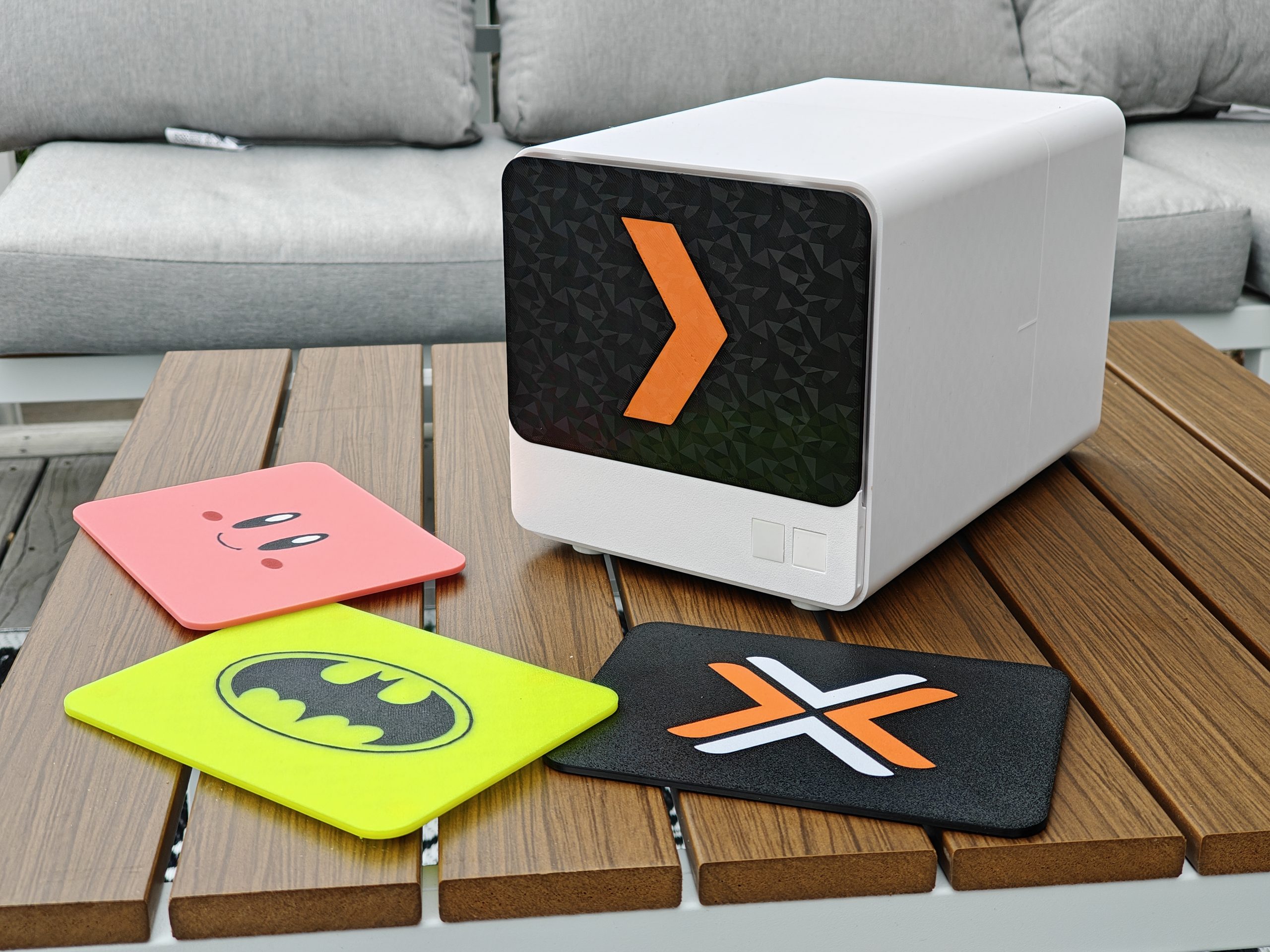
Build Your Own Minisforum N5 Inspired Mini NAS: A Comprehensive Guide
Print your own 5-bay N5 Mini NAS! Inspired by the Minisforum N5, this 175mm x 175mm design fits most small beds—use any mini PC you prefer.
JackHarvest.com
154 points · by LorenDB · 1y ago · 54 comments
To take a look at the 3D files for the chassi was literally the reason I open the blog post, sadly they haven't been published yet!
In the meantime, what are people's favorite 3D printed desktop/NAS chassis? I'm currently sitting and sketching one myself and looking for inspiration :)
https://makerworld.com/en/models/1644686-n5-mini-a-3d-printe...
In my case, I currently use a Macbook Air M1 (my personal one which I currently don't need as a laptop). Absolute overkill and in some aspects annoying - only two USB-C ports for example - but it was available and it's fanless and doesn't need much power.
When there's a MacOS security update and the Macbook reboots, do NAS functions work before a local user has logged in?
I see the appeal but I’m curious about the performance.
There are good all-in-one software solutions for all this stuff (unraid comes to mind) and I really feel this kind of article is unfinished without going into that kind of thing.
Having done it, the list for me is pretty much: install using the file system you fancy, setup the raid you want, install samba and nfs, eventually avahi and encryption and that’s pretty much it.
I wouldn’t personally call that non sense. Is there something I am missing?
It isn’t though.
I got that far and I wasn’t happy. There’s a lot of extra stuff you have to think about when you want a system to run unattended, vs something that’s a workstation.
First thing I noticed was the noise and the heat. Had to install a daemon to power down the hard disks when not in use. Then when I wanted RAID I had to go spend half a day learning to do that. Then there was software updates. So on and so forth.
I also had some lingering concerns about power consumption which meant I was going to have to get out some power monitors and read some stuff about Linux power tuning.
After a while the sense of “all in one” like packages TrueNAS and unraid started to make sense.
I was all set for unraid but luckily I came into a bit of extra money and I was able to buy some of my life back with a simple box with all of this designed and configured by people who know what they are doing.
Now all I need to do is manage storage and services which is all I should have to do with a NAS.
All this stuff is interesting to learn but there’s only so many hours in the day.
By all means if you want a hobby project or you’re not concerned with non functional aspects like reliability, power consumption and security and maintenance or if you’re very poor then building your own NAS makes sense.
It depends on the drives you buy, of course, but unnecessary spin-up/spin-down cycles will wear out drives faster. Many NAS drives will keep running intentionally for this reason. If the drives didn't spin down by themselves, it's possible they weren't designed to start/stop that often.
My personal NAS solution is a combination of Debian (for stability and unattended updates) with a motherboard that's in low-power mode, with ZFS + the usual software for accessing the NAS installed. I could write a script that reboots the system based on /var/run/reboot-required but a monthly scheduled reboot works fine too.
In my experience, this setup rarely requires any maintenance. It's quite boring for a homelab project. Once every few years I need to upgrade to a newer version of Debian (last time I went from 10 to 11 to 12 in one go) but even that isn't much of a spectacle if you don't mess with non-Debian package repositories.
They typically present as 4 USB connected external drives, which you can softraid into whatever. They also support eSATA. At one point I had 3 of these plugged into a spare intel NUC and used it as a NAS running first Windows, then Ubuntu, then unRAID over about 5 years. It wasn't blazing fast, but got the job done for home use.
I love seeing these cheap builds like this. IMHO NAS boxes are way overpriced, and underpowered. I had multiples the performance and capability piecemeal hacking together my old setup than buying the all-in-one systems that will lose vendor coverage in 2 years.
NAS do make sense in some contexts. But over the last decade they've become something people do just to do because it's hip. It usually makes much more sense just to put your storage drives in the computer you'll use them in.
But it is a problem that most people don't have capable computers anymore. :\
I have no idea how having a NAS would make somebody hip. Very strange disco. Everybody should have one.
A lot of people just use laptops and tablets / phones with limited storage expansion space at home, and want a dedicated device for a firewall/router anyways (no worries about reboots or other interruptions due to personal work on that computer, etc).
One more powerful computer to use as both NAS and firewall (and for various shared services...) makes a lot of sense much of the time - hence the popularity of proxmox.
for USD699 (no ram and no storage) you can get this
6 SATA, 5 NVME drives, OCUlink and much more.
https://aoostar.com/products/aoostar-wtr-max-amd-r7-pro-8845...
All that being said, there are more affordable NAS cases that would eliminate the labor. This is both an art piece and a because-I-can kind of venture.
I should probably just hook something up with, say, the old Mac Mini I have lying around, but it's fun to consider the options.
But this article points out that there really isn't any reason not to make this stuff out of printable plastic.
I'd guess the only real issue is cost.
To add something useful, this is very cool but I wish it came in JBOD form so I could run it off a Mac Mini instead, and the pricing listed in TFA seems like an idealistic lower limit.
They’re hardly competitive on price compared to an old nuc too. Even a new N100 with ram and ssd can be purchased heaper than a barebones Pi 5.
ARM64 does limit what software you can run as well as does the anaemic GPU hardware. They are good for other things and very small servers (like PIHoles) but once multiple drives are involved they aren't the right solution anymore.
I mean, pricewise and avoiding usb, it's a nice build. I have something not a million miles off using a zimablade and a pci card doing sata, with an ali express sata disk box and an atx psu. Even got 12v off the atx to power the zimablade via DCin
That's not how PCIe lanes work. Regardless of how many PCIe lanes are used to connect the CPU to the HBA, only one packet will be traversing that link at a time (striped across the lanes), but that imposes no direct constraints on what the other side of the HBA is doing with its several SATA links simultaneously. With 16Gb/s of PCIe bandwidth, that HBA should have no trouble keeping more than one 6Gb/s SATA link busy.
The HBA may not have or need much buffering, as transfer to/from system memory with DMA should be pretty fast... I'd guess enough memory to fully buffer one outgoing command for each port, and one or two to buffer a response for each port as well; they may have more, but not much is necessary.
Some multi-port sata cards do terrible things though. Rather than using a proper controller for the number of ports, they have a one port controller and then a sata port multiplier. These do result in a meaningful restriction in bandwidth, and some multipliers require waiting for a response before communicating with another drive which would result in poor throughput for most NAS workflows.
A particularly terrible idea would be a port multiplier hooked up as a m.2 sata device, rather than a pci-e sata controller. I don't know that I've seen that one (edit, found one on amazon), but I'm pretty sure I've seen the controller + port multiplier combo. It's definitely worth finding out what controller is on the board before buying to avoid surprises.
Seen some reports of people running into heat issues with them though if they run them full. So they end up using 3 out of 5 slots etc.
I went with a bunch of second hand enterprise ones (also sata) and seems to be working out great