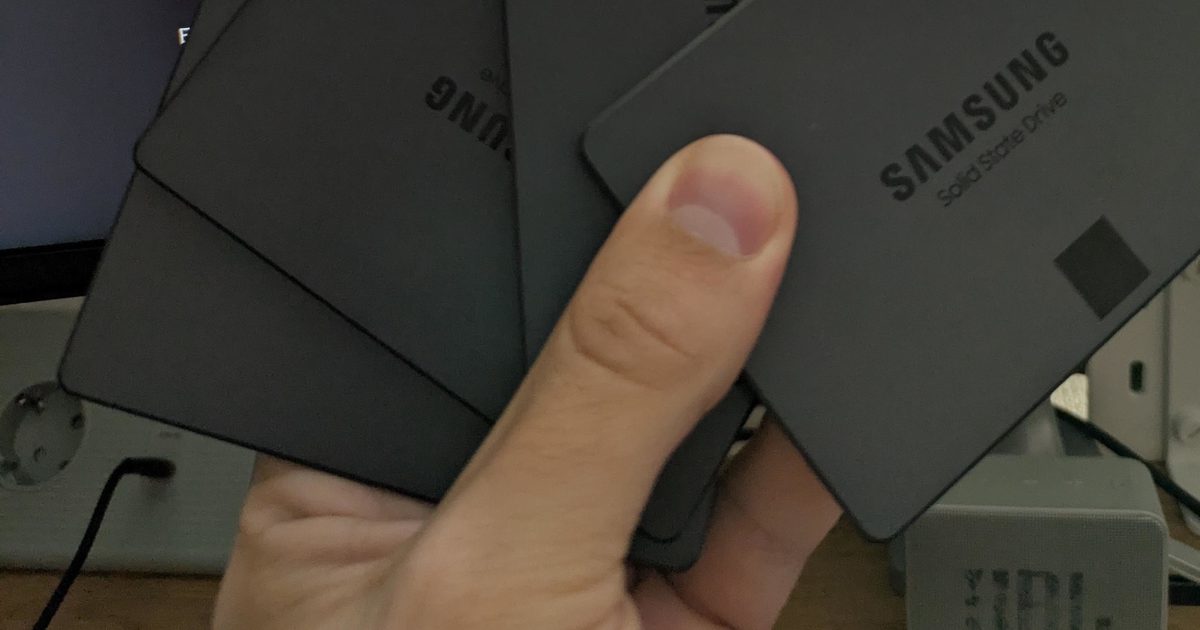
Samsung 870 QVO 4TB SATA SSD-s: how are they doing after 4 years of use?
How much damage can a self-hosting enthusiast do to a quartet of Samsung SSD-s after 4 years?
./techtipsy
85 points · by furkansahin · 1y ago · 42 comments
Reading the linked post, it's not a Linux kernel issue. Rather, the Linux kernel was forced to disable queued TRIM and maybe even NCQ for these drives, due to issues in the drives.
No issues were found on either of them.
[1]: https://www.tomshardware.com/pc-components/storage/unpowered...
The only insight you can gleam from that is that bad flash is bad, and worn bad flash is even worse, and that's frankly a stretch given the lack of sample sizes or a control group.
The reality is that its non trivial to determine data retention/resilience in a powered off state, at least as it pertains to a coming to a useful and reasonably accurate generalism of "X characteristics/features result in poor data retention/endurance when powered off in Y types of devices," and being able to provide the receipts to back that up. There are far more variables than most people realize going on under the hood with flash and how different controllers and drives are architected(hardware) and programmed(firmware). Thermal management is a huge factor that is often overlooked or misunderstood and that has substantial impact on flash endurance (and performance). I could go into more specifics if interested (storage at scale/speed is my bread and butter), but this post is long enough.
All that said, the general mantra remains true: more layers per cell generally means data per cell is more fragile/sensitive, but that's generally in the context of write cycle endurance.
Can you elaborate wrt the reason for your critique considering they're pretty much just testing from the perspective of the consumer? I thought their explicit goal is not to provide highly technical analysis and niche preferences but instead look at it for John Doe that's thinking about buying X, and what it would mean for his usecases. From my mental model of that perspective, they're reporting was pretty spot on and not shoddy, but I'm not an expert on the topic
I would love this.
I would read an entire series of blog posts about this.
I've never had any spinning drives come close to that level of reliability. I've only actually had one SSD or NVME fail, and that's the first gen Intel drive in my desktop that had a firmware bug and one day showed up as an 8mb empty drive. It was a 64gb unit and I was so impressed by the speed, but tired of symlinking directories to the HDD for storage needs I just bumped to 240gb+ models and never looked back.
Currently using a Corsair MP700 Pro drive (gen 5 nvme) in my desktop. Couldn't be happier... Rust and JS projects build crazy fast.
Still to be seen how that works out in long run but so far so good.
That said I only have a couple of TBs...bit more and HDDs do become unavoidable
Can't say I've heard of people worrying about this angle before tbh
Glad for the guy, but here are a bit different view on the same QVO series:
    Device Model:     Samsung SSD 870 QVO 1TB
    User Capacity:    1,000,204,886,016 bytes [1.00 TB]

    == /dev/sda
      9 Power_On_Hours          0x0032   091   091   000    Old_age   Always       -       40779
    177 Wear_Leveling_Count     0x0013   059   059   000    Pre-fail  Always       -       406
    241 Total_LBAs_Written      0x0032   099   099   000    Old_age   Always       -       354606366027
    == /dev/sdb
      9 Power_On_Hours          0x0032   091   091   000    Old_age   Always       -       40779
    177 Wear_Leveling_Count     0x0013   060   060   000    Pre-fail  Always       -       402
    241 Total_LBAs_Written      0x0032   099   099   000    Old_age   Always       -       354366033251
    == /dev/sdc
      9 Power_On_Hours          0x0032   091   091   000    Old_age   Always       -       40779
    177 Wear_Leveling_Count     0x0013   059   059   000    Pre-fail  Always       -       409
    241 Total_LBAs_Written      0x0032   099   099   000    Old_age   Always       -       352861545042
    == /dev/sdd
      9 Power_On_Hours          0x0032   091   091   000    Old_age   Always       -       40778
    177 Wear_Leveling_Count     0x0013   060   060   000    Pre-fail  Always       -       403
    241 Total_LBAs_Written      0x0032   099   099   000    Old_age   Always       -       354937764042
    == /dev/sde
      9 Power_On_Hours          0x0032   091   091   000    Old_age   Always       -       40779
    177 Wear_Leveling_Count     0x0013   059   059   000    Pre-fail  Always       -       408
    241 Total_LBAs_Written      0x0032   099   099   000    Old_age   Always       -       353743891717
While overall it's not that bad, losing only 40% after 4.5 years - it means what in another 3-4 years it would be down to 20% if the usage pattern wouldn't change and the system wouldn't hit the write amplification. Sure, someone had that "brilliant" idea ~5 years ago to use a desktop grade QLC flash as a ZFS storage for PVE...
As I understand it, the values in the device statistics log have standardized meanings that apply to any drive model, whereas any details about SMART attributes (as in the meaning of a particular attribute or any interpretation of its value apart from comparing the current value with the threshold) are not. So absent a data sheet for this particular drive documenting how to interpret attribute 177, I would not feel confident interpreting the normalized value as a percentage; all you can say is that the current value is > the threshold so the drive is healthy.
    == /dev/sda
    177 Wear_Leveling_Count     PO--C-   059   059   000    -    406
    0x07  0x008  1              42  N--  Percentage Used Endurance Indicator
    == /dev/sdb
    177 Wear_Leveling_Count     PO--C-   060   060   000    -    402
    0x07  0x008  1              42  N--  Percentage Used Endurance Indicator
    == /dev/sdc
    177 Wear_Leveling_Count     PO--C-   059   059   000    -    409
    0x07  0x008  1              43  N--  Percentage Used Endurance Indicator
    == /dev/sdd
    177 Wear_Leveling_Count     PO--C-   060   060   000    -    403
    0x07  0x008  1              42  N--  Percentage Used Endurance Indicator
    == /dev/sde
    177 Wear_Leveling_Count     PO--C-   059   059   000    -    408
    0x07  0x008  1              42  N--  Percentage Used Endurance Indicator
I said about 177 because it's the same numbers what PVE gives in the webui and I didn't found the obvious 'wearout/lifeleft' I'm accustomed to see in the SMART attributes.
The 4TB models obviously will hold up better under 170+ TB of writes than the 1TB drives will, and it wouldn't be surprising to see less write amplification on the larger drives.
Solution is to remove some files... and pray it lasts half of a 64GB Intel X25-E!
It should last 30x shorter because it is 30x larger?
Or is this game only about saturation rate?
I have an old Asus with a M.2 2280 slot that only takes SATA III.
I recall 840 EVO M.2 (if my memory serves me right) is the current drive but looking for a new replacement seems not to be straightforward as most SATA is 2.5 in. Or if its the correct M.2 2280, its for NVMe.
My apartment is super quiet, you hardly hear anything from the outside, so I can hear a HDD in the living room during the silent parts of movies. In some relative’s house, however, you only notice how loud is the background noise when the power goes off. No wonder why I always have a headache when I go there.