161 points · by Roachma · 1y ago · 273 comments
Developers writing software on 64GB M4 Macs often don't realize the performance bottlenecks of the software they write.
Developers working over 1gbps Internet connections often don't realize the data gluttony of the software they write.
Developers writing services over unlimited cloud budgets often don't realize the resource wastes into which their software incurrs.
And to extend this to society in general.
Rich people with nice things often alienate themselves from the reality of the majority of people in the World.
A number of times I've had to have a framing discussion with a dev that eventually gets to me asking "what kind of computer do your (grand)parents use? How might X perform there" around some customer complaint. Other times, I've heard devs comment negatively after the holidays when they've tried their product on a family computer.
I worked for a popular company and went to visit family during the winter holidays. I couldn't believe how many commercials there were for said company's hot consumer product (I haven't had cable or over-air television since well before streaming was a thing, so this was a new experience in the previous five years).
I concluded that if I had cable and didn't work for the company, I'd hate them due to the bajillion loud ads. My family didn't seem to notice. They tuned out all the commercials, as did a friend when I was at his place around a similar time
All it takes is a change in perspective to see something in an entirely new light.
Network performance can be trivially measured in your users; and most latency/performance/bandwidth issues can be identified clearly.
As a developer and AirBnB owner, what I’ve also noticed is the gluttony of the toolchain as well. I’ve had complaints about a 500/30 connection from remote working devs (very clear from the details they give) which is the fastest you can get for much of the metro I am in.
At home I can get up to 5/5 on fiber because we’re in a special permitting corridor and AT&T can basically do whatever they want with their fiber using an on old discontinued sewer run as their conduit.
I stick to the 1/1 and get 1.25 for “free” since we’re so over-provisioned. The fastest Xfinity provides in the same area as my AirBnB is an unreliable 230/20 which means my “free” excess bandwidth is higher than what many people near me can pay for.
I expect as a result of all this, developers on very fast connections end up having enough layers of corporate VPN, poorly optimized pipelines, a lot of dependency on external servers, etc that by the time you’re connected to work your 1/1 connection is about 300/300 (at least mine is) so the expectation is silently set that very fast internet will exist for on-Corp survival and that the off-corp experience is what others have.
Spotify's webapp, for example, won't even work on my old computer, whereas YouTube and other things that you'd think would be more resource intensive work without any issue whatsoever.
Philosophically I am with you, e-waste and consumerism are bad, but pragmatically it is not worth punishing yourself from a dollars and cents standpoint.
You can jump on Amazon and buy a mini PC in the $300 range that’s got an 8 core 16 thread AMD 6800H CPU, 16GB RAM, 500GB SSD, basically a well above-average machine, with upgradable RAM and storage. $240 if you buy it on AliExpress.
You can grab a MacBook Air M2 for around $500.
Why suffer with slow hardware? Assuming that using a computer is at least somewhat important to your workflow.
Conversely, it opens up a niche for "poor world" people to develop local solutions for local challenges, like mobile payments in India and some of Africa.
It is extremely useful if your work ends up in paper. For photography (edit: film and broadcast, too) would be great.
My use case are comics and illustration, so a self-color-correcting cintiq or tablet would be great for me.
If it looks good on a mac laptop screen/imac and the scopes look right, it’s good for 99%+ of viewers. You can basically just edit visually off any Mac laptop from the last 10 years and you’ll probably be happy tbh.
With more people being remote, this either doesn't happen, or is much more limited. Support teams have to repro issues or walk through scenarios across web, iOS, and Android. Sometimes they only have their own device. Better places will have some kind of program to get them refurb devices. Most times though people have to move the customer to someone who has an iPhone or whatever.
That’s not the problem of using this monitor for creating the work, that’s the problem of not also using a more typical monitor (or, better, an array covering the common use cases, but which is practical depends on whether you are talking about a solo creator or a bigger team) for validating the work.
Just as with software, developers benefit from a more powerful machine for developing, but the product benefits from also being tested on machines more like the typical end-user setup.
The solution here is wide device testing, not artificially limiting individual developers to the lowest common denominator of shitty displays.
Still, if you were to make an analogy you should target for a few devices that represent the "average", just as its done for (most) pop music production.
For Macs, 220DPI absolutely is the average.
Stands out like a sore thumb.
When all you use for testing is Browserstack, local emulators and whatnot and only the latest iPhone and Samsung S-series flagship, your Thing will be unusable for wide parts of the population.
Always, always use at the very least the oldest iPhone Apple still supports, the cheapest and oldest (!) Samsung A-series models still being sold in retail stores as "new", and at least one Huawei and Xiaomi device. And then, don't test your Thing only on wifi backed by your Gbit Wifi 7 router and uplink. Disable wifi and limit mobile data to 2G or whatever is the lowest your phone provider supports.
And then, have someone from QA visit the countryside with long stretches of no service at all or serious degradation (think packet loss rates of 60% or more, latencies of 2 seconds+). If your app survives this with minimal loss of functionality, you did good.
A bunch of issues will only crop up in real world testing. Stuff like instead of keeping a single socket to the mothership open, using fresh from scratch SSL connections for each interactions is the main bummer... latency really really eats such bottlenecks alive. Forgotten async handling leading to non-responsiveness of the main application. You won't catch that, not even with Chrome's network inspector - you won't feel the sheer rage of the end user having a pressing need and be let down by your Thing - even if you're not responsible for their shitty phone service, they will associate the bad service with your app.
Oh, and also test out getting interrupted while using your Thing on the cheap-ass phones. Whatsapp and FB Messenger calls, for example - these gobble so much RAM that your app or browser will get killed by OOM or battery saver, and when the user has their interruption finished, if you didn't do it right your Thing's local state will have gotten corrupted or removed, leading the user having to start from scratch!
Had reported many issues where to reproduce they needed to enable 10x throttling in the browser. Or use a Windows machine.
Part of what QA testing should be about: performance regressions.
Many audio engineers live by the mantra "if it sounds good on NS-10s, it'll sound good on anything".
We need such a touchstone for software engineers.
You could get somewhat close by looking at what was a middle of the road consumer laptop from Dell/HP/Lenovo 5 years ago and buying one of those though.
High quality normal DPI monitors are so cheap these days that even if multi-monitor isn't one's cup of tea there's not really a good reason to not have one (except maybe space restrictions, in which case a cheap ~16" 1080p/1200p portable monitor from Amazon will serve the purpose nicely).
Really? It's not a problem for photo retouchers, for whom a monitor like this is basically designed for.
> The redemption period ends August 31, 2026. For full details, visit https://www.asus.com/content/asus-offers-adobe-creative-clou....
Well, the monitor is €8,999, so maybe it’d be more than two taps for me:
> The monitor is scheduled to be available by October 2025 and will costs €8,999 in Europe (including VAT)
I’ll wait till 8k becomes more of the norm for say 1-1.5k
32" 4K isn't much better than pre-Retina iPhone, even after accounting for viewing distance between say, ~18" for phone, and 2-3 feet for desktop.
I agree for many people, I might even go so far as to say "normies", this sort of thing doesn't matter. But after many years of poking at this, I strongly believe it's not because their eyes can't see the difference, it's because they don't understand the question we're asking (i.e. about overall quality rather than detail density, and when you try explaining detail density, they think you're asking if a monitor "looks real" which sounds ~impossible)
This whole thing is disappointing because all I've wanted for a decade is 27" 5K to be mainstream and ubiqituous, that hits a sweet spot - surprisingly, only slightly less PPI than this, but a much more reasonable price. They of course exist, its just, consistently fringe and Mac-focused, presumably due to vagaries of HDMI.
Why is this? 5k/6k at 27" would be the sweet spot for me, and potentially 8k at 32". However, I'm not willing to drop $2k per monitor to go from a very nice 27" 4k to 27" 5k.
You can get 8K TVs for <$1000 now. And an Quest 3 headset has 2 displays at far higher PPI for $600.
There's been a bit of a 'renaissance' of 5K@27" in the last ~year:
> In just the past few months, we've taken a look at the ASUS ProArt Display 5K, the BenQ PD2730S, and the Alogic Clarity 5K Touch with its unique touchscreen capabilities, and most recently I've been testing out another new option, the $950 ViewSonic VP2788-5K, to see how it stacks up.
* https://www.macrumors.com/review/viewsonic-vp2788-5k-display...
There are 15 monitors discussed in this video:
* https://www.youtube.com/watch?v=EINM4EysdbI
The ASUS ProArt PA27JCV is USD 800 (a lot less than $2k):
5k is appealing, but I'll take a 4k with a much nicer panel, much better anti-reflective coating, faster refresh rate etc.
8K at jumbo TV size has relatively large pixels compared to an 8K desktop monitor. It’s easier to manufacture.
> And an Quest 3 headset has 2 displays at far higher PPI for $600
Those displays are physically tiny. Easier to deal with lower yields when it’s only taking a few square inches.
Ultra high resolution desktop monitors would exist in the middle: Very small pixel sizes but also relatively large unit area.
However, the demand side is also not there. There are already a number of 5K, 6K, and 8K monitors on the market. They’re just not selling well. Between difficult software support for scaling legacy apps, compatibility issues with different graphics cards and cables, and the fact that normal monitors are good enough, the really high resolution monitors don’t sell well. That doesn’t incentivize more.
If we get to a place where we could reliably plug a 6K monitor into any medium to high end laptop or desktop and it just works, there might be more. Until then, making a high res monitor is just asking for an extremely high return rate.
>8K at jumbo TV size has relatively large pixels compared to an 8K desktop monitor. It’s easier to manufacture.
I don't think that's true.
I've been using a 8k 55" TV as my main monitor for years now. It was available for sub-800 USD before all such tv's vanished from the market. Smaller pixels were not more expensive even then, the 55"s were the cheapest.
4k monitors can be had for sub-200 usd, selling 4x the area of the same panel should be at most 4x that price. And it was, years ago.
So they were clearly not complicated or expensive to manufacture - but there was no compelling reason for having 8k on a TV so they didn't sell. However, there IS a compelling reason to have 8K on a desktop monitor!
That such monitors sell for 8000 usd+ is IMO a very unfortunate situation caused by a weird incompetence in market segmentation by the monitor makers.
I firmly believe that they could sell 100x as many if they cut the price to 1/10th, which they clearly could do. The market that never appeared for tv's is present among the world's knowledge workers, for sure.
I wish the 55" 8k TVs still existed (or that the announced 55" 8k monitors were ever shipped). I make do with 65", but it's just a tad too large. I would never switch back to 4k, however.
They're available, but they never seem to have become a mass-market product at mass-market prices. The cheapest 5k monitor is at least double the price of the cheapest 4k monitor. And it was more like 4x until recently.
You're probably right that we're starting to hit the point where people don't care though.
If 4K reaches mass-market for those, the specs will shift down and there will be room in the (much smaller) Premium-Tier monitor segment
Heck, even if you just want USB-C and an integrated webcam on an average display, the price-hike compared to one without it is crazy, because everything except those basic office-monitors is still niche-production...
With 8K small pixels you could pick a number of resolutions up to 4K or higher and you wouldn’t even notice that the final product was scaled on your monitor.
People with Macs with retina displays have been doing this for years. It’s really nice once you realize how flexible it is.
What's your actual use-case for this? I run a 32" 4K, and I have to stick my nose within a foot (~30cm) of the display to actually spot individual pixels. Maybe my eyesight isn't what it used to be
I'd kill for a 40" 5k or 6k to be available - that's significantly more usable desktop real estate, and I still wouldn't be able to see the pixels.
It's simple math. A 32" 4K monitor is about 130 PPI. Retina displays (where you could reasonably say the pixels are not noticeable, and the text is sharp enough to not strain the eyes) start at 210 PPI.
Subjectively, the other problem with 32" 4K (a very popular and affordable size now) is that the optimal scaling is a fractional multiple of the underlying resolution (on MacOS - bizarrely I think Windows and Linux both know how to do this better than MacOS). Which again causes blur and a small performance hit.
I myself still use an old 43" 4K monitor as my main one, but I know it's not great for my eyes and I'd like to upgrade. My ideal would be a 40" or 42" 8K. A 6K at that size would not be enough.
I am very excited about this 32" 6K Asus ProArt that came out earlier this year: https://www.asus.com/displays-desktops/monitors/proart/proar... - it finally gets Retina-grade resolution at a more reasonable price point. I will probably switch to two of these side-by-side once I can get them below $1K.
It's also incorrectly applied math. You need to take into account the viewing distance - the 210 PPI figure often quoted is for smartphone displays (at the distance one typically holds a smartphone).
For a 32" monitor, if your eyeballs are 36" away from the monitor's surface, you are well beyond the limit of normal visual acuity (and the monitor still fills a massive 42 degrees of your field of view).
https://www.viewsonic.com/us/vx4381-4k-43-4k-uhd-monitor-wit...
There are a number of 40” 5K wide monitors on the market. They have the same vertical resolution as a 4K but with more horizontal pixels.
It's mostly because the improvement over 4k is marginal. In fact, even from 1920x1080 it's not so big of a deal, which is why people keep buying such monitors in 2025.
A the worse is that the higher spending consumer segment of PC parts, the gamers, can't really use high resolution display at their full potential because it puts such a burden on the GPU (DLSS helps, but the results is even smaller of an improvement over 1920x1080 than regular 4k is)
Only downside are the massive borders by todays standards, but it still has the Apple aesthetics, the 5k resolution is beautiful for my use cases (spreadsheets, documents, photo editing), and has HDMI inputs so I can play PS5 on it.
Multiple reasons.
The first one being yield - yes you can get 8K screens, but the larger they get, the more difficult it is to cut a panel with an acceptably low rate of dead/stuck pixels out of a giant piece of glass. Dead pixels are one thing and bad enough, but stuck-bright pixels ruin the entire panel because they will be noticeable in any dark-ish movie or game scene. That makes them really darn expensive.
The second reason is the processing power required to render the video signal to the screen, aka display controllers. Even if you "just" take regular 8 bit RGB - each frame takes up 33 million pixels, so 796.262.400 bits. Per frame. Per second? Even at just 30 FPS, you're talking about 23.887.872.000 bits per second - 23 gigabits/s. It takes an awful, awful lot of processing power just to shuffle that data from the link SerDes around to all the control lines and to make sure they all switch their individual pixels at the very same time.
The third is transferring all the data. Even if you use compression and sub-sampling, you still need to compress and sub-sample the framebuffer on the GPU side, transfer up to 48 GBit/s (HDMI 2.3) or 77 GBit/s (DP 2.1) of data, and then uncompress it on the display side. If it's HDCP-encrypted, you need to account for that as well - encrypting and decrypting at such line speeds used to be unthinkable even two decades ago. The fact that the physical transfer layer is capable of delivering such data rates over many meters of copper cable of varying quality is nothing short of amazing anyway.
And the fourth is generating all the data. You need absurdly high definition textures, which requires lots of VRAM, lots of regular RAM, lots of disk I/O, lots of disk storage (your average AAA game is well beyond 100GB of data at-rest for a reason!), and then render power to actually render the scene. 8K has 16x (!) the pixels of regular FullHD (1080p).
What's stopping further progress? Other than yield and simple physics (similar to microchips, the finer the structures get the more difficult and expensive it is to make them), the most pressing issue is human visual acuity - even a human with very good vision can only make useful sense of about 74 of the theoretical 576 megapixels [1]. As we already established, 8K is at 33-ish megapixels, so the usual quadratic increase would already be far too detailed for 99.999% of humans to perceive.
Yes, you could go for intermediate sizes. 5K, 6K, weird aspect ratios, whatever - but as soon as you go there, you'll run into issues with video content because it can't be up- or downscaled to such intermediates without a perceptible loss in quality and, again, a lot of processing power.
You don’t need to scale everything up to match the monitor. There are already benefits to higher resolution with the same textures for any object that isn’t directly next to the player.
This isn’t a problem at all. We wouldn’t have to run games at 4K.
You can’t compare large TVs to medium size computer monitors.
Relatedly, I also don’t understand why a half-trillion dollar company makes it so hard to give them my money. There’s no option to order ASUS directly on the UK site. I’m forced to check lots of smaller resellers or Amazon.
[0] https://media.startech.com/cms/products/gallery_large/dk30c2...
With the greatest of respect, this is a deeply silly way to think of it.
The way you should be thinking of it is:
> I'm not buying a new monitor that requires DSC to run at native resolution. That's fucking garbage.
Since DP 1.4, the only thing the DisplayPort version indicates that an end-user gives a shit about is the maximum supported speed link speed. So, if all you need is HRB3 to drive a display at its native resolution, refresh rate, and maximum bit depth without fucking DSC, then DisplayPort 1.4 will be just fine. And if DSC doesn't bother you, then your range of acceptable displays is magically widened!
My main "monitor" right now is an 85" 8K TV, that I absolutely love, but it would be nice to have something smaller for my upstairs desk.
So basically, YMMV. They make good stuff, and they make awful stuff.
I had an Asus laptop, but the frequent security firmware updates for one of the Dell laptop that I had makes me think it might make a good candidate in terms of keeping up with security updates.
Not sure for the current latest models for Asus/Dell/HP/etc., but I liked the fact that disassembly manuals are provided for older Dell and HP. I can hardly find disassembly manuals for Asus when I have to do maintenance such as swapping out thermal paste/pads and clearing out the heatsink fins.
The main problem was parts. She had a fan that was defective and noisy, and the Asus parts store didn't have it in stock, and there was one on ebay for $30.
But the replacement was easy, the construction was solid, and there have been no issues since.
>Asus when I have to do maintenance such as swapping out thermal paste/pads and clearing out the heatsink fins.
If you have to do this more than once or twice over a ten year lifespan of a laptop, you probably should invest in air cleaning systems. Mid range consumer laptops are way less thermally constrained than they used to be. Ryzen CPUs are essential for that, though I think Intel now has usable cool laptop CPUs
Very interesting, I might consider Asus laptops if repair manuals can be easily found.
Can you point me a direction to find it?
From my experience, Asus does not provide any official repair manuals on the specific laptop site. Googling for model keywords doesn't seem to provide any good sources, aside from the typical YouTube videos but these sometimes misses/skips specific instructions/techniques that are mentioned in official Dell/HP repair guides. Will be glad to finally have reliable sources to get Asus repair manuals.
---
> If you have to do this more than once or twice over a ten year lifespan of a laptop, you probably should invest in air cleaning systems.
If you're referring to home/work area air filters I don't think its possible since the mentioned laptops are not mine. Unless you mean there's a heatsink cleaning tool that cleans the exhaust fins without disassembly? I'll gladly consider this tool if it means I don't have to do a disassembly.
Unfortunately (or fortunately?), I'm the go-to repair guy in the family. Not unusual to find the fans spinning at high with clogged exhaust + likely old thermal paste (not sure for thermal pads helped much but I used new ones anywhare while the laptops disassembled anyway).
While typing this, I recalled one of the old Dells that had to have the bottom cover assembly replaced more than once, the plastic part of the bottom cover holding the metal hinge mechanism is absolutely terrible. Thankfully the specific part numbers in the repair manuals made it easy to order replacement parts.
Otherwise I had okay Dell or Lenovo laptops. Avoid HP, even the high end Zbook ones. A framework might be worth a try if you have a lot of money.
Did you choose the T line or X1 line of Thinkpad? What do you think of your current Thinkpad?
The P Thinkpads hardware looks great but is out of my budget, and I don't see how I'll use it at the moment.
Maybe I might need for local usage in the future, but currently I did most model training on Google Colab A100 and general purpose code editing are done remotely.
Only electronic device I’ve ever returned.
Also they tend to have stronger than necessary backlights. It might be possible to calibrate around this issue, but the thing is designed to be viewed from the other side of a room. You are at the mercy of however low they decided to let it go.
Was this the case even after enabling the TVs "game mode" that disables a lot of the latency inducing image processing (e.g. frame interpolation).
I really don't know why it's not more common. If you get a Samsung TV it even has a dedicated "PC Mode".
Then I bought a real display and realized oh my god there's a reason they cost so much more.
"Game mode" has no set meaning or standard, and in lots of cases can make things worse. On my TV, it made the display blurry in a way I never even noticed until I fixed it. It's like it was doing N64 style anti-aliasing. I actually had to use a different mode, and that may have had significant latency that I never realized.
Displays are tricky, because it can be hard to notice how good or bad one is without a comparison, which you can't do in the store because they cheat display modes and display content, and nobody is willing to buy six displays and run tests every time they want to buy a new display.
A bunch of TVs don't actually support 4:4:4 chroma subsampling, and at 4:2:2 or 4:2:0 text is bordering on unreadable.
And a bunch of OLEDs have weird sub-pixel layouts that break ClearType. This isn't the end of the world, but you end up needing to tweak the OS text rendering to clean up the result.
Televisions are also more prone to updates that can break things and often have user hostile 'smart' software.
Still, televisions can make a decent monitor and are definitely cheaper per inch.
If I were to use a TV, it would be an OLED. That being said, the subpixel layout is not great: https://pcmonitors.info/articles/qd-oled-and-woled-fringing-...
[8k@120Hz Gaming on HDMI 2.1 with compression](https://wccftech.com/8k-120hz-gaming-world-first-powered-by-...)
> With the HDMI 2.2 spec announced at CES 2025 and its official release scheduled for later this year, 8K displays will likely become more common thanks to the doubled (96 Gbps) bandwidth.
Nvidia quotes 8K@165Hz over DP for their latest generation. AMD has demoed 8K@120hz over HDMI but not on a consumer display yet.
https://en.wikipedia.org/wiki/DisplayPort#Refresh_frequency_...
https://en.wikipedia.org/wiki/HDMI#Refresh_frequency_limits_...
https://www.nvidia.com/en-gb/geforce/graphics-cards/compare/
The IBM T220 4k monitor required 4 DVI cables.
Two clarify, there are two options for allocating bandwidth:
* 80Gbps both up- and downstream
* 120Gbps in one direction (up or down), and 40 in the opposite
See:
* https://en.wikipedia.org/wiki/Thunderbolt_(interface)#Thunde...
They do when you move them (scroll)
Can you provide a ROI point for scrolling photos at 120Hz+ ?
8K, 32inch, 275ppi, 60Hz 2 Thunderbolt 4, 1 DisplayPort 2.1
No idea about prices, but, assuming they follow the usual conventions for model codes, that's a 32" unit.
I now run 2 3:2 Displays (BenQ RD280U) at home (more in the office, but I never go there) and love my vertical real estate. (No, portrait mode won't work out)
For Laptops 16:10 (and with the framework and surface even 15:10/3:2) is already quite common, while in the desktop market 16:9 and these ultrawides are dominant.
With 16:9 the whitespace on websites even with Tabs on the side is simply to high ;)
I’ve done a lot of color-calibrated work, and, for the most part, don’t like working in a calibrated system. I prefer good ol’ sRGB.
A calibrated system is a “least common denominator” system, where the least capable element dictates what all the others do. So you could have one of these monitors, but, if your printer has a limited gamut, all your images will look like mud, anyway, and printer technology is still pretty stagnant. There was a big burst of improvement in inkjets, but there hasn’t been much progress in a long time. Same with scanners. I have a 12-year-old HP flatbed that is still quite valid.
A lot of folks get twisted over a 60Hz refresh rate, but that’s not something I worry about. I’m old, and don’t game much. I also watch entertainment on my TV; not my monitor. 60Hz is fine, for me. Lots of room is my priority.
I'm working on a few wide gamut art pieces, and so far the test prints have been less than stellar. Disclaimer - I'm an amateur in this field.
With inkjets, though, you need to keep using them. Otherwise, the ink clogs.
Expensive process printers have wide gamuts. Laser printers basically suck. Xerox used to make decent color laser printers, but they had an odd “waxy” ink. Not sure if they still do it.
I don’t think anyone does dye-sub printers, anymore. They used to be good.
I suspect the ProArt can be calibrated, but when I do photo editing, I just use the Studio.
This is far too coarse to accurately resolve fine differences in HDR brightness, e.g. from lamps, car lights, street lights, specular highlights etc.
Perhaps the background LEDs are still relatively costly? Or customers just don't care enough to justify putting in significantly more? Which is unfortunate, since although OLED monitors have perfect fine HDR contrast, the overall achievable screen brightness is quite low compared to LED LCDs.
Which makes both technologies suboptimal for HDR content, for different reasons.
Any domain experts know how that actually squares in practice against automated colorimeter calibration?
DisplayPort over USB4@4x2/TB5 at 120Gbps would be required for uncompressed 12bpp.
But, that’s 8K DSC or.. 24fps maybe? then. Weird oversight/compromise for such a pro color-focused monitor, perhaps Asus reused their legacy monitor platform. “8K HDR” at 24fps could be a niche for theater movie mastering, perhaps?
macOS is optimized for PPIs at the sweet spot in which Asus's 5K 27" (PA27JCV) and 6K 32" (PA32QCV) monitors sit. Asus seemed to be one of the few manufacturers that understand a 27" monitor should be 5K (217ppi), not 4K (163ppi). 4K will show you pixels at most common distances. But if you follow that same 217ppi up to 8K, that leads to 40.5" not 32".
My wife has a triple vertical PA27JCV setup and it's amazing. I've been able to borrow it for short stints, and it's nearly everything I've ever wanted from a productivity monitor setup.
I'm still happy with it, would kill for an 8K 43" 120hz monitor but that's still a ways away.
Another great option is 22" nominal (a 21.5" 4K display has 204ppi), also running at @2x. This is better if you keep the monitor closer to the keyboard side of your desk, or if your desk is not very deep. These are hard to find, and even when you do they're likely to be a portable monitor. Asus has a page for a PQ22UC but I can't tell if it is no longer available, or no longer sold in the US.
My only complaint is that the KVM leaves a bit to be desired. One input can be Thunderbolt, but the other has to be HDMI/DisplayPort. That means I need to use a USB-C cable for real KVM when switching between my two laptops. I'd like two cables, but four cables isn't the end of the world.
OSX does great at scaling UIs for high resolutions
https://griffindavidson.com/blog/mac-displays.html has a good rundown.
27" 1440p is much easier to drive and live with day to day. I can still edit 4k+ content on this display. It's not like I'm missing critical detail going from 4k=>qhd. I can spot check areas by zooming in. There's a lot of arguments for not having to run 4k/8k displays all day every day. The power savings can be substantial. I am still gaming on a 5700xt because I don't need to push that many pixels. As long as I stay away from 4K I can probably use this GPU for another 5 years.
This 8k is bit overkill, but I suppose makes some sense to use a standard resolution instead of some random number.
Particularly for the people doing video an 8k display is great - that means you can have full resolution 4k video on screen with space around it for a user interface, or you can have a display with the 8k source material on it if the film was shot at that resolution.
And second for doing writing and research, because recently I had to get a certificate for which I had to write a portfolio of old-fashioned essays. 32" but even 40" is extremely helpful for this. Basically I kept my screen organized in three columns with the word processor on the left, and two PDFs in the middle and on the right.
I don't want to ever go back but I got this 2020 Dell for 200. I don't want to pay 800-1400 if I ever have to replace it
I wouldn’t be surprised if it comes in at a similar price point.
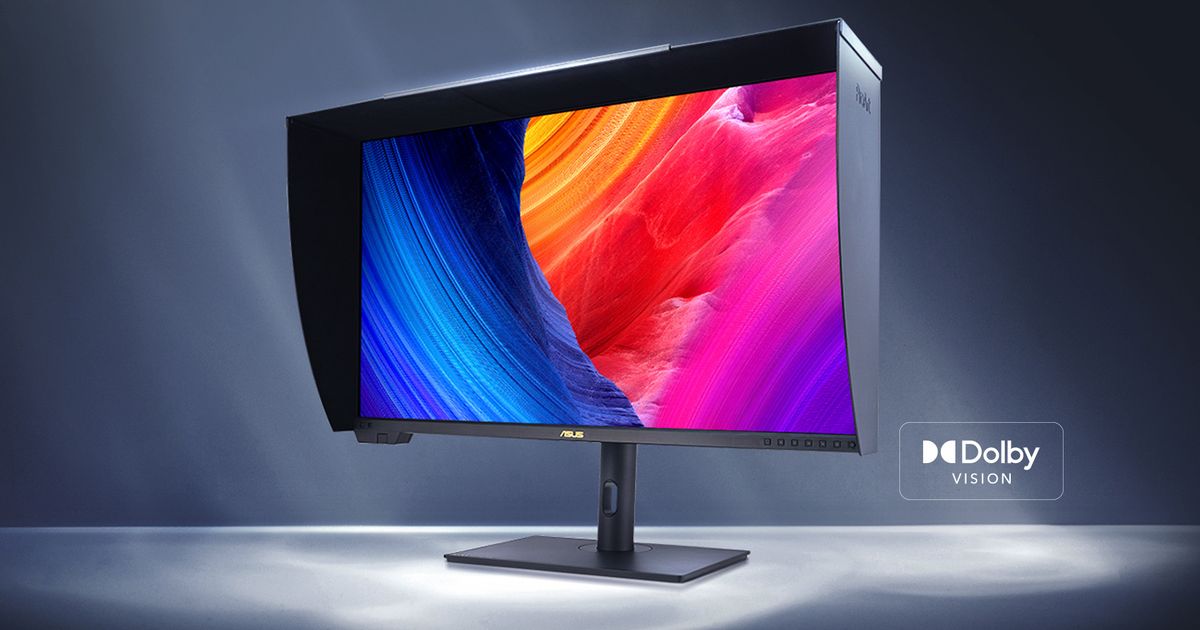
The sustained 1,000 nit HDR and Dolby Vision support suggest their target market is very specifically film color grading.
am i the only one who thinks that this would make sense?
ASUS ProArt PA169CDV, UPerfect 184T01, Lipa AX-60 (and AX-60T), UPerfect UFilm A17, UPerfect UGame J5, and two portable screens by Verbatim, just to name a few.
If you go slightly bigger, there are the ASUS ProArt PA24US, Japannext JN-IPS2380UHDR-C65W-HSP, ViewSonic VP2488-4K, AG Neovo EM2451, and the UPerfect UColor T3.