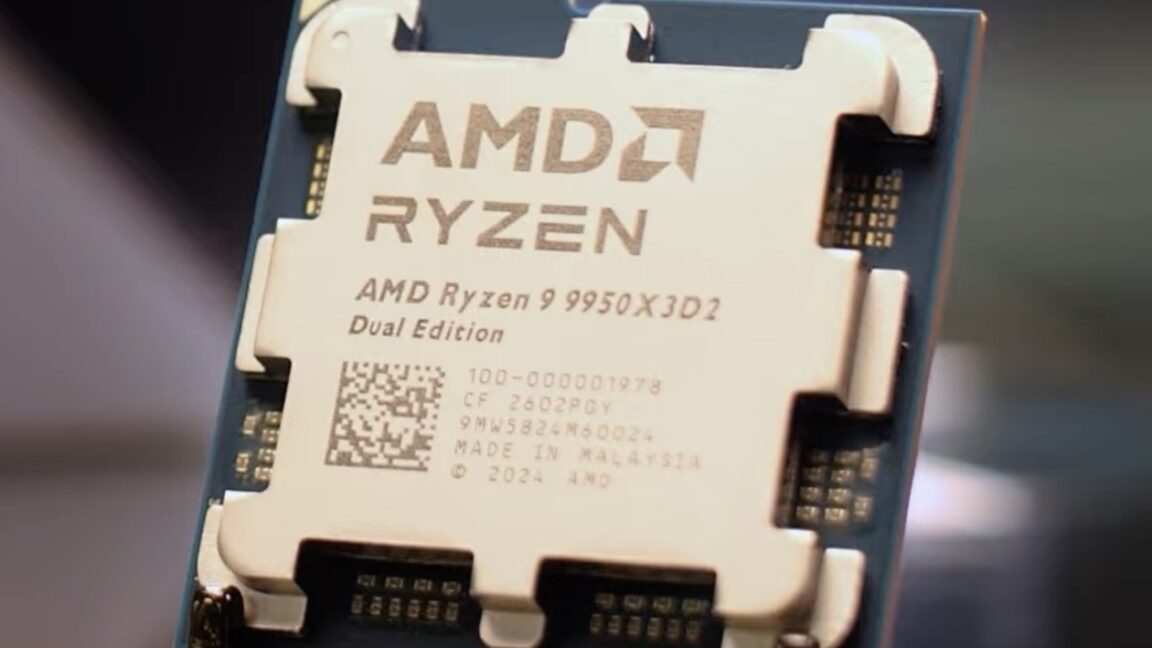
AMD's Ryzen 9 9950X3D2 Dual Edition crams 208MB of cache into a single chip
Both of the chip's CPU dies will include 64MB of extra cache stacked beneath.
Ars Technica
311 points · by zdw · 8mo ago · 170 comments
Meanwhile I hope my AM4 will chug along a few more years.
You can buy 128GB of DDR5-6000 with a 9950X3D (not this newest X2 version, but still a $699 CPU) and a motherboard and a case for $2800 right now: https://www.newegg.com/Product/ComboDealDetails?ItemList=Com...
If you don't need 128GB, there are quality 64GB kits for under $700 on Newegg right now, which is cheaper than this CPU.
If someone needs to build something now and can wait to upgrade RAM in a year or two, 32GB kits are in the $370 range.
I don't like this RAM price spike either, but in the context of building a high-end system with a 16-core flagship CPU like this and probably an expensive GPU, it's still reasonable to build a system. If you must have 128GB of RAM it can be done with bundles like the one I linked above but I'd recommend waiting at least 6 months if you can. There are signs that prices are falling now that panic-buying has started to trail off.
128GB of RAM should not cost $4K even in this market.
Last summer, a 9950X3D + motherboard + cooler + 128 GB DRAM + VAT sales taxes was the equivalent of $1400 in Europe, where I live.
That's half of your quoted price. That was without case and PSU, but adding e.g. $200 for those would not change much.
The RAM price was already inflated at that time, and the same kit is now £800, but in October or earlier last year I'd have saved possibly the cost of the CPU/GPU on the whole thing, but now it's be about the cost of a CPU/GPU more expensive.
On a side note for anyone not aware, 9950X3D isn't the best choice for pure gaming, 9850X3D is cheaper and marginally better, also I went with 2 sticks of RAM kit, 4 sticks is much harder to run at the advertised speed (6000) which is actually an overclock.
Im a dev and a linux user/gamer hence my choice of CPU/GPU.
I commented because someone thought that $4K was the going price for 128GB of RAM, which is way too much even with the demand crunch.
6 or so weeks after I returned it the kit was listed at 1499.
The most I could get running on 10GB VRAM + 96GB RAM was a REAP'd + quantized version of MiniMax-M2.5
Cheapest 64GB kit is $930.
The kit I was oh-so-close to buying was two 6400 64GB sticks.
Not gonna buy now, not that desperate. I have a spare AM4 board, DDR4 memory and heck even CPU, I'll ride this one out. Likely skip AM5 entirely if something doesn't drastically change.
That's not far from the bundle deal above, once you subtract the $700 CPU.
If you really need 128GB the 5600 kit is fine. Having 208MB of total cache on the CPU means the real world difference between a 5600 kit and a slightly faster kit is negligible in most use cases.
If you don't need to upgrade then clearly don't force an upgrade right now. I just wanted to comment that $4K for 128GB of RAM is a very bad price right now, even with the current situation.
I would not be surprised if we see casualties in adjacent markets, such as motherboards, coolers and whatnot.
Just reading now that they went out of production half a year ago which is a shame. I was very impressed being able to upgrade with the same motherboard 6 years down the line.
Here's hoping to more developments like TurboQuant to improve LLM memory efficiency.
Su said that typically, the first quarter (Q1) is slower due to seasonal patterns, but AMD has seen its data center business expand from Q4 into Q1, demonstrating ongoing strength across both CPUs and GPUs. This growth underscores the company’s ability to capitalize on rising demand for AI compute and enterprise workloads, even during traditionally quieter periods.
“We are going into a big inflection year here in 2026. The CPU business is absolutely on fire.”
[1]: https://stocktwits.com/news-articles/markets/equity/amd-ceo-...
I hope this is still enough for the planned upgrade to Zen7 in 2028.
I really want to see what enabling the L3 cache options in the BIOS do from a NUMA standpoint. I have some projects I want to work on where being able to even just simulate NUMA subdivisions would be highly useful.
While I was aiming at 128, I settled for 96GB, because any more than 2 sticks means a sharp drop in RAM clocks this generation.
Feeling pretty chuffed now XD (though still sad because building a new PC is dumb when RAM costs more than a 24 core monster CPU)
The not so good side is that getting a RVA23 development board this year with an usable size of RAM (for e.g. compiling and linking large code bases) is not going to be cheap.
It was an expensive mistake as I bought a few options to experiment including a NUC and an M4 Mac Mini but eventually bought a 9800X3D 5070Ti PC for <$2 and for no reason in particular I bought a 64GB DDR5-6000 kit for $200 in August or so. I checked recently and that kit is pushing $1000. I also bought a 4080 laptop and bought a 64GB kit and an extra SSD for it too last year.
That's pretty lucky given what's happened since. I don't claim any kind of foresight about what would happen.
I do kind of want to take the parts I have and build another AM4 PC. The 5900XT is not a bad option with 16 cores for ~$300 but my DDR4 RAM is almost useless because the best deals now are for combos of CPU + motherboard + RAM at steep discounts.
You can get some good deals on prebuilts still. Not as good as 6+ months ago but still not bad. Costco has a 5080 PC for $2300. There's no way I'm going overboard and building a 128GB+ PC right now.
I've seen multiple RAM spikes. We had one at the height of the crypto hysteria IIRC but this is significantly worse and is also impacting SSDs. I kinda wish I'd bought 1-2 4TB+ SSDs last year but oh well.
We're really waiting for the AI bubble to pop. Part of me think sthat'll be in the next year but it could stay irrational substantially longer than that.
I upgraded my UPS to a sine interactive unit to minimise the risk of it dying to bad power while the market is so crazy...
I am fine with my 2 year old 128GB DDR4 for now. I will just upgrade the 14700K to 14900KS CPU and wait 2 more years.
Judging by the benchmarks newer CPUs aren't much better for multithreading workloads than 14900KS anyway, so it doesn't make a lot of sense to upgrade to newer CPUs, DDR5 and a new mobo.
(cheapest at $1240 USD)
Nah, those of us who already bought DDR5 memory also already bought decent CPUs. Dropping another $1k for these incremental gains would be silly. It'd make a lot more sense if DDR5 had been around longer so that people had the option to make generational upgrades to this CPU but DDR5 on AMD has only been around for Zen4 and Zen5.
It's probably not possible architecturally, but it would be amusing to see an entire early 90's OS running entirely in the CPU's cache.
I imagine for such a workload you can always solder a small memory chip to avoid having to waste L3 on unused memory and a non-standard booting process so probably not.
The membrane keyboard wasn’t great (the lack of a space bar was a wierd choice) but it did work. We had programs on casette and did get the 16Kbyte memory expansion.
https://en.wikipedia.org/wiki/Timex_Sinclair_1000
I didn’t realize the Atari 2600 had basic, always thought of it as a game console.
There’s actually already two running (MINIX and UEFI), and it’s the opposite OS amusing - https://www.zdnet.com/article/minix-intels-hidden-in-chip-op...
Edit: Also this 192MB of L3 is spread across two Zen CCDs, so it's not as simple as "throw it all in L3" either, because any given core would only have access to half of that.
Lol a quick Google search leads me to a Linked in post with all the gory technical details?
https://www.linkedin.com/pulse/understanding-x86-cpu-cache-m...
* https://en.wikipedia.org/wiki/Commodore_PET
Same time as the Trash-80 and BBC micro were making inroads.
If you run a VM on a CPU like this, using a baremetal hypervisor, you can get very close to "everything in cache".
Consider a VM where that kind of stuff has been removed, like the firecracker hypervisor used for AWS Lambda. You're talking milliseconds.
"Feb 2001 128MB DIMM was $59. Aug 2001 256MB module was $49. Feb 2002 256MB $34. April 2003 hit bottom with $39 512MB DIMMs"
The lower leakage currents at lower voltages allowed them to implement a far more aggressive clock curve from the factory. That's where the higher allcore clock comes from (+30W TDP)
I'm not complaining at all, I think this is an excellent way to leverage binning to sell leftover cache.
Though if I may complain, Ars used to actually write about such things in their articles instead of speculate in a way that suspiciously resembles what an AI would write.
It depends on the task. For some memory-bound tasks the extra cache is very helpful. For CFD and other simulation workloads the benefits are huge.
For other tasks it doesn't help at all.
If someone wants a simple gaming CPU or general purpose CPU they don't need to spend the money for this. They don't need the 16-core CPU at all. The 9850X3D is a better buy for most users who aren't frequently doing a lot of highly parallel work
If your tasks don’t benefit then don’t buy it.
But stop claiming that it doesn’t help anywhere because that’s simply wrong. I do some FEA work occasionally and the extra cache is a HUGE help.
There are also a lot of non-LLM AI workloads that have models in the size range than fit into this cache.
See https://www.phoronix.com/review/amd-ryzen-9-9950x3d-linux/10
> Here is the side-by-side of the Ryzen 9 9950X vs. 9950X3D for showing the areas where 3D V-Cache really is helpful:
Coincidentally, it looks they filtered to all benchmarks with differences greater than 2%. The biggest speedup is 58.1%, and that's just 3d vcache on half the chip.
I’m curious to see whether the same benchmarks benefit again so greatly.
So for 9950X3D half of the cores use a small L3 cache.
For applications that use all 16 cores, the cases where X3D2 provides a great benefit will be much more frequent than for a hypothetical CPU where the same cache increase would have been applied to a unified L3 cache.
The threads that happen to be scheduled on the 2nd chiplet will have a 3 times bigger L3 cache, which can enhance their performance a lot and many applications may have synchronization points where they wait for the slowest thread to finish a task, so the speed of the slowest thread may have a lot of influence on the performance.
Agree. The article's 2nd para notes "AMD relies on its driver software to make sure that software that benefits from the extra cache is run on the V-Cache-enabled CPU cores, which usually works well but is occasionally error-prone." - in regard to the older, mixed-cache-size chips.
> I'm curious to see...
Yeah - though I don't expect current-day Ars Technica will bother digging that deep. It could take some very specialized benchmarks to show such large gains.
For comparison, 9950X3D have a total cache of 144MB.
It is indeed 8MB per compute die but really 1MB per core. Not shared among the entire CCD.
And that answer is good enough for most workloads. You should stop reading now.
_______________________
The complex answer is that there is some ability one CCD to pull cachelines from the other CCD. But I've never been able to find a solid answer for the limitations on this. I know it can pull a dirty cache line from the L1/L2 of another CCDs (this is the core-to-core latency test you often see in benchmarks, and there is an obvious cross-die latency hit).
But I'm not sure it can pull a clean cacheline from another CCD at all, or if those just get redirected to main memory (as the latency to main memory isn't that much higher than between CCDs). And even if it can pull a clean cacheline, I'm not sure it can pull them from another CCD's L3 (which is an eviction cache, so only holds clean cachelines).
The only way for a cacheline to get into a CCD's L3 is to be evicted from an L2 on that core, so if a dataset is active across both CCDs, it will end up duplicated across both L3s. Cachelines evicted from one L3 do NOT end up in another L3, so an idle CCD can't act as a pseudo L4.
I haven't seen anyone make a benchmark which would show the effect, if it exists.
When the L3 sizes are different across CCDs the special AMD driver is needed to keep threads pinned to the larger L3 CCD and prevent them from being placed on the small L3 CCD where their memory requests can exploit the other CCD's L3 as an L4. The AMD driver reduces CCD to CCD data requests by keeping programs contained in one CCD.
With equal L3 caches when a process spills onto the second CCD it will still use the first's L3 cache as "L4" but it no longer has to evict that data at the same rate as the lopsided models. Additionally the first CCD can use the second CCD's L3 in kind reducing the number of requests that need to go to main memory.
The same sized L3s reduce contention to the IO die and the larger sized L3s reduce memory contention, it's a win-win.
https://www.phoronix.com/review/amd-3d-vcache-optimizer-9950...
It'll probably only happen when they have a singular, large die filled with cache upon which both CCDs are stacked.
Run this test if you're curious: https://github.com/ChipsandCheese/MemoryLatencyTest
If they are stacked then why not 9800X3D2?
For gaming, AMD already pins the game threads to the CCD with the extra cache pretty well.
For multi-threaded workloads the gain from having cache on both CCDs is quite small.
There are many applications which need synchronization between threads, so the speed of the slowest thread has a disproportionate influence on the performance.
In such applications, on X3D2 the slowest thread has a 3 times bigger cache on an X3D2 vs. X3D. That can make a lot of difference.
So there will be applications with no difference in performance, but also applications with a very large difference in performance, equal to the best performance differences shown by X3D vs. plain 9950X.
Now, would I upgrade an existing computer with a slightly slower processor with it, probably not.
But to do it literally - I'm not a low-level motherboard EE, but I'd bet you're looking at 5 to 7 figures (US $) of engineering work, to get around all the ways in which that would violate assumptions baked into the designs of the CPU, support chips, firmwares, etc.
Would be neat to have an additional cache layer of ~1 GB of HBM on the package but I guess there's no way that happens in the consumer space any time soon.