639 points · by f2n · 8y ago · 288 comments
Microsoft is another major offender. When logging in, I get redirected 20 times between various domains, none of which in microsoft.com
I've had a real shitter of a time trying to login before, with redirect loops, or getting automatically signed out as soon as I sign in. Or accounts being a "games for Windows" account, but not an MS account, or an Xbox live account, so some other account. Often I've just found it easier to give up and make a new account.
I was pulling my hair out the other day trying to find my Microsoft credentials in LastPass. I was searching for "microsoft", "office", "outlook" etc. until I finally found them under "live.com".
* One account required me to log in with a username, and was associated with my main email address. * The other account required me to log in with my main email address.
In a way, they were both related to the same email, but different accounts. This shouldn't even have been possible, but it seems that one was an old MS account, and the other was an old Skype account. My roster ended up being split half and half between the two.
Very frustrating - fortunately I don't use Skype regularly but it's always an exercise when somebody asks for my username.
The steps I found to unlink within the XBox UI didn't work, futher research now leads me to the following discussion which I am about to try: https://answers.microsoft.com/en-us/outlook_com/forum/oemail...
Edit: it looks like this was possible in the past (basically deleting the Skype account?), but not anymore.
[1] https://support.microsoft.com/en-us/help/12412/microsoft-acc...
Well, a login system is a very central part, and other websites suck too, like Amazon still uses the old account login page since 1996 too. But Microsoft redirects way too often, it is worse.
I confirmed over the phone with their support that was indeed the correct site before typing anything into it.
I said think about what you're asking for a second. Should I answer your questions? Couldn't get them to understand. Wound up hanging up and calling again and waiting on hold.
The site itself is branded just like Templeton's own site. From what I could gather, it is actually their site but even the whois is something non descript. Quite ridiculous. And of course they don't have any way whatsoever that I could find to report things like vulnerabilities or phishing attempts.
It wouldn’t load because Facebook.com was blocked and apparently they were doing a full redirect via fb. Crazy.
This is also exploited by malicious actors to occasionally buy out fake ads for amazon.com or bestbuy.com (or even, hilariously, youtube.com) which actually direct you to support scam websites claiming your computer is infected.
Google seems to have no desire to correct this by making their advertisements show you the actual URL are you going to be directed to.
Verify that any link you click on is not an ad. Always look for the first native result. The policies permitted around ads make them simply a security risk to click on.
Having a bank as a current client, I am often joking about what would happen if Jeff Bezos takes control for a month. And when I am angry, I ask what would happen if Amazon or Google start selling credits or insurances, tomorrow.
The future is here folks. And it sucks.
So the passwords 'abc' 'ABC' and '222' are treated as equivalent. Try it out for fun!
Ex : I call my bank and I have to go through a menu leading me to the right agent. Eventually, it asks for my password over the phone that I need to type using the 10 numbers on a phone dial.
Good luck using your fingerprint there :)
What's worse, because it can be entered on the phone, aAbBcC are all == 1. So it's really just 6 digits.
That is, of course, complete bullshit.
Sure, it is plausible that a bank has an old mainframe handling their accounts. It is also plausible that user account passwords on that old mainframe are only 6 or 8 characters and from a limited alphabet.
What does that have to do with customer online banking accounts? Nothing!
When you open a bank account they don't make a user account for you on their mainframe. What they make for you is an entry in an application database that their banking applications use. The only mainframe user accounts involved are the account that the database runs under and the account that the banking application runs under, both of which are the same for all banking customers.
Even if, for some strange reason, they do actually have to make a mainframe login account for each banking customer there is no reason for the banking customer to ever directly access that. Online banking is accessed through the web, so only the web server needs to access your banking account on the mainframe. They could make the website have its own password system, without the mainframe login restrictions. The restricted mainframe login information would only be known by the mainframe and the website back end. The banking customer should never deal with that.
(Obligatory xkcd comic: https://xkcd.com/1926/ )
https://i.imgur.com/O2eOwLw.jpg
Edit:
"You may be liable for all losses from unauthorized use of your Account if you:
contributed to its unauthorized use; used a PIN combination selected from your name, telephone number, date of birth, address, or Social Insurance Number; did not use reasonable care to safeguard your Secret ID Code; did not keep your Secret ID Code separate from your Card; did not comply with your reporting obligations in Section 11 of this Agreement unless there were exceptional circumstances for your failure to do so; or shared a mobile device that you registered with us for Electronic Banking Services. In those cases, your liability may exceed the funds in an Account, your credit limit or any daily transaction limits. In other words, your liability will not be limited by your Account balance, your credit limit or any daily transaction limits. You must cooperate and assist in any investigation that we initiate into the unauthorized use you reported, which is a precondition to being reimbursed for any losses. This cooperation may include filing a report with law enforcement authorities."
Overall seems fair enough protection.
Look at Mr. PrivateBanking over there, my one is 5. Amount in words : Five.
And that is after they updated all their software and moved to a new datacenter and everything recently.
Granted I have a hardware dongle to authenticate any transactions, but to gain access to all my information, five characters is all the protection they wish to offer...
My corp (guild for non-Eve players) had a better and more secure login & SSO system than either my bank or my employer. My employer has replaced their SSO system by now, but my bank is still in the 90s.
Offenders: Wells Fargo, Chase, American Express, Fidelity, ....
I complained and a member of the dev team phoned me up and after a long discussion about why this was madness he told me that it was better to use older browsers for important things such as online banking (like IE6 which was in their whitelist) because they're tried and tested.
I'm sure that has been said by some manager somewhere.
When they started using computers, they were taught to NEVER write your password down and to do things like replace letters like I with numbers like 1 for security.
Not only are those not true any more, but the opposite is recommended. Making a unique LONG password is much more important, and writing it down on a sticky note next to your monitor is arguably more secure from some threats than even something like LastPass.
https://www.bankofamerica.com/information/supported-browsers...
The app is pretty great.
I open it in another tab and just go do something else.
It seems that every time Troy interacts with a company on Twitter, they never seem to click on to who he is, until it's probably too late and they look like fools.
It's just so amusing to see companies trying to condescend to Troy, when he's one of the most visible authorities on web security on the planet (not necessarily the most authoritative, but the most well known).
I occasionally get this when people try talking to me about computer science topics, when they don't realise that it's what I do for a living. I've probably done the same myself when talking to Doctors and other domain experts, I'm sure.
There's a number of places in that chain of events that something could go nastily wrong, despite them owning every part of that chain.
Several months ago I recall a website owner posted a bug to Firefox saying he didn’t need HTTPs and that Firefox shouldn’t tell users it’s insecure. Within hours his database was pwned.
I remember a few years ago when there was no way you could do it for side projects because certs were 100/yr., now they're free.
For anyone interested :
I'm only a customer for small niche sites, not associated in any other way, works fine enough for my needs.
Besides, if the DB was pwned, it is unlikely that http -> https would have any real bearing anyway. There was probably a XSS exploit or whatever.
If you don't think HTTPS is important you're probably not worried about SQL injection either.
The problem is not pissing off Troy Hunt; but more that they are advertising that their website is vulnerable and that they don't care.
everyone = Hacker News
Mostly likely not their customers; whom they have a vested interest in keeping money with.
My care factor is probably very different to most non techies, by assumption. Then again, there's probably a bunch of things I do that would annoy(?) {them} greatly - that I'm not even aware of.
> We have our own security system, and it has never been breached in more than 15 years.
Which leads me to believe that their system was built by scratch, in PHP, 15 years ago, and hasn't been updated since.
Sorry that's what I meant. Both moves are smart. Doing both is smartest.
My sides.
When I got a new nano-SIM (in 2012, one hopes they've changed this since), they didn't check any ID and only needed a postcode and date of birth to move my account to a new SIM.
The man on the other end of the phone was totally unable to solve my problem and in the end just gave me £10 of free credit on the account I'd meant to top up. He didn't ask for any ID or verification at any point, except for the serial number on the SIM card. It was a pretty bizarre customer service experience.
But Nationwide is pretty good for banking.
Until I'm sure the other person doesn't know what they're talking about, I try and assume they're right.
Alternative take, particularly pertinent to this situation:
The person handling twitter is not a technical person, but a customer support person who handles hundreds of dumb questions, day in, day out, from customers who have no clue what they're doing but will often throw technical terms around.
Expecting solid technical answers from a general twitter account for a business is beyond absurd.
It's an important legal mindset, too, because it's an important mindset for any honest debater: You prepare an argument by attacking it, and trying your damndest to be the best argument for the opposition you can possibly be.
That's important in moral issues, where there arguably is no "right answer" to certain questions, but it's vital when things come down to factual questions where one position is right, any other position is wrong, and being able to recognize when you're holding a position which is wrong is vital to being honest, not only with others but with yourself.
Oh bollocks, that's me undone. Err without Googling and being British and given where I am and a few other things, I'm going to go for ... ... firearm?
Simplistic analysis by me: Well it can't likely be a Champagne (French). Dunning (English), Kruger (German with options).
OK Goo ... https://en.wikipedia.org/wiki/Dunning%E2%80%93Kruger_effect - hmmm 8)
Not anymore!
https://www.whois.com/whois/nuuolb.com
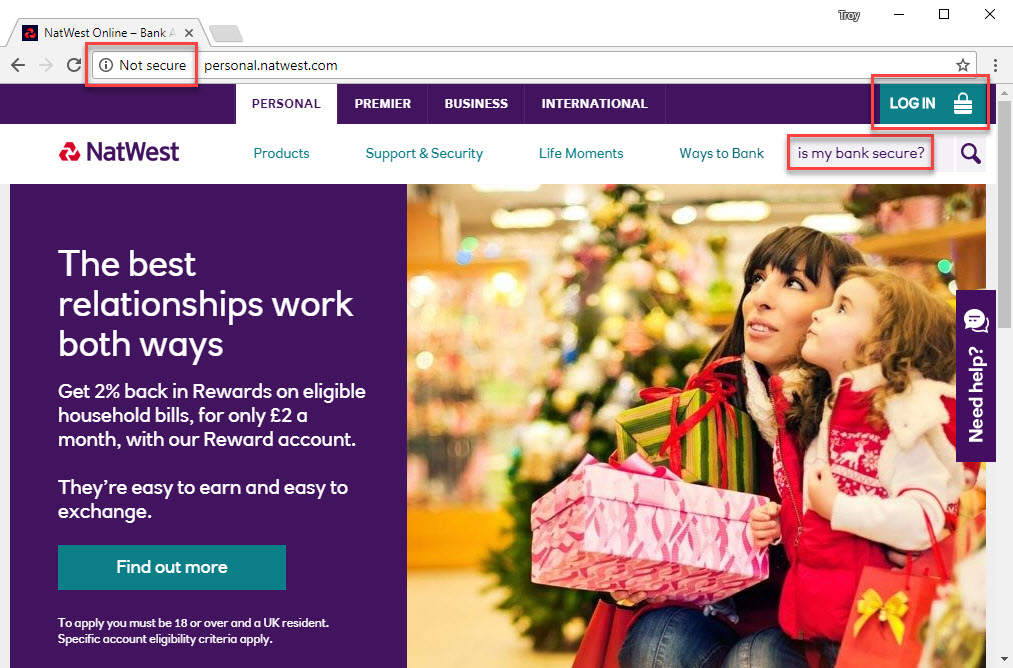
It seems NatWest has quickly gone to secure this major attack point in their otherwise chink-free armour. Does someone want to inform them about nwalb.com as well?
So I would advise you not to do it.
https://developers.google.com/web/fundamentals/security/encr...
It's nice that their goals align with something actually helpful. But don't mistake the motive. This extends their dominance in global snooping.
[Edit] Thank you to those people who had some honest replies, not sure why this got down voted, it was an honest question. When you go to the "Learn More" page on Chrome it doesn't even say "Secure" it says "Information you send or get through the site is private."
"secure" means "secure connection" to me, and it sounds perfectly appropriate. Maybe you can't find a better term for "secure" because it's perfectly fine, already..?
Could be! Someone else suggested "Encrypted", seems like a good word. I really don't know.
This is fine, except one of these A records was a 192.168.x.x address so their site didn't work intermittently.
I called them to report it and they refused to listen. Claimed the site was worked as intended from their office and they wouldn't escalate.
Bare in mind, on their complaints page you can download a complaints Word document, fully capable of having embedded VB script [2].
Also, it took them _months_ to sort out an issue where they would only check for 3 numbers (pin) and 3 letters (password), always asking for the first, second and third characters.
Also-also, I remember a while back not being able to access my card (for about a day) because a single engineer accidentally corrupted their main database.
[1] http://financial-ombudsman.org.uk
[2] http://financial-ombudsman.org.uk/consumer/complaints.htm
Only then we can have 100% of the web encrypted.
[0] https://en.wikipedia.org/wiki/HTTP_Strict_Transport_Security
[2] https://security.googleblog.com/2017/09/broadening-hsts-to-s...
Couldn't something like a TXT record also address this, but on a cross-client, scalable fashion? Like how SMTP with SPF or DKIM works right now.
(And yes, I know DNS also has trust problems!)
At the very worst, a central, programmatic source of truth, like DNSBL and company... just like how Google offers their "malware sites" hash table for all to use.
DNSSEC has no practical impact on this due to a lack of adoption both on the domain and end-user resolver side. (Not to mention that it's a terrible protocol.)
Note that the HSTS preload list is not only used by Chrome, but practically all major browsers. For all intents and purposes it currently is the central source of truth. I imagine if the size ever becomes a problem, browsers will switch to a mechanism like Safe Browsing to distribute the list.
1. HSTS Preload: I am not 100% sure but, AFAIK your browser gets the list once during installation and then sticks with it until he receives another software update. I think the list should be dynamic (e.g. like adblock lists). That way even older browsers would have an up-to-date HSTS Preload list.
2. Like everything else HSTS records have a lifetime, but when you use your dev-tools to delete your browser cache it doesn't delete the HSTS information. So every time you want to delete them you have to go to some net-internals... browser configuration to explicitly delete a HSTS record for a specific domain. It's even easier to delete serviceworkers...
For a long time I also didn't like that you could not easily remove your own domain from a preload list, but that fortunately changed and now there is a website where you can easily request to be deleted from the preload lists. The only hitch here is that as it takes a few month until every browser on this planet got a software update the new list will also have to wait for a while: https://hstspreload.org/removal/
I mean, take this case; lets say NatWest DID put their landing page behind SSL... well, lots of people are going to try to go to http://<url> instead of https://<url>. Most site will redirect the user to the https version, but if an attacker hijacks the initial request, they could easily serve up a fake version of the landing page that has a 'login' link to the malicious site.
Now, at least if NatWest was redirecting http to https, a savvy user could notice that their session wasn't being redirected to https and could be aware something was wrong, but if you didn't know to check, you could be fooled.
There is nothing the site owner can do to prevent that sort of hijacking.
10 years ago it was best practice for ecommerce shops to serve non sensitive pages (pages without forms or user data) without HTTPS to reduce the server load (HTTPS connections are a little more expensive than HTTP).
Nowadays, even the economical driven ecommerce shops got it that is better to just serve everything via HTTPS. It is very sad to see a bank (which should really know better) arguing that way.
I can just imagine NatWest: "Oh, is that the problem? Ah, ok, well, let's just go get that domain then. Sorted!"
The thing about domains is that so many companies register companyname-someotherwords.com for legitimate use that if you are suspicious about the domain name you'll get little done. Azure is a case in point.
What if browsers record "tainted follows"? E.g. you visit http. Once you click a link, anything linked from there onwards is not trusted. No http post information is sent to the server without a hard to get around warning page.
Apparently 35% of all UK banks have insecure landing pages. [5][6]
[2] https://www.starlingbank.com
[3] https://www.atombank.co.uk
[5] http://blog.softwareverify.com/list-of-uk-banks-that-are-sec...
[6] https://twitter.com/softwareverify/status/940961044633149440
Well, HSBC's didn't: https://threatpost.com/banking-apps-found-vulnerable-to-mitm...
A bit of programming, but most importantly, general concepts required to understand this kind of issue should be common knowledge.
For me it falls in the same category as the people putting an IP camera to watch their son sleep and broadcasting it to the whole internet. This kind of issue should be understood by them.
In this case, if the "banking manager" was aware of how security works, the issue would not have presented itself in the first place.
a: 0CC175B9C0F1B6A831C399E269772661
b: 92EB5FFEE6AE2FEC3AD71C777531578F
c: 4A8A08F09D37B73795649038408B5F33
etc.
then this is basically the same as storing the plaintext characters because as long as you know the hashing algorithm you can generate a pretty small map of hash -> original character and convert back.
I think the attitude here is kind of douche.
Ridiculous password policy, http home page, virtual keyboard for password, loading javascript from http and what not..
Instead what they did as preventive measure is to buy the domain name that Troy mentioned as one of the possible vector to spoof their site.
Hate to say this, but whoever made that decision as a course of resolution should be axed.
http://www.scotiabank.com/ca/en/0,,2,00.html
Didn't find any contact to report it. Is Twitter really the right place?
And the user shouldn't need to check the certs - if the CAs are trusted (yes there are problems there) then the domain name is enough.
(Banks should also protect against easily phishable domain names but that's a also losing game, and in that case the technical solution is not as simple or complete).
It doesn't seem to matter to me if my ISP is MITM, because someone inside the ISP would need to cause that. If my ISP is forced to MITM by government etc, I am in trouble anyway.
I could see that it could be done by using a bad/spoofed wireless or a public network connection somewhere. That makes sense. I don't do that though; I only use my own secure home network in a wired fashion when accessing my bank account.
If people are able to spoof my network connection, they could interfere with non-https software updates on my machine, which would let them replace the root certs of my browser potentially, in which case https wouldn't matter. Is the assumption here that all software updates on my machine are happening via https and only the bank website is a danger?
My point here is that while I agree what the bank is doing is bad practice, I don't see how it would affect me in any way.
I fail to see how the bank changing their website to HTTPS is going to save the average Joe.
There are so many websites and things that operate over HTTP that make our machines vulnerable, that I think it is foolishness to use a link that could be MITM to begin with.
That is, it seems to me, that if you simply avoid ever using wireless there is no danger of MITM. I could see that XSS could be done on some sites with ads, and that would be worsened by lack of HTTP.
Is it as simple as "Don't use wifi. Use adblock. HTTP/HTTPS then no longer matters." ?
The assumption is that yes, all of your machine’s updates are served over HTTPS. If they weren’t, then of course you’re right - it’d be possible to hijack your machine by serving malicious binaries. That’d be one hell of a security hole.
The HTTP landing page serves a link to the login page. This link could be modified by a hostile network to another site. The fact that the login page is served over HTTPS is immaterial for this attack.
Under that attack, wouldn't be the same whether you are using https or not? If you are in a hostile network with a compromised DNS, Couldn't the domain be phished too? Meaning that a valid certificate trusted by a fake CA would be used by the browser?
I don't think that's possible. A fake CA can't issue out valid certificates because you wouldn't trust their certs to begin with -- it's all about trust and if you know they are a fake CA, then you would never trust them or anything they issue. It's like if a known counterfeiter claims to be selling legit products, you probably wouldn't trust them.
> fake CA
Pick one. If your cert isn't signed by a CA that the browser trusts, it won't load the page.
Modifying the link would not be possible if the landing page were served over an encrypted connection.
You want to know if the login page is NatWest?
Click on the Login link and look at the browsers security bar.
If it says "The Royal Bank of Scotland Group Plc [GB]" and that then entity with which you do business, great.
It seems as if Troy would be just fine with HTTPS rather than HTTP, but DV validated certs aren't what you want anyway with a financial institution.
It seems far more likely that you care about the entity you are working with (Royal Bank of Scotland), than the domain of the referring page (personal.natwest.com).
https://arstechnica.com/information-technology/2017/12/nope-...
For ~$170 apparently you can get an EV cert for "Stripe, Inc" (by forming a company with that name).
Even aside from that fact, users are very bad at knowing what a secure site looks like. I would wager that if most users clicked "login" and didn't see an EV cert, but instead saw "<padlock> Secure" (i.e. a non-EV HTTPS connection), they would not notice the difference.
Troy is right to kick up a fuss about this; this is a significant attack vector (anyone on a wifi network can MITM your banking login URL), and it's more egregious because of how easy it is to set up HTTPS.
For one tenth that cost, you can register stripeinc.net and get an SSL cert. Yay!
Domain registration is available instantly for anyone, anytime, and it can be phished at least as easily as anything else. https://www.xn--80ak6aa92e.com/ looks pretty legit in Firefox.
Also, it may not be apparent to users whether "The Royal Bank of Scotland Group Plc [GB]" would be affiliated with NatWest. Companies often have different names they do business under.
If the name is unrecognizable for users, _that_ is the user security concern that you should be posting about.
That handles the widest array of security vulnerabilities on http://personal.natwest.com/, whether MITM, compromised site, misspelled domain, etc.
This was on the topic of an EV cert being issued to a different 'Stripe, Inc'.
But also, I observed that for top sites, "people trust their website by fiat, simply by mental associations about their domain names (...)". This is why HTTPS on a landing page is so important: to safeguard the trust chain that most users use to arrive at the login page -- first, the name of their bank, then the bank's URL from memory, then the bank's login page from the homepage's URL.
The case is not overstated in any way, serving a major trust-building page like a bank homepage over HTTP is crazy. Redirecting to a spoofed webpage is obviously the simple hijack but there's no reason some attacker couldn't drop some custom-built HTML and JS to drop a faux-login form right on the page that's filled with copy about how trustworthy the bank is.
Sidenote: several years ago my bank started POSTing their login form to a completely separate domain to login to my account. So I fill in the username field on the homepage and it sends me to "totallysecurebankloginsite.com" to enter my password. After a few calls to the bank they insist that this is the design they intended and that it's just fine.
The issue is that most non-technical users would not even think about checking. They went to their "secure" bank website and clicked login, why should they have to worry?
You want them to continuously keep verifying it’s the correct domain/cert just because this company is too lazy/cheap to buy a cert?